Releases: AdguardTeam/AdguardForAndroid
2.1.177

Firewall changes
Firewall settings section (#61)
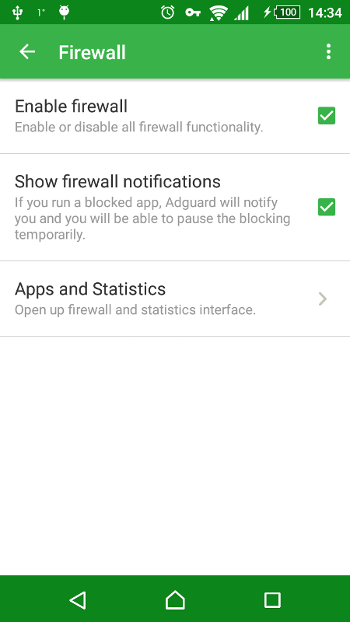
Now it's up to you whether you need the Firewall feature or not. So, yeah, this feature can now be enabled and disabled. Very useful if you were setting different preferences for different apps and now would like to temporarily disable Firewall and won't lose all the settings herewith.
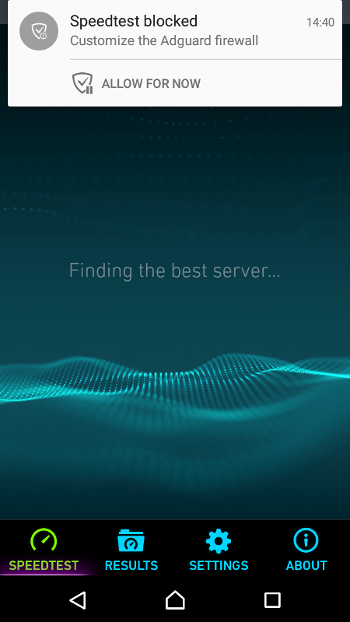
Firewall: Added an ability to temporarily pause blocking for foreground application (#27)
This feature allows to return the Internet access with one tap. Let's say you have prohibited some app (like Maps or any other using geolocation) to go online without you knowing. But when you need the app to connect to the Internet immediately - you no longer have to open Adguard, go in Firewall and change the settings. Now you can regain access to the network right in the app.
Low-level settings #42
What is low-level settings?
Most of users don't really need them. Such settings were made to make the troubleshooting faster, to solve some very rare problems or for a really specific configuration of the program. Now we won't spend time on the assembling of a special version for your device and you - on its download and installation. We will be able to tell right away what to change to solve the problem. So the support is now easier, and these settings are needed to parse some tricky bugs.
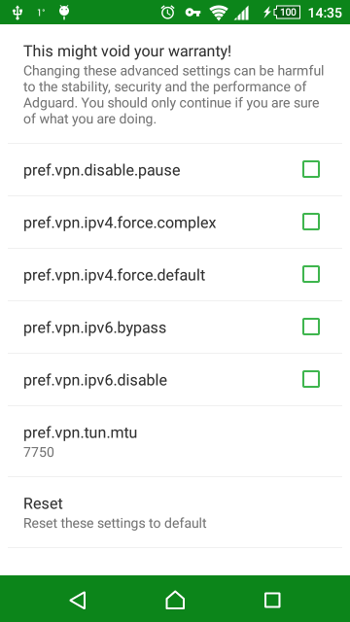
Let's go down the list:
pref.vpn.ipv4.force.default - disables the routes we use to exclude LAN from filtering.
pref.vpn.ipv4.force.complex - settings reverse to the previous one. Regardless of the network configuration use of routes excluding LAN. Usually, we do not exclude the LAN networks with a complex configuration. This setting will bypass the restriction.
pref.vpn.ipv6.bypass - forcibly exclude filtering of IPv6 networks. In this case, IPv6 will work, but will not be filtered.
pref.vpn.ipv6.disable- forcibly disable filtering for IPv6 networks. In case,IPv6 will not work at all.
pref.vpn.tun.mtu- the maximum size of the data package, which is used in VPN. In general, the rule is - the larger the package, the less CPU time spent on creating packages from the program, and the faster everything works. On the other hand, when the size is too large, VPN may cease to work at all, or fail to start. The recommended interval for the experiments is from 1500 to 9000.
pref.vpn.disable.pause - (#84) disable Adguard automatic restart functional when disconnecting/connecting to the network. Why needed? When the VPN is enabled, routes are built in accordance with the current network configuration on the device. Sometimes it happens that when you connect to another network, these routes no longer correspond to the new configuration, and VPN ceases to operate. Automatic restart is needed to avoid this situation.
Reworked DNS filtering
Now it should work even where external DNS are blocked
To 'catch' the requests to DNS servers (which resolve domains in IP) we had to set the preferences for our VPN, which provide access to some server outside the current network. We used one Google' and one Yandex' servers. But it turned out that there are providers and tariffs which block access to the external servers. Now, we look at what DNS server the user has. Then set some fake DNS in VPN settings. And when the query is executed to this fake server, we change the address with the one that the user has.
Other changes:
- Reworked the application life cycle: now the protection can be turned off/on without any issues #2, #36, #47, #65, #79
- Fixed application restart after deep sleep #2
- Fixed critical error that led to Adguard restart #24
- Fixed a mechanism for identifying modem and access point mode and showing a warning #81
- Fixed authorization problem in the Moscow Subway #41
- Fixed problem sending SMS/MMS in the AT&T network #33, #43
- Fixed an issue with collecting traffic statistics #56
- Fixed rare problem with automatic filter updates #59
- Fixed an issue with firewall interface on small screens #53
- Added support for new browsers: Dolphin Zero #22, Ghostery #19, CM Private Browsing #18, Jbak Browser #46 and more
- Exceptions added: Handcent Next SMS #75, Chomp SMS #49, FarmVille 2 #45
- Updated German and Polish localizations #73
- Fixed several issues in the interface #4, #5, #7
2.1.168 RC

This is the long-awaited Release Candidate!
Change notes:
- An option has been added to low-level configuration, which prohibits VPN pause when changing the network or disconnecting from it #84
- Fixed a mechanism for identifying modem and access point mode and showing a warning #81
- Now the notification about firewall blocking current app will hide when user allows it in firewall settings #78
- Updated German and Polish localizations #73
2.0.156 beta
2.0.153 beta
- Fixed an issue when the firewall was turned off after a clean installation #68
- Fixed problem with appearance of a "critical error" when uploading files to the internet #60
- Fixed rare problem with automatic filter updates #59
- FarmVille 2 game was added to the exceptions #45
- Fixed an issue with firewall interface on small screens, yet again #53
- Fixed an issue with IPv6 network of AT&T operator, introduced in 2.0.139 #33
- Fixed update behavior for builds for markets #69
2.0.139 beta
- 'Firewall' section added to settings, with an ability to disable it completely. #61
- Firewall: Added an ability to temporary pause blocking for foreground application #27
- Fixed an issue with collecting traffic statistics #56
- Fixed firewall interface on small screens #53
- Added Jbak Browser to default browser list #46
- Fixed application restart after deep sleep #47
- Chomp SMS added to exclusion list #49
- Fixed SMS issue in AT&T networks #33
2.0.106 beta
- Added low-level settings that can help with the work in non-standard networks and custom firmware: #42
- Added support for new browsers: Dolphin Zero, Ghostery, CM Private Browsing and more #22 #20 #19 #18
- Reworked the DNS-filtering - now it should work even where external DNS are blocked
- Reworked the application life cycle: now the protection can be turned off/on without any issues: #36 #7
- Fixed critical error that led to Adguard restart: #24
- Fixed several issues in the interface: #4
- Partially fixed problem sending SMS/MMS in the AT&T network
2.0.62
Firewall
Added the long-awaited firewall feature. Now it is possible to fully control the internet access of apps in different networks. The apps won’t be able to go online and send any data without you knowing. In addition, by using our firewall, you can allow some apps to go to the network only via mobile Internet, while others (for example, ones that require a lot of traffic) – only through Wi-Fi.

Added app traffic monitoring system. You can monitor the consumption of app traffic in real time. Adguard will show you which apps consume resources at the moment, and demonstrate the used traffic for day, month or all-time.

DNS filtering
Added module for blocking advertising domains by DNS (can be found in advanced settings). DNS filtering consists in Adguard intercepting requests to the DNS server, which let the program know where the particular domain is, at what IP address. If requests to the domain should be blocked, then Adguard returns the special blocking response with a lifetime of 1 hour. During this hour, the program will no longer send requests to the DNS server, so the load will be reduced accordingly.
Adguard goes Material
We have switched to the Material design. Now Adguard is consistent and even more handsome :)

More features
- Added IPv6 filtering support. This protocol may not even be supported by your provider yet, and we have already added its support in VPN mode. Just keep using Adguard as if nothing has changed.
- Implemented blocking of QUIC protocol in Google Chrome. Google servers are working based on it, and also with its help Google Chrome loads banners and text ads. At the moment, the use of this protocol gives no significant advantage to the user, therefore we decided to block this protocol.
- Added simplified filtering mode without cosmetic rules. It is useful for low-end devices limited by memory and CPU resources. Banners are also wonderfully blocked, but once they are blocked, there will be “holes” that are usually hidden by some cosmetic rules that are present in other modes of filtering.
- Added the import function for user rules lists from a file.
- Added widget for your desktop, allowing one-click control for the ad-protection.
- Added options for update channel - Beta/Release. If you plan on using latest beta updates, don't forget to check the checkbox in advanced settings.
- Fixed problem with TCP-stack when downloading large files (in Google Play, etc.).
- Remarkably redesigned UDP and TCP connections handling, which led to the load reduction and increase of concurrent connections number.
- Use of system Intents to manage the service from other programs (Tasker, etc.) is now allowed.
- Improved restarting protection after reconnecting to the network.
- Fixed problem with sending MMS through the Verizon operator.
- Fixed sending SMS for T-Mobile users.
- Added support for NoChromo, Chrome Dev, Amazon Silk.
- Added an exception for new Opera Max, you can now use it with Adguard in proxy mode.
- Added new icons for different application states. Our notifications became more vivid and informative with new icons of pause, available update, or when a conflicting app is found on the device.
- No more status bar colored icon option in Lollipop. In new Android version Google has released a new design requirements, and when we assembled Adguard for the new system while using new technologies, a color icon was “damaged” by assembly tools. Therefore, we had to abandon the colored icon in the Android Lollipop notification (5.0+).
- Redesigned interface of user lists.
- Added new languages and updated existing localization.
- Many small but important fixes.