Privacy Please is a browser extension that automatically redirects users from major websites to privacy-respecting frontend alternatives. Instead of feeding surveillance capitalism, you get clean access to content without tracking, ads, or engagement profiling.
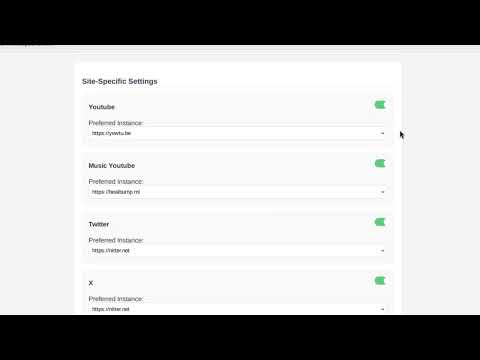

When you navigate to sites like YouTube, Reddit, Twitter/X, or Google, the extension intercepts the request and redirects you to an open-source frontend. Same content, zero tracking.
Examples:
- YouTube → Invidious
- Twitter/X → Nitter
- Reddit → RedLib
- Google Search → SearXNG
- TikTok → ProxiTok
The extension supports multiple frontends for each service. You can pick your preferred instance or disable redirection for specific platforms entirely.
- Seamless redirection from centralized platforms to FOSS frontends
- User-configurable instance selection per service
- Enable/disable individual redirect rules from the UI
- Lightweight and fast — no telemetry, no bloat
- Open-source under AGPL-3.0
| Original Site | Privacy Frontend | Example Instance |
|---|---|---|
| YouTube | Invidious | https://yewtu.be |
| Twitter/X | Nitter | https://nitter.net |
| RedLib | https://safereddit.com |
|
| TikTok | ProxiTok | https://tok.artemislena.eu |
| Proxigram | https://proxigram.lunar.icu |
|
| Google Search | SearXNG | https://search.disroot.org |
| Medium | Scribe | https://scribe.rip |
| Mobile site | https://m.facebook.com |
|
| StackOverflow | AnonymousOverflow | https://code.whatever.social |
| Tumblr | Priviblur | https://pb.bloat.cat |
| Twitch | SafeTwitch | https://safetwitch.drgns.space |
| IMDb | LibreMDB | https://libremdb.iket.me |
| Quora | Quetre | https://quetre.iket.me |
| Google Translate | Lingva Translate | https://lingva.ml |
| and more... |
Firefox Addons: https://addons.mozilla.org/en-US/firefox/addon/privacy-please/
- Download the
.xpifile from the Releases section. - Open
about:debugging#/runtime/this-firefox - Click "Load Temporary Add-on…" and select the
manifest.jsoninside the extracted folder
Permanent installation will be available via addons.mozilla.org once approved.
Chrome Store: https://chromewebstore.google.com/detail/privacy-please/pelceacokglomngpmedefbnlmmmpnlea
- Download the ZIP from the Releases
- Extract it somewhere on your disk
- Open
chrome://extensionsand enable Developer Mode - Click Load Unpacked and select the extracted folder
Web Store submission is pending approval. Once live, users will be able to install it directly.
Most modern websites aren't just content platforms — they’re surveillance machines. Even without logging in, you’re being profiled. This extension bypasses the platform’s frontend entirely, reducing your exposure to:
- Tracking cookies
- Behavioral analytics
- Fingerprinting
- Ad targeting
- UI dark patterns
Instead of patching the surveillance model, this extension replaces it at the source.

Want to modify the rules or extend support to new services? All the redirection logic is stored in rules.json. You can edit it directly and rebuild the extension locally.