React bindings for @zoompinch/core - Apply a pinch-and-zoom experience that feels native and communicates the transform reactively and lets you project any layer on top of the transformed canvas.
Play with the demo: https://zoompinch.pages.dev
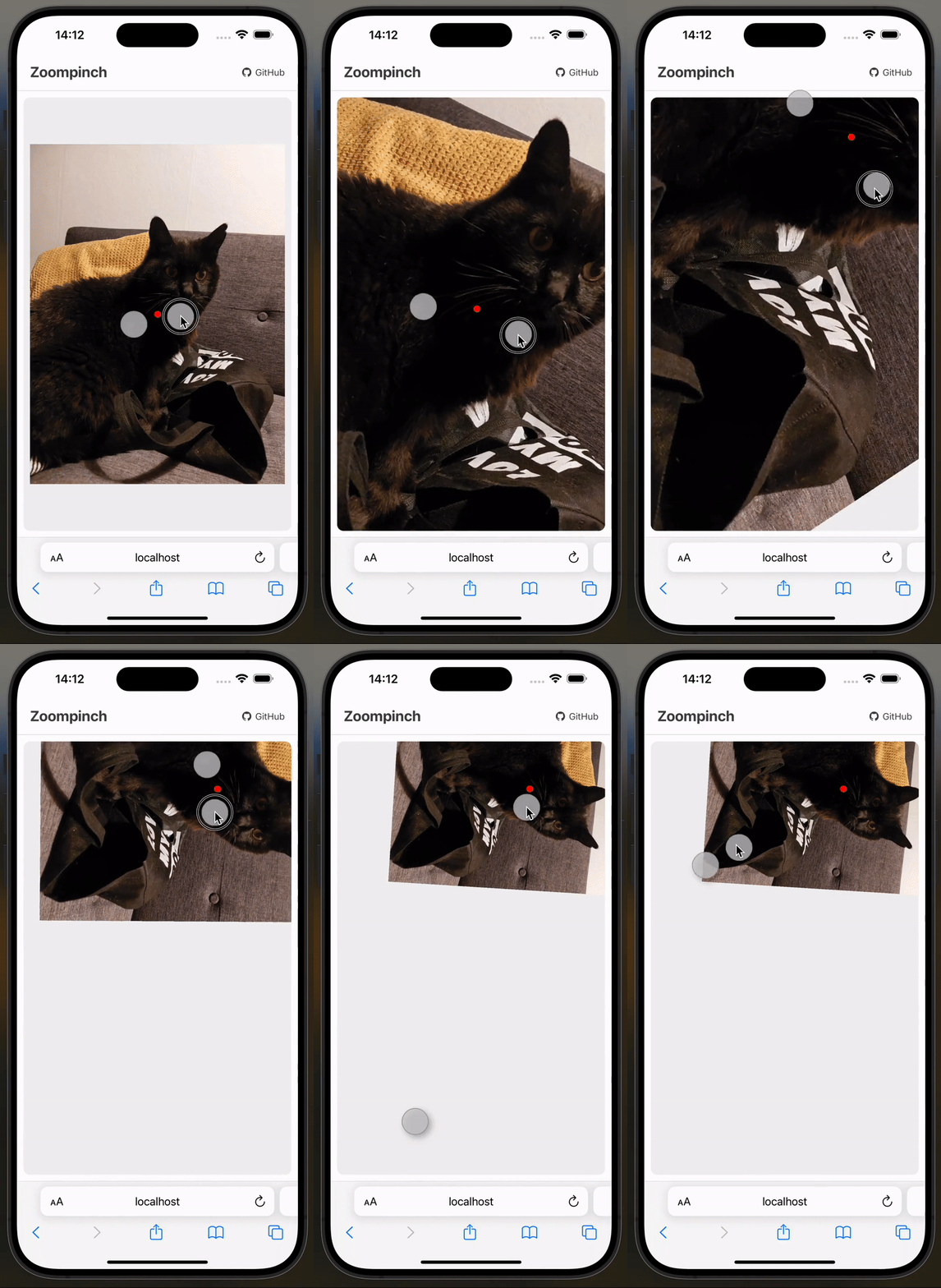
Unlike other libraries, Zoompinch does not just use the center point between two fingers as projection center. The fingers get correctly projected on the virtual canvas. This makes pinching on touch devices feel native-like.
Aside from touch, mouse and wheel events, gesture events (Safari Desktop) are supported as well! Try it out on the demo
npm install @zoompinch/reactimport React, { useRef, useState } from 'react';
import { Zoompinch, ZoompinchRef } from '@zoompinch/react';
function App() {
const zoompinchRef = useRef<ZoompinchRef>(null);
const [transform, setTransform] = useState({
translateX: 0,
translateY: 0,
scale: 1,
rotate: 0
});
function handleInit() {
// Center canvas on initialization
zoompinchRef.current?.applyTransform(1, [0.5, 0.5], [0.5, 0.5], 0);
}
function handleTransformChange(newTransform) {
console.log('Transform updated:', newTransform);
setTransform(newTransform);
}
function handleClick(event: React.MouseEvent) {
if (!zoompinchRef.current) return;
const [x, y] = zoompinchRef.current.normalizeClientCoords(event.clientX, event.clientY);
console.log('Clicked at canvas position:', x, y);
}
return (
<Zoompinch
ref={zoompinchRef}
style={{ width: '800px', height: '600px', border: '1px solid #ccc' }}
transform={transform}
onTransformChange={handleTransformChange}
offset={{ top: 0, right: 0, bottom: 0, left: 0 }}
minScale={0.5}
maxScale={4}
clampBounds={false}
rotation={true}
zoomSpeed={1}
translateSpeed={1}
zoomSpeedAppleTrackpad={1}
translateSpeedAppleTrackpad={1}
mouse={true}
wheel={true}
touch={true}
gesture={true}
onInit={handleInit}
onClick={handleClick}
>
<img
width="1536"
height="2048"
src="https://imagedelivery.net/mudX-CmAqIANL8bxoNCToA/489df5b2-38ce-46e7-32e0-d50170e8d800/public"
draggable={false}
style={{ userSelect: 'none' }}
/>
</Zoompinch>
);
}
export default App;<Zoompinch
ref={zoompinchRef}
style={{ width: '800px', height: '600px' }}
onInit={handleInit}
matrix={({ composePoint, normalizeClientCoords, canvasWidth, canvasHeight }) => (
<svg width="100%" height="100%">
{/* Center marker */}
<circle
cx={composePoint(canvasWidth / 2, canvasHeight / 2)[0]}
cy={composePoint(canvasWidth / 2, canvasHeight / 2)[1]}
r="8"
fill="red"
/>
</svg>
)}
>
<img width="1536" height="2048" src="image.jpg" />
</Zoompinch>| Prop | Type | Default | Description |
|---|---|---|---|
transform |
Transform |
{ translateX: 0, translateY: 0, scale: 1, rotate: 0 } |
Current transform state |
onTransformChange |
(transform: Transform) => void |
- | Callback when transform changes |
offset |
Offset |
{ top: 0, right: 0, bottom: 0, left: 0 } |
Inner padding/offset within container |
minScale |
number |
0.5 |
Minimum scale (user gestures only) |
maxScale |
number |
10 |
Maximum scale (user gestures only) |
clampBounds |
boolean |
false |
Clamp panning within bounds (user gestures only) |
rotation |
boolean |
true |
Enable rotation gestures |
mouse |
boolean |
true |
Enable mouse drag |
wheel |
boolean |
true |
Enable wheel/trackpad |
touch |
boolean |
true |
Enable touch gestures |
gesture |
boolean |
true |
Enable Safari gesture events |
style |
React.CSSProperties |
- | Inline styles for container |
children |
ReactNode |
- | Canvas content |
matrix |
ReactNode | Function |
- | Overlay content (see Matrix Prop) |
Note: minScale, maxScale, rotation, and clampBounds only apply during user interaction. Programmatic changes via ref methods are unrestricted.
Pan and zoom interactions behave differently across input devices:
- Apple Trackpads: Provide smooth, precise scroll values with natural momentum
- Mouse Wheels: Send large, discrete jumps (typically ±100 or ±120 per scroll tick)
Without normalization, this causes:
- Uncomfortably large zoom jumps when using mouse wheels
- Panning that's either too slow (trackpad-optimized) or too fast (mouse-optimized)
- Inconsistent user experience across Windows, Mac, and Linux
The library automatically detects the input device type and applies different speed multipliers:
- Trackpad gestures use base values for smooth, 1:1 response
- Mouse wheel actions use amplified values for comfortable discrete steps
You can fine-tune these multipliers for your specific use case using the speed props.
| Prop | Type | Default | Description |
|---|---|---|---|
translateSpeed |
number |
1 |
Pan speed multiplier for mouse wheels |
zoomSpeed |
number |
1 |
Zoom speed multiplier for mouse wheels |
translateSpeedAppleTrackpad |
number |
1 |
Pan speed multiplier for trackpads |
zoomSpeedAppleTrackpad |
number |
1 |
Zoom speed multiplier for trackpads |
Note: min-scale, max-scale, rotation, and clamp-bounds only apply during user interaction. Programmatic changes via ref methods are unrestricted.
| Event | Payload | Description |
|---|---|---|
onInit |
void |
Fired when canvas dimensions are available |
onTransformChange |
Transform |
Fired when transform changes |
onClick |
React.MouseEvent |
Standard click event |
onMouseDown |
React.MouseEvent |
Standard mousedown event |
onTouchStart |
React.TouchEvent |
Standard touchstart event |
onMouseUp |
React.MouseEvent |
Standard mouseup event |
onTouchEnd |
React.TouchEvent |
Standard touchend event |
<Zoompinch
  onInit={handleInit}
  onTransformChange={handleTransformChange}
  onClick={handleClick}
>
  {/* content */}
</Zoompinch>Access methods via ref:
import { ZoompinchRef } from '@zoompinch/react';

const zoompinchRef = useRef<ZoompinchRef>(null);

// Call methods
zoompinchRef.current?.applyTransform(scale, wrapperCoords, canvasCoords, rotate?);
zoompinchRef.current?.normalizeClientCoords(clientX, clientY);
zoompinchRef.current?.composePoint(x, y);
zoompinchRef.current?.rotateCanvas(x, y, radians);

// Access properties
zoompinchRef.current?.canvasWidth;
zoompinchRef.current?.canvasHeight;
zoompinchRef.current?.zoompinchEngine; // Access core engine directlyApply transform by anchoring a canvas point to a wrapper point.
Parameters:
scale: number- Target scalewrapperCoords: [number, number]- Wrapper position (0-1, 0.5 = center)canvasCoords: [number, number]- Canvas position (0-1, 0.5 = center)rotate?: number- Optional rotation in radians
Examples:
// Center canvas at scale 1
zoompinchRef.current?.applyTransform(1, [0.5, 0.5], [0.5, 0.5]);

// Zoom to 2x, keep centered
zoompinchRef.current?.applyTransform(2, [0.5, 0.5], [0.5, 0.5]);

// Anchor canvas top-left to wrapper center
zoompinchRef.current?.applyTransform(1.5, [0.5, 0.5], [0, 0]);

// Set rotation
zoompinchRef.current?.applyTransform(1, [0.5, 0.5], [0.5, 0.5], Math.PI / 4);Convert global client coordinates to canvas coordinates.
Parameters:
clientX: number- Global X from eventclientY: number- Global Y from event
Returns: [number, number] - Canvas coordinates in pixels
Example:
function handleClick(event: React.MouseEvent) {
  const [x, y] = zoompinchRef.current!.normalizeClientCoords(
    event.clientX,
    event.clientY
  );
  console.log('Canvas position:', x, y);
}Convert canvas coordinates to wrapper coordinates (accounts for transform).
Parameters:
x: number- Canvas X in pixelsy: number- Canvas Y in pixels
Returns: [number, number] - Wrapper coordinates in pixels
Example:
// Get wrapper position for canvas center
const [wrapperX, wrapperY] = zoompinchRef.current!.composePoint(
  zoompinchRef.current!.canvasWidth / 2,
  zoompinchRef.current!.canvasHeight / 2
);Rotate canvas around a specific canvas point.
Parameters:
x: number- Canvas X (rotation center)y: number- Canvas Y (rotation center)radians: number- Rotation angle
Example:
// Rotate 90° around canvas center
const centerX = zoompinchRef.current!.canvasWidth / 2;
const centerY = zoompinchRef.current!.canvasHeight / 2;
zoompinchRef.current?.rotateCanvas(centerX, centerY, Math.PI / 2);Access current canvas dimensions and engine:
const width = zoompinchRef.current?.canvasWidth;   // number
const height = zoompinchRef.current?.canvasHeight; // number
const engine = zoompinchRef.current?.zoompinchEngine; // ZoompinchCore | nullRender overlay elements that follow the canvas transform.
Type: ReactNode | ((props: MatrixProps) => ReactNode)
MatrixProps:
| Prop | Type | Description |
|---|---|---|
composePoint |
(x: number, y: number) => [number, number] |
Canvas → Wrapper coords |
normalizeClientCoords |
(clientX: number, clientY: number) => [number, number] |
Client → Canvas coords |
canvasWidth |
number |
Current canvas width |
canvasHeight |
number |
Current canvas height |
Note: applyTransform and rotateCanvas are NOT available in the matrix function. Use component ref instead.
Example:
<Zoompinch
  matrix={({ composePoint, normalizeClientCoords, canvasWidth, canvasHeight }) => (
    <svg width="100%" height="100%">
      <circle
        cx={composePoint(canvasWidth / 2, canvasHeight / 2)[0]}
        cy={composePoint(canvasWidth / 2, canvasHeight / 2)[1]}
        r="8"
        fill="red"
      />
    </svg>
  )}
>
  <img width="1920" height="1080" src="image.jpg" />
</Zoompinch>Absolute pixels within canvas content.
- Origin:
(0, 0)at top-left - Range:
0tocanvasWidth,0tocanvasHeight
const [canvasX, canvasY] = normalizeClientCoords(event.clientX, event.clientY);Absolute pixels within viewport/wrapper.
- Origin:
(0, 0)at top-left (accounting for offset) - Range:
0towrapperWidth,0towrapperHeight
const [wrapperX, wrapperY] = composePoint(canvasX, canvasY);Normalized coordinates for applyTransform.
- Range:
0.0to1.0 0.5= center,1.0= bottom-right
[0, 0]       // top-left
[0.5, 0.5]   // center
[1, 1]       // bottom-right
Conversion Flow:
Client Coords → normalizeClientCoords() → Canvas Coords → composePoint() → Wrapper Coords
import React, { useRef, useState } from 'react';
import { Zoompinch, ZoompinchRef } from '@zoompinch/react';

function App() {
  const zoompinchRef = useRef<ZoompinchRef>(null);
  const [transform, setTransform] = useState({
    translateX: 0,
    translateY: 0,
    scale: 1,
    rotate: 0
  });
  const [clickPoint, setClickPoint] = useState<[number, number] | null>(null);

  function handleInit() {
    // Center canvas on initialization
    zoompinchRef.current?.applyTransform(1, [0.5, 0.5], [0.5, 0.5], 0);
  }

  function handleClick(event: React.MouseEvent) {
    if (!zoompinchRef.current) return;
    const [x, y] = zoompinchRef.current.normalizeClientCoords(
      event.clientX,
      event.clientY
    );
    setClickPoint([x, y]);
    console.log('Clicked at:', x, y);
  }

  function handleZoomIn() {
    if (!zoompinchRef.current) return;
    const newScale = Math.min(transform.scale * 1.5, 4);
    zoompinchRef.current.applyTransform(newScale, [0.5, 0.5], [0.5, 0.5]);
  }

  function handleZoomOut() {
    if (!zoompinchRef.current) return;
    const newScale = Math.max(transform.scale / 1.5, 0.5);
    zoompinchRef.current.applyTransform(newScale, [0.5, 0.5], [0.5, 0.5]);
  }

  function handleReset() {
    zoompinchRef.current?.applyTransform(1, [0.5, 0.5], [0.5, 0.5], 0);
  }

  function handleRotate() {
    if (!zoompinchRef.current) return;
    const centerX = zoompinchRef.current.canvasWidth / 2;
    const centerY = zoompinchRef.current.canvasHeight / 2;
    zoompinchRef.current.rotateCanvas(centerX, centerY, Math.PI / 4);
  }

  return (
    <div style={{ padding: '20px' }}>
      <div style={{ marginBottom: '10px' }}>
        <button onClick={handleZoomIn}>Zoom In</button>
        <button onClick={handleZoomOut}>Zoom Out</button>
        <button onClick={handleReset}>Reset</button>
        <button onClick={handleRotate}>Rotate 45°</button>
      </div>

      <div style={{ marginBottom: '10px' }}>
        <strong>Transform:</strong> Scale: {transform.scale.toFixed(2)},
        Rotate: {(transform.rotate * 180 / Math.PI).toFixed(0)}°
      </div>

      {clickPoint && (
        <div style={{ marginBottom: '10px' }}>
          <strong>Last click:</strong> ({clickPoint[0].toFixed(0)}, {clickPoint[1].toFixed(0)})
        </div>
      )}

      <Zoompinch
        ref={zoompinchRef}
        style={{
          width: '800px',
          height: '600px',
          border: '2px solid #333',
          borderRadius: '8px'
        }}
        transform={transform}
        onTransformChange={setTransform}
        offset={{ top: 0, right: 0, bottom: 0, left: 0 }}
        minScale={0.5}
        maxScale={4}
        clampBounds={false}
        rotation={true}
        mouse={true}
        wheel={true}
        touch={true}
        gesture={true}
        onInit={handleInit}
        onClick={handleClick}
        matrix={({ composePoint, canvasWidth, canvasHeight }) => (
          <svg width="100%" height="100%">
            {/* Center marker */}
            <circle
              cx={composePoint(canvasWidth / 2, canvasHeight / 2)[0]}
              cy={composePoint(canvasWidth / 2, canvasHeight / 2)[1]}
              r="8"
              fill="red"
            />

            {/* Click point marker */}
            {clickPoint && (
              <circle
                cx={composePoint(clickPoint[0], clickPoint[1])[0]}
                cy={composePoint(clickPoint[0], clickPoint[1])[1]}
                r="5"
                fill="blue"
              />
            )}
          </svg>
        )}
      >
        <img
          width="1536"
          height="2048"
          src="https://imagedelivery.net/mudX-CmAqIANL8bxoNCToA/489df5b2-38ce-46e7-32e0-d50170e8d800/public"
          draggable={false}
          style={{ userSelect: 'none' }}
        />
      </Zoompinch>
    </div>
  );
}

export default App;-
Always specify image dimensions to avoid layout shifts:
<img width="1920" height="1080" src="image.jpg" />
-
Center content on init:
function handleInit() {
  zoompinchRef.current?.applyTransform(1, [0.5, 0.5], [0.5, 0.5]);
}
-
Prevent image drag:
<img
  src="image.jpg"
  draggable={false}
  style={{ userSelect: 'none' }}
/>
-
Use controlled transform state:
const [transform, setTransform] = useState({
  translateX: 0, translateY: 0, scale: 1, rotate: 0
});

<Zoompinch
  transform={transform}
  onTransformChange={setTransform}
/>
-
Enable clamp bounds for better UX:
<Zoompinch clampBounds={true} minScale={0.5} maxScale={4} />
Minimal base styles are applied. Customize via style prop:
<Zoompinch
  style={{
    width: '100%',
    height: '600px',
    border: '1px solid #ccc',
    borderRadius: '8px'
  }}
>
  {/* content */}
</Zoompinch>
Internal CSS classes:
.zoompinch          /* Container */
.zoompinch > .canvas    /* Canvas wrapper */
.zoompinch > .matrix /* Matrix overlay */Full TypeScript support with exported types:
import {
  Zoompinch,
  ZoompinchRef,
  ZoompinchProps
} from '@zoompinch/react';

import type { Transform } from '@zoompinch/core';- ✅ Chrome/Edge (latest)
- ✅ Firefox (latest)
- ✅ Safari (latest, including iOS)
- ✅ Mobile browsers (iOS Safari, Chrome Mobile)
MIT
- @zoompinch/core - Core engine
- @zoompinch/vue - Vue 3
- @zoompinch/elements - Web Components
Built with ❤️ by Elya Maurice Conrad