In this section we provide 3 Virtual Server deployment examples. The first two examples are simple VirtualServer deployments whereas the third provides an example of Path based routing.
- HTTP Virtual Server without Host parameter
- HTTP Virtual Server with Host parameter and a single service
- HTTP Virtual Server with two services (Path Based Routing)
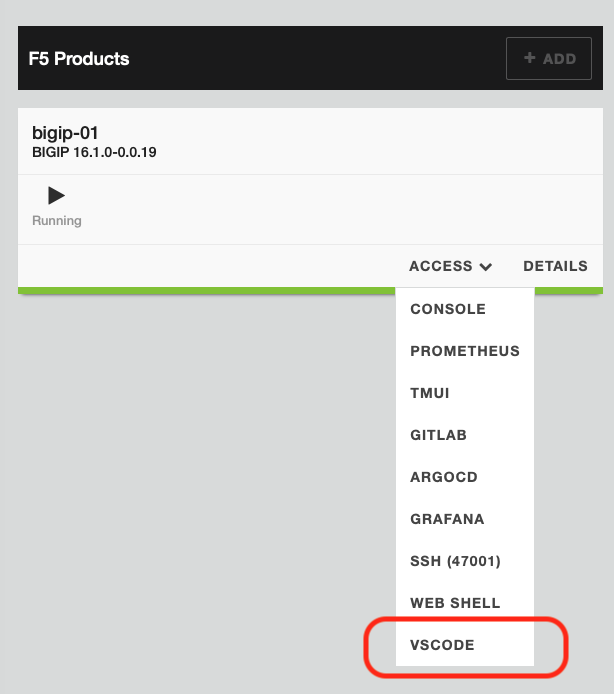
To run the demos, use the terminal on VS Code. VS Code is under the
bigip-01on theAccessdrop-down menu. Click here to see how.
This section demonstrates the deployment of a Basic Virtual Server without Host parameter and a single service as the pool. The virtual server should send traffic for all Hostnames and Paths to the same pool.
Eg: noHost.yml
apiVersion: "cis.f5.com/v1"
kind: VirtualServer
metadata:
  name: noHost
  labels:
    f5cr: "true"
spec:
  virtualServerAddress: "10.1.10.54"
  pools:
  - path: /
    service: echo-svc
    servicePort: 80
Change the working directory to basic.
cd ~/oltra/use-cases/cis-examples/cis-crd/VirtualServer/Basic
Note: Verify that the backend service is working. Otherwise go to
oltra/setup/appsand deploy the service.
Create the VirtualServer resource.
kubectl apply -f noHost.yml
Note: CIS will create a Virtual Server on BIG-IP with VIP "10.1.10.54" and attaches a policy which forwards all traffic to service echo-svc.
Confirm that the VirtualServer resource is deployed correctly. You should see Ok under the Status column for the VirtualServer that was just deployed.
kubectl get f5-vs nohost-vs
Expected output
NAME        HOST   TLSPROFILENAME   HTTPTRAFFIC   IPADDRESS    IPAMLABEL   IPAMVSADDRESS   STATUS   AGE
nohost-vs                                         10.1.10.54               10.1.10.54      Ok       8s
Access the service as per the examples below.
curl http://10.1.10.54
curl http://10.1.10.54/test.php
curl http://nohost.f5k8s.net
In all cases you should be able to access the service running in K8s. The output should be similar to:
{
    "Project": "My Echo Project",
    "Project": "https://github.com/skenderidis/docker-images/echo",
    "Server Address": "10.244.140.117",
    "Server Port": "80",
    "Request Method": "GET",
    "Request URI": "/",
    "Query String": "",
    "Headers": [{"accept":"*\/*","user-agent":"curl\/7.58.0","host":"nohost.f5k8s.net","content-length":"","content-type":""}],
    "Remote Address": "10.1.20.5",
    "Remote Port": "54884",
    "Timestamp": "1692858613",
    "Data": "0"
}
Clean up the environment (Optional)
kubectl delete -f noHost.yml
This section demonstrates the deployment of a Virtual Server with a single service as the pool. The virtual server should send traffic for all paths to the same pool.
Eg: virtual-single-pool.yml
apiVersion: "cis.f5.com/v1"
kind: VirtualServer
metadata:
  name: single-pool-vs
  labels:
    f5cr: "true"
spec:
  host: app1.f5k8s.net
  virtualServerAddress: "10.1.10.55"
  pools:
  - path: /
    service: echo-svc
    servicePort: 80
Change the working directory to basic.
cd ~/oltra/use-cases/cis-examples/cis-crd/VirtualServer/Basic
Note: Verify that the backend service is working. Otherwise go to
oltra/setup/appsand deploy the service.
Create the VS CRD resource.
kubectl apply -f virtual-single-pool.yml
Note: CIS will create a Virtual Server on BIG-IP with VIP
10.1.10.55and will attach a policy that forwards all traffic to pool echo-svc when the Host Header is equal toapp1.f5k8s.net.
Confirm that the VirtualServer resource is deployed correctly. You should see Ok under the Status column for the VirtualServer that was just deployed.
kubectl get f5-vs single-pool-vs
Expected output
NAME             HOST                    TLSPROFILENAME   HTTPTRAFFIC   IPADDRESS    IPAMLABEL   IPAMVSADDRESS   STATUS   AGE
single-pool-vs   single-pool.f5k8s.net                                  10.1.10.55               10.1.10.55      Ok       6s
Try accessing the service with curl as per the examples below.
curl http://10.1.10.55
curl http://single-pool.f5k8s.net
In all the above examples you should see a reset connection as it didnt match the configured Host Header.
curl: (56) Recv failure: Connection reset by peer
Try again with the examples below
curl http://single-pool.f5k8s.net
curl http://single-pool.f5k8s.net/test
In both cases you should be able to access the service running in K8s. The output should be similar to:
{
    "Server Name": "single-pool.f5k8s.net",
    "Server Address": "10.244.196.135",
    "Server Port": "80",
    "Request Method": "GET",
    "Request URI": "/test",
    "Query String": "",
    "Headers": [{"host":"single-pool.f5k8s.net","user-agent":"curl\/7.58.0","accept":"*\/*"}],
    "Remote Address": "10.1.20.5",
    "Remote Port": "34724",
    "Timestamp": "1657610340",
    "Data": "0"
}
Clean up the environment (Optional)
kubectl delete -f virtual-single-pool.yml
This section demonstrates the deployment of a Virtual Server with 2 services as the pools. This is a typical Path Based Forwarding example
The virtual server should send traffic to the corresponding K8s service, according to the URI Path. In the following example traffic with URI Path /lib will be forwarded to service app1-svc while traffic with URI Path /portal will be forwarded to app2-svc. Traffic on all other URI Paths will be dropped.
Eg: virtual-two-pools.yml
apiVersion: "cis.f5.com/v1"
kind: VirtualServer
metadata:
  name: two-pools-vs
  labels:
    f5cr: "true"
spec:
  virtualServerAddress: "10.1.10.56"
  host: two-pools.f5k8s.net
  pools:
  - path: /svc1
    service: app1-svc
    servicePort: 8080
  - path: /svc2
    service: app2-svc
    servicePort: 8080
Change the working directory to basic.
cd ~/oltra/use-cases/cis-examples/cis-crd/VirtualServer/Basic
Note: Verify that the backend service is working. Otherwise go to
oltra/setup/appsand deploy the service.
Create the VirtualServer resource.
kubectl apply -f virtual-two-pools.yml
Note: CIS will create a Virtual Server on BIG-IP with VIP
10.1.10.56and will attach a policy that forwards traffic to service app1-svc or app2-svc based on the URI path.
Confirm that the VirtualServer resource is deployed correctly. You should see Ok under the Status column for the VirtualServer that was just deployed.
kubectl get f5-vs two-pools-vs
Expected output
NAME           HOST                  TLSPROFILENAME   HTTPTRAFFIC   IPADDRESS    IPAMLABEL   IPAMVSADDRESS   STATUS   AGE
two-pools-vs   two-pools.f5k8s.net                                  10.1.10.56               10.1.10.56      Ok       2m55s
Try accessing the service with curl as per the examples below.
curl http://two-pools.f5k8s.net/
In the above example you should see a reset connection as it didnt match the configured URI Path.
curl: (56) Recv failure: Connection reset by peer
Try again with the examples below
curl http://two-pools.f5k8s.net/svc1
curl http://two-pools.f5k8s.net/svc2
Verify that the traffic was forwarded to the right service depending on the path that was entered. The output should be similar to:
Server address: 10.244.140.116:8080
Server name: app2-78c95bccb5-jvfnr
Date: 12/Jul/2022:07:21:49 +0000
URI: /svc2                                    <======== URI Path
Request ID: a5b08e8249b65a11aaaacd307feeca8e
Clean up the environment (Optional)
kubectl delete -f virtual-two-pools.yml