A flexible Graph RAG package with advanced ingestion and augmentation strategies.

Kwnl is short for 'knowledge' but could just as well stand for 'know well'(as in knowing your knowledge well), 'knowledge network workflow library', 'knwledge notes with linking', 'keep notes, wiki and links', 'knwoledge network and wisdom library' or 'keep notes, write and learn'.
- Five Graph RAG Strategies: Local, Global, Naive, Self and Hybrid query modes for flexible knowledge retrieval
- Dependency Injection Framework: Decorator-based DI system (
@service,@singleton_service,@inject_config,defaults) for clean, configurable architecture - Extensively Tested: Comprehensive test suite covering all components and strategies
- No External Services Required: Runs with lightweight local implementations (Ollama, NetworkX, JSON storage) out of the box. Great for experiments while fully open for enterprise-grade integrations with Qdrant, Neo4j, LangGraph, etc.
- Protocol-Based & Extensible: Override base classes and configure via JSON to customize LLMs, storage, chunking, extraction, and more
- Semantic Search: Vector-based similarity search for nodes, edges, and chunks
- Classic RAG: includes traditional retrieval-augmented generation with chunk-based context
- Rich Output Formatting: Beautiful terminal, HTML, and Markdown renderers for all models using Rich and custom formatters.
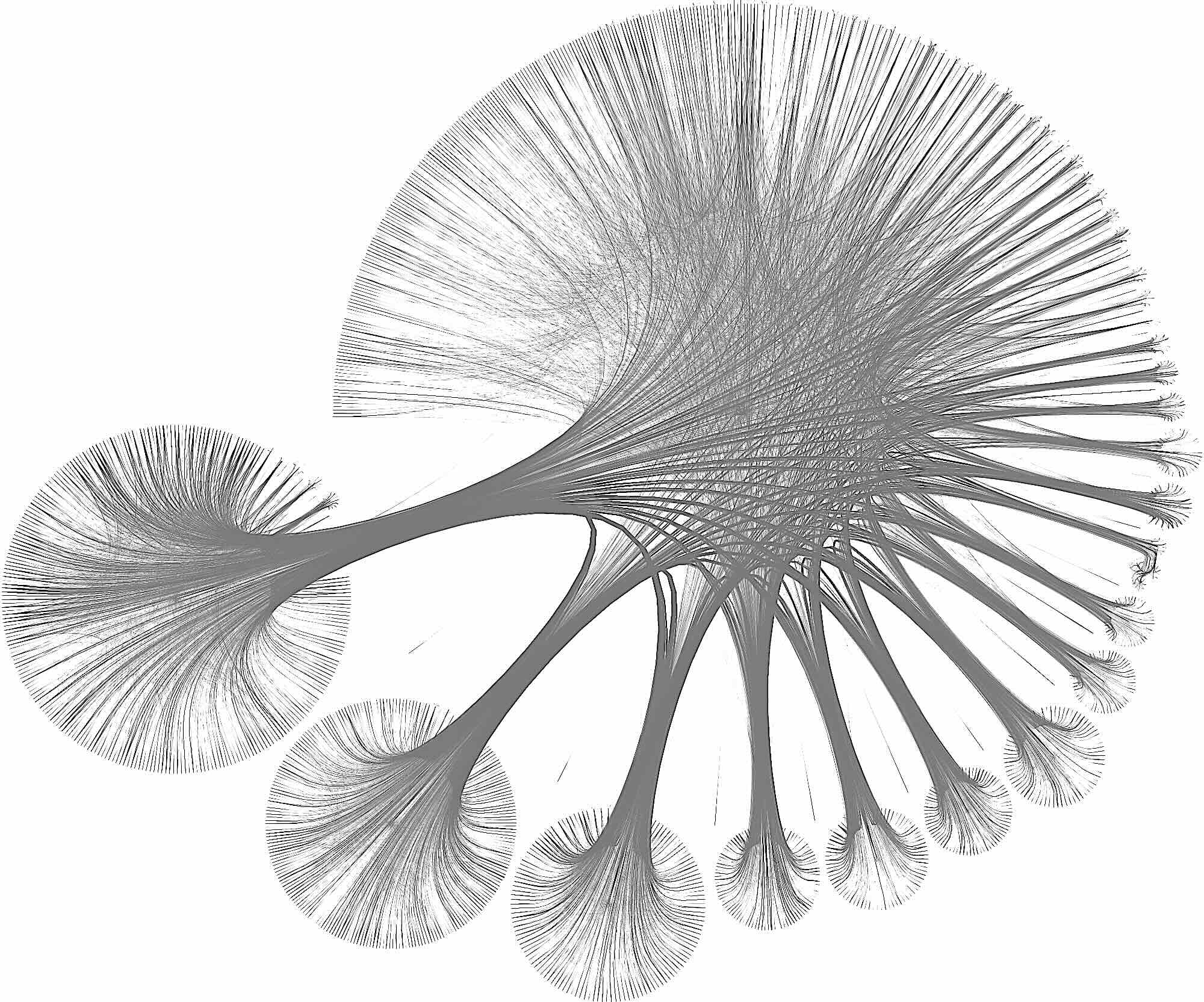
- Graph Visualization: the default graph store is saved as GraphML which can be visualized with tools like Gephi, yEd or Cytoscape. Equally open to graph databases and advanced graph visualization (Bloom, yFiles, Ogma, etc.)
- Any LLM: Easily swap LLM implementations (Ollama, OpenAI, Anthropic, etc.) via configuration.
KNWL uses a hierarchical configuration system with service variants, allowing runtime component swapping without code changes. All components inherit from FrameworkBase and are wired through dependency injection.
Core services include:
- LLM: Ollama, OpenAI (configurable via
llm.default) - Storage: JSON, Chroma, NetworkX, Memgraph storage
- Chunking: Tiktoken-based text splitting
- Extraction: Graph and entity extraction with customizable prompts
- Vector Search: Semantic similarity for retrieval
KNWL implements five distinct retrieval strategies for different query patterns:
Focuses on entity-centric retrieval:
- Extracts low-level keywords from the query and matches against nodes (primary nodes)
- Retrieves the relationship neighborhood around these primary nodes
- Builds context from:
- Primary node records (name, type, description)
- Connected relationship records (source, target, type, description)
- Text chunks associated with the primary nodes
Use case: Questions about specific entities or concepts and their immediate relationships.
Focuses on relationship-centric retrieval:
- Extracts high-level keywords from the query and matches against edges
- Retrieves the node endpoints of matching edges
- Builds context from:
- Node endpoint records (entities connected by the relationships)
- Edge records (source, target, type, description)
- Text chunks associated with the edges
Use case: Questions about relationships, connections, or patterns between entities.
Traditional RAG approach:
- Performs direct semantic similarity search on text chunks
- No graph structure utilized
- Builds context purely from retrieved chunks
Use case: Simple fact-finding or when graph structure isn't beneficial.
Combines Local and Global strategies:
- Executes both local and global retrieval in parallel
- Merges and deduplicates the combined context
- Provides comprehensive coverage across entities, relationships, and chunks
Use case: Complex queries benefiting from both entity and relationship context.
Like naive RAG, this is an auxiliary strategy. It asks the LLM to generate context on its own without retrieval. This is useful for:
- Baseline comparisons
- Scenarios where no relevant context exists in the graph
- Fallback when other strategies yield no results.
Knwl is a flexible package with many services and articulations. You typically would not use the quick start below for a real-world scenario but we have included the Knwl class as a wrapper around some functionality to demonstrate how you can get started without any setup or config.
You can use Kwnl with Poetry, pip and UV. Out of the box Knwl will use Ollama as LLM, NetworkX as graph store and JSON files for persistence.
So, if you want to run the snippet below, make sure you have Ollama running locally with a model like qwen2.5:7b downloaded (ollama pull qwen2.5:7b).
Install Knwl:
uv add knwlPaste the following code in a Python file (say, go.py) and run it (uv run go.py):
from knwl import Knwl, print_knwl


async def main():
    knwl = Knwl()

    # add a fact
    await knwl.add_fact("gravity", "Gravity is a universal force that attracts two bodies toward each other.", id="fact1", )

    assert (await knwl.node_exists("fact1")) is True

    # add another fact
    await knwl.add_fact("photosynthesis", "Photosynthesis is the process by which green plants and some other organisms use sunlight to synthesize foods from carbon dioxide and water.", id="fact2", )
    # at least two nodes should be present now
    assert await knwl.node_count() >= 2

    # you can take the node returned from add_fact as an alternative
    found = await knwl.get_nodes_by_name("gravity")
    assert len(found) >= 1
    gravity_node = found[0]
    found = await knwl.get_nodes_by_name("photosynthesis")
    assert len(found) >= 1
    photosynthesis_node = found[0]
    # connect the two nodes
    await knwl.connect(source_name=gravity_node.name, target_name=photosynthesis_node.name, relation="Both are fundamental natural processes.", )

    # one edge
    assert await knwl.edge_count() >= 1

    # Augmentation will fetch the gravity node, despite that it does not directly relate to photosynthesis
    # Obviously, this 1-hop result would not happen with classic RAG since the vector similarity is too low
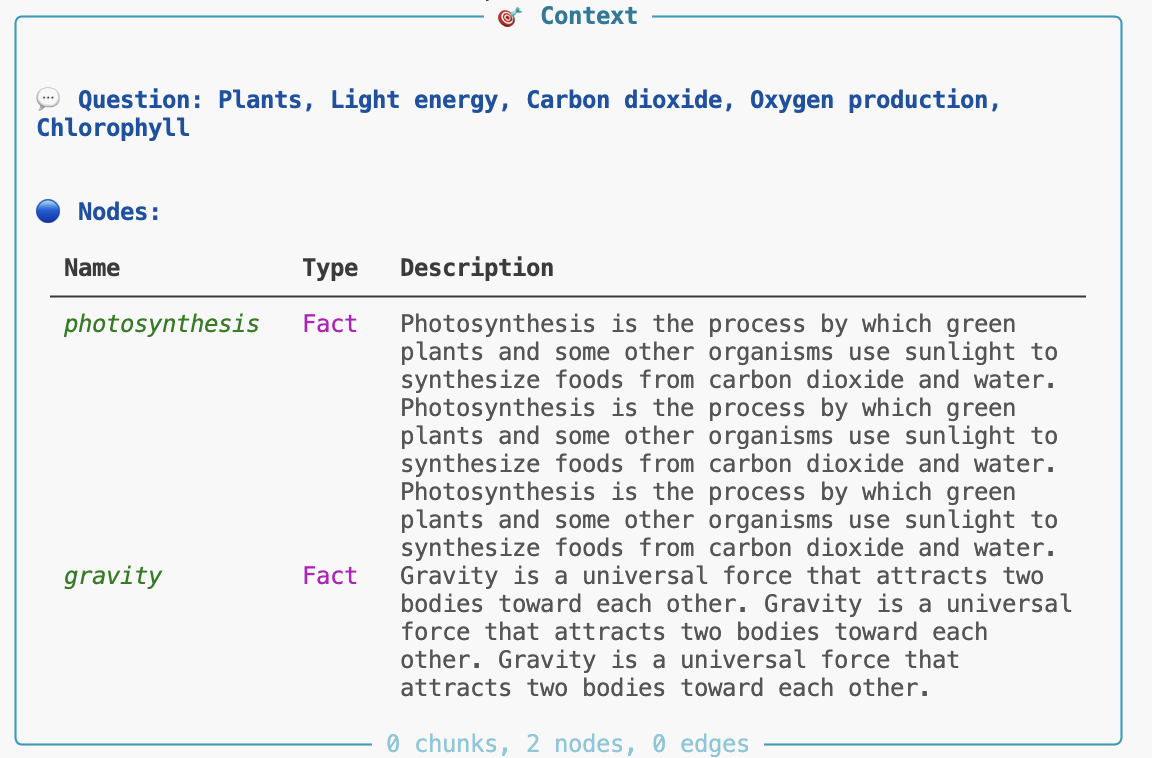
    augmentation = await knwl.augment("What is photosynthesis?")
    # pretty print the augmentation result
    print_knwl(augmentation)

    # graph RAG question-answer
    a = await knwl.ask("What is photosynthesis?")
    print_knwl(a.answer)


if __name__ == "__main__":
    import asyncio

    asyncio.run(main())
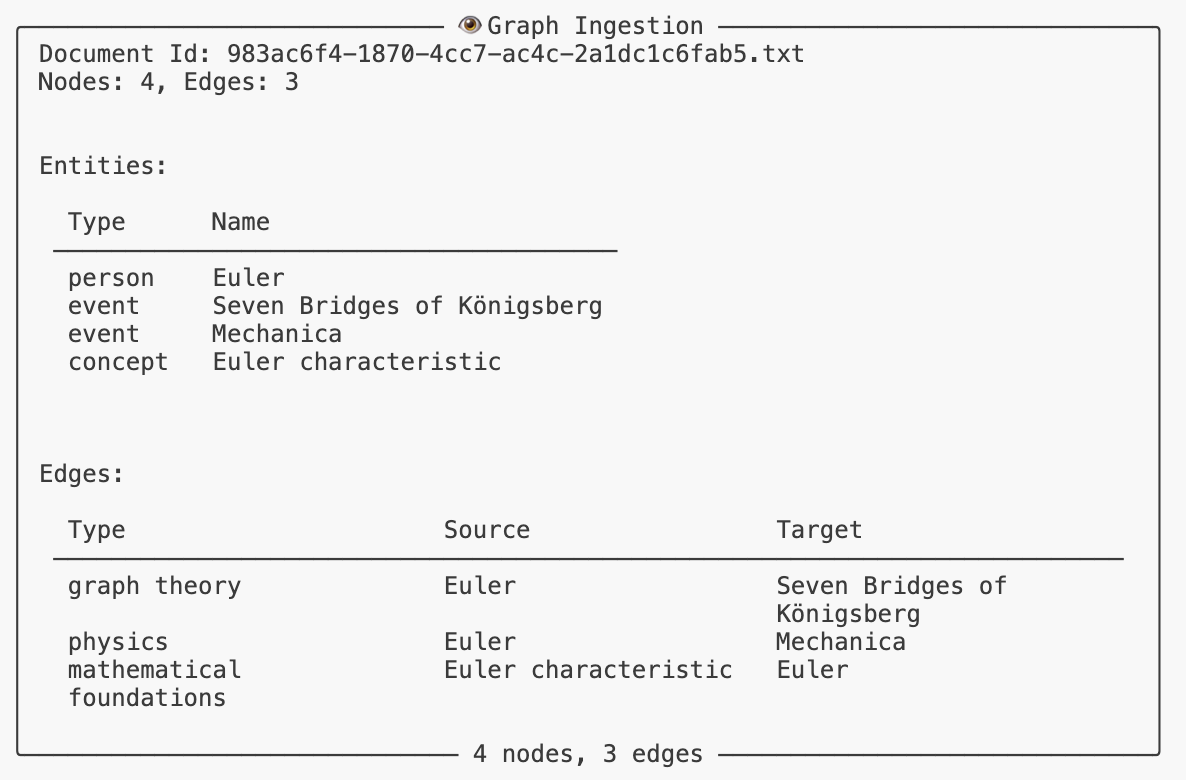
This will output the ingestion
and the answer to the question about photosynthesis, augmented with graph context.
You can find the LLM cache, the graph (GraphML) and the JSON storage files in the working directory (~/.knwl/default). You can define multiple data namespaces and switch between them via configuration (Knwl(namespace=...)).
Note: ChromaDB is used for vector similarity and out of the box uses all-MiniLM-L6-v2 as embedding model. The model will be downloaded automatically on first run.
KNWL provides sophisticated formatting utilities for beautiful output across multiple mediums: terminal, HTML, and Markdown. The formatting system is protocol-based and extensible, allowing custom formatters for any Pydantic model.
The Rich-based terminal formatter creates beautiful, colorful console output with tables, panels, and trees:
from knwl.format import print_knwl, format_knwl
from knwl.models import KnwlNode, KnwlEdge, KnwlGraph

# Print models directly to terminal with beautiful formatting
node = KnwlNode(name="AI", type="Concept", description="Artificial Intelligence")
print_knwl(node)  # Renders as formatted panel with table

# Format collections
edges = [KnwlEdge(...), KnwlEdge(...)]
print_knwl(edges)  # Renders as organized table with syntax highlighting

# Get formatted object for further manipulation
formatted = format_knwl(node, format_type="terminal")
Features:
- Consistent color schemes and styling across all models
- Automatic table generation for model fields
- Syntax highlighting for code and JSON
- Tree views for hierarchical data
- Customizable themes via
RichTheme
Generate semantic HTML with CSS classes for web displays, documentation, and reports:
from knwl.format import render_knwl, format_knwl

# Get HTML string
html = format_knwl(node, format_type="html")

# Save to file with full page structure
render_knwl(graph, format_type="html", output_file="output.html", full_page=True, title="Knowledge Graph")
Features:
- Semantic HTML5 with CSS classes (
knwl-panel,knwl-table, etc.) - Customizable class mappings
- Full page generation with proper HTML structure
- Responsive tables and layouts
Create GitHub-flavored Markdown for documentation and static sites:
# Generate markdown
md = format_knwl(graph, format_type="markdown")

# Save with frontmatter
render_knwl(result, format_type="markdown", output_file="report.md", add_frontmatter=True, title="Query Results")
Features:
- GitHub-flavored Markdown tables
- Code blocks with syntax highlighting
- Frontmatter support for static site generators
- Hierarchical headings for nested structures
Register custom formatters for your own models:
from knwl.format import register_formatter
from knwl.format.formatter_base import ModelFormatter


@register_formatter(MyCustomModel, "terminal")
class MyCustomFormatter(ModelFormatter):
    def format(self, model, formatter, **options):
        # Access Rich formatter's theming
        table = formatter.create_table(title="My Custom Output")
        # Add custom formatting logic
        return formatter.create_panel(table, title=model.name)
All KNWL models (KnwlNode, KnwlEdge, KnwlGraph, KnwlAnswer, KnwlContext, etc.) have pre-registered formatters for consistent output across formats.
Dependency Injection (DI) is a design pattern that allows a class or function to receive its dependencies from an external source rather than creating them itself. This promotes loose coupling and enhances testability and maintainability of code.
Knwl has a default configuration allowing you to run things out of the box. For example, the default LLM is set to use Ollama with Qwen 2.5.
There are two ways to tune the configuration:
- all DI methods have an
overrideparameter that allows you to pass a configuration dictionary that will override the default configuration for that specific function or class. Override here means actually 'deep merge' so you only need to specify the parts you want to change. - you can modify the
knwl.config.default_configdictionary directly to change the default configuration for the entire application. You can see an example of this below.
A simple example illustrate how it works and at the same time shows that the DI framework in Knwl can be used independently:
from knwl.di import service

class Pizza:
    def __init__(self, *args, **kwargs):
        self._size = kwargs.get("size", "medium")
        self._price = kwargs.get("price", 10.00)
        self._name = kwargs.get("name", "pizza")

    def size(self):
        return self._size

    def price(self):
        return self._price

    def name(self):
        return self._name

sett = {
    "food": {
        "default":"pizza",
        "pizza": {
            "class": "__main__.Pizza",
            "size": "large",
            "price": 13.99,
            "name": "pizza",
        }
    }
}

@service("food", override=sett, param_name="kitchen")
def prepare(kitchen=None):
    if kitchen is None:
        raise ValueError("Kitchen service not injected")
    return f"Prepared a {kitchen.size()} {kitchen.name()} costing ${kitchen.price()}"


print(prepare()) # Output: Prepared a large pizza costing $13.99
A service food is defined in a configuration dictionary and the default food service is set to pizza. The Pizza class is a simple class with a method price that returns the price of the pizza.
The prepare function is decorated with the @service decorator, which injects the kitchen parameter with an instance of the Pizza class based on the configuration provided in sett. When prepare() is called, it uses the injected kitchen service to get the size and price of the pizza.
The configuration also defines a couple of named parameters that are passed to the Pizza constructor when the service is instantiated. This allows one to completely change the behavior of the prepare function by simply changing the configuration, without modifying the function itself.
Adding Chinese food would be as simple as:
class Chinese:
    def __init__(self, *args, **kwargs):
        self._size = kwargs.get("size", "medium")
        self._price = kwargs.get("price", 7.00)
        self._name = kwargs.get("name", "chinese food")

    def size(self):
        return self._size

    def price(self):
        return self._price

    def name(self):
        return self._name
sett = {
    "food": {
        "default":"chinese",
        "pizza": {
            "class": "__main__.Pizza",
            "size": "large",
            "price": 13.99,
            "name": "pizza",
        },
        "chinese": {
            "class": "__main__.Chinese",
            "size": "small",
            "price": 8.99,
            "name": "noodles",
        },
    }
}Note that DI does not force you to create instances via configuration. You can still create instances directly and pass them to functions if you prefer. DI simply provides a flexible way to manage dependencies when needed.
The above example will inject a new instance every time prepare is called. If you want to use a singleton instance instead, you can use the @singleton_service decorator:
@singleton_service("food", override=sett, param_name="a")
@singleton_service("food", override=sett, param_name="b")
def prepare(a=None, b=None):
    assert a is b, "Singleton instances are not the same!"
    return a

food1 = prepare()
food2 = prepare()
assert food1 is food2, "Singleton instances are not the same!"
The magic happens via the DI framework container which keeps track of all services and their instances.
You can define ad-hoc classes, functions, or even instances directly in the configuration:
from knwl.di import service, singleton_service


class Car:
    def __init__(self, make="Toyota", model="Corolla"):
        self.make = make
        self.model = model

    def __repr__(self):
        return f"Car(make={self.make}, model={self.model})"


sett = {
    "vehicle": {
        "default": "car",
        "car": {
            "class": Car,
            "make": "Honda",
            "model": "Civic"
        }
    }
}

@service("vehicle", override=sett)
def get_vehicle(vehicle=None):
    if vehicle:
        print(str(vehicle))

get_vehicle() # Output: Car(make=Honda, model=Civic)
With a lambda function:
from knwl.di import service, singleton_service


class Car:
    def __init__(self, make="Toyota", model="Corolla"):
        self.make = make
        self.model = model

    def __repr__(self):
        return f"Car(make={self.make}, model={self.model})"


sett = {
    "vehicle": {
        "default": "car",
        "car": {
            "class": Car,
            "make": "Honda",
            "model": "Civic"
        }
    }
}

@service("vehicle", override=sett)
def get_vehicle(vehicle=None):
    if vehicle:
        print(str(vehicle))

get_vehicle() # Output: Car(make=Toyota, model=Corolla)Services can depend on other services. The DI framework will resolve these dependencies automatically:
from knwl.di import service, singleton_service

sett = {
    "vehicle": {
        "default": "car",
        "car": {"class": "__main__.Car", "make": "Honda", "model": "Civic"},
    },
    "engine": {
        "default": "v6",
        "v6": {"class": "__main__.Engine", "horsepower": 300},
        "v4": {"class": "__main__.Engine", "horsepower": 150},
    },
}


class Engine:
    def __init__(self, horsepower=150):
        self.horsepower = horsepower

    def __repr__(self):
        return str(self.horsepower)


@service("engine", override=sett)
class Car:
    def __init__(self, engine=None):
        self._engine = engine

    def __repr__(self):
        return f"Car(engine={self._engine})"


@service("vehicle", override=sett)
def get_vehicle(vehicle=None):
    if vehicle:
        print(str(vehicle))


get_vehicle()
# Output: Car(engine=300)The DI framework can inject configuration values, not just services. This is useful for injecting settings or parameters into functions or classes:
from knwl.di import service, singleton_service, inject_config

sett = {
    "not_found": {
        "short": "Sorry, I can't help with that.",
        "long": "I'm sorry, but I don't have the information you're looking for.",
    }
}
@inject_config("not_found.long", override=sett, param_name="not_found")
def ask(not_found):
    return not_found

print(ask()) # Output: I'm sorry, but I don't have the information you're looking for.In all the examples above, we passed an override parameter to the decorators to provide configuration. In a real application, you would typically load configuration from a file or environment variables and set it in the DI container at application startup:
from knwl.di import inject_config
from knwl.config import default_config
default_config["a"] = {"b": "I'm a.b"}

@inject_config("a.b",  param_name="who")
def ask(who):
    return who

print(ask())  # Output: I'm a.b
You can also completely replace the default_config dictionary if needed.
The DI container makes use of dynamic instantiation which you can also use directly if needed:
import asyncio
from knwl import services

async def main():
	s = services.get_service("llm")
	result = await s.ask("What is the Baxter equation?")
	print(result.answer)

asyncio.run(main())
The get_service looks up the llm service configuration and if not variation is found, the default one will be used. In this case it will use the OllamaClient.
A variation is simply a named configuration under the service. For example, if you had a configuration like this:
sett = {
    "llm": {
        "default": "gemma",
        "gemma": {
            "class": "knwl.services.llm.ollama.OllamaClient",
            "model": "gemma3:7b"
        },
        "qwen": {
            "class": "knwl.services.llm.ollama.OllamaClient",
            "model": "Qwen2.5-7B"
        }
    }
}
you could use services.get_service("llm", variation="qwen") to get an instance of the OllamaClient configured to use the Qwen2.5-7B model instead of the default gemma3:7b.
This allows you to easily switch between different implementations or configurations of a service at runtime without changing the code that uses the service.
Much like the injection decorators, you can also pass an override parameter to get_service to provide ad-hoc configuration for that specific instance. You can also use get_singleton_service to get a singleton instance of a service. Whether you use a service via injection or directly via get_service, the same instance will be returned if it's a singleton service. The DI container relies on the services for singletons and instantiation.
Service injection happens if the parameter is not provided. If you instantiate a class in the normal Python way:
engine = Engine(horsepower=110)
car = Car(engine=engine)
print(car)  # Car(engine=110)
the DI is still active beyond the screen but nothing will be injected since the parameter is already provided. It supplies defaults only.
There are situations where the constructor parameter is another services and you want to use a specific variation of that service. You can do this by using a special syntax in the configuration: @/service_name/variant_name. For example, if you have a Car class that depends on an Engine service, and you want to use a specific variant of the Engine service when creating a Car, you can do it like this:
import asyncio
from knwl import  services, service


config = {
    "engine":{
        "default":"e240",
       "e240":{
            "class": "__main__.Engine",
            "horsepower": 240
       },
       "e690":{
            "class": "__main__.Engine",
            "horsepower": 690
       }
    },
    "car":{
        "default":"car1",
        "car1":{
            "class": "__main__.Car",
            "engine": "@/engine/e690"
        },
        "car2":{
            "class": "__main__.Car",
            "engine": "@/engine/e240"
        }
    }
}

class Engine:

    def __init__(self, horsepower=150):
        self.horsepower = horsepower

    def __repr__(self):
        return str(self.horsepower)


@service("engine", override=config)
class Car:
    def __init__(self, engine=None):
        self._engine = engine

    def __repr__(self):
        return f"Car(engine={self._engine})"


async def main():
   car = services.get_service("car", override=config)
   print(car)  # Car(engine=690)


asyncio.run(main())
The important bit to note here is that the output is Car(engine=690) even though the default engine is e240. This is because the car1 configuration specifies that the engine parameter should be injected with the e690 variant of the Engine service using the special syntax @/engine/e690. This allows you to control which variant of a dependent service is used when instantiating a service, providing fine-grained control over service dependencies via configuration.
If you leave out the engine parameter in the car1 configuration, the default e240 engine would be used instead.
Specifically in the context of Knwl, this allows you to define LLM instances for different actions: you can define a different LLM for summarization, another for question answering, and so on, all configurable via the configuration dictionary without changing the code. This is not just theoretical, a small LLM (say, 4b parameters) is convenient for summarization but you might want to use a larger model for more complex tasks like entity extraction. If you try gemma3:4b for entity extraction you will find that it times out while a larger model like Qwen2.5-7b works fine. Of course, if would be great to use one model to do everything but exxperience shows that every model has its strengths and weaknesses and using the right one for the job is often the best approach.
The @defaults decorator provides a convenient way to inject default values from service configurations directly into class constructors or functions. This is particularly useful when you want all the parameters from a service configuration to be automatically injected without manually specifying each one. The @defaults decorator reads the configuration for the specified service and injects all matching parameters into the decorated function or class constructor. It replaces the standard way of assigning default values in the constructor with automatic injection from configuration.
While @service is great for injecting a single service instance, @defaults shines when you have a service configuration with multiple parameters that you want to inject as defaults. It reads the configuration for the specified service and injects all matching parameters into the decorated function or class constructor.
The following complete example illustrates how @defaults works:
import asyncio
from knwl import defaults
from faker import Faker

config = {
    "generator": {
        "default": "small",
        "small": {"class": "__main__.Generator", "max_length": 50},
        "large": {"class": "__main__.Generator", "max_length": 200},
    },
    "llm": {
        "default": "my",
        "my": {"class": "__main__.MyLLM", "generator": "@/generator/large"},
    },
}

class Generator:
    def __init__(self, max_length=50):
        self.faker = Faker()
        self.max_length = max_length

    def generate(self, input):
        return self.faker.text(max_nb_chars=self.max_length)

@defaults("llm", override=config)
class MyLLM:
    def __init__(self, generator=None):
        if generator is None:
            raise ValueError("MyLLM: Generator instance must be provided.")
        if not isinstance(generator, Generator):
            raise TypeError("MyLLM: generator must be an instance of Generator.")
        self.generator = generator

    def ask(self, question):
        return f"Answer ({self.generator.max_length}): '{self.generator.generate(question)}'"
async def main():
    llm = MyLLM()
    print(llm.ask("What is a quandl?"))


asyncio.run(main())
In this example:
- The decorator reads the default variant ("basic") from the
llmconfiguration - It retrieves all parameters from
llm.my(the default variant) - For the
generatorparameter, it sees the@/generator/largereference - It instantiates the large variant of the generator service and injects it.
By changing {"class": "__main__.MyLLM", "generator": "@/generator/large"} to {"class": "__main__.MyLLM", "generator": "@/generator/small"} in the config, the MyLLM instance would instead receive a small generator with max_length=50.
You can specify a particular variant instead of using the default:
@defaults("llm", variant="ollama")
class CustomLLMProcessor:
    def __init__(self, model=None, temperature=None, context_window=None):
        # All parameters from llm.ollama config are injected:
        # model="qwen2.5:14b", temperature=0.1, context_window=32768
        self.model = model
        self.temperature = temperature
self.context_window = context_windowChannging providers and settings is, hence, a matter of changing the configuration, not the code. It's also easy to define custom implementations and plugging them into the system via configuration.
In the example below, a StaticGenerator is defined that always returns the same text. This is useful for testing or specific use cases where you want predictable output. The instance is created directly in the configuration and injected as-is into the MyLLM class.
import asyncio
from knwl import defaults
from faker import Faker


class Generator:
    def __init__(self, max_length=50):
        self.faker = Faker()
        self.max_length = max_length

    def generate(self, input):
        return self.faker.text(max_nb_chars=self.max_length)


class StaticGenerator(Generator):
    def __init__(self, text="Hello, World!"):
        self.text = text
        self.max_length = len(text)

    def generate(self, input):
        return self.text


config = {
    "generator": {
        "default": "small",
        "small": {"class": "__main__.Generator", "max_length": 50},
        "large": {"class": "__main__.Generator", "max_length": 200},
    },
    "llm": {
        "default": "my",
        "my": {
            "class": "__main__.MyLLM",
            "generator": StaticGenerator(),  # Direct instance
        },
    },
}


@defaults("llm", override=config)
class MyLLM:
    def __init__(self, generator=None):
        if generator is None:
            raise ValueError("MyLLM: Generator instance must be provided.")
        if not isinstance(generator, Generator):
            raise TypeError("MyLLM: generator must be an instance of Generator.")
        self.generator = generator

    def ask(self, question):
        return f"Answer ({self.generator.max_length}): '{self.generator.generate(question)}'"


async def main():
    llm = MyLLM()
    print(llm.ask("What is a quandl?"))


asyncio.run(main())The @defaults decorator automatically handles service redirection (strings starting with @/):
# Config:
# "graph_extraction": {
#     "default": "basic",
#     "basic": {
#         "class": "knwl.extraction.BasicGraphExtraction",
#         "mode": "full",
#         "llm": "@/llm/ollama"  # Service reference
#     }
# }

@defaults("graph_extraction")
class BasicGraphExtraction:
    def __init__(self, llm=None, mode=None):
        # llm is instantiated from the llm/ollama service
        # mode is injected as the string value "full"
        self.llm = llm
        self.mode = mode
This allows you to reuse configurations across different services and ensures that the correct instances are injected based on the configuration.
The decorator only injects parameters that exist in the function/constructor signature. Config values that don't match parameter names are silently ignored:
# Config has: model, temperature, context_window, caching
@defaults("llm")
class SimpleProcessor:
    def __init__(self, model=None, temperature=None):
        # Only model and temperature are injected
        # caching and context_window are ignored (not in signature)
        self.model = model
        self.temperature = temperature
This ensures that you can define all sorts of things in the configuration without worrying that the constructor or function will break because of unexpected parameters.
You can still override the injected defaults when creating instances:
@defaults("entity_extraction")
class FlexibleExtraction:
    def __init__(self, llm=None, custom_param="default"):
        self.llm = llm
        self.custom_param = custom_param

# Use injected defaults
extractor1 = FlexibleExtraction()

# Override the LLM
from knwl.services import services
custom_llm = services.get_service("llm", variant_name="ollama")
extractor2 = FlexibleExtraction(llm=custom_llm)

# Override a custom parameter
extractor3 = FlexibleExtraction(custom_param="custom_value")The @defaults decorator can be combined with other DI decorators like @inject_config:
@defaults("graph_extraction")
@inject_config("api.host", "api.port")
class AdvancedGraphExtraction:
    def __init__(self, llm=None, mode=None, host=None, port=None):
        # llm and mode injected from graph_extraction config
        # host and port injected from api config
        self.llm = llm
        self.mode = mode
        self.host = host
        self.port = port
When multiple decorators are used, they are applied in order from bottom to top (this is the Python default behavior). Each decorator adds its own injections, and explicitly provided arguments always take precedence.
Like other DI decorators, @defaults supports runtime configuration overrides:
custom_config = {
    "entity_extraction": {
        "basic": {
            "llm": "@/llm/gemma_small"  # Override to use different LLM
        }
    }
}

@defaults("entity_extraction", override=custom_config)
class TestExtraction:
    def __init__(self, llm=None):
self.llm = llmKnwl has an intricate [[DependencyInjection]] system which allows for flexible configuration of its services. Instead of having defaults for the constructor parameters of each service, Knwl uses a centralized configuration object to manage dependencies. This design choice enables easier testing, customization, and extension of the services without modifying their internal implementations.
For example, the default chunking is based on Tiktoken and happens in the TiktokenChunkin class. There are essentially three parameters that can be configured for chunking:
- the chunk size
- the chunk overlap
- the chunking model
In the config.py file you will find:
{
  "chunking": {
    "default": "tiktoken",
    "tiktoken": {
      "class": "knwl.chunking.TiktokenChunking",
      "model": "gpt-4o-mini",
      "chunk_size": 1024,
      "chunk_overlap": 128
    }
  }
}
You can moddigy these paramters to change the default chunking behavior of Knwl.
Alternatively you can override the config when instantiating the chunking service:
from knwl.services import services
chunker = services.get_service("chunking", override={
    "chunking"{
        "tiktoken": {
            "chunk_size": 2048,
            "chunk_overlap": 256,
        }
    }
})
This overrides the default chunking configuration but you can also defines variations (variants) like so:
{
  "chunking": {
    "default": "tiktoken",
    "tiktoken": {
      "class": "knwl.chunking.TiktokenChunking",
      "model": "gpt-4o-mini",
      "chunk_size": 1024,
      "chunk_overlap": 128
    },
    "tiktoken-large": {
      "class": "knwl.chunking.TiktokenChunking",
      "model": "gpt-4o-mini",
      "chunk_size": 2048,
      "chunk_overlap": 256
  }
}
Then you can instantiate the chunking service with the "tiktoken-large" variant:
from knwl.services import services
chunker = services.get_service("chunking", "tiktoken-large")
If you have lots of configurations to override, you can also replace the active or base configuration entirely using the set_active_config function from knwl.config:
from knwl.config import set_active_config
new_config = {
  "chunking": {
    "default": "tiktoken-large",
    "tiktoken": {
      "class": "knwl.chunking.TiktokenChunking",
      "model": "gpt-4o-mini",
      "chunk_size": 1024,
      "chunk_overlap": 128
    },
    "tiktoken-large": {
      "class": "knwl.chunking.TiktokenChunking",
      "model": "gpt-4o-mini",
      "chunk_size": 2048,
      "chunk_overlap": 256
    }
  }
}
set_active_config(new_config)
If you want this configuration to be the default for all chunking services, you can change the "default" key in the config to point to "tiktoken-large":
{
  "chunking": {
    "default": "tiktoken-large",
    ...
  }
}The inter-dependency of services means that a service configuration is required in multiple place. You can re-use or redirect a configuration by using the @/ prefix. For example, if you want to use the same chunking configuration for a different service, you can do:
{
  "some_other_service": {
    "chunking": "@/chunking/tiktoken"
  }
}
More concretely, you will see that the default graph RAG service is configured like so:
{
  "graph_rag": {
    "default": "local",
    "local": {
      "class": "knwl.semantic.graph_rag.graph_rag.GraphRAG",
      "semantic_graph": "@/semantic_graph/memory",
      "ragger": "@/rag_store",
      "graph_extractor": "@/graph_extraction/basic",
      "keywords_extractor": "@/keywords_extraction"
    }
  }
}
The syntax @/semantic_graph/memory tells Knwl to use the configuration defined for the memory variant of the semantic_graph service. This allows for consistent configuration across different services without duplication.
If there is no variant specified, Knwl will use the default variant for that service. The @/rag_store in the example above will resolve to the default variant of the rag_store service.
The print_knwl function is a generic printing utility for various Knwl objects. It also allows to print configuration details of services. For example, to print the configuration of the chunking service, you can do:
from knwl import print_knwl
print_knwl("@/chunking")
or the default Ollama model:
print_knwl("@/llm/ollama/model")The configuration can contains redirections but the print will resolve them for clarity.
There are special paths in Knwl that can be used to reference different directories. These paths are prefixed with $ and are resolved to specific locations in the file system. The special paths include:
$/data: This path points to thedatadirectory within the Knwl project. It is typically used to store datasets or other data files required by Knwl.$/root: This path points to the root directory of the Knwl project. It can be used to reference files or directories located at the top level of the Knwl project.$/user: This path points to a user-specific directory, typically located in the user's home directory. It is used to store user-specific configurations or data related to Knwl.$/tests: This path points to thetests/datadirectory within the Knwl project. It is used to store test datasets or files required for testing Knwl functionalities. These special paths can be used in configuration files or code to easily reference important directories without hardcoding absolute paths. The Knwl utility functions will resolve these paths to their actual locations when needed.
You can test the special paths using the print_knwl function like so:
print_knwl("$/user/abc")
print_knwl("$/data/xyz")
print_knwl("$/tests/xyz")Knwl is extensively tested with unit tests covering all components, strategies, and integration scenarios. The tests depending on an LLM require various Ollama models, Anthropic, OpenAI and more.
You can run the tests without LLM integration (fast) via:
uv run pytest -m "not llm"In the examples/ directory, you can find various scripts demonstrating KNWL's capabilities, including:
- Basic usage and querying
- Custom LLM integration
- Advanced configuration scenarios
Use VSCode Interactive Python for best experience but you can also run this script directly. See https://code.visualstudio.com/docs/python/jupyter-support-py for more details.
In the benchmarks directory, you can find evaluation scripts and benchmark datasets to assess Knwl's performance across different graph RAG strategies and configurations. These benchmarks help in understanding the effectiveness of various retrieval methods and the overall system efficiency. Main insights include:
- bigger models take longer to ingest data and do not perform better
- reasoning models do not improved graph extraction quality.
- The error
PanicException: range start index 10 out of range for slice ...from ChromaDB happens when the underlying collection is corrupted. The workaround is to delete the collection and re-create it. Go to the Kwnl data directory (usually~/.knwl/default/) and delete thevectoror any other ChromaDB subdirectory.
Knwl is released under the MIT License. See LICENSE for details.
For consulting, support, or custom development services around Knwl, please contact the author at [email protected] or visit https://orbifold.net/contact.
Orbifold Consulting, based in Belgium, specialises in delivering comprehensive technical and strategic consulting services to a global clientele across diverse industries and sectors. Our firm provides tailored solutions that empower businesses to navigate and thrive in today's dynamic market landscape. With a commitment to excellence and innovation, Orbifold Consulting ensures that each client receives personalised strategies and expert guidance to achieve their unique business objectives effectively and sustainably.
With over 25 years of experience as an independent consulting firm, we specialise in merging business acumen with scientific expertise to create customised software solutions. Our unique and innovative approaches leverage cutting-edge tools and technologies to meet the specific needs of our clients. We are committed to delivering excellence through bespoke solutions that drive efficiency, innovation, and success. By consistently staying ahead of industry trends and advancements, we ensure our clients receive the highest quality service and support. Orbifold Consulting excels in translating cutting-edge technologies into actionable business insights, empowering companies to embrace graph technology and AI to drive innovation. Our expertise lies in guiding organisations through the complexities of technological adoption, ensuring seamless integration and optimal utilisation of advanced solutions to achieve strategic goals. We are committed to fostering a culture of innovation, helping businesses not only adapt to but also thrive in an increasingly digital landscape. Through our comprehensive world-wide consulting services, we enable clients to harness the full potential of advanced AI, paving the way for sustained growth and competitive advantage.
As a vendor-neutral organisation, we are committed to selecting the optimal technology for each project, ensuring tailored solutions that drive innovation from ideation to implementation. We position ourselves as your strategic innovation partners, dedicated to delivering excellence at every stage of your project’s lifecycle.