|
| 1 | +--- |
| 2 | +title: Flutter Timer |
| 3 | +description: Bloc을 사용한 Flutter 타이머 앱 만들기 튜토리얼입니다. |
| 4 | +sidebar: |
| 5 | + order: 2 |
| 6 | +--- |
| 7 | + |
| 8 | +import RemoteCode from '~/components/code/RemoteCode.astro'; |
| 9 | +import FlutterCreateSnippet from '~/components/tutorials/flutter-timer/FlutterCreateSnippet.astro'; |
| 10 | +import TimerBlocEmptySnippet from '~/components/tutorials/flutter-timer/TimerBlocEmptySnippet.astro'; |
| 11 | +import TimerBlocInitialStateSnippet from '~/components/tutorials/flutter-timer/TimerBlocInitialStateSnippet.astro'; |
| 12 | +import TimerBlocTickerSnippet from '~/components/tutorials/flutter-timer/TimerBlocTickerSnippet.astro'; |
| 13 | +import TimerBlocOnStartedSnippet from '~/components/tutorials/flutter-timer/TimerBlocOnStartedSnippet.astro'; |
| 14 | +import TimerBlocOnTickedSnippet from '~/components/tutorials/flutter-timer/TimerBlocOnTickedSnippet.astro'; |
| 15 | +import TimerBlocOnPausedSnippet from '~/components/tutorials/flutter-timer/TimerBlocOnPausedSnippet.astro'; |
| 16 | +import TimerBlocOnResumedSnippet from '~/components/tutorials/flutter-timer/TimerBlocOnResumedSnippet.astro'; |
| 17 | +import TimerPageSnippet from '~/components/tutorials/flutter-timer/TimerPageSnippet.astro'; |
| 18 | +import ActionsSnippet from '~/components/tutorials/flutter-timer/ActionsSnippet.astro'; |
| 19 | +import BackgroundSnippet from '~/components/tutorials/flutter-timer/BackgroundSnippet.astro'; |
| 20 | + |
| 21 | + |
| 22 | + |
| 23 | +이 튜토리얼에서는 bloc 라이브러리를 사용해서 타이머 앱을 만들어 봅니다. 완성된 |
| 24 | +앱은 다음과 같습니다: |
| 25 | + |
| 26 | + |
| 27 | + |
| 28 | +## 핵심 주제 |
| 29 | + |
| 30 | +- [BlocObserver](/ko/bloc-concepts#blocobserver)로 상태 변화 관찰하기. |
| 31 | +- [BlocProvider](/ko/flutter-bloc-concepts#blocprovider)로 하위 위젯에 bloc |
| 32 | + 제공하기. |
| 33 | +- [BlocBuilder](/ko/flutter-bloc-concepts#blocbuilder)로 상태 변화에 따라 위젯 |
| 34 | + 다시 그리기. |
| 35 | +- [Equatable](/ko/faqs#언제-equatable를-사용해야-하나요)로 불필요한 rebuild |
| 36 | + 방지하기. |
| 37 | +- Bloc에서 `StreamSubscription` 사용하기. |
| 38 | +- `buildWhen`으로 불필요한 rebuild 방지하기. |
| 39 | + |
| 40 | +## 프로젝트 설정 |
| 41 | + |
| 42 | +새로운 Flutter 프로젝트를 생성합니다: |
| 43 | + |
| 44 | +<FlutterCreateSnippet /> |
| 45 | + |
| 46 | +pubspec.yaml 파일을 아래 내용으로 교체합니다: |
| 47 | + |
| 48 | +<RemoteCode |
| 49 | + url="https://raw.githubusercontent.com/felangel/bloc/master/examples/flutter_timer/pubspec.yaml" |
| 50 | + title="pubspec.yaml" |
| 51 | +/> |
| 52 | + |
| 53 | +:::note |
| 54 | + |
| 55 | +이 앱에서는 [flutter_bloc](https://pub.dev/packages/flutter_bloc)과 |
| 56 | +[equatable](https://pub.dev/packages/equatable) 패키지를 사용합니다. |
| 57 | + |
| 58 | +::: |
| 59 | + |
| 60 | +`flutter pub get`을 실행해서 의존성을 설치합니다. |
| 61 | + |
| 62 | +## 프로젝트 구조 |
| 63 | + |
| 64 | +``` |
| 65 | +├── lib |
| 66 | +| ├── timer |
| 67 | +│ │ ├── bloc |
| 68 | +│ │ │ └── timer_bloc.dart |
| 69 | +| | | └── timer_event.dart |
| 70 | +| | | └── timer_state.dart |
| 71 | +│ │ └── view |
| 72 | +│ │ | ├── timer_page.dart |
| 73 | +│ │ ├── timer.dart |
| 74 | +│ ├── app.dart |
| 75 | +│ ├── ticker.dart |
| 76 | +│ └── main.dart |
| 77 | +├── pubspec.lock |
| 78 | +├── pubspec.yaml |
| 79 | +``` |
| 80 | + |
| 81 | +## Ticker |
| 82 | + |
| 83 | +Ticker는 타이머 앱의 데이터 소스입니다. 구독하고 반응할 수 있는 tick 스트림을 |
| 84 | +제공합니다. |
| 85 | + |
| 86 | +`ticker.dart` 파일을 생성합니다. |
| 87 | + |
| 88 | +<RemoteCode |
| 89 | + url="https://raw.githubusercontent.com/felangel/bloc/master/examples/flutter_timer/lib/ticker.dart" |
| 90 | + title="lib/ticker.dart" |
| 91 | +/> |
| 92 | + |
| 93 | +`Ticker` 클래스는 원하는 tick 수(초)를 받아서 매초마다 남은 시간을 emit하는 |
| 94 | +스트림을 반환하는 tick 함수를 제공합니다. |
| 95 | + |
| 96 | +다음으로 `Ticker`를 사용하는 `TimerBloc`을 만들어야 합니다. |
| 97 | + |
| 98 | +## Timer Bloc |
| 99 | + |
| 100 | +### TimerState |
| 101 | + |
| 102 | +먼저 `TimerBloc`이 가질 수 있는 `TimerState`를 정의합니다. |
| 103 | + |
| 104 | +`TimerBloc`의 상태는 다음 중 하나입니다: |
| 105 | + |
| 106 | +- `TimerInitial`: 지정된 시간부터 카운트다운을 시작할 준비가 된 상태. |
| 107 | +- `TimerRunInProgress`: 지정된 시간부터 카운트다운 중인 상태. |
| 108 | +- `TimerRunPause`: 남은 시간에서 일시 정지된 상태. |
| 109 | +- `TimerRunComplete`: 남은 시간이 0으로 완료된 상태. |
| 110 | + |
| 111 | +각 상태는 UI와 사용자가 수행할 수 있는 액션에 영향을 줍니다. 예를 들어: |
| 112 | + |
| 113 | +- `TimerInitial` 상태면 사용자가 타이머를 시작할 수 있습니다. |
| 114 | +- `TimerRunInProgress` 상태면 사용자가 타이머를 일시 정지하고 리셋할 수 있으며, |
| 115 | + 남은 시간을 볼 수 있습니다. |
| 116 | +- `TimerRunPause` 상태면 사용자가 타이머를 재개하고 리셋할 수 있습니다. |
| 117 | +- `TimerRunComplete` 상태면 사용자가 타이머를 리셋할 수 있습니다. |
| 118 | + |
| 119 | +bloc 파일들을 한곳에 모아두기 위해 bloc 디렉토리에 `bloc/timer_state.dart`를 |
| 120 | +생성합니다. |
| 121 | + |
| 122 | +:::tip |
| 123 | + |
| 124 | +[IntelliJ](https://plugins.jetbrains.com/plugin/12129-bloc-code-generator)나 |
| 125 | +[VSCode](https://marketplace.visualstudio.com/items?itemName=FelixAngelov.bloc) |
| 126 | +확장을 사용하면 bloc 파일을 자동으로 생성할 수 있습니다. |
| 127 | + |
| 128 | +::: |
| 129 | + |
| 130 | +<RemoteCode |
| 131 | + url="https://raw.githubusercontent.com/felangel/bloc/master/examples/flutter_timer/lib/timer/bloc/timer_state.dart" |
| 132 | + title="lib/timer/bloc/timer_state.dart" |
| 133 | +/> |
| 134 | + |
| 135 | +모든 `TimerState`는 duration 속성을 가진 추상 클래스 `TimerState`를 상속합니다. |
| 136 | +`TimerBloc`이 어떤 상태에 있든 남은 시간을 알아야 하기 때문입니다. 또한 |
| 137 | +`TimerState`는 `Equatable`을 상속해서 동일한 상태가 발생했을 때 불필요한 |
| 138 | +rebuild를 방지합니다. |
| 139 | + |
| 140 | +다음으로 `TimerBloc`이 처리할 `TimerEvent`를 정의하고 구현합니다. |
| 141 | + |
| 142 | +### TimerEvent |
| 143 | + |
| 144 | +`TimerBloc`은 다음 이벤트를 처리해야 합니다: |
| 145 | + |
| 146 | +- `TimerStarted`: 타이머를 시작해야 함을 알립니다. |
| 147 | +- `TimerPaused`: 타이머를 일시 정지해야 함을 알립니다. |
| 148 | +- `TimerResumed`: 타이머를 재개해야 함을 알립니다. |
| 149 | +- `TimerReset`: 타이머를 원래 상태로 리셋해야 함을 알립니다. |
| 150 | +- `_TimerTicked`: tick이 발생했고 그에 따라 상태를 업데이트해야 함을 알립니다. |
| 151 | + |
| 152 | +[IntelliJ](https://plugins.jetbrains.com/plugin/12129-bloc-code-generator)나 |
| 153 | +[VSCode](https://marketplace.visualstudio.com/items?itemName=FelixAngelov.bloc) |
| 154 | +확장을 사용하지 않았다면 `bloc/timer_event.dart`를 생성하고 이벤트를 구현합니다. |
| 155 | + |
| 156 | +<RemoteCode |
| 157 | + url="https://raw.githubusercontent.com/felangel/bloc/master/examples/flutter_timer/lib/timer/bloc/timer_event.dart" |
| 158 | + title="lib/timer/bloc/timer_event.dart" |
| 159 | +/> |
| 160 | + |
| 161 | +다음으로 `TimerBloc`을 구현합니다! |
| 162 | + |
| 163 | +### TimerBloc |
| 164 | + |
| 165 | +아직 하지 않았다면 `bloc/timer_bloc.dart`를 생성하고 빈 `TimerBloc`을 만듭니다. |
| 166 | + |
| 167 | +<TimerBlocEmptySnippet /> |
| 168 | + |
| 169 | +먼저 `TimerBloc`의 초기 상태를 정의해야 합니다. 여기서는 `TimerBloc`이 |
| 170 | +1분(60초)의 기본 시간으로 `TimerInitial` 상태에서 시작하도록 합니다. |
| 171 | + |
| 172 | +<TimerBlocInitialStateSnippet /> |
| 173 | + |
| 174 | +다음으로 `Ticker` 의존성을 정의합니다. |
| 175 | + |
| 176 | +<TimerBlocTickerSnippet /> |
| 177 | + |
| 178 | +`Ticker`에 대한 `StreamSubscription`도 정의합니다. 이건 잠시 후에 다룹니다. |
| 179 | + |
| 180 | +이제 이벤트 핸들러만 구현하면 됩니다. 가독성을 위해 각 이벤트 핸들러를 별도의 |
| 181 | +헬퍼 함수로 분리합니다. `TimerStarted` 이벤트부터 시작합니다. |
| 182 | + |
| 183 | +<TimerBlocOnStartedSnippet /> |
| 184 | + |
| 185 | +`TimerBloc`이 `TimerStarted` 이벤트를 받으면 시작 시간과 함께 |
| 186 | +`TimerRunInProgress` 상태를 push합니다. 이미 열린 `_tickerSubscription`이 있다면 |
| 187 | +메모리 해제를 위해 취소해야 합니다. 또한 `TimerBloc`이 닫힐 때 |
| 188 | +`_tickerSubscription`을 취소하도록 `close` 메서드를 override해야 합니다. |
| 189 | +마지막으로 `_ticker.tick` 스트림을 listen하고 매 tick마다 남은 시간과 함께 |
| 190 | +`_TimerTicked` 이벤트를 추가합니다. |
| 191 | + |
| 192 | +다음으로 `_TimerTicked` 이벤트 핸들러를 구현합니다. |
| 193 | + |
| 194 | +<TimerBlocOnTickedSnippet /> |
| 195 | + |
| 196 | +`_TimerTicked` 이벤트를 받을 때마다 tick의 duration이 0보다 크면 새로운 |
| 197 | +duration과 함께 `TimerRunInProgress` 상태를 push합니다. 그렇지 않고 tick의 |
| 198 | +duration이 0이면 타이머가 끝난 것이므로 `TimerRunComplete` 상태를 push합니다. |
| 199 | + |
| 200 | +이제 `TimerPaused` 이벤트 핸들러를 구현합니다. |
| 201 | + |
| 202 | +<TimerBlocOnPausedSnippet /> |
| 203 | + |
| 204 | +`_onPaused`에서 `TimerBloc`의 `state`가 `TimerRunInProgress`이면 |
| 205 | +`_tickerSubscription`을 일시 정지하고 현재 타이머 duration과 함께 |
| 206 | +`TimerRunPause` 상태를 push합니다. |
| 207 | + |
| 208 | +다음으로 타이머를 재개할 수 있도록 `TimerResumed` 이벤트 핸들러를 구현합니다. |
| 209 | + |
| 210 | +<TimerBlocOnResumedSnippet /> |
| 211 | + |
| 212 | +`TimerResumed` 이벤트 핸들러는 `TimerPaused` 이벤트 핸들러와 매우 비슷합니다. |
| 213 | +`TimerBloc`의 `state`가 `TimerRunPause`이고 `TimerResumed` 이벤트를 받으면 |
| 214 | +`_tickerSubscription`을 재개하고 현재 duration과 함께 `TimerRunInProgress` |
| 215 | +상태를 push합니다. |
| 216 | + |
| 217 | +마지막으로 `TimerReset` 이벤트 핸들러를 구현합니다. |
| 218 | + |
| 219 | +<RemoteCode |
| 220 | + url="https://raw.githubusercontent.com/felangel/bloc/master/examples/flutter_timer/lib/timer/bloc/timer_bloc.dart" |
| 221 | + title="lib/timer/bloc/timer_bloc.dart" |
| 222 | +/> |
| 223 | + |
| 224 | +`TimerBloc`이 `TimerReset` 이벤트를 받으면 추가 tick 알림을 받지 않도록 현재 |
| 225 | +`_tickerSubscription`을 취소하고 원래 duration과 함께 `TimerInitial` 상태를 |
| 226 | +push합니다. |
| 227 | + |
| 228 | +`TimerBloc`은 이게 전부입니다. 이제 타이머 앱의 UI만 구현하면 됩니다. |
| 229 | + |
| 230 | +## 앱 UI |
| 231 | + |
| 232 | +### MyApp |
| 233 | + |
| 234 | +`main.dart`의 내용을 삭제하고 다음으로 교체합니다. |
| 235 | + |
| 236 | +<RemoteCode |
| 237 | + url="https://raw.githubusercontent.com/felangel/bloc/master/examples/flutter_timer/lib/main.dart" |
| 238 | + title="lib/main.dart" |
| 239 | +/> |
| 240 | + |
| 241 | +다음으로 앱의 루트가 될 'App' 위젯을 `app.dart`에 생성합니다. |
| 242 | + |
| 243 | +<RemoteCode |
| 244 | + url="https://raw.githubusercontent.com/felangel/bloc/master/examples/flutter_timer/lib/app.dart" |
| 245 | + title="lib/app.dart" |
| 246 | +/> |
| 247 | + |
| 248 | +다음으로 `Timer` 위젯을 구현합니다. |
| 249 | + |
| 250 | +### Timer |
| 251 | + |
| 252 | +`Timer` 위젯(`lib/timer/view/timer_page.dart`)은 남은 시간을 표시하고 사용자가 |
| 253 | +타이머를 시작, 일시 정지, 리셋할 수 있는 버튼을 제공합니다. |
| 254 | + |
| 255 | +<TimerPageSnippet /> |
| 256 | + |
| 257 | +여기서는 `BlocProvider`를 사용해서 `TimerBloc` 인스턴스에 접근합니다. |
| 258 | + |
| 259 | +다음으로 적절한 액션(시작, 일시 정지, 리셋)을 가진 `Actions` 위젯을 구현합니다. |
| 260 | + |
| 261 | +### Barrel |
| 262 | + |
| 263 | +`Timer` 섹션의 import를 깔끔하게 정리하기 위해 barrel 파일 `timer/timer.dart`를 |
| 264 | +생성합니다. |
| 265 | + |
| 266 | +<RemoteCode |
| 267 | + url="https://raw.githubusercontent.com/felangel/bloc/master/examples/flutter_timer/lib/timer/timer.dart" |
| 268 | + title="lib/timer/timer.dart" |
| 269 | +/> |
| 270 | + |
| 271 | +### Actions |
| 272 | + |
| 273 | +<ActionsSnippet /> |
| 274 | + |
| 275 | +`Actions` 위젯은 `BlocBuilder`를 사용해서 새로운 `TimerState`가 올 때마다 UI를 |
| 276 | +rebuild하는 `StatelessWidget`입니다. `Actions`는 `context.read<TimerBloc>()`을 |
| 277 | +사용해서 `TimerBloc` 인스턴스에 접근하고 `TimerBloc`의 현재 상태에 따라 다른 |
| 278 | +`FloatingActionButton`을 반환합니다. 각 `FloatingActionButton`은 `onPressed` |
| 279 | +콜백에서 `TimerBloc`에 알리기 위해 이벤트를 추가합니다. |
| 280 | + |
| 281 | +`builder` 함수가 호출되는 시점을 세밀하게 제어하고 싶다면 `BlocBuilder`에 |
| 282 | +선택적으로 `buildWhen`을 제공할 수 있습니다. `buildWhen`은 이전 bloc 상태와 현재 |
| 283 | +bloc 상태를 받아서 `boolean`을 반환합니다. `buildWhen`이 `true`를 반환하면 |
| 284 | +`state`와 함께 `builder`가 호출되고 위젯이 rebuild됩니다. `buildWhen`이 |
| 285 | +`false`를 반환하면 `state`와 함께 `builder`가 호출되지 않고 rebuild도 일어나지 |
| 286 | +않습니다. |
| 287 | + |
| 288 | +이 경우 매 tick마다 `Actions` 위젯이 rebuild되는 것은 비효율적이므로 원하지 |
| 289 | +않습니다. 대신 `TimerState`의 `runtimeType`이 바뀔 때만 `Actions`가 rebuild되길 |
| 290 | +원합니다 (TimerInitial => TimerRunInProgress, TimerRunInProgress => |
| 291 | +TimerRunPause 등). |
| 292 | + |
| 293 | +결과적으로 매 rebuild마다 위젯에 랜덤 색상을 칠하면 다음과 같이 보입니다: |
| 294 | + |
| 295 | +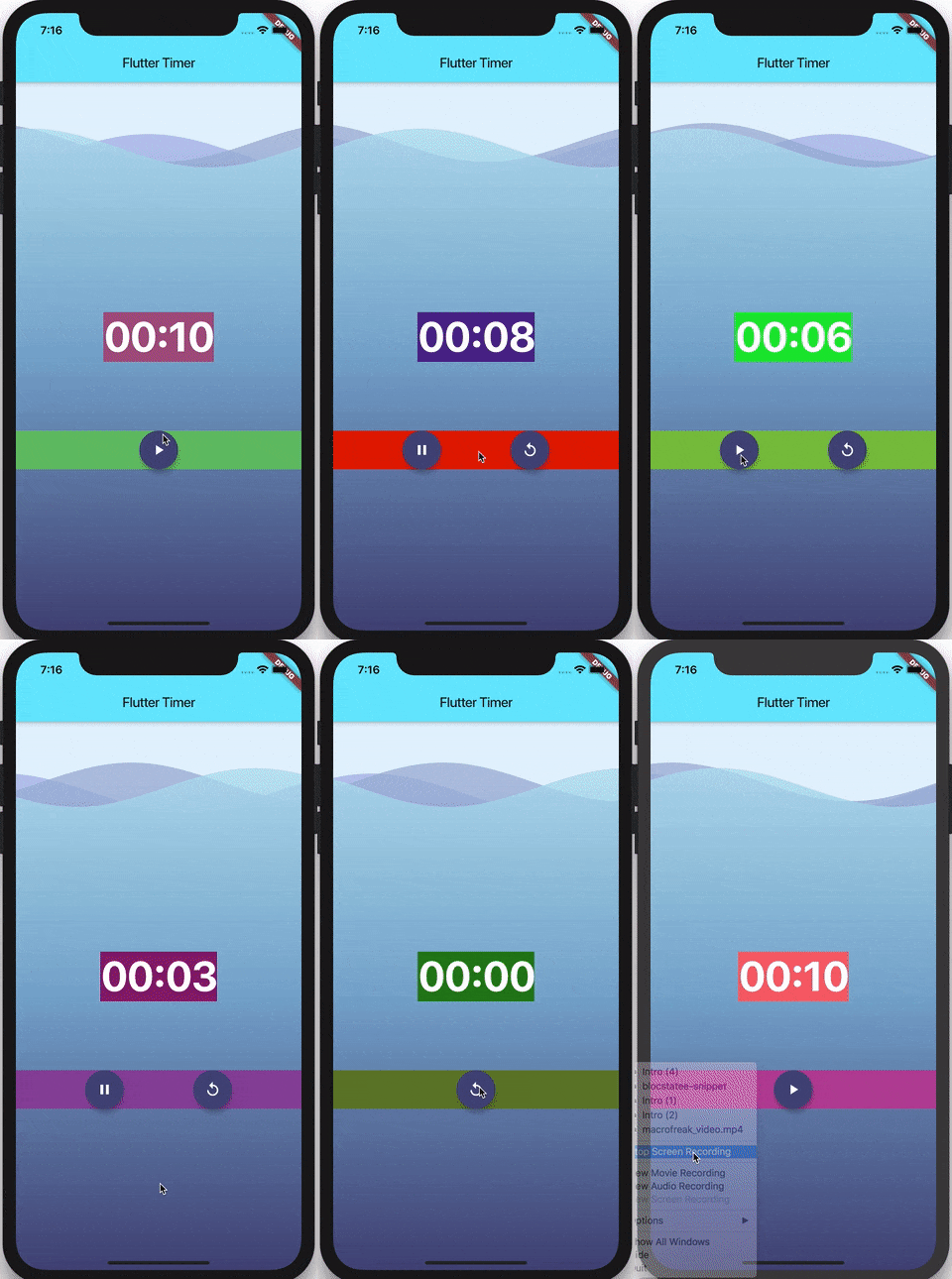 |
| 296 | + |
| 297 | +:::note |
| 298 | + |
| 299 | +`Text` 위젯은 매 tick마다 rebuild되지만 `Actions`는 필요할 때만 rebuild됩니다. |
| 300 | + |
| 301 | +::: |
| 302 | + |
| 303 | +### Background |
| 304 | + |
| 305 | +마지막으로 background 위젯을 추가합니다: |
| 306 | + |
| 307 | +<BackgroundSnippet /> |
| 308 | + |
| 309 | +### 완성 |
| 310 | + |
| 311 | +이게 전부입니다! 이제 필요한 위젯만 효율적으로 rebuild하는 꽤 괜찮은 타이머 앱이 |
| 312 | +완성됐습니다. |
| 313 | + |
| 314 | +이 예제의 전체 소스 코드는 |
| 315 | +[여기](https://github.com/felangel/Bloc/tree/master/examples/flutter_timer)에서 |
| 316 | +확인할 수 있습니다. |


0 commit comments