- HTTP
The client sends a request message to the server. The server processes it based on the information in the request message and returns the result in a response message.
Request message structure:
- The first line contains the request method, URL, and protocol version.
- The following lines are request headers. Each header has a name and a corresponding value.
- A blank line separates the headers from the body.
- The last part is the request body.
GET http://www.example.com/ HTTP/1.1
Accept: text/html,application/xhtml+xml,application/xml;q=0.9,image/webp,image/apng,*/*;q=0.8,application/signed-exchange;v=b3;q=0.9
Accept-Encoding: gzip, deflate
Accept-Language: zh-CN,zh;q=0.9,en;q=0.8
Cache-Control: max-age=0
Host: www.example.com
If-Modified-Since: Thu, 17 Oct 2019 07:18:26 GMT
If-None-Match: "3147526947+gzip"
Proxy-Connection: keep-alive
Upgrade-Insecure-Requests: 1
User-Agent: Mozilla/5.0 xxx
param1=1¶m2=2
Response message structure:
- The first line contains the protocol version, status code, and reason phrase. The most common one is 200 OK, which means the request succeeded.
- The following lines are also headers.
- A blank line separates the headers from the body.
- The last part is the response body.
HTTP/1.1 200 OK
Age: 529651
Cache-Control: max-age=604800
Connection: keep-alive
Content-Encoding: gzip
Content-Length: 648
Content-Type: text/html; charset=UTF-8
Date: Mon, 02 Nov 2020 17:53:39 GMT
Etag: "3147526947+ident+gzip"
Expires: Mon, 09 Nov 2020 17:53:39 GMT
Keep-Alive: timeout=4
Last-Modified: Thu, 17 Oct 2019 07:18:26 GMT
Proxy-Connection: keep-alive
Server: ECS (sjc/16DF)
Vary: Accept-Encoding
X-Cache: HIT

<!doctype html>
<html>
<head>
    <title>Example Domain</title>
	// omitted...
</body>
</html>
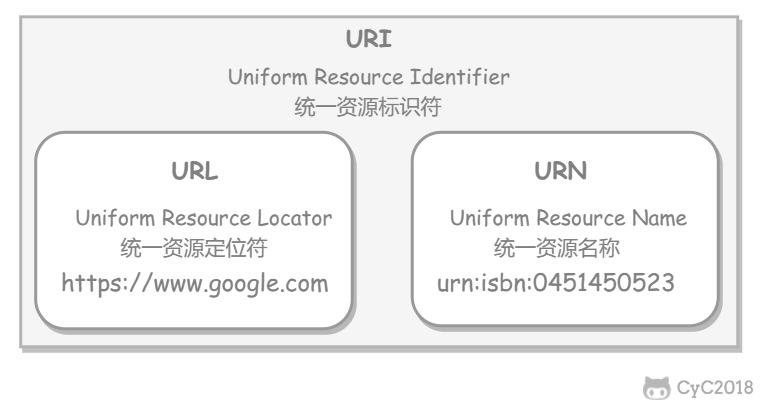
HTTP uses URLs (Uniform Resource Locators) to locate resources. A URL is a subset of a URI (Uniform Resource Identifier); it adds location information to a URI. Besides URLs, URIs also include URNs (Uniform Resource Names), which only define resource names and do not locate those resources. For example, urn:isbn:0451450523 defines the name of a book but does not say how to find it.
- Wikipedia: Uniform Resource Identifier
- wikipedia: URL
- rfc2616:3.2.2 http URL
- What is the difference between a URI, a URL and a URN?
The first line of the request message sent by the client is the request line, which contains the method field.
Retrieve a resource
Most current web requests use the GET method.
Retrieve message headers
It is similar to GET, but it does not return the message body.
It is mainly used to check whether a URL is valid and when a resource was last updated.
Transfer an entity body
POST is mainly used to transfer data, while GET is mainly used to retrieve resources.
For more comparison between POST and GET, see section 9.
Upload a file
Because it has no built-in validation mechanism, anyone can upload files, which creates security risks. This method is generally not used.
PUT /new.html HTTP/1.1
Host: example.com
Content-type: text/html
Content-length: 16

<p>New File</p>Partially modify a resource
PUT can also modify resources, but it can only completely replace the original resource. PATCH allows partial modification.
PATCH /file.txt HTTP/1.1
Host: www.example.com
Content-Type: application/example
If-Match: "e0023aa4e"
Content-Length: 100

[description of changes]Delete a file
It is the opposite of PUT and likewise has no built-in validation mechanism.
DELETE /file.html HTTP/1.1Query supported methods
Query which methods a specified URL supports.
It returns content such as Allow: GET, POST, HEAD, OPTIONS.
Request a tunnel when communicating with a proxy server
It uses SSL (Secure Sockets Layer) and TLS (Transport Layer Security) to encrypt communication content and transmit it through a network tunnel.
CONNECT www.example.com:443 HTTP/1.1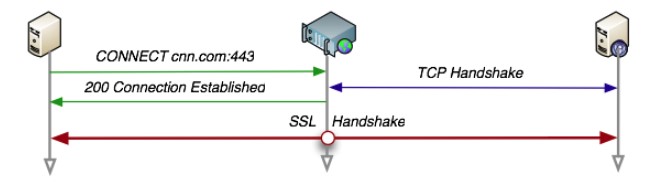
Trace the path
The server returns the communication path to the client.
When sending the request, a value is placed in the Max-Forwards header field. The value is decremented by 1 each time it passes through a server, and transmission stops when it reaches 0.
TRACE is usually not used, and it is vulnerable to XST (Cross-Site Tracing) attacks.
The first line of the response message returned by the server is the status line. It contains the status code and reason phrase, which tell the client the result of the request.
| Status Code | Category | Meaning |
|---|---|---|
| 1XX | Informational | The received request is being processed |
| 2XX | Success | The request was processed successfully |
| 3XX | Redirection | Additional action is required to complete the request |
| 4XX | Client Error | The server cannot process the request |
| 5XX | Server Error | The server encountered an error while processing the request |
- 100 Continue: Everything is normal so far. The client can continue sending the request or ignore this response.
-
200 OK
-
204 No Content: The request has been processed successfully, but the response message does not contain a body. It is generally used when the client only needs to send information to the server and does not need returned data.
-
206 Partial Content: Indicates that the client made a range request, and the response message contains the entity content in the range specified by Content-Range.
-
301 Moved Permanently: Permanent redirection
-
302 Found: Temporary redirection
-
303 See Other: Has the same function as 302, but 303 explicitly requires the client to use GET to retrieve the resource.
-
Note: Although the HTTP protocol specifies that POST must not be changed to GET during 301 or 302 redirects, most browsers change POST to GET for redirects with status codes 301, 302, and 303.
-
304 Not Modified: If the request headers contain conditions such as If-Match, If-Modified-Since, If-None-Match, If-Range, or If-Unmodified-Since, and those conditions are not met, the server returns status code 304.
-
307 Temporary Redirect: Temporary redirection. It is similar to 302, but 307 requires the browser not to change the redirected request method from POST to GET.
-
400 Bad Request: The request message has a syntax error.
-
401 Unauthorized: This status code means the request needs authentication information (BASIC authentication or DIGEST authentication). If a request has already been made before, it means user authentication failed.
-
403 Forbidden: The request was rejected.
-
404 Not Found
-
500 Internal Server Error: An error occurred while the server was executing the request.
-
503 Service Unavailable: The server is temporarily overloaded or undergoing maintenance and cannot process the request right now.
There are four types of header fields: general header fields, request header fields, response header fields, and entity header fields.
The following tables list common header fields and their meanings. They are for reference only and do not need to be memorized.
| Header Field | Description |
|---|---|
| Cache-Control | Controls caching behavior |
| Connection | Controls header fields that should not be forwarded to proxies and manages persistent connections |
| Date | Date and time when the message was created |
| Pragma | Message directive |
| Trailer | List of headers at the end of the message |
| Transfer-Encoding | Specifies the transfer encoding for the message body |
| Upgrade | Upgrades to another protocol |
| Via | Information about proxy servers |
| Warning | Error notification |
| Header Field | Description |
|---|---|
| Accept | Media types the user agent can handle |
| Accept-Charset | Preferred character sets |
| Accept-Encoding | Preferred content encodings |
| Accept-Language | Preferred natural languages |
| Authorization | Web authentication information |
| Expect | Specific behavior expected from the server |
| From | User's email address |
| Host | Server where the requested resource resides |
| If-Match | Compares entity tags (ETags) |
| If-Modified-Since | Compares the resource update time |
| If-None-Match | Compares entity tags, opposite of If-Match |
| If-Range | Sends a byte-range request when the resource has not been updated |
| If-Unmodified-Since | Compares the resource update time, opposite of If-Modified-Since |
| Max-Forwards | Maximum number of hops |
| Proxy-Authorization | Client authentication information required by a proxy server |
| Range | Byte-range request for an entity |
| Referer | Original source of the requested URI |
| TE | Transfer encoding priority |
| User-Agent | Information about the HTTP client program |
| Header Field | Description |
|---|---|
| Accept-Ranges | Whether byte-range requests are accepted |
| Age | Estimated time elapsed since the resource was created |
| ETag | Resource matching information |
| Location | Redirects the client to a specified URI |
| Proxy-Authenticate | Proxy server authentication information for the client |
| Retry-After | When the client should send the request again |
| Server | Information about the HTTP server installation |
| Vary | Cache management information for proxy servers |
| WWW-Authenticate | Server authentication information for the client |
| Header Field | Description |
|---|---|
| Allow | HTTP methods supported by the resource |
| Content-Encoding | Encoding applied to the entity body |
| Content-Language | Natural language of the entity body |
| Content-Length | Size of the entity body |
| Content-Location | URI for an alternate corresponding resource |
| Content-MD5 | Message digest of the entity body |
| Content-Range | Location range of the entity body |
| Content-Type | Media type of the entity body |
| Expires | Date and time when the entity body expires |
| Last-Modified | Date and time when the resource was last modified |
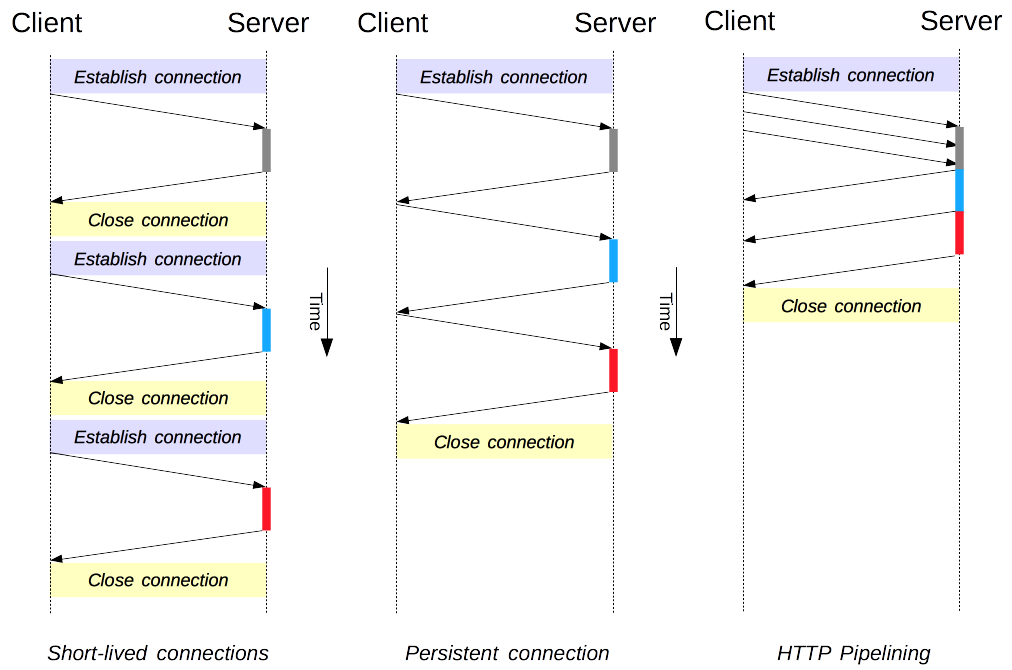
When a browser accesses an HTML page that contains multiple images, it requests the HTML resource as well as the image resources. If a new TCP connection had to be created for each HTTP communication, the overhead would be high.
A long connection only needs one TCP connection for multiple HTTP communications.
- Starting with HTTP/1.1, long connections are the default. To close the connection, either the client or server must request it with
Connection : close. - Before HTTP/1.1, short connections were the default. To use long connections, use
Connection : Keep-Alive.
By default, HTTP requests are sent sequentially. The next request is sent only after the current request receives a response. Due to network latency and bandwidth limits, there may be a long wait before the next request is sent to the server.
Pipelining sends requests continuously over the same long connection without waiting for responses, which reduces latency.
HTTP is stateless, mainly to keep the protocol as simple as possible so it can handle a large number of transactions. HTTP/1.1 introduced cookies to store state information.
A cookie is a small piece of data sent by the server to the user's browser and stored locally. It is included when the browser later sends requests to the same server, allowing the server to tell whether two requests came from the same browser. Because cookie data must be carried on later requests, it introduces additional performance overhead, especially on mobile networks.
Cookies were once used for client-side data storage because there were no other suitable storage mechanisms at the time. As modern browsers began supporting many storage options, cookies were gradually replaced for this purpose. New browser APIs allow developers to store data locally, such as the Web Storage API (local storage and session storage) or IndexedDB.
- Session state management, such as login state, shopping carts, game scores, or other information that needs to be recorded
- Personalization, such as user-defined settings and themes
- Browser behavior tracking, such as tracking and analyzing user behavior
The response message sent by the server contains a Set-Cookie header field. After receiving the response, the client stores the cookie content in the browser.
HTTP/1.0 200 OK
Content-type: text/html
Set-Cookie: yummy_cookie=choco
Set-Cookie: tasty_cookie=strawberry

[page content]
When the client later sends a request to the same server, it retrieves the cookie information from the browser and sends it to the server through the Cookie request header field.
GET /sample_page.html HTTP/1.1
Host: www.example.org
Cookie: yummy_cookie=choco; tasty_cookie=strawberry- Session cookie: It is automatically deleted after the browser is closed, meaning it is valid only during the session.
- Persistent cookie: It becomes persistent after an expiration time (Expires) or lifetime (max-age) is specified.
Set-Cookie: id=a3fWa; Expires=Wed, 21 Oct 2015 07:28:00 GMT;The Domain attribute specifies which hosts can receive the cookie. If it is not specified, it defaults to the host of the current document, excluding subdomains. If Domain is specified, subdomains are generally included. For example, if Domain=mozilla.org is set, the cookie is also included for subdomains such as developer.mozilla.org.
The Path attribute specifies which paths under the host can receive the cookie. The URL path must exist in the request URL. The character %x2F ("/") is used as the path separator, and subpaths also match. For example, if Path=/docs is set, the following paths all match:
- /docs
- /docs/Web/
- /docs/Web/HTTP
The browser can create new cookies through the document.cookie property and can also use it to access cookies that are not marked HttpOnly.
document.cookie = "yummy_cookie=choco";
document.cookie = "tasty_cookie=strawberry";
console.log(document.cookie);Cookies marked HttpOnly cannot be accessed by JavaScript scripts. Cross-site scripting (XSS) attacks often use JavaScript's document.cookie API to steal user cookie information, so the HttpOnly flag can help prevent XSS attacks to some extent.
Set-Cookie: id=a3fWa; Expires=Wed, 21 Oct 2015 07:28:00 GMT; Secure; HttpOnlyCookies marked Secure can only be sent to the server through requests encrypted by HTTPS. Even with the Secure flag set, sensitive information should not be transmitted through cookies, because cookies have inherent security weaknesses and the Secure flag cannot provide complete protection.
Besides storing user information in the user's browser through cookies, sessions can store it on the server side, which is more secure.
Sessions can be stored in files, databases, or memory on the server. They can also be stored in an in-memory database such as Redis for higher efficiency.
The process of using a session to maintain user login state is as follows:
- When the user logs in, the user submits a form containing the username and password, which is placed in the HTTP request message.
- The server verifies the username and password. If they are correct, it stores the user information in Redis. The key in Redis is called the Session ID.
- The Set-Cookie header field in the server response contains this Session ID. After the client receives the response, it stores the cookie value in the browser.
- Later requests from the client to the same server include this cookie value. After receiving it, the server extracts the Session ID, retrieves the user information from Redis, and continues the previous business operation.
Pay attention to the security of the Session ID. It must not be easy for attackers to obtain, and the generated Session ID must not be easy to guess. In addition, the Session ID should be regenerated frequently. In scenarios with very high security requirements, such as transfers, users should be reauthenticated in addition to using sessions for state management, for example by re-entering a password or using an SMS verification code.
In this case, cookies cannot be used to store user information, so sessions must be used. In addition, the Session ID can no longer be stored in a cookie. URL rewriting is used instead, passing the Session ID as a URL parameter.
- Cookies can only store ASCII strings, while sessions can store any type of data. Therefore, sessions are preferred when data complexity matters.
- Cookies are stored in the browser and can be viewed maliciously. If private data must be stored in a cookie, encrypt the cookie value and decrypt it on the server.
- For large websites, storing all user information in sessions creates high overhead, so it is not recommended to store all user information in sessions.
- Reduces server pressure.
- Reduces client latency when retrieving resources: caches are usually in memory, so reads are faster. Cache servers may also be geographically closer than the origin server, such as browser caches.
- Let proxy servers cache resources.
- Let client browsers cache resources.
HTTP/1.1 controls caching through the Cache-Control header field.
3.1 Prevent Caching
The no-store directive specifies that no part of a request or response may be cached.
Cache-Control: no-store3.2 Force Cache Validation
The no-cache directive specifies that a cache server must first validate the cached resource with the origin server. The cache can respond to the client request only when the cached resource is valid.
Cache-Control: no-cache3.3 Private and Public Caches
The private directive specifies that the resource is a private cache and can be used only by an individual user. It is generally stored in the user's browser.
Cache-Control: privateThe public directive specifies that the resource is a public cache and can be used by multiple users. It is generally stored on a proxy server.
Cache-Control: public3.4 Cache Expiration Mechanism
When the max-age directive appears in a request message, and the cached resource has been cached for less time than the value specified by the directive, the cache can be accepted.
When the max-age directive appears in a response message, it indicates how long the cached resource is stored on the cache server.
Cache-Control: max-age=31536000The Expires header field can also tell the cache server when the resource expires.
Expires: Wed, 04 Jul 2012 08:26:05 GMT- In HTTP/1.1, the max-age directive takes priority.
- In HTTP/1.0, the max-age directive is ignored.
First understand the meaning of the ETag header field: it is the unique identifier of a resource. A URL cannot uniquely identify a resource. For example, http://www.google.com/ has Chinese and English resources, and only ETag can uniquely identify these two resources.
ETag: "82e22293907ce725faf67773957acd12"The ETag value of the cached resource can be placed in the If-None-Match header. After receiving the request, the server checks whether the cached resource's ETag matches the latest ETag of the resource. If they match, the cached resource is valid and the server returns 304 Not Modified.
If-None-Match: "82e22293907ce725faf67773957acd12"The Last-Modified header field can also be used for cache validation. It is included in the response message sent by the origin server and indicates when the origin server last modified the resource. However, it is a weak validator because it is only accurate to one second, so it is usually used as a fallback for ETag. If the response headers contain this information, the client can include If-Modified-Since in later requests to validate the cache. The server returns the resource with status code 200 OK only if the requested resource has been modified after the given date and time. If the requested resource has not been modified since then, the server returns a 304 Not Modified response without an entity body.
Last-Modified: Wed, 21 Oct 2015 07:28:00 GMTIf-Modified-Since: Wed, 21 Oct 2015 07:28:00 GMTContent negotiation returns the most appropriate content, such as choosing whether to return a Chinese or English interface based on the browser's default language.
1.1 Server-Driven
The client sets specific HTTP header fields, such as Accept, Accept-Charset, Accept-Encoding, and Accept-Language. The server returns specific resources based on these fields.
This has the following problems:
- It is difficult for the server to know all information about the client browser.
- The information provided by the client is quite verbose. HTTP/2 header compression mitigates this problem, but there are still privacy risks such as HTTP fingerprinting.
- A given resource needs to return different representations, which reduces the efficiency of shared caches and makes server-side implementation increasingly complex.
1.2 Agent-Driven
The server returns 300 Multiple Choices or 406 Not Acceptable, and the client selects the most suitable resource.
Vary: Accept-LanguageWhen content negotiation is used, a cache server can use its cached response only when the cache satisfies the content negotiation conditions. Otherwise, it should request the resource from the origin server.
For example, after a client sends a request containing the Accept-Language header field, the origin server returns a response containing Vary: Accept-Language. After the cache server caches this response, it returns the cached response the next time a client accesses the same URL only if Accept-Language matches the corresponding value in the cache.
Content encoding compresses the entity body to reduce the amount of data transmitted.
Common content encodings include gzip, compress, deflate, and identity.
The browser sends the Accept-Encoding header, which contains the compression algorithms it supports and their priorities. The server selects one of them, uses that algorithm to compress the response message body, and sends the Content-Encoding header to tell the browser which algorithm it selected. Because this content negotiation process chooses the resource representation based on encoding type, the response message's Vary header field should include at least Content-Encoding.
If the network is interrupted and the server has sent only part of the data, range requests allow the client to request only the part that the server has not sent, avoiding a full retransmission.
Add the Range header field to the request message to specify the requested range.
GET /z4d4kWk.jpg HTTP/1.1
Host: i.imgur.com
Range: bytes=0-1023
If the request succeeds, the server response contains status code 206 Partial Content.
HTTP/1.1 206 Partial Content
Content-Range: bytes 0-1023/146515
Content-Length: 1024
...
(binary content)The Accept-Ranges response header field tells the client whether range requests can be handled. Use bytes if they can be handled; otherwise use none.
Accept-Ranges: bytes- If the request succeeds, the server returns status code 206 Partial Content.
- If the requested range is out of bounds, the server returns status code 416 Requested Range Not Satisfiable.
- If range requests are not supported, the server returns status code 200 OK.
Chunked Transfer Encoding splits data into multiple chunks, allowing the browser to display the page progressively.
A message body can contain multiple types of entities sent together. Each part is separated by the delimiter defined by the boundary field, and each part can have its own header fields.
For example, multiple form parts can be uploaded as follows:
Content-Type: multipart/form-data; boundary=AaB03x

--AaB03x
Content-Disposition: form-data; name="submit-name"

Larry
--AaB03x
Content-Disposition: form-data; name="files"; filename="file1.txt"
Content-Type: text/plain

... contents of file1.txt ...
--AaB03x--HTTP/1.1 uses virtual hosting, allowing one server to have multiple domain names and logically behave like multiple servers.
A proxy server accepts client requests and forwards them to other servers.
The main purposes of using a proxy are:
- Caching
- Load balancing
- Network access control
- Access logging
Proxy servers are divided into forward proxies and reverse proxies:
- Users are aware of a forward proxy.
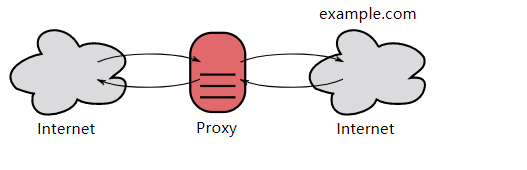
- A reverse proxy is generally located inside an internal network, and users are unaware of it.
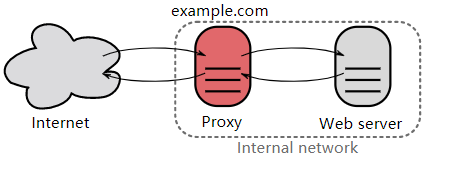
Unlike a proxy server, a gateway server converts HTTP into other protocols for communication, so it can request services from non-HTTP servers.
Use encryption mechanisms such as SSL to establish a secure communication path between the client and server.
HTTP has the following security issues:
- Communication uses plaintext, so content may be eavesdropped.
- The identity of the communicating party is not verified, so an identity may be spoofed.
- Message integrity cannot be proven, so messages may be tampered with.
HTTPS is not a new protocol. It lets HTTP communicate with SSL (Secure Sockets Layer) first, and then SSL communicates with TCP. In other words, HTTPS uses a tunnel for communication.
By using SSL, HTTPS provides encryption (prevents eavesdropping), authentication (prevents spoofing), and integrity protection (prevents tampering).
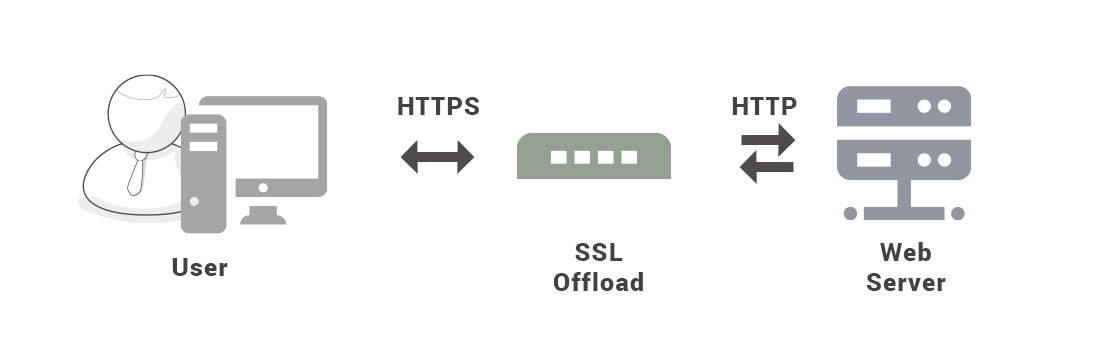
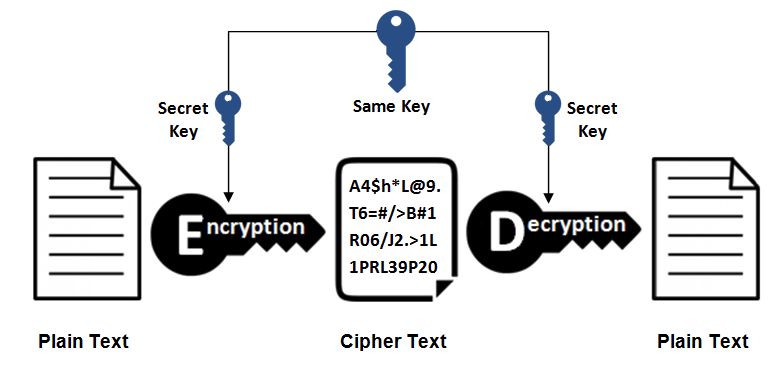
Symmetric-key encryption uses the same key for encryption and decryption.
- Advantage: fast computation.
- Disadvantage: the key cannot be safely transmitted to the communicating party.
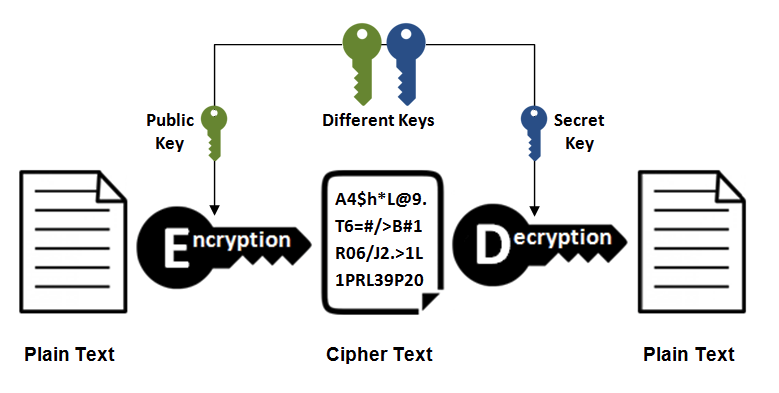
Asymmetric-key encryption, also called public-key encryption, uses different keys for encryption and decryption.
The public key is available to everyone. After the sender obtains the receiver's public key, the sender can encrypt with that public key. After receiving the communication content, the receiver decrypts it with the private key.
Asymmetric keys can be used not only for encryption, but also for signatures. Because the private key cannot be obtained by others, the sender signs with its private key. The receiver decrypts the signature with the sender's public key and can determine whether the signature is correct.
- Advantage: the public key can be transmitted to the sender more safely.
- Disadvantage: computation is slow.
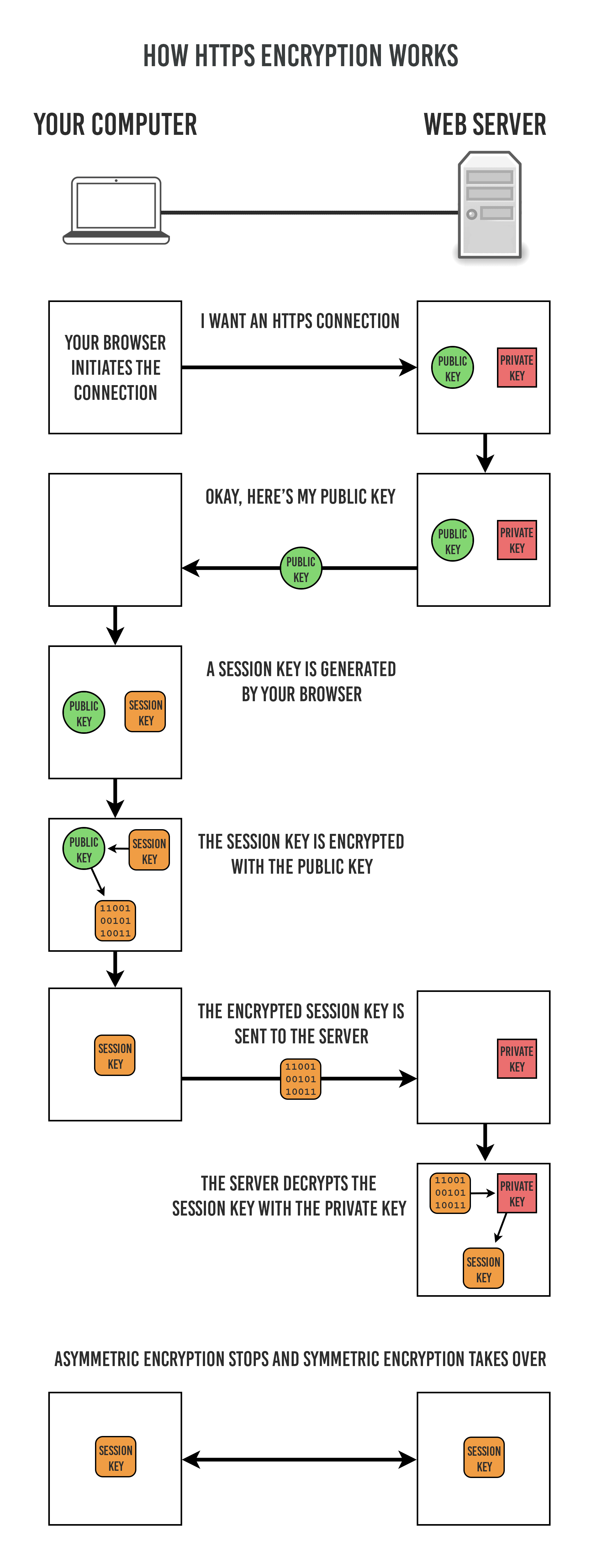
As mentioned above, symmetric-key encryption has higher transmission efficiency, but it cannot safely transmit the Secret Key to the communicating party. Asymmetric-key encryption can ensure transmission security, so we can use asymmetric-key encryption to transmit the Secret Key to the communicating party. HTTPS uses a hybrid encryption mechanism based on this approach:
- Use asymmetric-key encryption to transmit the Secret Key required by symmetric-key encryption, ensuring security.
- After obtaining the Secret Key, use symmetric-key encryption for communication, ensuring efficiency. The Session Key in the figure below is the Secret Key.
The communicating party is authenticated by using certificates.
A Certificate Authority (CA) is a third-party organization trusted by both the client and the server.
The server operator applies to the CA for a public key. After verifying the applicant's identity, the CA digitally signs the requested public key, distributes the signed public key, and binds it into a public-key certificate.
During HTTPS communication, the server sends the certificate to the client. After the client obtains the public key in it, it first verifies the digital signature. If verification succeeds, communication can begin.
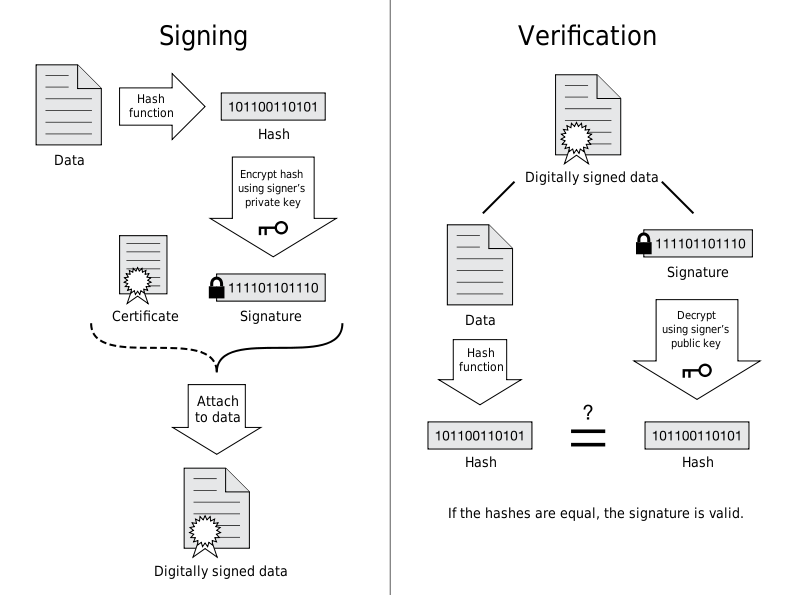
SSL provides message digest functionality for integrity protection.
HTTP also provides MD5 message digests, but they are not secure. For example, if the message content is tampered with and the MD5 value is recalculated, the receiver cannot detect the tampering.
HTTPS message digests are secure because they combine encryption and authentication. Consider an encrypted message: if it is tampered with, it is difficult to recalculate the message digest because the plaintext is not easily available.
- It is slower because encryption and decryption are required.
- Certificate authorization can be expensive.
HTTP/1.x is simple to implement at the cost of performance:
- Clients need to use multiple connections to achieve concurrency and reduce latency.
- Request and response headers are not compressed, causing unnecessary network traffic.
- Effective resource prioritization is not supported, resulting in low utilization of the underlying TCP connection.
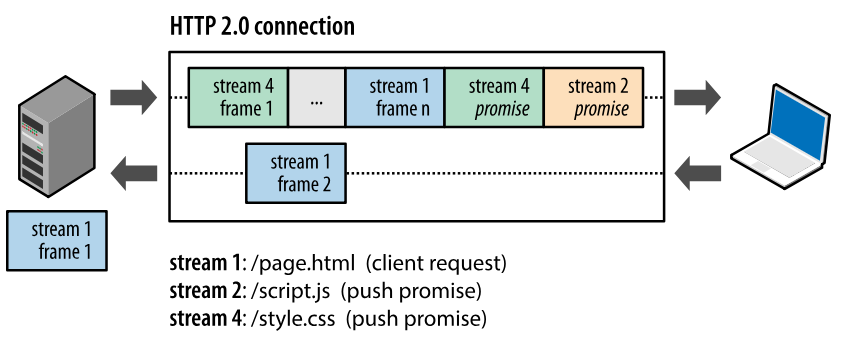
HTTP/2.0 divides messages into HEADERS frames and DATA frames. Both are in binary format.
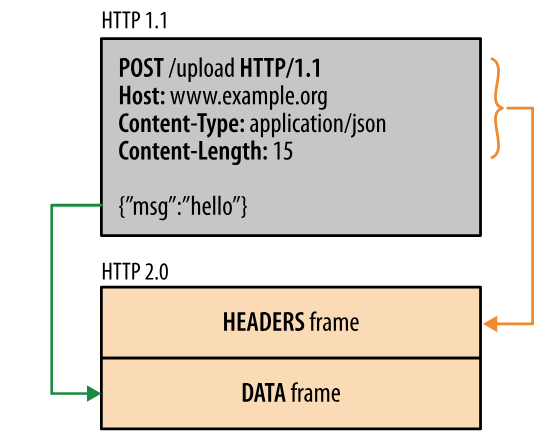
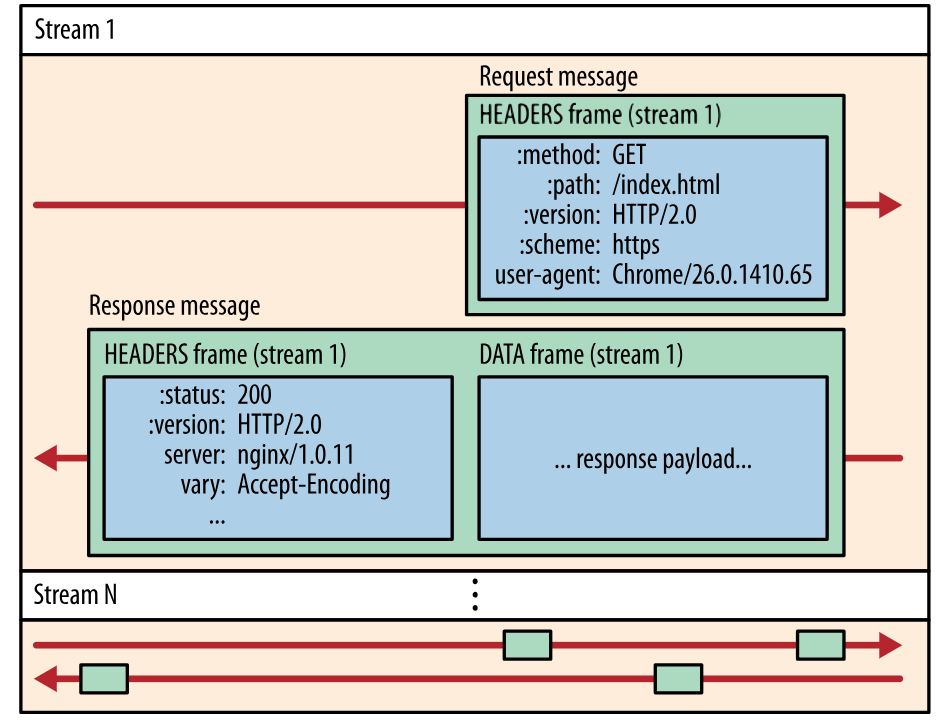
During communication, there is only one TCP connection, and it carries any number of bidirectional streams.
- Each stream has a unique identifier and optional priority information, and carries bidirectional information.
- A message is a complete sequence of frames corresponding to a logical request or response.
- A frame is the smallest unit of communication. Frames from different streams can be interleaved and then reassembled based on the stream identifier in each frame header.
When a client requests a resource, HTTP/2.0 can send related resources to the client as well, so the client does not need to initiate additional requests. For example, when the client requests page.html, the server sends related resources such as script.js and style.css together with it.
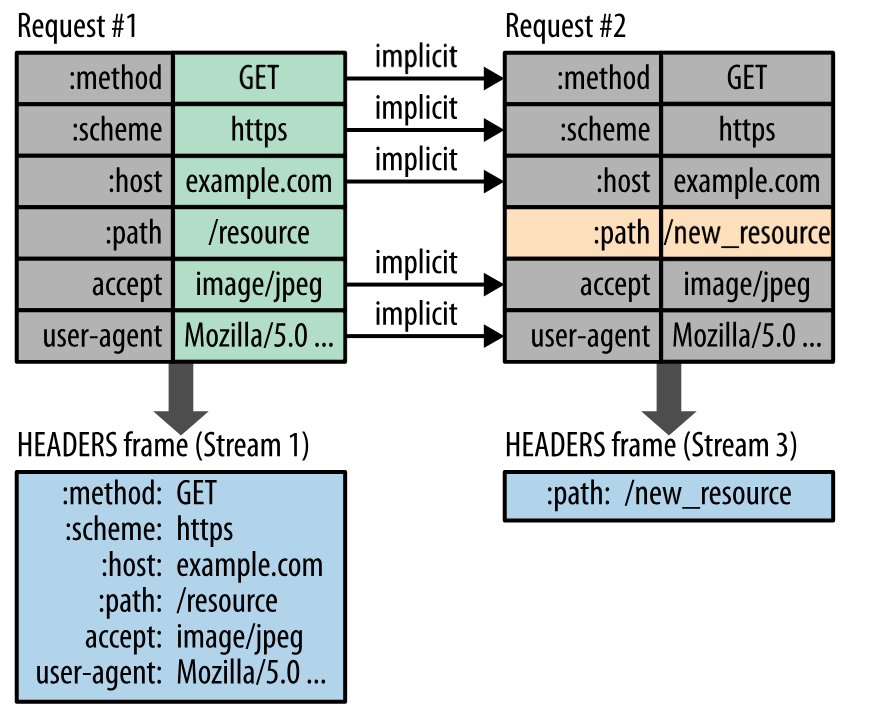
HTTP/1.1 headers carry a large amount of information and must be sent repeatedly each time.
HTTP/2.0 requires the client and server to both maintain and update a table of previously seen header fields, avoiding repeated transmission.
In addition, HTTP/2.0 uses Huffman coding to compress header fields.
See the sections above for details.
- Long connections are the default
- Supports pipelining
- Supports opening multiple TCP connections at the same time
- Supports virtual hosts
- Adds status code 100
- Supports chunked transfer encoding
- Adds the cache directive max-age
GET is used to retrieve resources, while POST is used to transfer an entity body.
Both GET and POST requests can use extra parameters, but GET parameters appear in the URL as a query string, while POST parameters are stored in the entity body. Do not assume POST parameters are more secure simply because they are stored in the entity body; packet capture tools such as Fiddler can still view them.
Because URLs support only ASCII characters, characters such as Chinese in GET parameters must be encoded first. For example, the Chinese word for "Chinese" is converted to %E4%B8%AD%E6%96%87, and a space is converted to %20. POST parameters support standard character sets.
GET /test/demo_form.asp?name1=value1&name2=value2 HTTP/1.1
POST /test/demo_form.asp HTTP/1.1
Host: w3schools.com
name1=value1&name2=value2
Safe HTTP methods do not change server state; in other words, they are read-only.
GET is safe, while POST is not, because POST is meant to transmit entity body content. This content may be form data uploaded by a user. After a successful upload, the server may store this data in a database, so the state changes.
Safe methods besides GET include HEAD and OPTIONS.
Unsafe methods besides POST include PUT and DELETE.
For an idempotent HTTP method, executing the same request once has the same effect as executing it multiple times in a row, and the server state is the same. In other words, idempotent methods should not have side effects, except for statistical purposes.
All safe methods are also idempotent.
When implemented correctly, methods such as GET, HEAD, PUT, and DELETE are idempotent, while POST is not.
GET /pageX HTTP/1.1 is idempotent. If it is called multiple times in a row, the client receives the same result each time:
GET /pageX HTTP/1.1
GET /pageX HTTP/1.1
GET /pageX HTTP/1.1
GET /pageX HTTP/1.1
POST /add_row HTTP/1.1 is not idempotent. If it is called multiple times, it adds multiple rows:
POST /add_row HTTP/1.1   -> Adds a 1nd row
POST /add_row HTTP/1.1   -> Adds a 2nd row
POST /add_row HTTP/1.1   -> Adds a 3rd row
DELETE /idX/delete HTTP/1.1 is idempotent, even if different requests receive different status codes:
DELETE /idX/delete HTTP/1.1   -> Returns 200 if idX exists
DELETE /idX/delete HTTP/1.1   -> Returns 404 as it just got deleted
DELETE /idX/delete HTTP/1.1   -> Returns 404
To cache a response, the following conditions must be met:
- The HTTP method of the request message itself is cacheable, including GET and HEAD. PUT and DELETE are not cacheable, and POST is not cacheable in most cases.
- The status code of the response message is cacheable, including 200, 203, 204, 206, 300, 301, 404, 405, 410, 414, and 501.
- The Cache-Control header field of the response message does not specify that caching is disabled.
To explain another difference between POST and GET, first understand XMLHttpRequest:
XMLHttpRequest is an API that lets clients transfer data between the client and server. It provides a simple way to retrieve data through a URL without refreshing the entire page. This allows a web page to update only part of the page without disturbing the user. XMLHttpRequest is widely used in AJAX.
- When using the POST method with XMLHttpRequest, the browser sends the headers first and then the data. Not all browsers do this; for example, Firefox does not.
- With GET, the headers and data are sent together.
- Noboru Ueno. Illustrated HTTP[M]. Posts and Telecom Press, 2014.
- MDN : HTTP
- Introduction to HTTP/2
- htmlspecialchars
- Difference between file URI and URL in java
- How to Fix SQL Injection Using Java PreparedStatement & CallableStatement
- A Brief Discussion of the Difference Between GET and POST in HTTP
- Are http:// and www really necessary?
- HTTP (HyperText Transfer Protocol)
- Web-VPN: Secure Proxies with SPDY & Chrome
- File:HTTP persistent connection.svg
- Proxy server
- What Is This HTTPS/SSL Thing And Why Should You Care?
- What is SSL Offloading?
- Sun Directory Server Enterprise Edition 7.0 Reference - Key Encryption
- An Introduction to Mutual SSL Authentication
- The Difference Between URLs and URIs
- Differences Between Cookie and Session
- What Is the Difference Between Cookie and Session?
- Cookie/Session Mechanisms and Security
- How HTTPS Certificates Work
- What is the difference between a URI, a URL and a URN?
- XMLHttpRequest
- XMLHttpRequest (XHR) Uses Multiple Packets for HTTP POST?
- Symmetric vs. Asymmetric Encryption – What are differences?
- Web Performance Optimization and HTTP/2
- Introduction to HTTP/2
