- Java Concurrency
- 1. Using Threads
- 2. Basic Thread Mechanisms
- 3. Interrupts
- 4. Mutual Exclusion Synchronization
- 5. Thread Cooperation
- 6. Thread States
- 7. J.U.C - AQS
- 8. J.U.C - Other Components
- 9. Thread Unsafe Example
- 10. Java Memory Model
- 11. Thread Safety
- 12. Lock Optimization
- 13. Good Multithreaded Development Practices
- References
There are three ways to use threads:
- Implement the Runnable interface;
- Implement the Callable interface;
- Extend the Thread class.
Classes that implement Runnable and Callable can only be treated as tasks that run inside threads, not threads in the true sense. Therefore, they still need to be invoked through Thread. A task can be understood as being executed by being driven by a thread.
The run() method in the interface must be implemented.
public class MyRunnable implements Runnable {
    @Override
    public void run() {
        // ...
    }
}
Create a Thread instance from a Runnable instance, then call the Thread instance's start() method to start the thread.
public static void main(String[] args) {
    MyRunnable instance = new MyRunnable();
    Thread thread = new Thread(instance);
    thread.start();
}Compared with Runnable, Callable can have a return value, which is wrapped by FutureTask.
public class MyCallable implements Callable<Integer> {
    public Integer call() {
        return 123;
    }
}
public static void main(String[] args) throws ExecutionException, InterruptedException {
MyCallable mc = new MyCallable();
FutureTask<Integer> ft = new FutureTask<>(mc);
Thread thread = new Thread(ft);
thread.start();
System.out.println(ft.get());
}The run() method also needs to be implemented because the Thread class also implements the Runnable interface.
When start() is called to start a thread, the virtual machine places the thread into the ready queue to wait for scheduling. When the thread is scheduled, its run() method executes.
public class MyThread extends Thread {
    public void run() {
        // ...
    }
}
public static void main(String[] args) {
MyThread mt = new MyThread();
mt.start();
}Implementing an interface is usually better because:
- Java does not support multiple inheritance. If a class extends Thread, it cannot extend another class, but it can implement multiple interfaces;
- A class may only need to be executable, and inheriting the entire Thread class has too much overhead.
Executor manages the execution of multiple asynchronous tasks without requiring programmers to explicitly manage the thread lifecycle. Here, asynchronous means multiple tasks execute without interfering with each other and do not require synchronization.
There are three main Executor types:
- CachedThreadPool: creates one thread for each task;
- FixedThreadPool: all tasks use a fixed-size thread pool;
- SingleThreadExecutor: equivalent to a FixedThreadPool of size 1.
public static void main(String[] args) {
    ExecutorService executorService = Executors.newCachedThreadPool();
    for (int i = 0; i < 5; i++) {
        executorService.execute(new MyRunnable());
    }
    executorService.shutdown();
}A daemon thread provides services in the background while the program runs and is not an indispensable part of the program.
When all non-daemon threads end, the program terminates and all daemon threads are killed.
main() is a non-daemon thread.
Use setDaemon() before a thread starts to set it as a daemon thread.
public static void main(String[] args) {
    Thread thread = new Thread(new MyRunnable());
    thread.setDaemon(true);
}Thread.sleep(millisec) sleeps the currently executing thread. millisec is measured in milliseconds.
sleep() may throw InterruptedException. Because exceptions cannot propagate across threads back to main(), they must be handled locally. Other exceptions thrown in a thread also need to be handled locally.
public void run() {
    try {
        Thread.sleep(3000);
    } catch (InterruptedException e) {
        e.printStackTrace();
    }
}Calling the static method Thread.yield() declares that the current thread has completed the most important part of its lifecycle and can switch execution to other threads. This method is only a suggestion to the thread scheduler, and only suggests that other threads with the same priority may run.
public void run() {
    Thread.yield();
}A thread ends automatically after execution completes. It also ends early if an exception occurs during execution.
Interrupt a thread by calling interrupt() on it. If the thread is in blocked, timed waiting, or waiting state, it throws InterruptedException and ends early. However, I/O blocking and synchronized lock blocking cannot be interrupted.
In the following code, a thread is started in main() and then interrupted. Because the thread calls Thread.sleep(), it throws InterruptedException, ends early, and does not execute the following statements.
public class InterruptExample {

    private static class MyThread1 extends Thread {
        @Override
        public void run() {
            try {
                Thread.sleep(2000);
                System.out.println("Thread run");
            } catch (InterruptedException e) {
                e.printStackTrace();
            }
        }
    }
}
public static void main(String[] args) throws InterruptedException {
Thread thread1 = new MyThread1();
thread1.start();
thread1.interrupt();
System.out.println("Main run");
}Main run
java.lang.InterruptedException: sleep interrupted
at java.lang.Thread.sleep(Native Method)
at InterruptExample.lambda$main$0(InterruptExample.java:5)
at InterruptExample$$Lambda$1/713338599.run(Unknown Source)
at java.lang.Thread.run(Thread.java:745)If a thread's run() method executes an infinite loop and does not execute operations such as sleep() that throw InterruptedException, calling interrupt() on the thread cannot make it end early.
However, calling interrupt() sets the thread's interrupt flag, and interrupted() returns true. Therefore, interrupted() can be used inside the loop body to check whether the thread is interrupted and end it early.
public class InterruptExample {

    private static class MyThread2 extends Thread {
        @Override
        public void run() {
            while (!interrupted()) {
                // ..
            }
            System.out.println("Thread end");
        }
    }
}
public static void main(String[] args) throws InterruptedException {
Thread thread2 = new MyThread2();
thread2.start();
thread2.interrupt();
}Thread endCalling Executor's shutdown() waits for all threads to finish before shutting down. Calling shutdownNow() is equivalent to calling interrupt() on each thread.
The following uses a Lambda to create a thread, equivalent to creating an anonymous inner thread.
public static void main(String[] args) {
    ExecutorService executorService = Executors.newCachedThreadPool();
    executorService.execute(() -> {
        try {
            Thread.sleep(2000);
            System.out.println("Thread run");
        } catch (InterruptedException e) {
            e.printStackTrace();
        }
    });
    executorService.shutdownNow();
    System.out.println("Main run");
}
Main run
java.lang.InterruptedException: sleep interrupted
at java.lang.Thread.sleep(Native Method)
at ExecutorInterruptExample.lambda$main$0(ExecutorInterruptExample.java:9)
at ExecutorInterruptExample$$Lambda$1/1160460865.run(Unknown Source)
at java.util.concurrent.ThreadPoolExecutor.runWorker(ThreadPoolExecutor.java:1142)
at java.util.concurrent.ThreadPoolExecutor$Worker.run(ThreadPoolExecutor.java:617)
at java.lang.Thread.run(Thread.java:745)If only one thread in an Executor needs to be interrupted, submit the task with submit(), which returns a Future<?> object. Calling cancel(true) on that object can interrupt the thread.
Future<?> future = executorService.submit(() -> {
    // ..
});
future.cancel(true);Java provides two lock mechanisms to control mutual exclusive access to shared resources by multiple threads. The first is synchronized, implemented by the JVM, and the second is ReentrantLock, implemented by the JDK.
1. Synchronize a code block
public void func() {
    synchronized (this) {
        // ...
    }
}
It only applies to the same object. If synchronized code blocks are called on two different objects, synchronization does not occur.
In the following code, ExecutorService executes two threads. Because the synchronized code block is called on the same object, these two threads synchronize. When one thread enters the synchronized block, the other must wait.
public class SynchronizedExample {

    public void func1() {
        synchronized (this) {
            for (int i = 0; i < 10; i++) {
                System.out.print(i + " ");
            }
        }
    }
}
public static void main(String[] args) {
SynchronizedExample e1 = new SynchronizedExample();
ExecutorService executorService = Executors.newCachedThreadPool();
executorService.execute(() -> e1.func1());
executorService.execute(() -> e1.func1());
}0 1 2 3 4 5 6 7 8 9 0 1 2 3 4 5 6 7 8 9In the following code, the two threads call synchronized code blocks on different objects, so the two threads do not need to synchronize. The output shows that the two threads execute interleaved.
public static void main(String[] args) {
    SynchronizedExample e1 = new SynchronizedExample();
    SynchronizedExample e2 = new SynchronizedExample();
    ExecutorService executorService = Executors.newCachedThreadPool();
    executorService.execute(() -> e1.func1());
    executorService.execute(() -> e2.func1());
}
0 0 1 1 2 2 3 3 4 4 5 5 6 6 7 7 8 8 9 92. Synchronize a method
public synchronized void func () {
    // ...
}
Like a synchronized code block, it applies to the same object.
3. Synchronize a class
public void func() {
    synchronized (SynchronizedExample.class) {
        // ...
    }
}
It applies to the entire class. This means if two threads call this kind of synchronized statement on different objects of the same class, they also synchronize.
public class SynchronizedExample {

    public void func2() {
        synchronized (SynchronizedExample.class) {
            for (int i = 0; i < 10; i++) {
                System.out.print(i + " ");
            }
        }
    }
}
public static void main(String[] args) {
SynchronizedExample e1 = new SynchronizedExample();
SynchronizedExample e2 = new SynchronizedExample();
ExecutorService executorService = Executors.newCachedThreadPool();
executorService.execute(() -> e1.func2());
executorService.execute(() -> e2.func2());
}0 1 2 3 4 5 6 7 8 9 0 1 2 3 4 5 6 7 8 94. Synchronize a static method
public synchronized static void fun() {
    // ...
}
It applies to the entire class.
ReentrantLock is a lock in the java.util.concurrent (J.U.C) package.
public class LockExample {

    private Lock lock = new ReentrantLock();

    public void func() {
        lock.lock();
        try {
            for (int i = 0; i < 10; i++) {
                System.out.print(i + " ");
            }
        } finally {
            lock.unlock(); // ensure the lock is released to avoid deadlock
        }
    }
}
public static void main(String[] args) {
LockExample lockExample = new LockExample();
ExecutorService executorService = Executors.newCachedThreadPool();
executorService.execute(() -> lockExample.func());
executorService.execute(() -> lockExample.func());
}0 1 2 3 4 5 6 7 8 9 0 1 2 3 4 5 6 7 8 91. Lock implementation
synchronized is implemented by the JVM, while ReentrantLock is implemented by the JDK.
2. Performance
Newer Java versions have optimized synchronized heavily, such as with spin locks, making synchronized roughly equivalent to ReentrantLock.
3. Interruptible waiting
When the thread holding the lock does not release it for a long time, a waiting thread can choose to give up waiting and handle other work instead.
ReentrantLock is interruptible, while synchronized is not.
4. Fair locks
A fair lock means that when multiple threads wait for the same lock, they must acquire it in the order in which they requested it.
Locks in synchronized are unfair. ReentrantLock is also unfair by default, but it can be configured as fair.
5. A lock binds multiple conditions
A ReentrantLock can bind multiple Condition objects at the same time.
Unless ReentrantLock's advanced features are needed, prefer synchronized. This is because synchronized is a JVM-implemented lock mechanism that the JVM natively supports, while ReentrantLock is not supported by all JDK versions. Also, with synchronized, there is no need to worry about deadlock caused by failing to release a lock because the JVM ensures lock release.
When multiple threads can work together to solve a problem, if some parts must complete before others, thread coordination is needed.
Calling another thread's join() method from a thread suspends the current thread instead of busy-waiting until the target thread ends.
In the following code, although thread b starts first, b calls a.join(), so b waits for a to finish before continuing. Therefore, a's output is guaranteed to appear before b's output.
public class JoinExample {

    private class A extends Thread {
        @Override
        public void run() {
            System.out.println("A");
        }
    }

    private class B extends Thread {

        private A a;

        B(A a) {
            this.a = a;
        }

        @Override
        public void run() {
            try {
                a.join();
            } catch (InterruptedException e) {
                e.printStackTrace();
            }
            System.out.println("B");
        }
    }

    public void test() {
        A a = new A();
        B b = new B(a);
        b.start();
        a.start();
    }
}
public static void main(String[] args) {
JoinExample example = new JoinExample();
example.test();
}A
B
Calling wait() makes a thread wait for a condition to be satisfied. The thread is suspended while waiting. When another thread makes the condition true, it calls notify() or notifyAll() to wake the suspended thread.
They are part of Object, not Thread.
They can only be used in synchronized methods or synchronized control blocks; otherwise, IllegalMonitorStateException is thrown at runtime.
While suspended by wait(), the thread releases the lock. If the lock were not released, other threads could not enter the object's synchronized methods or synchronized blocks, so they could not call notify() or notifyAll() to wake the suspended thread, causing deadlock.
public class WaitNotifyExample {

    public synchronized void before() {
        System.out.println("before");
        notifyAll();
    }

    public synchronized void after() {
        try {
            wait();
        } catch (InterruptedException e) {
            e.printStackTrace();
        }
        System.out.println("after");
    }
}
public static void main(String[] args) {
ExecutorService executorService = Executors.newCachedThreadPool();
WaitNotifyExample example = new WaitNotifyExample();
executorService.execute(() -> example.after());
executorService.execute(() -> example.before());
}before
afterDifference between wait() and sleep()
- wait() is a method of Object, while sleep() is a static method of Thread;
- wait() releases the lock, while sleep() does not.
The java.util.concurrent library provides the Condition class for thread coordination. Calling await() on a Condition makes a thread wait, while other threads call signal() or signalAll() to wake waiting threads.
Compared with wait(), await() can specify the waiting condition and is therefore more flexible.
Use Lock to obtain a Condition object.
public class AwaitSignalExample {

    private Lock lock = new ReentrantLock();
    private Condition condition = lock.newCondition();

    public void before() {
        lock.lock();
        try {
            System.out.println("before");
            condition.signalAll();
        } finally {
            lock.unlock();
        }
    }

    public void after() {
        lock.lock();
        try {
            condition.await();
            System.out.println("after");
        } catch (InterruptedException e) {
            e.printStackTrace();
        } finally {
            lock.unlock();
        }
    }
}
public static void main(String[] args) {
ExecutorService executorService = Executors.newCachedThreadPool();
AwaitSignalExample example = new AwaitSignalExample();
executorService.execute(() -> example.after());
executorService.execute(() -> example.before());
}before
afterA thread can be in only one state, and the thread states here specifically refer to Java virtual machine thread states. They do not reflect the state of a thread under a specific operating system.
Created but not yet started.
Running in the Java virtual machine. At the operating system level, it may be running or waiting for resource scheduling, such as processor resources. It enters the running state after resources are scheduled. Therefore, runnable here means it can run; whether it is actually running depends on the underlying operating system's resource scheduling.
The thread requests a monitor lock to enter a synchronized function or code block, but another thread already holds that monitor lock, so it is blocked. To leave this state and enter RUNNABLE, another thread must release the monitor lock.
Waiting for another thread to wake it explicitly.
The difference between blocking and waiting is that blocking is passive: it waits to acquire a monitor lock. Waiting is active and is entered by calling methods such as Object.wait().
| Entry Method | Exit Method |
|---|---|
| Object.wait() without a Timeout parameter | Object.notify() / Object.notifyAll() |
| Thread.join() without a Timeout parameter | The called thread finishes execution |
| LockSupport.park() method | LockSupport.unpark(Thread) |
Does not need to wait for another thread to wake it explicitly; the system wakes it automatically after a certain time.
| Entry Method | Exit Method |
|---|---|
| Thread.sleep() method | Time ends |
| Object.wait() with a Timeout parameter | Time ends / Object.notify() / Object.notifyAll() |
| Thread.join() with a Timeout parameter | Time ends / the called thread finishes execution |
| LockSupport.parkNanos() method | LockSupport.unpark(Thread) |
| LockSupport.parkUntil() method | LockSupport.unpark(Thread) |
Calling Thread.sleep() to make a thread enter timed waiting is often described as putting a thread to sleep. Calling Object.wait() to make a thread enter timed waiting or waiting is often described as suspending a thread. Sleep and suspend describe behavior, while blocked and waiting describe states.
The thread may end after completing its task, or it may end because an exception occurs.
java.util.concurrent (J.U.C) greatly improves concurrency performance, and AQS is considered the core of J.U.C.
Used to control one or more threads waiting for multiple threads.
It maintains a counter cnt. Each call to countDown() decrements the counter by 1. When it reaches 0, threads waiting because they called await() are awakened.
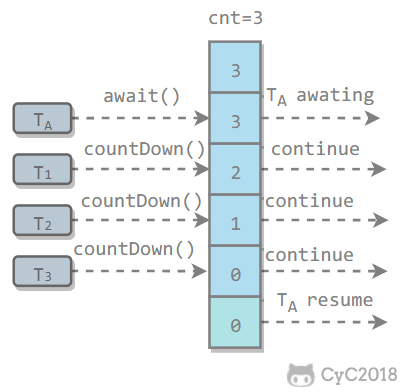
public class CountdownLatchExample {

    public static void main(String[] args) throws InterruptedException {
        final int totalThread = 10;
        CountDownLatch countDownLatch = new CountDownLatch(totalThread);
        ExecutorService executorService = Executors.newCachedThreadPool();
        for (int i = 0; i < totalThread; i++) {
            executorService.execute(() -> {
                System.out.print("run..");
                countDownLatch.countDown();
            });
        }
        countDownLatch.await();
        System.out.println("end");
        executorService.shutdown();
    }
}run..run..run..run..run..run..run..run..run..run..endUsed to control multiple threads waiting for each other. These threads continue executing only after all of them arrive.
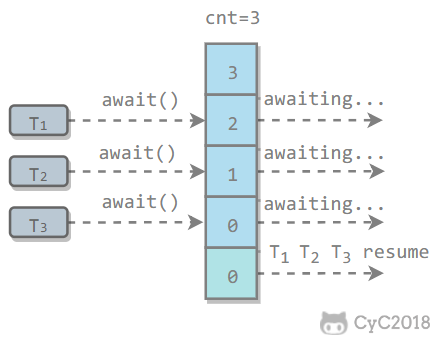
Similar to CountdownLatch, it is implemented by maintaining a counter. After a thread executes await(), the counter is decremented by 1 and the thread waits. Only when the counter reaches 0 can all threads waiting through await() continue executing.
One difference between CyclicBarrier and CountdownLatch is that CyclicBarrier's counter can be reused by calling reset(), which is why it is called a cyclic barrier.
CyclicBarrier has two constructors. parties indicates the initial value of the counter, and barrierAction runs once when all threads reach the barrier.
public CyclicBarrier(int parties, Runnable barrierAction) {
    if (parties <= 0) throw new IllegalArgumentException();
    this.parties = parties;
    this.count = parties;
    this.barrierCommand = barrierAction;
}

public CyclicBarrier(int parties) {
    this(parties, null);
}
public class CyclicBarrierExample {

    public static void main(String[] args) {
        final int totalThread = 10;
        CyclicBarrier cyclicBarrier = new CyclicBarrier(totalThread);
        ExecutorService executorService = Executors.newCachedThreadPool();
        for (int i = 0; i < totalThread; i++) {
            executorService.execute(() -> {
                System.out.print("before..");
                try {
                    cyclicBarrier.await();
                } catch (InterruptedException | BrokenBarrierException e) {
                    e.printStackTrace();
                }
                System.out.print("after..");
            });
        }
        executorService.shutdown();
    }
}before..before..before..before..before..before..before..before..before..before..after..after..after..after..after..after..after..after..after..after..Semaphore is similar to semaphores in operating systems and can control the number of threads accessing a mutually exclusive resource.
The following code simulates concurrent requests to a service. Only 3 clients can access it at the same time, and the total number of requests is 10.
public class SemaphoreExample {

    public static void main(String[] args) {
        final int clientCount = 3;
        final int totalRequestCount = 10;
        Semaphore semaphore = new Semaphore(clientCount);
        ExecutorService executorService = Executors.newCachedThreadPool();
        for (int i = 0; i < totalRequestCount; i++) {
            executorService.execute(()->{
                try {
                    semaphore.acquire();
                    System.out.print(semaphore.availablePermits() + " ");
                } catch (InterruptedException e) {
                    e.printStackTrace();
                } finally {
                    semaphore.release();
                }
            });
        }
        executorService.shutdown();
    }
}
2 1 2 2 2 2 2 1 2 2When introducing Callable, we saw that it can have a return value, which is wrapped by Future<V>. FutureTask implements the RunnableFuture interface, which extends Runnable and Future<V>. This allows FutureTask to be executed as a task and also have a return value.
public class FutureTask<V> implements RunnableFuture<V>public interface RunnableFuture<V> extends Runnable, Future<V>FutureTask can be used to asynchronously obtain execution results or cancel tasks. When a computation task takes a long time, FutureTask can wrap the task, and the main thread can retrieve the result after finishing its own work.
public class FutureTaskExample {

    public static void main(String[] args) throws ExecutionException, InterruptedException {
        FutureTask<Integer> futureTask = new FutureTask<Integer>(new Callable<Integer>() {
            @Override
            public Integer call() throws Exception {
                int result = 0;
                for (int i = 0; i < 100; i++) {
                    Thread.sleep(10);
                    result += i;
                }
                return result;
            }
        });

        Thread computeThread = new Thread(futureTask);
        computeThread.start();

        Thread otherThread = new Thread(() -> {
            System.out.println("other task is running...");
            try {
                Thread.sleep(1000);
            } catch (InterruptedException e) {
                e.printStackTrace();
            }
        });
        otherThread.start();
        System.out.println(futureTask.get());
    }
}
other task is running...
4950The java.util.concurrent.BlockingQueue interface has the following blocking queue implementations:
- FIFO queues : LinkedBlockingQueue, ArrayBlockingQueue (fixed length)
- Priority queue : PriorityBlockingQueue
It provides blocking take() and put() methods: if the queue is empty, take() blocks until the queue has content; if the queue is full, put() blocks until there is free space.
Use BlockingQueue to implement the producer-consumer problem
public class ProducerConsumer {

    private static BlockingQueue<String> queue = new ArrayBlockingQueue<>(5);

    private static class Producer extends Thread {
        @Override
        public void run() {
            try {
                queue.put("product");
            } catch (InterruptedException e) {
                e.printStackTrace();
            }
            System.out.print("produce..");
        }
    }

    private static class Consumer extends Thread {

        @Override
        public void run() {
            try {
                String product = queue.take();
            } catch (InterruptedException e) {
                e.printStackTrace();
            }
            System.out.print("consume..");
        }
    }
}
public static void main(String[] args) {
for (int i = 0; i < 2; i++) {
Producer producer = new Producer();
producer.start();
}
for (int i = 0; i < 5; i++) {
Consumer consumer = new Consumer();
consumer.start();
}
for (int i = 0; i < 3; i++) {
Producer producer = new Producer();
producer.start();
}
}produce..produce..consume..consume..produce..consume..produce..consume..produce..consume..Mainly used in parallel computing. Similar to MapReduce, it splits a large computation task into multiple smaller tasks for parallel computation.
public class ForkJoinExample extends RecursiveTask<Integer> {

    private final int threshold = 5;
    private int first;
    private int last;

    public ForkJoinExample(int first, int last) {
        this.first = first;
        this.last = last;
    }

    @Override
    protected Integer compute() {
        int result = 0;
        if (last - first <= threshold) {
            // Compute directly if the task is small enough
            for (int i = first; i <= last; i++) {
                result += i;
            }
        } else {
            // Split into smaller tasks
            int middle = first + (last - first) / 2;
            ForkJoinExample leftTask = new ForkJoinExample(first, middle);
            ForkJoinExample rightTask = new ForkJoinExample(middle + 1, last);
            leftTask.fork();
            rightTask.fork();
            result = leftTask.join() + rightTask.join();
        }
        return result;
    }
}
public static void main(String[] args) throws ExecutionException, InterruptedException {
ForkJoinExample example = new ForkJoinExample(1, 10000);
ForkJoinPool forkJoinPool = new ForkJoinPool();
Future result = forkJoinPool.submit(example);
System.out.println(result.get());
}ForkJoin starts with ForkJoinPool, a special thread pool whose number of threads depends on the number of CPU cores.
public class ForkJoinPool extends AbstractExecutorServiceForkJoinPool implements a work-stealing algorithm to improve CPU utilization. Each thread maintains a deque to store tasks that need to execute. The work-stealing algorithm allows idle threads to steal a task from another thread's deque. The stolen task must be the latest task to avoid competing with the thread that owns the queue. For example, in the figure below, Thread2 takes the latest Task1 from Thread1's queue, while Thread1 takes Task2 to execute, avoiding competition. However, if there is only one task in the queue, competition can still occur.

If multiple threads access the same shared data without synchronization, the operation results are inconsistent.
The following code demonstrates 1000 threads incrementing cnt at the same time. After the operation finishes, its value may be less than 1000.
public class ThreadUnsafeExample {

    private int cnt = 0;

    public void add() {
        cnt++;
    }

    public int get() {
        return cnt;
    }
}
public static void main(String[] args) throws InterruptedException {
final int threadSize = 1000;
ThreadUnsafeExample example = new ThreadUnsafeExample();
final CountDownLatch countDownLatch = new CountDownLatch(threadSize);
ExecutorService executorService = Executors.newCachedThreadPool();
for (int i = 0; i < threadSize; i++) {
executorService.execute(() -> {
example.add();
countDownLatch.countDown();
});
}
countDownLatch.await();
executorService.shutdown();
System.out.println(example.get());
}997The Java memory model tries to hide memory-access differences across hardware and operating systems so Java programs can have consistent memory behavior on different platforms.
Registers on a processor are several orders of magnitude faster to read and write than main memory. To bridge that speed gap, caches are placed between them.
Adding caches introduces a new problem: cache consistency. If multiple caches share the same main-memory region, their data may become inconsistent, so protocols are needed to solve this problem.
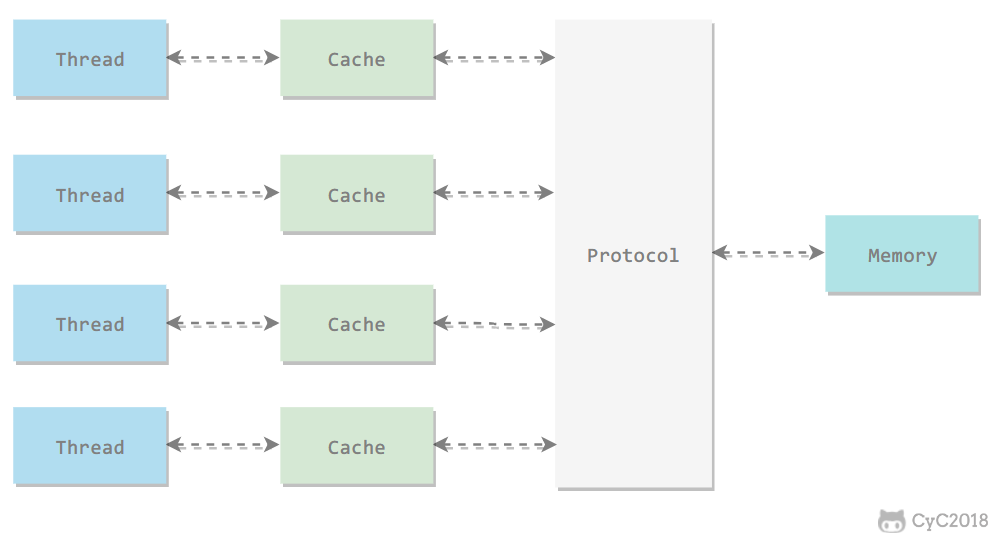
All variables are stored in main memory. Each thread also has its own working memory, stored in caches or registers, which keeps copies of the main-memory variables used by that thread.
Threads can directly operate only on variables in their own working memory. Values are passed between different threads through main memory.
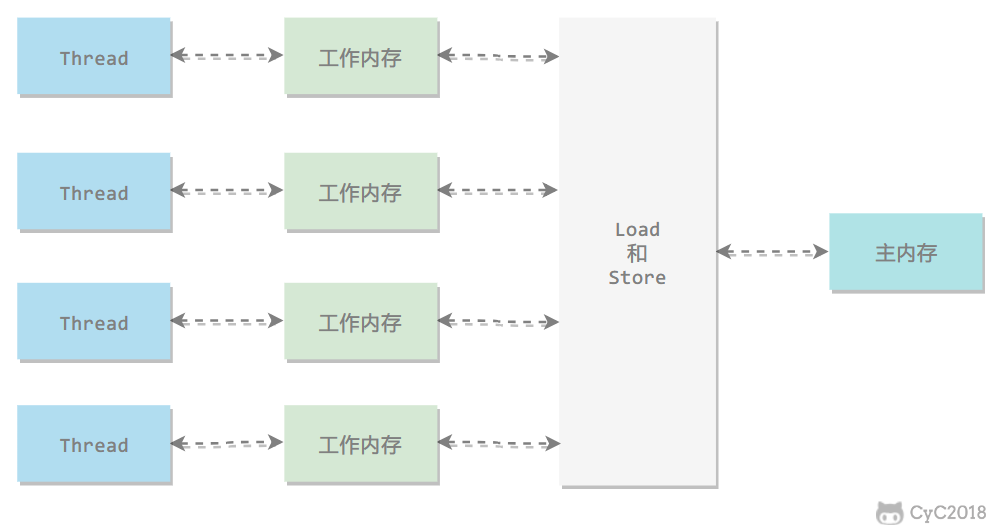
The Java memory model defines eight operations for interaction between main memory and working memory.
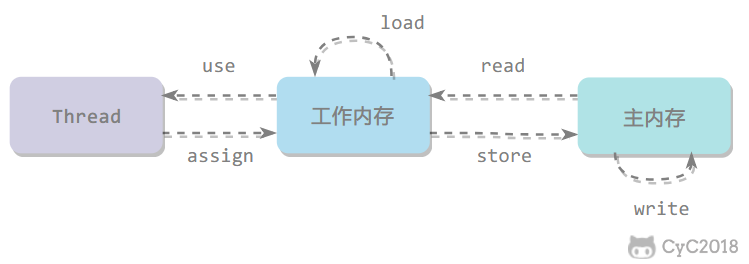
- read: transfers the value of a variable from main memory to working memory
- load: runs after read and places the value obtained by read into the working-memory copy of the variable
- use: passes the value of a variable in working memory to the execution engine
- assign: assigns a value received from the execution engine to a variable in working memory
- store: transfers the value of a variable from working memory to main memory
- write: runs after store and places the value obtained by store into the variable in main memory
- lock: acts on variables in main memory
- unlock
The Java memory model guarantees that read, load, use, assign, store, write, lock, and unlock operations are atomic. For example, assigning a value to an int variable with assign is atomic. However, the Java memory model allows the virtual machine to split reads and writes of non-volatile 64-bit data (long and double) into two 32-bit operations, so load, store, read, and write operations may not be atomic.
A common misconception is that atomic types such as int will not have thread-safety problems in a multithreaded environment. In the previous thread-unsafe example, cnt is an int variable. After 1000 threads increment it, the result is 997 instead of 1000.
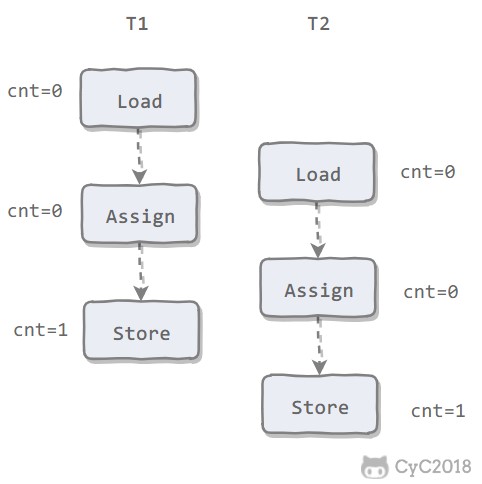
For easier discussion, simplify the memory interaction operations to three: load, assign, and store.
The following figure shows two threads operating on cnt at the same time. The sequence of load, assign, and store is not atomic as a whole. When T1 modifies cnt but has not yet written the new value back to main memory, T2 can still read the old value. As a result, although the two threads perform two increment operations, the final value of cnt in main memory is 1 instead of 2. Therefore, saying that reads and writes of int are atomic only means that individual operations such as load, assign, and store are atomic.
AtomicInteger can guarantee atomicity when multiple threads modify a value.
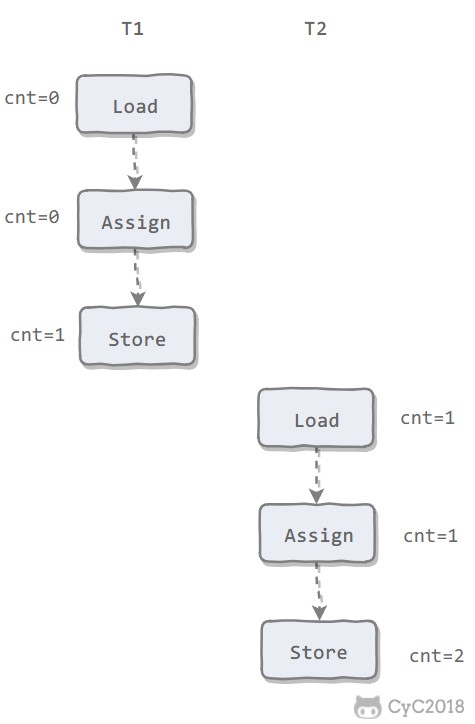
After rewriting the previous thread-unsafe code with AtomicInteger, we get the following thread-safe implementation:
public class AtomicExample {
    private AtomicInteger cnt = new AtomicInteger();

    public void add() {
        cnt.incrementAndGet();
    }

    public int get() {
        return cnt.get();
    }
}
public static void main(String[] args) throws InterruptedException {
final int threadSize = 1000;
AtomicExample example = new AtomicExample(); // only this line changes
final CountDownLatch countDownLatch = new CountDownLatch(threadSize);
ExecutorService executorService = Executors.newCachedThreadPool();
for (int i = 0; i < threadSize; i++) {
executorService.execute(() -> {
example.add();
countDownLatch.countDown();
});
}
countDownLatch.await();
executorService.shutdown();
System.out.println(example.get());
}1000Besides atomic classes, synchronized mutual-exclusion locks can also guarantee operation atomicity. The corresponding memory interaction operations are lock and unlock, and in the virtual-machine implementation they correspond to the bytecode instructions monitorenter and monitorexit.
public class AtomicSynchronizedExample {
    private int cnt = 0;

    public synchronized void add() {
        cnt++;
    }

    public synchronized int get() {
        return cnt;
    }
}
public static void main(String[] args) throws InterruptedException {
final int threadSize = 1000;
AtomicSynchronizedExample example = new AtomicSynchronizedExample();
final CountDownLatch countDownLatch = new CountDownLatch(threadSize);
ExecutorService executorService = Executors.newCachedThreadPool();
for (int i = 0; i < threadSize; i++) {
executorService.execute(() -> {
example.add();
countDownLatch.countDown();
});
}
countDownLatch.await();
executorService.shutdown();
System.out.println(example.get());
}1000Visibility means that when one thread modifies the value of a shared variable, other threads can immediately observe that change. The Java memory model implements visibility by synchronizing a new value back to main memory after a variable is modified and refreshing a variable value from main memory before it is read.
There are three main ways to implement visibility:
- volatile
- synchronized: before an unlock operation is performed on a variable, the variable value must be synchronized back to main memory.
- final: once a field modified by final is initialized in the constructor, and this escape has not occurred (another thread accessing a partially initialized object through the this reference), other threads can see the value of the final field.
Marking cnt in the previous thread-unsafe example as volatile does not solve the thread-safety problem because volatile does not guarantee operation atomicity.
Ordering means that, when observed from within the same thread, all operations appear ordered. When one thread observes another thread, operations appear unordered because instruction reordering has occurred. In the Java memory model, compilers and processors are allowed to reorder instructions. Reordering does not affect single-threaded execution, but it can affect correctness in multithreaded execution.
The volatile keyword forbids instruction reordering by adding memory barriers, meaning later instructions cannot be moved before a memory barrier during reordering.
Ordering can also be guaranteed with synchronized. It ensures that only one thread executes synchronized code at any moment, which is equivalent to letting threads execute synchronized code sequentially.
As mentioned above, volatile and synchronized can guarantee ordering. In addition, the JVM defines happens-before rules, which allow one operation to complete before another without additional control.
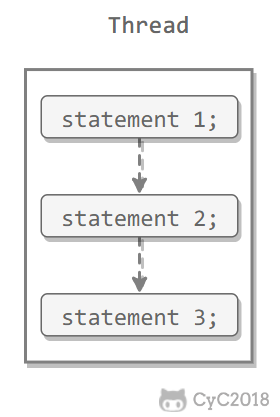
Single Thread rule
Within a single thread, operations earlier in the program happen-before later operations.
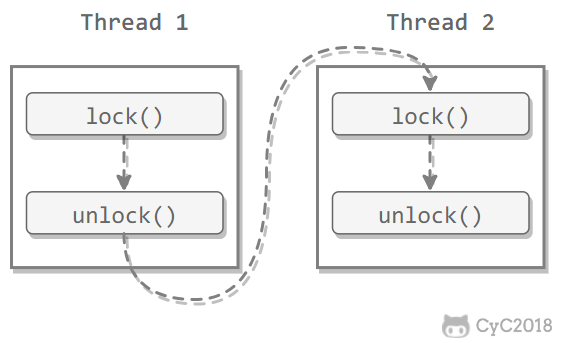
Monitor Lock Rule
An unlock operation happens-before a subsequent lock operation on the same lock.
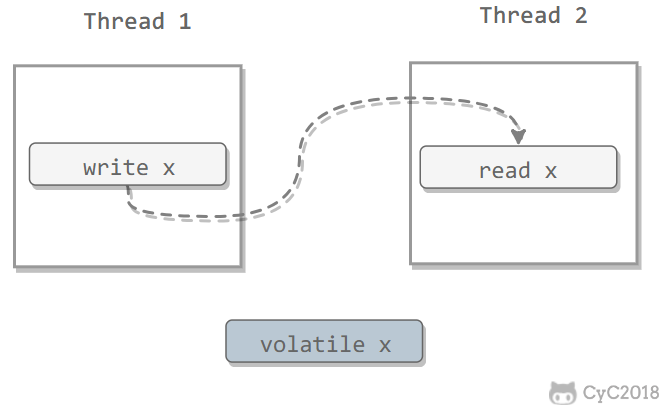
Volatile Variable Rule
A write to a volatile variable happens-before a subsequent read of that variable.
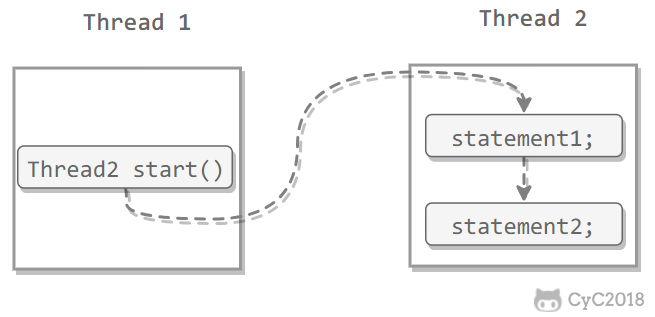
Thread Start Rule
A call to a Thread object's start() method happens-before every action in that thread.
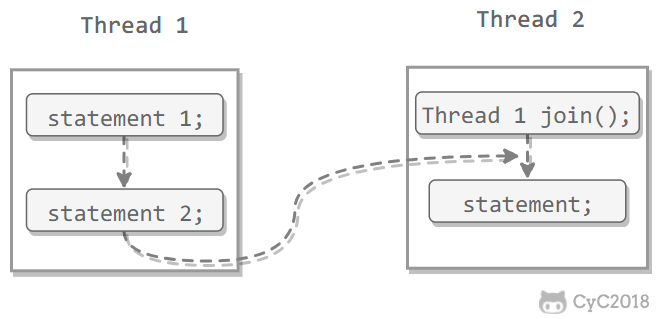
Thread Join Rule
The termination of a Thread object happens-before join() returns.
Thread Interruption Rule
A call to a thread's interrupt() method happens-before the interrupted thread's code detects the interruption event, which can be checked with interrupted().
Finalizer Rule
Completion of an object's initialization (the end of its constructor) happens-before the start of its finalize() method.
Transitivity
If operation A happens-before operation B, and operation B happens-before operation C, then operation A happens-before operation C.
A class is thread-safe if it behaves correctly no matter how multiple threads access it, without requiring synchronization in the calling code.
Thread safety can be implemented in the following ways:
Immutable objects are always thread-safe and need no additional thread-safety protection. As long as an immutable object is constructed correctly, it will never be observed in an inconsistent state by multiple threads. In a multithreaded environment, objects should be made immutable whenever possible to satisfy thread safety.
Immutable types:
- primitive types modified by the final keyword
- String
- enum types
- some subclasses of Number, such as numeric wrapper types like Long and Double, and large-number types like BigInteger and BigDecimal. However, Number atomic classes such as AtomicInteger and AtomicLong are mutable.
For collection types, use Collections.unmodifiableXXX() to obtain an immutable collection.
public class ImmutableExample {
    public static void main(String[] args) {
        Map<String, Integer> map = new HashMap<>();
        Map<String, Integer> unmodifiableMap = Collections.unmodifiableMap(map);
        unmodifiableMap.put("a", 1);
    }
}
Exception in thread "main" java.lang.UnsupportedOperationException
at java.util.Collections$UnmodifiableMap.put(Collections.java:1457)
at ImmutableExample.main(ImmutableExample.java:9)Collections.unmodifiableXXX() first copies the original collection, and methods that would modify the collection directly throw exceptions.
public V put(K key, V value) {
    throw new UnsupportedOperationException();
}synchronized and ReentrantLock.
The main problem with mutual-exclusion synchronization is the performance cost of blocking and waking threads, so this kind of synchronization is also called blocking synchronization.
Mutual-exclusion synchronization is a pessimistic concurrency strategy. It assumes that if proper synchronization is not performed, problems will occur. Regardless of whether shared data will actually be contended, it performs operations such as locking (this describes the conceptual model; in practice, the virtual machine optimizes away many unnecessary locks), switching between user mode and kernel mode, maintaining lock counters, and checking whether blocked threads need to be awakened.
As hardware instruction sets have evolved, we can use optimistic concurrency strategies based on conflict detection: perform the operation first; if no other thread contends for the shared data, the operation succeeds; otherwise, take compensating action, usually retrying until it succeeds. Many implementations of this optimistic strategy do not need to block threads, so this synchronization operation is called non-blocking synchronization.
Optimistic locking requires the operation and conflict detection steps to be atomic. Mutual-exclusion synchronization cannot be used to guarantee this here; it must be completed by hardware. The most typical hardware-supported atomic operation is compare-and-swap (CAS). A CAS instruction requires three operands: memory address V, old expected value A, and new value B. During execution, V is updated to B only if the value of V equals A.
Methods in the integer atomic class AtomicInteger from the J.U.C package call CAS operations in the Unsafe class.
The following code uses AtomicInteger to perform an increment operation.
private AtomicInteger cnt = new AtomicInteger();

public void add() {
    cnt.incrementAndGet();
}
The following code is the source of incrementAndGet(), which calls Unsafe's getAndAddInt().
public final int incrementAndGet() {
    return unsafe.getAndAddInt(this, valueOffset, 1) + 1;
}
The following code is the source of getAndAddInt(). var1 indicates the object's memory address, var2 indicates the offset of the field relative to the object's memory address, and var4 indicates the value to add, which is 1 here. getIntVolatile(var1, var2) obtains the old expected value, and compareAndSwapInt() performs the CAS comparison. If the value at the field's memory address equals var5, the variable at address var1+var2 is updated to var5+var4.
As shown, getAndAddInt() runs in a loop, and when a conflict occurs it keeps retrying.
public final int getAndAddInt(Object var1, long var2, int var4) {
    int var5;
    do {
        var5 = this.getIntVolatile(var1, var2);
    } while(!this.compareAndSwapInt(var1, var2, var5, var5 + var4));

    return var5;
}If a variable is initially read as value A, then changed to B, and later changed back to A, a CAS operation will mistakenly assume that it has never changed.
The J.U.C package provides AtomicStampedReference, an atomic reference class with a stamp, to solve this problem. It can guarantee CAS correctness by controlling the version of the variable value. In most cases, the ABA problem does not affect concurrency correctness. If the ABA problem must be solved, traditional mutual-exclusion synchronization may be more efficient than atomic classes.
Thread safety does not always require synchronization. If a method does not involve shared data, it naturally does not need synchronization to guarantee correctness.
When multiple threads access local variables of the same method, thread-safety problems do not occur because local variables are stored in the virtual-machine stack and are private to each thread.
public class StackClosedExample {
    public void add100() {
        int cnt = 0;
        for (int i = 0; i < 100; i++) {
            cnt++;
        }
        System.out.println(cnt);
    }
}
public static void main(String[] args) {
StackClosedExample example = new StackClosedExample();
ExecutorService executorService = Executors.newCachedThreadPool();
executorService.execute(() -> example.add100());
executorService.execute(() -> example.add100());
executorService.shutdown();
}100
100If data required by a piece of code must be shared with other code, check whether the code using that shared data can be guaranteed to run in the same thread. If so, the visible scope of the shared data can be limited to that single thread, which guarantees that no data race occurs between threads without synchronization.
Applications with this property are common. Most architectures that use consumer queues, such as the Producer-Consumer pattern, try to complete product consumption within one thread. One of the most important examples is the classic Web interaction model of one server thread per request (Thread-per-Request). The widespread use of this model allows many Web server applications to use thread-local storage to solve thread-safety problems.
Thread-local storage can be implemented with the java.lang.ThreadLocal class.
In the following code, thread1 sets threadLocal to 1, while thread2 sets threadLocal to 2. After some time, thread1 still reads threadLocal as 1, unaffected by thread2.
public class ThreadLocalExample {
    public static void main(String[] args) {
        ThreadLocal threadLocal = new ThreadLocal();
        Thread thread1 = new Thread(() -> {
            threadLocal.set(1);
            try {
                Thread.sleep(1000);
            } catch (InterruptedException e) {
                e.printStackTrace();
            }
            System.out.println(threadLocal.get());
            threadLocal.remove();
        });
        Thread thread2 = new Thread(() -> {
            threadLocal.set(2);
            threadLocal.remove();
        });
        thread1.start();
        thread2.start();
    }
}1To understand ThreadLocal, first look at the following code:
public class ThreadLocalExample1 {
    public static void main(String[] args) {
        ThreadLocal threadLocal1 = new ThreadLocal();
        ThreadLocal threadLocal2 = new ThreadLocal();
        Thread thread1 = new Thread(() -> {
            threadLocal1.set(1);
            threadLocal2.set(1);
        });
        Thread thread2 = new Thread(() -> {
            threadLocal1.set(2);
            threadLocal2.set(2);
        });
        thread1.start();
        thread2.start();
    }
}
Its corresponding underlying structure is:
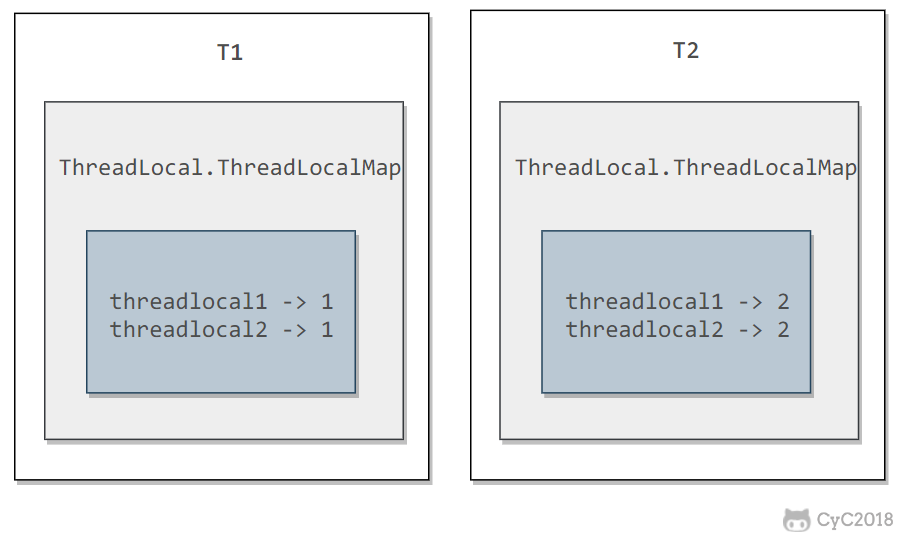
Each Thread has a ThreadLocal.ThreadLocalMap object.
/* ThreadLocal values pertaining to this thread. This map is maintained
 * by the ThreadLocal class. */
ThreadLocal.ThreadLocalMap threadLocals = null;
When the set(T value) method of a ThreadLocal is called, it first obtains the current thread's ThreadLocalMap object, then inserts the ThreadLocal->value key-value pair into that Map.
public void set(T value) {
    Thread t = Thread.currentThread();
    ThreadLocalMap map = getMap(t);
    if (map != null)
        map.set(this, value);
    else
        createMap(t, value);
}
The get() method is similar.
public T get() {
    Thread t = Thread.currentThread();
    ThreadLocalMap map = getMap(t);
    if (map != null) {
        ThreadLocalMap.Entry e = map.getEntry(this);
        if (e != null) {
            @SuppressWarnings("unchecked")
            T result = (T)e.value;
            return result;
        }
    }
    return setInitialValue();
}
In theory, ThreadLocal is not used to solve multithreaded concurrency problems, because no multithreaded competition exists.
In some scenarios, especially when using thread pools, ThreadLocal can cause memory leaks because of the underlying data structure of ThreadLocal.ThreadLocalMap. Call remove() manually after each use of ThreadLocal whenever possible to avoid the classic ThreadLocal memory leak and even the risk of business logic confusion.
This kind of code is also called pure code. It can be interrupted at any point during execution to run another piece of code, including recursively calling itself, and when control returns, the original program will not have any errors.
Reentrant code has several common characteristics: it does not depend on data stored on the heap or shared system resources, all state it uses is passed in through parameters, and it does not call non-reentrant methods.
Lock optimization here mainly refers to the JVM's optimization of synchronized.
Entering the blocked state during mutual-exclusion synchronization is expensive and should be avoided where possible. In many applications, shared data stays locked only briefly. The idea of a spin lock is to let a thread busy-loop, or spin, for a short period when requesting a lock on shared data. If the lock can be obtained during that time, entering the blocked state can be avoided.
Although a spin lock can avoid entering the blocked state and reduce overhead, it consumes CPU time by busy-looping, so it is suitable only when shared data is locked for a very short time.
Adaptive spin locks were introduced in JDK 1.6. Adaptive means the number of spins is no longer fixed; it is determined by the number of spins on the same lock last time and the state of the lock owner.
Lock elimination removes locks on shared data that is detected as impossible to contend.
Lock elimination is mainly supported by escape analysis. If shared data on the heap cannot escape and be accessed by other threads, it can be treated as private data, and its locks can be eliminated.
Some code that appears not to use locks actually adds many implicit locks. For example, the following string concatenation code implicitly uses locks:
public static String concatString(String s1, String s2, String s3) {
    return s1 + s2 + s3;
}
String is immutable, and the compiler automatically optimizes String concatenation. Before JDK 1.5, it was converted into consecutive append() operations on a StringBuffer object:
public static String concatString(String s1, String s2, String s3) {
    StringBuffer sb = new StringBuffer();
    sb.append(s1);
    sb.append(s2);
    sb.append(s3);
    return sb.toString();
}
Each append() method contains a synchronized block. The virtual machine observes the variable sb and quickly discovers that its dynamic scope is limited to the concatString() method. In other words, all references to sb never escape outside concatString(), so other threads cannot access it and the lock can be eliminated.
If a sequence of consecutive operations repeatedly locks and unlocks the same object, frequent locking causes performance loss.
The consecutive append() calls in the previous example belong to this case. If the virtual machine detects a series of small operations that all lock the same object, it expands, or coarsens, the locking range to cover the entire operation sequence. In the previous example, the range is expanded from before the first append() operation to after the last append() operation, so only one lock is needed.
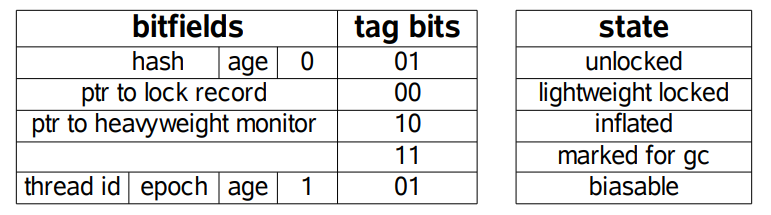
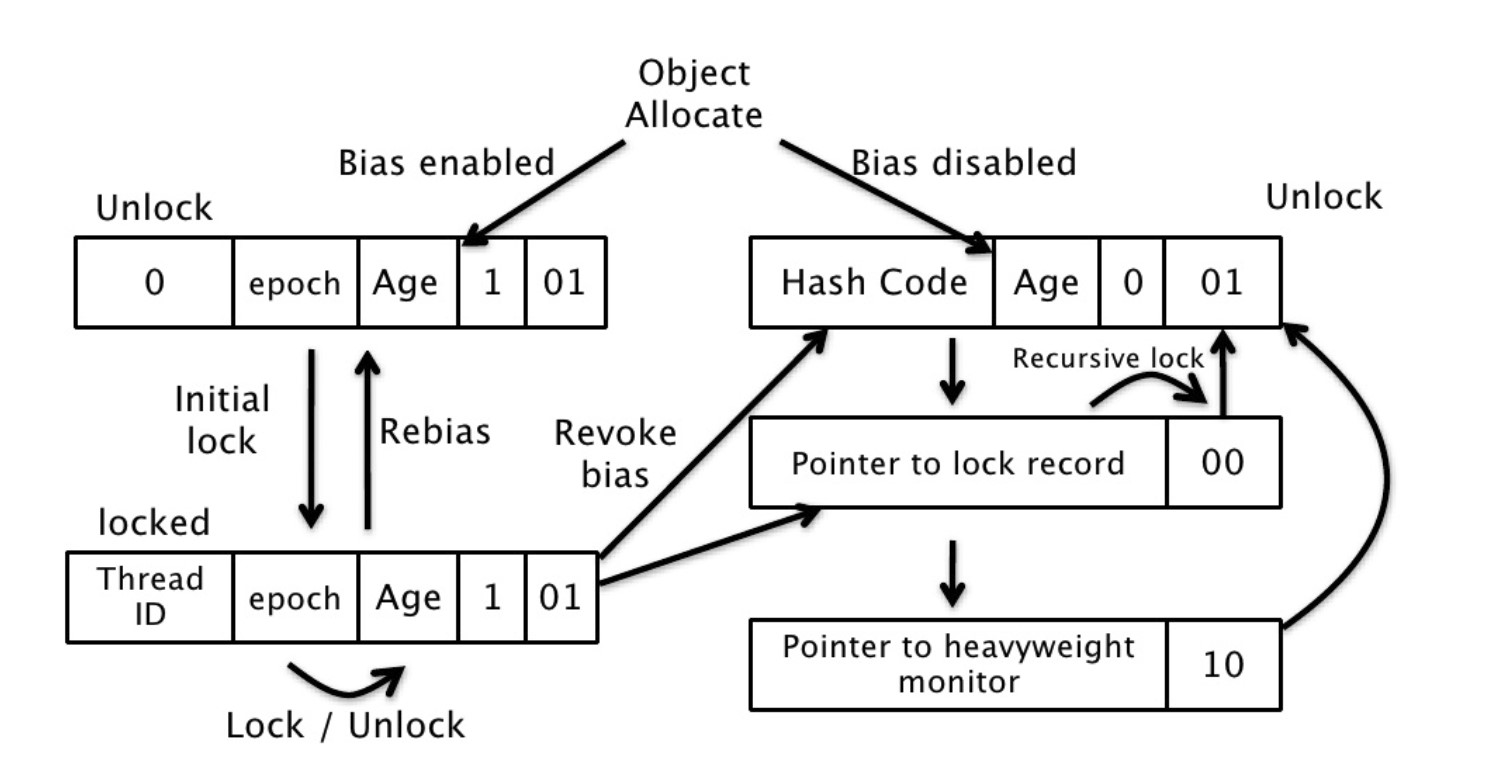
JDK 1.6 introduced biased locks and lightweight locks, giving locks four states: unlocked, biasable, lightweight locked, and inflated.
The following is the memory layout of an object header in the HotSpot virtual machine. This data is called the Mark Word. The tag bits correspond to five states, shown in the state table on the right. Except for the marked for gc state, the other four states have already been introduced above.
On the left side of the following figure is a thread's virtual-machine stack. Part of it is an area called the Lock Record, created during lightweight-lock execution to store the lock object's Mark Word. On the right side is the lock object, which contains the Mark Word and other information.
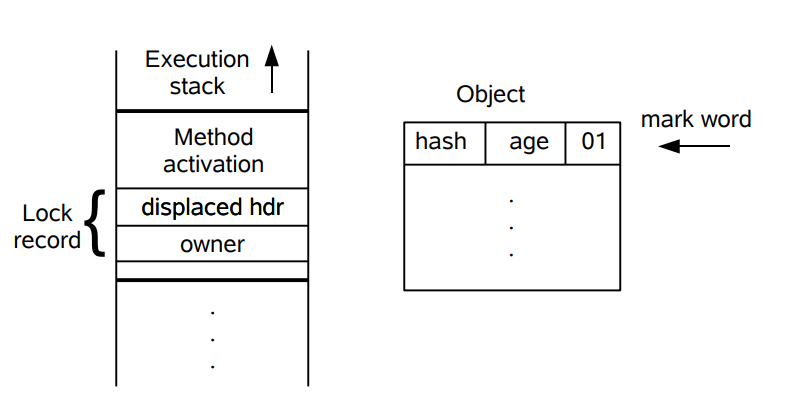
A lightweight lock is lightweight compared with a traditional heavyweight lock. It uses CAS operations to avoid the overhead of mutexes used by heavyweight locks. For most locks, no contention exists during the entire synchronization period, so mutex-based synchronization is not always necessary. CAS can be used first; if CAS fails, synchronization switches to a mutex.
When trying to acquire a lock object, if the lock object is marked as 0 01, the object is in the unlocked state. At this point, the virtual machine creates a Lock Record in the current thread's virtual-machine stack, then uses CAS to update the object's Mark Word to a pointer to the Lock Record. If the CAS operation succeeds, the thread has acquired the lock on that object, and the object's Mark Word lock tag becomes 00, indicating that the object is in the lightweight locked state.
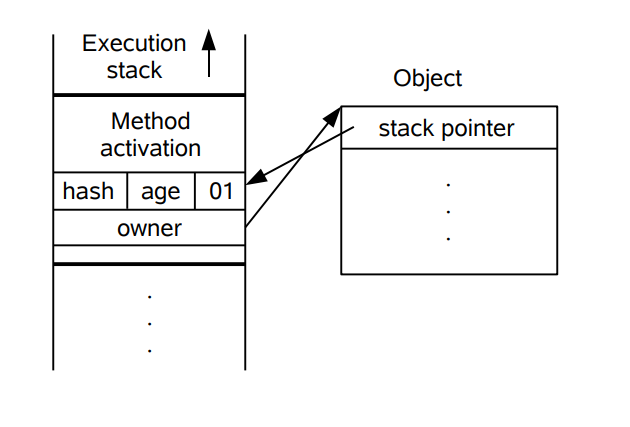
If the CAS operation fails, the virtual machine first checks whether the object's Mark Word points to the current thread's virtual-machine stack. If it does, the current thread already owns the lock object and can enter the synchronized block directly. Otherwise, the lock object has been preempted by another thread. If two or more threads contend for the same lock, the lightweight lock is no longer effective and inflates into a heavyweight lock.
The idea of a biased lock is to favor the first thread that acquires the lock object. When that thread later acquires the same lock, it no longer needs synchronization operations, not even CAS.
When a lock object is first acquired by a thread, it enters the biased state and is marked as 1 01. CAS is also used to record the thread ID in the Mark Word. If the CAS operation succeeds, each later entry by that thread into a synchronized block related to this lock requires no synchronization operation.
When another thread tries to acquire this lock object, the biased state ends. After the bias is revoked, the object returns to the unlocked state or the lightweight locked state.
-
Give threads meaningful names, which makes bugs easier to find.
-
Narrow the synchronization scope to reduce lock contention. For synchronized, for example, prefer synchronized blocks over synchronized methods where possible.
-
Prefer synchronization utilities over wait() and notify(). First, synchronization classes such as CountDownLatch, CyclicBarrier, Semaphore, and Exchanger simplify coding, while wait() and notify() make complex control flow hard to implement. Second, these synchronization classes are written and maintained by top vendors and will continue to be optimized and improved in later JDKs.
-
Use BlockingQueue to implement producer-consumer problems.
-
Prefer concurrent collections over synchronized collections. For example, use ConcurrentHashMap instead of Hashtable.
-
Use local variables and immutable classes to guarantee thread safety.
-
Use thread pools instead of creating threads directly, because creating threads is expensive and a thread pool can use a limited number of threads efficiently to start tasks.
- Bruce Eckel. Thinking in Java, 4th ed. [M]. China Machine Press, 2007.
- Zhou Zhiming. Understanding the Java Virtual Machine [M]. China Machine Press, 2011.
- Threads and Locks
- Thread Communication
- Top 50 Java Thread Interview Questions
- BlockingQueue
- thread state java
- CSC 456 Spring 2012/ch7 MN
- Java - Understanding Happens-before relationship
- 6장 Thread Synchronization
- How is Java's ThreadLocal implemented under the hood?
- Concurrent
- JAVA FORK JOIN EXAMPLE
- Discussing Concurrency (8): Introduction to the Fork/Join Framework
- Eliminating SynchronizationRelated Atomic Operations with Biased Locking and Bulk Rebiasing