- Java IO
Java I/O can be roughly divided into the following categories:
- Disk operations: File
- Byte operations: InputStream and OutputStream
- Character operations: Reader and Writer
- Object operations: Serializable
- Network operations: Socket
- New input/output: NIO
The File class can represent information about files and directories, but it does not represent file contents.
Recursively list all files under a directory:
public static void listAllFiles(File dir) {
    if (dir == null || !dir.exists()) {
        return;
    }
    if (dir.isFile()) {
        System.out.println(dir.getName());
        return;
    }
    for (File file : dir.listFiles()) {
        listAllFiles(file);
    }
}
Starting with Java 7, Paths and Files can be used instead of File.
public static void copyFile(String src, String dist) throws IOException {
    FileInputStream in = new FileInputStream(src);
    FileOutputStream out = new FileOutputStream(dist);

    byte[] buffer = new byte[20 * 1024];
    int cnt;

    // read() reads at most buffer.length bytes
    // returns the actual number of bytes read
    // returns -1 when EOF, the end of the file, is reached
    while ((cnt = in.read(buffer, 0, buffer.length)) != -1) {
        out.write(buffer, 0, cnt);
    }

    in.close();
    out.close();
}Java I/O is implemented with the decorator pattern. Taking InputStream as an example:
- InputStream is the abstract component.
- FileInputStream is a subclass of InputStream. It is a concrete component that provides byte-stream input operations.
- FilterInputStream is an abstract decorator. Decorators decorate components and provide additional functionality. For example, BufferedInputStream adds buffering to FileInputStream.

To instantiate a byte-stream object with buffering, wrap the FileInputStream object with a BufferedInputStream object.
FileInputStream fileInputStream = new FileInputStream(filePath);
BufferedInputStream bufferedInputStream = new BufferedInputStream(fileInputStream);
The DataInputStream decorator provides input operations for more data types, such as primitive types like int and double.
Encoding converts characters into bytes, while decoding recombines bytes into characters.
If different encodings are used for encoding and decoding, garbled text appears.
- In GBK encoding, Chinese characters occupy 2 bytes and English characters occupy 1 byte.
- In UTF-8 encoding, Chinese characters occupy 3 bytes and English characters occupy 1 byte.
- In UTF-16be encoding, both Chinese and English characters occupy 2 bytes.
The be in UTF-16be refers to Big Endian. Correspondingly, UTF-16le exists, where le refers to Little Endian.
Java uses the two-byte encoding UTF-16be for in-memory character encoding. This does not mean Java supports only this encoding; it means the char type uses UTF-16be. The char type occupies 16 bits, or two bytes. Java uses this two-byte encoding so that either a Chinese character or an English character can be stored in one char.
A String can be viewed as a character sequence. You can specify an encoding to encode it into a byte sequence, or specify an encoding to decode a byte sequence into a String.
String str1 = "English";
byte[] bytes = str1.getBytes("UTF-8");
String str2 = new String(bytes, "UTF-8");
System.out.println(str2);
When calling the no-argument getBytes() method, the default encoding is not UTF-16be. The advantage of two-byte encoding is that one char can store either Chinese or English characters, but this advantage is no longer needed when converting a String to a bytes[] array, so two-byte encoding is no longer necessary. The default encoding of getBytes() is platform-dependent and is usually UTF-8.
byte[] bytes = str1.getBytes();Whether on disk or during network transmission, the smallest storage unit is a byte, not a character. However, programs usually operate on data in character form, so methods for character operations are needed.
- InputStreamReader decodes a byte stream into a character stream.
- OutputStreamWriter encodes a character stream into a byte stream.
public static void readFileContent(String filePath) throws IOException {

    FileReader fileReader = new FileReader(filePath);
    BufferedReader bufferedReader = new BufferedReader(fileReader);

    String line;
    while ((line = bufferedReader.readLine()) != null) {
        System.out.println(line);
    }

    // The decorator pattern lets BufferedReader compose a Reader object
    // Calling BufferedReader.close() calls Reader.close()
    // Therefore a single close() call is enough
    bufferedReader.close();
}Serialization converts an object into a byte sequence so it can be stored and transmitted.
- Serialization: ObjectOutputStream.writeObject()
- Deserialization: ObjectInputStream.readObject()
Static variables are not serialized because serialization saves only object state, while static variables belong to class state.
Classes that need serialization must implement the Serializable interface. It is only a marker and has no methods to implement, but serialization throws an exception if the class does not implement it.
public static void main(String[] args) throws IOException, ClassNotFoundException {

    A a1 = new A(123, "abc");
    String objectFile = "file/a1";

    ObjectOutputStream objectOutputStream = new ObjectOutputStream(new FileOutputStream(objectFile));
    objectOutputStream.writeObject(a1);
    objectOutputStream.close();

    ObjectInputStream objectInputStream = new ObjectInputStream(new FileInputStream(objectFile));
    A a2 = (A) objectInputStream.readObject();
    objectInputStream.close();
    System.out.println(a2);
}

private static class A implements Serializable {

    private int x;
    private String y;

    A(int x, String y) {
        this.x = x;
        this.y = y;
    }

    @Override
    public String toString() {
        return "x = " + x + "  " + "y = " + y;
    }
}The transient keyword can prevent some fields from being serialized.
The elementData array that stores data in ArrayList is marked transient because the array expands dynamically and not all of its space is used, so not all of its contents need to be serialized. By overriding the serialization and deserialization methods, only the portion of the array that contains data is serialized.
private transient Object[] elementData;Java network support includes:
- InetAddress: represents hardware resources on a network, namely IP addresses.
- URL: Uniform Resource Locator.
- Sockets: implements network communication using TCP.
- Datagram: implements network communication using UDP.
It has no public constructor, so instances can only be created through static methods.
InetAddress.getByName(String host);
InetAddress.getByAddress(byte[] address);Byte-stream data can be read directly from a URL.
public static void main(String[] args) throws IOException {

    URL url = new URL("http://www.baidu.com");

    /* byte stream */
    InputStream is = url.openStream();

    /* character stream */
    InputStreamReader isr = new InputStreamReader(is, "utf-8");

    /* provides buffering */
    BufferedReader br = new BufferedReader(isr);

    String line;
    while ((line = br.readLine()) != null) {
        System.out.println(line);
    }

    br.close();
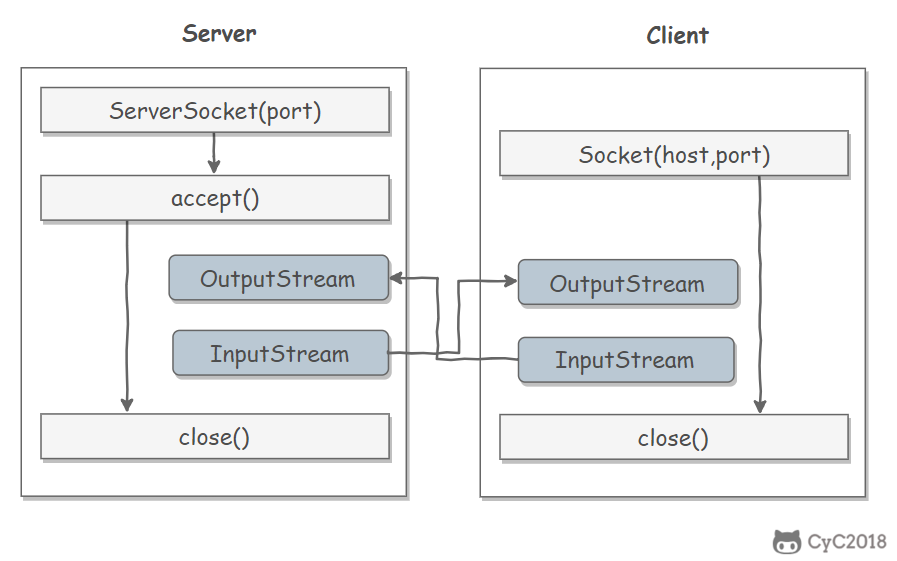
}- ServerSocket: server-side class
- Socket: client-side class
- The server and client perform input and output through InputStream and OutputStream.
- DatagramSocket: communication class
- DatagramPacket: packet class
The new input/output (NIO) library was introduced in JDK 1.4. It addresses shortcomings in the original I/O library and provides high-speed, block-oriented I/O.
The most important difference between I/O and NIO is how data is packaged and transmitted. I/O processes data as streams, while NIO processes data as blocks.
Stream-oriented I/O processes one byte at a time: an input stream produces one byte of data, and an output stream consumes one byte of data. It is easy to create filters for streaming data and chain several filters so that each filter is responsible for only part of a complex processing mechanism. The downside is that stream-oriented I/O is usually quite slow.
Block-oriented I/O processes one block of data at a time. Processing data by block is much faster than processing it by stream. However, block-oriented I/O lacks some of the elegance and simplicity of stream-oriented I/O.
The I/O package and NIO are well integrated. java.io.* has been reimplemented on top of NIO, so it can now take advantage of some NIO features. For example, some classes in the java.io.* package include methods that read and write data in blocks, which makes processing faster even in a stream-oriented system.
A Channel is an analog of streams in the original I/O package. Data can be read and written through it.
Channels differ from streams in that streams can move in only one direction (a stream must be a subclass of InputStream or OutputStream), while channels are bidirectional and can be used for reading, writing, or both.
Channels include the following types:
- FileChannel: reads and writes data from files.
- DatagramChannel: reads and writes network data over UDP.
- SocketChannel: reads and writes network data over TCP.
- ServerSocketChannel: listens for incoming TCP connections and creates a SocketChannel for each new connection.
All data sent to a channel must first be placed in a buffer. Likewise, any data read from a channel must first be read into a buffer. In other words, data is not read from or written to a channel directly; it passes through a buffer first.
A buffer is essentially an array, but it is more than just an array. It provides structured access to data and can also track the system's read/write progress.
Buffers include the following types:
- ByteBuffer
- CharBuffer
- ShortBuffer
- IntBuffer
- LongBuffer
- FloatBuffer
- DoubleBuffer
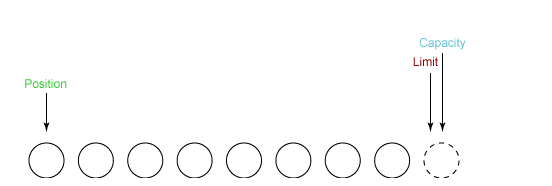
- capacity: maximum capacity.
- position: the number of bytes currently read or written.
- limit: the number of bytes that can still be read or written.
Example of how state variables change:
- Create a new buffer of 8 bytes. At this point, position is 0 and limit = capacity = 8. The capacity variable does not change, so the following discussion ignores it.
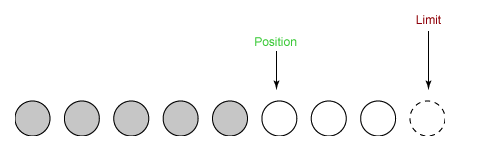
- Read 5 bytes from the input channel and write them into the buffer. At this point, position is 5 and limit remains unchanged.
- Before writing the buffer's data to the output channel, call flip(). This method sets limit to the current position and sets position to 0.
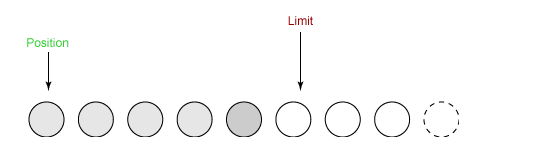
- Take 4 bytes from the buffer into the output buffer. At this point, position is set to 4.
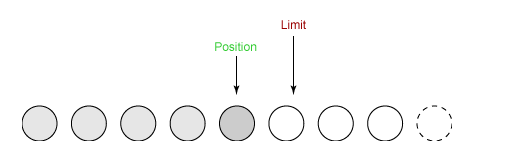
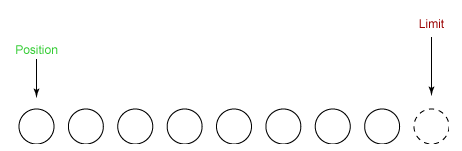
- Finally, call clear() to clear the buffer. At this point, both position and limit are reset to their initial positions.
The following example uses NIO to copy a file quickly:
public static void fastCopy(String src, String dist) throws IOException {

    /* get the input byte stream of the source file */
    FileInputStream fin = new FileInputStream(src);

    /* get the file channel of the input byte stream */
    FileChannel fcin = fin.getChannel();

    /* get the output byte stream of the target file */
    FileOutputStream fout = new FileOutputStream(dist);

    /* get the file channel of the output byte stream */
    FileChannel fcout = fout.getChannel();

    /* allocate 1024 bytes for the buffer */
    ByteBuffer buffer = ByteBuffer.allocateDirect(1024);

    while (true) {

        /* read data from the input channel into the buffer */
        int r = fcin.read(buffer);

        /* read() returns -1 to indicate EOF */
        if (r == -1) {
            break;
        }

        /* switch between writing and reading */
        buffer.flip();

        /* write the buffer contents to the output file */
        fcout.write(buffer);

        /* clear the buffer */
        buffer.clear();
    }
}NIO is often called non-blocking IO, mainly because NIO's non-blocking behavior is widely used in network communication.
NIO implements the Reactor model in IO multiplexing. A thread uses a Selector to poll and listen for events on multiple Channels, allowing one thread to handle multiple events.
By configuring the monitored Channel as non-blocking, the thread does not enter a blocked waiting state when an IO event has not yet arrived on that Channel. Instead, it continues polling other Channels and executes the Channel whose IO event has arrived.
Because creating and switching threads is expensive, using one thread to handle multiple events instead of one thread per event provides good performance for IO-intensive applications.
Note that only socket Channels can be configured as non-blocking. FileChannel cannot, and configuring FileChannel as non-blocking would not make sense.

Selector selector = Selector.open();ServerSocketChannel ssChannel = ServerSocketChannel.open();
ssChannel.configureBlocking(false);
ssChannel.register(selector, SelectionKey.OP_ACCEPT);The Channel must be configured as non-blocking; otherwise, using a Selector is meaningless. If a Channel is blocked on an event, the server cannot respond to other events and must wait for that event to finish before processing others, which clearly defeats the purpose of a Selector.
When registering a Channel with a Selector, the specific events to register must also be specified. The main types are:
- SelectionKey.OP_CONNECT
- SelectionKey.OP_ACCEPT
- SelectionKey.OP_READ
- SelectionKey.OP_WRITE
They are defined in SelectionKey as follows:
public static final int OP_READ = 1 << 0;
public static final int OP_WRITE = 1 << 2;
public static final int OP_CONNECT = 1 << 3;
public static final int OP_ACCEPT = 1 << 4;Each event can be treated as a bit field, forming an integer event set. For example:
int interestSet = SelectionKey.OP_READ | SelectionKey.OP_WRITE;int num = selector.select();Use select() to listen for arriving events. It blocks until at least one event arrives.
Set<SelectionKey> keys = selector.selectedKeys();
Iterator<SelectionKey> keyIterator = keys.iterator();
while (keyIterator.hasNext()) {
SelectionKey key = keyIterator.next();
if (key.isAcceptable()) {
// ...
} else if (key.isReadable()) {
// ...
}
keyIterator.remove();
}Because one select() call cannot process all events, and the server may need to listen for events continuously, server-side event handling code is generally placed in an infinite loop.
while (true) {
int num = selector.select();
Set<SelectionKey> keys = selector.selectedKeys();
Iterator<SelectionKey> keyIterator = keys.iterator();
while (keyIterator.hasNext()) {
SelectionKey key = keyIterator.next();
if (key.isAcceptable()) {
// ...
} else if (key.isReadable()) {
// ...
}
keyIterator.remove();
}
}public class NIOServer {
public static void main(String[] args) throws IOException {
Selector selector = Selector.open();
ServerSocketChannel ssChannel = ServerSocketChannel.open();
ssChannel.configureBlocking(false);
ssChannel.register(selector, SelectionKey.OP_ACCEPT);
ServerSocket serverSocket = ssChannel.socket();
InetSocketAddress address = new InetSocketAddress("127.0.0.1", 8888);
serverSocket.bind(address);
while (true) {
selector.select();
Set<SelectionKey> keys = selector.selectedKeys();
Iterator<SelectionKey> keyIterator = keys.iterator();
while (keyIterator.hasNext()) {
SelectionKey key = keyIterator.next();
if (key.isAcceptable()) {
ServerSocketChannel ssChannel1 = (ServerSocketChannel) key.channel();
// The server creates a SocketChannel for each new connection
SocketChannel sChannel = ssChannel1.accept();
sChannel.configureBlocking(false);
// This new connection is mainly used to read data from the client
sChannel.register(selector, SelectionKey.OP_READ);
} else if (key.isReadable()) {
SocketChannel sChannel = (SocketChannel) key.channel();
System.out.println(readDataFromSocketChannel(sChannel));
sChannel.close();
}
keyIterator.remove();
}
}
}
private static String readDataFromSocketChannel(SocketChannel sChannel) throws IOException {
ByteBuffer buffer = ByteBuffer.allocate(1024);
StringBuilder data = new StringBuilder();
while (true) {
buffer.clear();
int n = sChannel.read(buffer);
if (n == -1) {
break;
}
buffer.flip();
int limit = buffer.limit();
char[] dst = new char[limit];
for (int i = 0; i < limit; i++) {
dst[i] = (char) buffer.get(i);
}
data.append(dst);
buffer.clear();
}
return data.toString();
}
}public class NIOClient {
public static void main(String[] args) throws IOException {
Socket socket = new Socket("127.0.0.1", 8888);
OutputStream out = socket.getOutputStream();
String s = "hello world";
out.write(s.getBytes());
out.close();
}
}Memory-mapped file I/O is a method for reading and writing file data. It can be much faster than regular stream-based or channel-based I/O.
Writing to a memory-mapped file can be dangerous. A simple operation such as changing a single array element may directly modify the file on disk. Modifying data and saving data to disk are not separated.
The following line maps the first 1024 bytes of a file into memory. The map() method returns a MappedByteBuffer, which is a subclass of ByteBuffer. Therefore, the newly mapped buffer can be used like any other ByteBuffer, and the operating system performs the mapping when needed.
MappedByteBuffer mbb = fc.map(FileChannel.MapMode.READ_WRITE, 0, 1024);The differences between NIO and regular I/O mainly include the following two points:
- NIO is non-blocking.
- NIO is block-oriented, while I/O is stream-oriented.
- Eckel B, Eckel, Haopeng, et al. Thinking in Java [M]. China Machine Press, 2002.
- IBM: Introduction to NIO
- Java NIO Tutorial
- Brief Analysis of Java NIO
- IBM: In-Depth Analysis of How Java I/O Works
- IBM: In-Depth Analysis of Chinese Encoding Issues in Java
- IBM: Advanced Understanding of Java Serialization
- Differences Between NIO and Traditional IO
- Decorator Design Pattern
- Socket Multicast