Regular expressions are used to search and replace text content.
Regular expressions are built into other languages or software products; they are not themselves a language or software product.
Online Regular Expression Tool
. can match any single character, but in most implementations it cannot match newline characters.
. is a metacharacter, meaning it has special meaning rather than representing the literal character. To match a literal ., escape it with \, placing \ before ..
Regular expressions are generally case-sensitive, though some implementations are not.
Regular Expression
C.C2018
Match Result
My name is CyC2018 .
[ ] defines a character set.
0-9 and a-z define character ranges. Ranges are determined by ASCII codes and are used inside [ ].
- is a metacharacter only inside [ ]; outside [ ], it is a normal character.
^ inside [ ] means negation.
Application
Match strings that start with abc and whose last character is not a digit:
Regular Expression
abc[^0-9]
Match Result
- abcd
- abc1
- abc2
| Metacharacter | Description |
|---|---|
| [\b] | Backspace, deleting one character |
| \f | Form feed |
| \n | Newline |
| \r | Carriage return |
| \t | Tab |
| \v | Vertical tab |
\r\n is the text line-ending marker in Windows, while Unix/Linux uses \n.
\r\n\r\n can match blank lines on Windows because it matches two consecutive line-ending markers, which is exactly the blank line between two records.
| Metacharacter | Description |
|---|---|
| \d | Digit character, equivalent to [0-9] |
| \D | Non-digit character, equivalent to [^0-9] |
| Metacharacter | Description |
|---|---|
| \w | Uppercase letters, lowercase letters, underscores, and digits; equivalent to [a-zA-Z0-9_] |
| \W | Negation of \w |
| Metacharacter | Description |
|---|---|
| \s | Any whitespace character, equivalent to [\f\n\r\t\v] |
| \S | Negation of \s |
\x matches hexadecimal characters, and \0 matches octal. For example, \xA corresponds to ASCII value 10, namely \n.
- + matches 1 or more characters.
- ** * matches 0 or more characters.
- ? matches 0 or 1 character.
Application
Match an email address.
Regular Expression
[\w.]+@\w+\.\w+
[\w.] matches an alphanumeric character or ., and adding + after it means matching one or more times. Inside a character set [ ], . is not a metacharacter.
Match Result
abc.def<span>@</span>qq.com
- {n} matches n characters.
- {m,n} matches m~n characters.
- {m,} matches at least m characters.
* and + are greedy metacharacters and match as much content as possible. Adding ? after them converts them into lazy metacharacters, such as *?, +?, and {m,n}?.
Regular Expression
a.+c
Match Result
abcabcabc
Because + is greedy, .+ matches as much content as possible, so it matches the entire abcabcabc text rather than only the first abc. A lazy form can match only the first part.
\b can match a word boundary, which is the position between \w and \W; \B matches a position that is not a word boundary.
\b matches only a position, not a character, so \babc\b matches 3 characters.
^ matches the beginning of the entire string, and $ matches the end.
The ^ metacharacter is used for negation inside a character set and for matching the start of a string outside a character set.
In multiline mode, line breaks are treated as string boundaries.
Application
Match comment lines in code that start with //.
Regular Expression
^\s*\/\/.*$
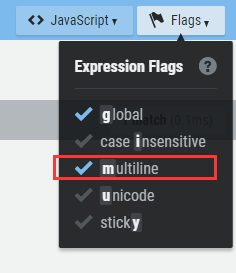
Match Result
- public void fun() {
- // comment 1
- int a = 1;
- int b = 2;
- // comment 2
- int c = a + b;
- }
Use ( ) to define a subexpression. The contents of a subexpression can be treated as an independent element, like a character, and can use metacharacters such as *.
Subexpressions can be nested, but deeply nested expressions become hard to understand.
Regular Expression
(ab){2,}
Match Result
ababab
| is the OR metacharacter. It treats all content on the left and right as two separate parts; a match succeeds if either part matches.
Regular Expression
(19|20)\d{2}
Match Result
- 1900
- 2010
- 1020
Application
Match an IP address.
Each part of an IP address is a number from 0 to 255. When matching with a regular expression, the following cases are valid:
- One digit
- Two digits that do not start with 0
- Three digits starting with 1
- Three digits starting with 2, where the second digit is 0-4
- Three digits starting with 25, where the third digit is 0-5
Regular Expression
((25[0-5]|(2[0-4]\d)|(1\d{2})|([1-9]\d)|(\d))\.){3}(25[0-5]|(2[0-4]\d)|(1\d{2})|([1-9]\d)|(\d))
Match Result
- 192.168.0.1
- 00.00.00.00
- 555.555.555.555
Backreferences use \n to refer to a subexpression, where n is the subexpression number starting from 1. It must match the same content as the subexpression. For example, if the subexpression matches abc, the backreference must also match abc.
Application
Match valid heading elements in HTML.
Regular Expression
\1 backreferences the content matched by subexpression (h[1-6]), meaning it must match the same content as that subexpression.
<(h[1-6])>\w*?<\/\1>
Match Result
- <h1>x</h1>
- <h2>x</h2>
- <h3>x</h1>
Two regular expressions are needed.
Application
Modify a phone number format.
Text
313-555-1234
Search Regular Expression
(\d{3})(-)(\d{3})(-)(\d{4})
Replacement Regular Expression
Add () around the result found by the first subexpression, then add a space, and separate the results from the third and fifth subexpressions with -.
($1) $3-$5
Result
(313) 555-1234
| Metacharacter | Description |
|---|---|
| \l | Convert the next character to lowercase |
| \u | Convert the next character to uppercase |
| \L | Convert all characters between \L and \E to lowercase |
| \U | Convert all characters between \U and \E to uppercase |
| \E | End \L or \U |
Application
Convert the second and third characters of the text to uppercase.
Text
abcd
Search
(\w)(\w{2})(\w)
Replacement
$1\U$2\E$3
Result
aBCd
Lookaround specifies what should match before or after the matched content, while excluding that surrounding content from the match.
Lookahead is defined with ?=. It specifies the content that must match after the current content, and that content is defined after ?=. Lookbehind is defined with ?\<=. Note: JavaScript does not support lookbehind, and Java's support is also incomplete.
Application
Find the part before the @ character in an email address.
Regular Expression
\w+(?=@)
Result
abc @qq.com
To negate lookahead or lookbehind, replace = with !, for example replacing (?=) with (?!). Negation matches content whose surrounding text does not meet the requirement.
The condition is whether a certain subexpression matched. If it matched, the content after the conditional expression must continue to match.
Regular Expression
The subexpression (\\() matches a left parenthesis, and the following ? means matching 0 or 1 occurrence. ?(1) is the condition. When subexpression 1 matches, the condition is true and \) must be matched, meaning the right parenthesis must be matched.
(\()?abc(?(1)\))
Result
- (abc)
- abc
- (abc
The condition is whether the defined surrounding content matches. If it matches, matching continues. Note that the surrounding content is not included in the matched content.
Regular Expression
?(?=-) is a lookahead condition. Only when \d{5} can match with - as the lookahead suffix does matching continue with -\d{4}.
\d{5}(?(?=-)-\d{4})
Result
- 11111
- 22222-
- 33333-4444
- Ben Forta. Regular Expressions: 10 Minute Tutorial [M]. People's Posts and Telecommunications Press, 2007.