


A simple library for printing rich coloured texts on console terminal.
Designed with Cross-platform in mind
Targets tested :
- Windows 10 21H1
- Ubuntu 20.04.1 LTS
Inculde in your C++ program by
#include "printer.hpp"Then call the functions as you see fit
Example :
//test.cpp
#include <stdio.h>
#include "printer.hpp"
int main()
{

	printerClearScreen();

	puts("\n\n");
	printerSlowPrint("Its too cold here...z.z..z.z.zz\n");
	printerPrintText("I need to go to my room fast\n", _text_foreground_white, _text_background_red);
	printerPrintText("Maybe a coffee will do\n", _text_foreground_red, _text_background_white);
	printerPrintText("COFFEEE...\n", _text_foreground_red, _text_background_default,_text_style_underline);

	puts("\n\n\n\n");

 return 0;
}
Output :
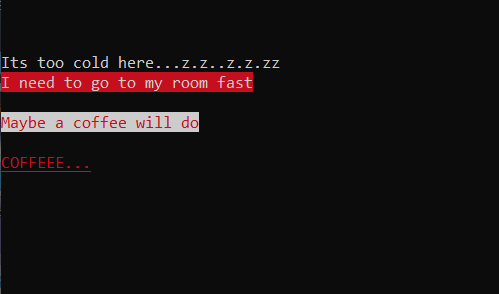
For Windows,
I used Visual Studio
For Ubuntu,
You will need to link the .cpp file during build
g++ printer.cpp test.cpp -o testTutorialsPoint: https://www.tutorialspoint.com/how-to-output-colored-text-to-a-linux-terminal
Badges : https://github.com/Ileriayo/markdown-badges
Feel free to use/edit these files as you like it.