# Flutter Gemma



The plugin supports not only Gemma, but also other models. Here's the full list of supported models: Gemma 4 E2B/E4B, Gemma3n E2B/E4B, FastVLM 0.5B, Gemma-3 1B, Gemma 3 270M, FunctionGemma 270M, Qwen3 0.6B, Qwen 2.5, Phi-4 Mini, DeepSeek R1, SmolLM 135M.
*Note: The flutter_gemma plugin supports Gemma 4 and Gemma3n (with multimodal vision and audio support), FastVLM (vision), Gemma-3, FunctionGemma, Qwen3, Qwen 2.5, Phi-4, DeepSeek R1 and SmolLM. Desktop platforms (macOS, Windows, Linux) require .litertlm model format.
Gemma is a family of lightweight, state-of-the art open models built from the same research and technology used to create the Gemini models
Bring the power of Google's lightweight Gemma language models directly to your Flutter applications. With Flutter Gemma, you can seamlessly incorporate advanced AI capabilities into your Flutter applications, all without relying on external servers.
There is an example of using:
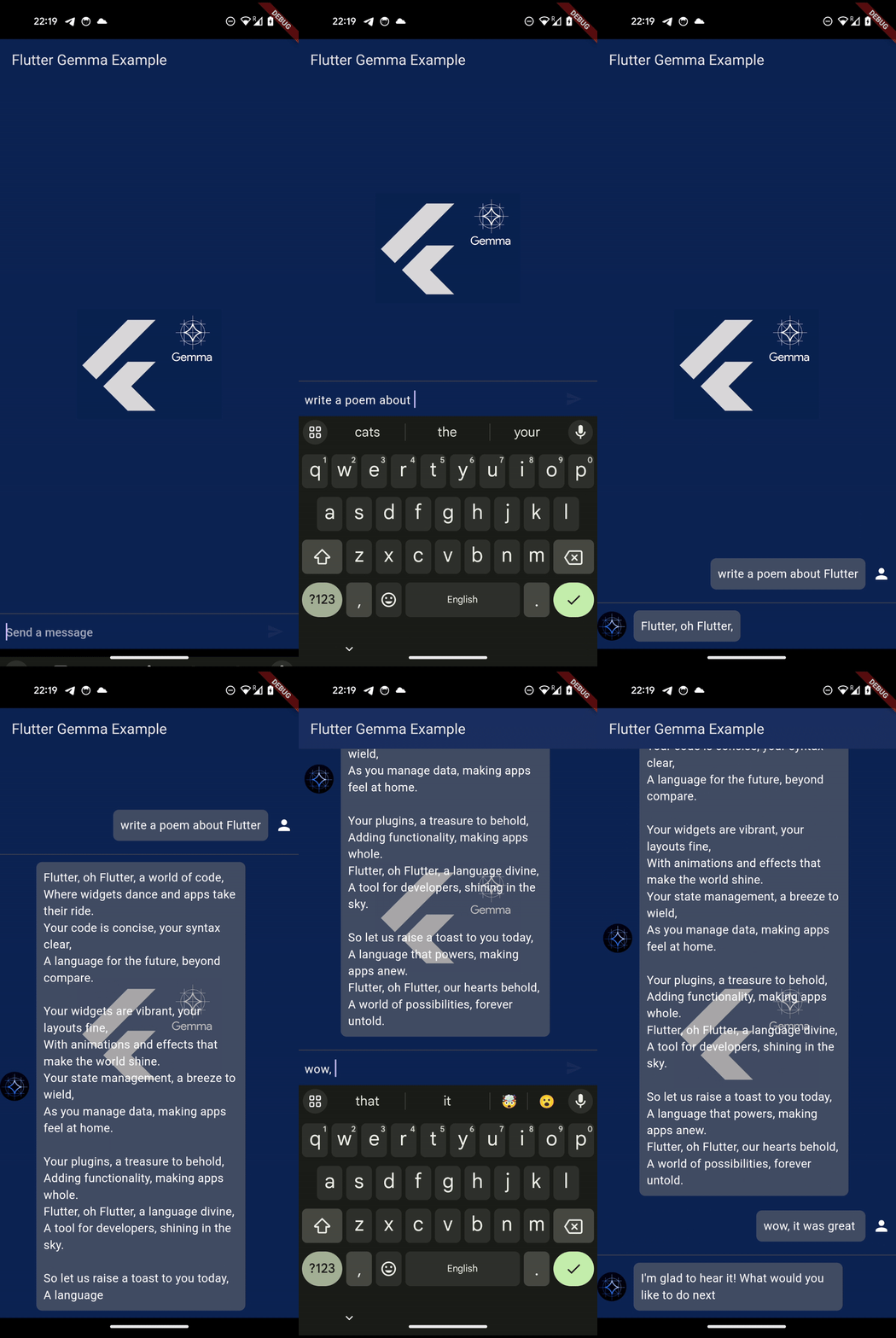
- Local Execution: Run Gemma models directly on user devices for enhanced privacy and offline functionality.
- Platform Support: Compatible with iOS, Android, Web, macOS, Windows, and Linux platforms.
- 🖥️ Desktop Support: Native desktop apps (macOS, Windows, Linux) with GPU acceleration via LiteRT-LM, called directly from Dart through
dart:ffi— no JVM/JRE bundling. See DESKTOP_SUPPORT.md for details. - 🖼️ Multimodal Support: Text + Image input with Gemma3n vision models
- 🎙️ Audio Input: Record and send audio messages with Gemma3n E2B/E4B models (Android, iOS device, Desktop)
- 🛠️ Function Calling: Enable your models to call external functions and integrate with other services (supported by select models)
- 🧠 Thinking Mode: View the reasoning process of DeepSeek and Gemma 4 models with thinking blocks
- 🛑 Stop Generation: Cancel text generation mid-process on Android, iOS, Web, and Desktop
- ⚙️ Backend Switching: Choose between CPU and GPU backends for each model individually in the example app
- 🔍 Advanced Model Filtering: Filter models by features (Multimodal, Function Calls, Thinking) with expandable UI
- 📊 Model Sorting: Sort models alphabetically, by size, or use default order in the example app
- LoRA Support: Efficient fine-tuning and integration of LoRA (Low-Rank Adaptation) weights for tailored AI behavior.
- 📥 Enhanced Downloads: Smart retry logic with exponential backoff for reliable model downloads
- 🔧 Download Reliability: Automatic restart logic for interrupted downloads (resume not supported by HuggingFace CDN)
- 📱 Android Foreground Service: Large downloads (>500MB) automatically use foreground service to bypass 9-minute timeout
- 🔧 Model Replace Policy: Configurable model replacement system (keep/replace) with automatic model switching
- 📊 Text Embeddings: Generate vector embeddings from text using EmbeddingGemma and Gecko models
- 🔧 Unified Model Management: Single system for managing both inference and embedding models with automatic validation
- 💾 Web Persistent Caching: Models persist across browser restarts using Cache API (Web only)
- 🖥️ Desktop rewritten on
dart:ffi— no JVM, no gRPC, no separate server. Native libs auto-fetched at build time. - 🍎 iOS Metal GPU for
.litertlmmodels on physical devices via FFI. - 🐧 Linux GPU (Vulkan/WebGPU) and 🪟 Windows GPU (DirectX 12) ready out of the box.
- 🤖 Android — Kotlin LiteRtLm dependency removed; FFI used exclusively for
.litertlm.
See CHANGELOG.md for the full release history.
Flutter Gemma supports different model file formats, which are grouped into two types based on how chat templates are handled:
.taskfiles: MediaPipe-optimized format for mobile (Android/iOS).litertlmfiles: LiteRT-LM format for Android, iOS, and Desktop platforms
Both formats have identical behavior — MediaPipe handles chat templates internally.
.binfiles: Standard binary format.tflitefiles: LiteRT format (formerly TensorFlow Lite)
Both formats require manual chat template formatting in your code.
Note: The plugin automatically detects the file extension and applies appropriate formatting. When specifying ModelFileType in your code:
- Use
ModelFileType.taskfor.taskand.litertlmfiles (same behavior) - Use
ModelFileType.binaryfor.binand.tflitefiles (same behavior)
| Format | Android | iOS | Web | Desktop | Use Case |
|---|---|---|---|---|---|
.task |
✅ | ✅ | ✅ | ❌ | Older models (Gemma3n, Gemma 3, DeepSeek, Qwen 2.5, Phi-4) |
.litertlm |
✅ | ✅ ¹ | ❌ | ✅ | Newer models (Gemma 4, Qwen3, FastVLM + desktop for all) |
-web.task |
❌ | ❌ | ✅ | ❌ | Web-specific builds (e.g. Gemma 4, Gemma3n) |
.bin |
✅ | ✅ | ✅ | ❌ | Manual chat template formatting required |
.tflite |
✅ | ✅ | ✅ | ✅ | Embeddings only (EmbeddingGemma, Gecko) |
¹ iOS
.litertlmruns on the FFI engine — vision and audio supported on physical devices. The Simulator stays CPU-only because Metal sim has a 256 MB single-allocation cap.
The example app offers a curated list of models, each suited for different tasks. Here's a breakdown of the models available and their capabilities:
| Model Family | Best For | Function Calling | Thinking Mode | Vision | Languages | Size |
|---|---|---|---|---|---|---|
| Gemma 4 E2B | Next-gen multimodal chat — text, image, audio | ✅ | ✅ | ✅ | Multilingual | 2.4GB |
| Gemma 4 E4B | Next-gen multimodal chat — text, image, audio | ✅ | ✅ | ✅ | Multilingual | 4.3GB |
| Gemma3n | On-device multimodal chat and image analysis | ✅ | ❌ | ✅ | Multilingual | 3-6GB |
| FastVLM 0.5B | Fast vision-language inference | ❌ | ❌ | ✅ | Multilingual | 0.5GB |
| Phi-4 Mini | Advanced reasoning and instruction following | ✅ | ❌ | ❌ | Multilingual | 3.9GB |
| DeepSeek R1 | High-performance reasoning and code generation | ✅ | ✅ | ❌ | Multilingual | 1.7GB |
| Qwen3 0.6B | Compact multilingual chat with function calling | ✅ | ✅ | ❌ | Multilingual | 586MB |
| Qwen 2.5 | Strong multilingual chat and instruction following | ✅ | ❌ | ❌ | Multilingual | 0.5-1.6GB |
| Gemma 3 1B | Balanced and efficient text generation | ✅ | ❌ | ❌ | Multilingual | 0.5GB |
| Gemma 3 270M | Ideal for fine-tuning (LoRA) for specific tasks | ❌ | ❌ | ❌ | Multilingual | 0.3GB |
| FunctionGemma 270M | Specialized for function calling on-device | ✅ | ❌ | ❌ | Multilingual | 284MB |
| SmolLM 135M | Ultra-compact, resource-constrained devices | ❌ | ❌ | ❌ | English | 135MB |
When installing models, you need to specify the correct ModelType. Use this table to find the right type for your model:
| Model Family | ModelType | Examples |
|---|---|---|
| Gemma (all variants) | ModelType.gemmaIt |
Gemma 4 E2B/E4B, Gemma 3 1B, Gemma 3 270M, Gemma3n E2B/E4B |
| DeepSeek | ModelType.deepSeek |
DeepSeek R1 |
| Qwen 2.5 | ModelType.qwen |
Qwen 2.5 1.5B, Qwen 2.5 0.5B |
| Qwen 3 | ModelType.qwen3 |
Qwen3 0.6B |
| FunctionGemma | ModelType.functionGemma |
FunctionGemma 270M IT |
| Phi | ModelType.phi |
Phi-4 Mini |
| General | ModelType.general |
FastVLM 0.5B, SmolLM 135M |
Usage Example:
// Gemma models
await FlutterGemma.installModel(modelType: ModelType.gemmaIt)
  .fromNetwork(url).install();

// DeepSeek models
await FlutterGemma.installModel(modelType: ModelType.deepSeek)
  .fromNetwork(url).install();

// Phi-4 (uses general type)
await FlutterGemma.installModel(modelType: ModelType.general)
.fromNetwork(url).install();-
Add
flutter_gemmato yourpubspec.yaml:dependencies: flutter_gemma: latest_version
-
Run
flutter pub getto install.
⚠️ Important: Complete platform-specific setup before using the plugin.
- Download Model and optionally LoRA Weights: Obtain a model from the Supported Models section or HuggingFace
- For multimodal support, download Gemma3n models or Gemma3n in LitertLM format that support vision input
- Optionally, fine-tune a model for your specific use case
- If you have LoRA weights, you can use them to customize the model's behavior without retraining the entire model.
- There is an article that described all approaches
- Platform specific setup:
iOS
- Set minimum iOS version in
Podfile:
platform :ios, '16.0' # Required for MediaPipe GenAI- Enable file sharing in
Info.plist:
<key>UIFileSharingEnabled</key>
<true/>- Add network access description in
Info.plist(for development):
<key>NSLocalNetworkUsageDescription</key>
<string>This app requires local network access for model inference services.</string>- Enable performance optimization in
Info.plist(optional):
<key>CADisableMinimumFrameDurationOnPhone</key>
<true/>- Add memory entitlements in
Runner.entitlements(for large models):
<?xml version="1.0" encoding="UTF-8"?>
<!DOCTYPE plist PUBLIC "-//Apple//DTD PLIST 1.0//EN" "http://www.apple.com/DTDs/PropertyList-1.0.dtd">
<plist version="1.0">
<dict>
	<key>com.apple.developer.kernel.extended-virtual-addressing</key>
	<true/>
	<key>com.apple.developer.kernel.increased-memory-limit</key>
	<true/>
	<key>com.apple.developer.kernel.increased-debugging-memory-limit</key>
	<true/>
</dict>
</plist>- Change the linking type of pods to static in
Podfile:
use_frameworks! :linkage => :static- Setup LiteRT-LM dylib symlinks in
ios/Podfilepost_installblock. LiteRT-LM'sgpu_registrycallsdlopen("libLiteRtMetalAccelerator.dylib")by basename at runtime. Native Assets bundles the dylibs as.frameworks, so each framework also needs a flatlib*.dylibsymlink alongside it (required for GPU on physical iOS devices):
post_install do |installer|
  installer.pods_project.targets.each do |target|
    flutter_additional_ios_build_settings(target)
  end

  # flutter_gemma: create lib*.dylib symlinks next to the bundled
  # .framework so LiteRT-LM's gpu_registry can dlopen by basename.
  installer.aggregate_targets.each do |aggregate_target|
    aggregate_target.user_targets.each do |user_target|
      next if user_target.shell_script_build_phases.any? { |p| p.name == '[flutter_gemma] Setup LiteRT-LM iOS' }
      phase = user_target.new_shell_script_build_phase('[flutter_gemma] Setup LiteRT-LM iOS')
      phase.shell_script = <<~SHELL
        set -e
        FRAMEWORKS="${BUILT_PRODUCTS_DIR}/${PRODUCT_NAME}.app/Frameworks"
        if [ ! -d "${FRAMEWORKS}" ]; then
          echo "[flutter_gemma] no Frameworks/ in ${PRODUCT_NAME}.app — skipping"
          exit 0
        fi
        for base in LiteRtMetalAccelerator GemmaModelConstraintProvider; do
          src="${base}.framework/${base}"
          if [ ! -e "${FRAMEWORKS}/${src}" ]; then
            echo "[flutter_gemma] ${FRAMEWORKS}/${src} missing — Native Assets did not bundle it"
            continue
          fi
          dst="${FRAMEWORKS}/lib${base}.dylib"
          if [ ! -e "${dst}" ]; then
            ln -sf "${src}" "${dst}"
            echo "[flutter_gemma] symlinked lib${base}.dylib -> ${src}"
          fi
        done
      SHELL
    end
  end
end
Android
- If you want to use a GPU to work with the model, you need to add OpenGL support in the manifest.xml. If you plan to use only the CPU, you can skip this step.
Add to 'AndroidManifest.xml' above tag </application>
 <uses-native-library
     android:name="libOpenCL.so"
     android:required="false"/>
 <uses-native-library android:name="libOpenCL-car.so" android:required="false"/>
<uses-native-library android:name="libOpenCL-pixel.so" android:required="false"/>- For release builds with ProGuard/R8 enabled, the plugin automatically includes necessary ProGuard rules. If you encounter issues with
UnsatisfiedLinkErroror missing classes in release builds, ensure yourproguard-rules.proincludes:
# MediaPipe
-keep class com.google.mediapipe.** { *; }
-dontwarn com.google.mediapipe.**

# Protocol Buffers
-keep class com.google.protobuf.** { *; }
-dontwarn com.google.protobuf.**

# RAG functionality
-keep class com.google.ai.edge.localagents.** { *; }
-dontwarn com.google.ai.edge.localagents.**
Web
-
Web currently works only GPU backend models, CPU backend models are not supported by MediaPipe yet
-
Model compatibility: Mobile
.taskmodels often don't work on web. Use web-specific variants:-web.taskor.litertlmfiles. Check model repository for web-compatible versions. -
Add dependencies to
index.htmlfile in web folder
  <script type="module">
  import { FilesetResolver, LlmInference } from 'https://cdn.jsdelivr.net/npm/@mediapipe/tasks-genai@0.10.27';
  window.FilesetResolver = FilesetResolver;
  window.LlmInference = LlmInference;
  </script>
Desktop (macOS, Windows, Linux)
⚠️ Desktop Model FormatDesktop platforms use LiteRT-LM format only (
.litertlmfiles). MediaPipe.taskand.binmodels used on mobile/web are NOT compatible with desktop.
Since 0.14.0 desktop inference and embeddings both use the LiteRT-LM C API via dart:ffi directly in the Dart process — no JVM, no gRPC, no separate server. Native libraries are downloaded by hook/build.dart (Native Assets) at build time and bundled into the app automatically.
| Platform | Architecture | GPU Acceleration | Status |
|---|---|---|---|
| macOS | arm64 (Apple Silicon) | Metal | ✅ Ready |
| macOS | x86_64 (Intel) | - | ❌ Not Supported |
| Windows | x86_64 | DirectX 12 | ✅ Ready |
| Windows | arm64 | - | ❌ Not Supported |
| Linux | x86_64 | Vulkan | ✅ Ready |
| Linux | arm64 | Vulkan | ✅ Ready |
macOS Setup:
The plugin uses Flutter Native Assets to bundle LiteRT-LM dylibs as
.frameworks. The LiteRT-LM runtime, however, calls
dlopen("libLiteRtMetalAccelerator.dylib") by basename at runtime, so each
framework also needs a flat lib*.dylib symlink alongside it. Add this to
your macos/Podfile post_install block:
post_install do |installer|
  installer.pods_project.targets.each do |target|
    flutter_additional_macos_build_settings(target)
  end

  # flutter_gemma: create lib*.dylib symlinks next to the bundled
  # .framework so LiteRT-LM's gpu_registry can dlopen by basename.
  installer.aggregate_targets.each do |aggregate_target|
    aggregate_target.user_targets.each do |user_target|
      next if user_target.shell_script_build_phases.any? { |p| p.name == '[flutter_gemma] Setup LiteRT-LM macOS' }
      phase = user_target.new_shell_script_build_phase('[flutter_gemma] Setup LiteRT-LM macOS')
      phase.shell_script = <<~SHELL
        set -e
        FRAMEWORKS="${BUILT_PRODUCTS_DIR}/${PRODUCT_NAME}.app/Contents/Frameworks"
        if [ ! -d "${FRAMEWORKS}" ]; then
          echo "[flutter_gemma] no Contents/Frameworks/ in ${PRODUCT_NAME}.app — skipping"
          exit 0
        fi
        for base in LiteRtMetalAccelerator GemmaModelConstraintProvider; do
          src="${base}.framework/Versions/Current/${base}"
          if [ ! -e "${FRAMEWORKS}/${src}" ]; then
            echo "[flutter_gemma] ${FRAMEWORKS}/${src} missing — Native Assets did not bundle it"
            continue
          fi
          dst="${FRAMEWORKS}/lib${base}.dylib"
          if [ ! -e "${dst}" ]; then
            ln -sf "${src}" "${dst}"
            echo "[flutter_gemma] symlinked lib${base}.dylib -> ${src}"
          fi
        done
      SHELL
    end
  end
end
Add to macos/Runner/DebugProfile.entitlements and Release.entitlements:
<key>com.apple.security.cs.disable-library-validation</key>
<true/>
Windows Setup:
No additional configuration required. hook/build.dart (Native Assets) downloads LiteRtLm.dll + companion DLLs + the DXC runtime (dxil.dll, dxcompiler.dll v1.9.2602) from the GitHub release on first build, verifies them via SHA256, and bundles them next to your app.exe. End users need the Microsoft Visual C++ Redistributable 2019+ (download) — most modern Windows 10/11 systems already have it.
Linux Setup:
No additional configuration required. Build dependencies:
sudo apt install clang cmake ninja-build libgtk-3-devFor GPU acceleration, ensure Vulkan drivers are installed:
sudo apt install vulkan-tools libvulkan1📚 Full Desktop Documentation →
⚠️ Important: Complete platform setup before running this code.
import 'package:flutter_gemma/flutter_gemma.dart';

// Install model
await FlutterGemma.installModel(
  modelType: ModelType.gemmaIt,
).fromNetwork(
  'https://huggingface.co/google/gemma-3-2b-it/resolve/main/gemma-3-2b-it-gpu-int8.task',
  token: 'your_hf_token',
).withProgress((progress) {
  print('Downloading: ${progress.percentage}%');
}).install();// Create model with specific configuration
final model = await FlutterGemma.getActiveModel(
maxTokens: 2048,
preferredBackend: PreferredBackend.gpu,
);
// Use model
final chat = await model.createChat();
await chat.addQueryChunk(Message.text(
text: 'Explain quantum computing',
isUser: true,
));
final response = await chat.generateChatResponse();
// Cleanup
await model.close();Control model behavior with a system-level instruction:
final chat = await model.createChat(
  systemInstruction: 'You are a concise assistant. Always respond in bullet points.',
);
Platform support:
- Android
.litertlm/ Desktop: Passed natively viaConversationConfig.systemInstruction - Android
.task/ iOS / Web: Prepended to first user message as fallback
// Install once
await FlutterGemma.installModel(modelType: ModelType.gemmaIt)
  .fromNetwork(url).install();

// Create multiple instances
final quickModel = await FlutterGemma.getActiveModel(maxTokens: 512);
final deepModel = await FlutterGemma.getActiveModel(maxTokens: 4096);
// Both use the SAME model file!// Network
await FlutterGemma.installModel(modelType: ModelType.gemmaIt)
.fromNetwork('https://example.com/model.task', token: 'optional')
.install();
// Flutter assets
await FlutterGemma.installModel(modelType: ModelType.gemmaIt)
.fromAsset('assets/models/model.task')
.install();
// Native bundle
await FlutterGemma.installModel(modelType: ModelType.gemmaIt)
.fromBundled('model.task')
.install();
// External file
await FlutterGemma.installModel(modelType: ModelType.gemmaIt)
.fromFile('/path/to/model.task')
.install();Benefits:
- ✅ Cleaner, more intuitive
- ✅ Type-safe ModelSource
- ✅ Automatic active model management
- ✅ Install once, create many instances
Usage:
await FlutterGemma.installModel(modelType: ModelType.gemmaIt)
  .fromNetwork(url).install();
final model = await FlutterGemma.getActiveModel(maxTokens: 2048);
⚠️ DEPRECATED: This API is maintained for backwards compatibility only. New projects should use the Modern API above.
Still works but requires manual ModelType specification:
final model = await FlutterGemmaPlugin.instance.createModel(
  modelType: ModelType.gemmaIt,  // Must specify every time
  maxTokens: 2048,
);Add to your main.dart:
import 'package:flutter_gemma/core/api/flutter_gemma.dart';

void main() {
  WidgetsFlutterBinding.ensureInitialized();

  // Optional: Initialize with HuggingFace token for gated models
  FlutterGemma.initialize(
    huggingFaceToken: const String.fromEnvironment('HUGGINGFACE_TOKEN'),
    maxDownloadRetries: 10,
  );

  runApp(MyApp());
}
Configuration Options:
huggingFaceToken: Authentication token for gated models (Gemma3n, EmbeddingGemma)maxDownloadRetries: Number of retry attempts for failed downloads (default: 10)webStorageMode: (Web only) Storage strategy for model files (default:cacheApi)WebStorageMode.cacheApi: Cache API with Blob URLs (for models <2GB)WebStorageMode.streaming: OPFS streaming (for large models >2GB like E4B, 7B)WebStorageMode.none: No caching (ephemeral mode for testing)
Example:
FlutterGemma.initialize(
  huggingFaceToken: const String.fromEnvironment('HUGGINGFACE_TOKEN'),
  maxDownloadRetries: 10,
  webStorageMode: WebStorageMode.streaming,  // For large models (>2GB)
);
Next Steps:
- 📖 Authentication Setup - Configure tokens for gated models
- 📦 Model Sources - Learn about different model sources
- 🌐 Platform Support - Web vs Mobile differences
- 🔄 Migration Guide - Upgrade from Legacy API
- 📚 Legacy API Documentation - For backwards compatibility
Many models require authentication to download from HuggingFace. Never commit tokens to version control.
This is the most secure way to handle tokens in development and production.
Step 1: Create config template file config.json.example:
{
  "HUGGINGFACE_TOKEN": ""
}
Step 2: Copy and add your token:
cp config.json.example config.json
# Edit config.json and add your token from https://huggingface.co/settings/tokens
Step 3: Add to .gitignore:
# Never commit tokens!
config.json
Step 4: Run with config:
flutter run --dart-define-from-file=config.jsonStep 5: Access in code:
void main() {
  WidgetsFlutterBinding.ensureInitialized();

  // Read from environment (populated by --dart-define-from-file)
  const token = String.fromEnvironment('HUGGINGFACE_TOKEN');

  // Initialize with token (optional if all models are public)
  FlutterGemma.initialize(
    huggingFaceToken: token.isNotEmpty ? token : null,
  );

  runApp(MyApp());
}export HUGGINGFACE_TOKEN=hf_your_token_here
flutter run --dart-define=HUGGINGFACE_TOKEN=$HUGGINGFACE_TOKEN// Pass token directly for specific downloads
await FlutterGemma.installModel(
modelType: ModelType.gemmaIt,
)
.fromNetwork(
'https://huggingface.co/google/gemma-3n-E2B-it-litert-preview/resolve/main/gemma-3n-E2B-it-int4.task',
token: 'hf_your_token_here', // ⚠️ Not recommended - use config.json
)
.install();Common gated models:
- ✅ Gemma3n (E2B, E4B) -
google/repos are gated - ✅ Gemma 3 1B -
litert-community/requires access - ✅ Gemma 3 270M -
litert-community/requires access - ✅ EmbeddingGemma -
litert-community/requires access
Public models (no auth needed):
- ❌ DeepSeek, Qwen3, Qwen 2.5, SmolLM, Phi-4, FastVLM - Public repos
Get your token: https://huggingface.co/settings/tokens
Grant access to gated repos: Visit model page → "Request Access" button
Flutter Gemma supports multiple model sources with different capabilities:
| Source Type | Platform | Progress | Resume | Authentication | Use Case |
|---|---|---|---|---|---|
| NetworkSource | All | ✅ Detailed | ✅ Supported | HuggingFace, CDNs, private servers | |
| AssetSource | All | ❌ No | ❌ N/A | Models bundled in app assets | |
| BundledSource | All | ❌ No | ❌ N/A | Native platform resources | |
| FileSource | Mobile only | ❌ No | ❌ N/A | User-selected files (file picker) |
Downloads models from HTTP/HTTPS URLs with full progress tracking and authentication.
Features:
- ✅ Progress tracking (0-100%)
⚠️ Resume after interruption (server-dependent, not supported by HuggingFace CDN)- ✅ HuggingFace authentication
- ✅ Smart retry logic with exponential backoff
- ✅ Background downloads on mobile
- ✅ Cancellable downloads with CancelToken
- ✅ Android foreground service for large downloads (>500MB)
Example:
// Public model
await FlutterGemma.installModel(
  modelType: ModelType.gemmaIt,
)
  .fromNetwork('https://example.com/model.bin')
  .withProgress((progress) => print('$progress%'))
  .install();

// Private model with authentication
await FlutterGemma.installModel(
  modelType: ModelType.gemmaIt,
)
  .fromNetwork(
    'https://huggingface.co/google/gemma-3n-E2B-it-litert-preview/resolve/main/model.task',
    token: 'hf_...',  // Or use FlutterGemma.initialize(huggingFaceToken: ...)
  )
  .withProgress((progress) => setState(() => _progress = progress))
  .install();
Android Foreground Service (Large Downloads):
Android has a 9-minute background execution limit. For large models (>500MB), you can use foreground service mode which shows a notification but bypasses this timeout:
// Auto-detect based on file size (>500MB = foreground) - DEFAULT
await FlutterGemma.installModel(modelType: ModelType.gemmaIt)
  .fromNetwork(url)  // foreground: null (auto-detect)
  .install();

// Force foreground mode (always show notification)
await FlutterGemma.installModel(modelType: ModelType.gemmaIt)
  .fromNetwork(url, foreground: true)
  .install();

// Force background mode (may fail for large files)
await FlutterGemma.installModel(modelType: ModelType.gemmaIt)
  .fromNetwork(url, foreground: false)
  .install();
Foreground Parameter:
null(default): Auto-detect based on file size. Files >500MB use foreground service.true: Always use foreground service (shows notification, no timeout)false: Never use foreground service (subject to 9-minute timeout)
Note: iOS uses native URLSession which handles long downloads automatically - no foreground service needed.
Cancelling Downloads:
Use CancelToken to cancel downloads in progress:
import 'package:flutter_gemma/core/model_management/cancel_token.dart';

// Create cancel token
final cancelToken = CancelToken();

// Start download with cancel token
final future = FlutterGemma.installModel(
  modelType: ModelType.gemmaIt,
)
  .fromNetwork(url)
  .withCancelToken(cancelToken)  // ← Pass cancel token via builder
  .withProgress((progress) => print('Progress: $progress%'))
  .install();

// Cancel download from another part of your code
// (e.g., user pressed cancel button)
cancelToken.cancel('User cancelled download');

// Handle cancellation
try {
  await future;
  print('Download completed');
} catch (e) {
  if (CancelToken.isCancel(e)) {
    print('Download was cancelled by user');
  } else {
    print('Download failed: $e');
  }
}

// Check if cancelled
if (cancelToken.isCancelled) {
  print('Reason: ${cancelToken.cancelReason}');
}
CancelToken Features:
- ✅ Non-breaking: Optional parameter, existing code works without changes
- ✅ Works with network downloads (inference + embedding models)
- ✅ Cancels ALL files in multi-file downloads (embedding: model + tokenizer)
- ✅ Platform-independent (Mobile + Web)
- ✅ Throws
DownloadCancelledExceptionfor proper error handling - ✅ Thread-safe cancellation
Copies models from Flutter assets (declared in pubspec.yaml).
Features:
- ✅ No network required
- ✅ Fast installation (local copy)
⚠️ Increases app size significantly- ✅ Works offline
Example:
// 1. Add to pubspec.yaml
// assets:
//   - models/gemma-2b-it.bin

// 2. Install from asset
await FlutterGemma.installModel(
  modelType: ModelType.gemmaIt,
)
  .fromAsset('models/gemma-2b-it.bin')
.install();Production-Ready Offline Models: Include small models directly in your app bundle for instant availability without downloads.
Use Cases:
- ✅ Offline-first applications (works without internet from first launch)
- ✅ Small models (Gemma 3 270M ~300MB)
- ✅ Core features requiring guaranteed availability
⚠️ Not for large models (increases app size significantly)
Platform Setup:
Android (android/app/src/main/assets/models/)
# Place your model file
android/app/src/main/assets/models/gemma-3-270m-it.task
iOS (Add to Xcode project)
- Drag model file into Xcode project
- Check "Copy items if needed"
- Add to target membership
Web (Static files in web/ directory)
# Place model files in web/ directory
example/web/gemma-3-270m-it.task

# Files are automatically copied to build/web/ during production build
flutter build web- Production only: Bundled resources work ONLY in production builds (
flutter build web) - Debug mode: Files in
web/are NOT served byflutter rundev server - For development: Use
NetworkSourceorAssetSourceinstead
Features:
- ✅ Zero network dependency
- ✅ No installation delay
- ✅ No storage permission needed
- ✅ Direct path usage (no file copying)
Example:
await FlutterGemma.installModel(
  modelType: ModelType.gemmaIt,
)
  .fromBundled('gemma-3-270m-it.task')
  .install();
App Size Impact:
- SmolLM 135M: ~135MB
- Gemma 3 270M: ~300MB
- Qwen3 0.6B: ~586MB
- Consider hosting large models for download instead
References external files (e.g., user-selected via file picker).
Features:
- ✅ No copying (references original file)
- ✅ Protected from cleanup
- ❌ Web not supported (no local file system)
Example:
// Mobile only - after user selects file with file_picker
final path = '/data/user/0/com.app/files/model.task';
await FlutterGemma.installModel(
  modelType: ModelType.gemmaIt,
)
  .fromFile(path)
  .install();
Important: On web, FileSource only works with URLs or asset paths, not local file system paths.
If you're upgrading from the Legacy API, here are common migration patterns:
| Legacy API | Modern API |
|---|---|
// Network download
final spec = MobileModelManager.createInferenceSpec(
  name: 'model.bin',
  modelUrl: 'https://example.com/model.bin',
);

await FlutterGemmaPlugin.instance.modelManager
  .downloadModelWithProgress(spec, token: token)
  .listen((progress) {
    print('${progress.overallProgress}%');
}); |
// Network download
await FlutterGemma.installModel(
  modelType: ModelType.gemmaIt,
)
  .fromNetwork(
    'https://example.com/model.bin',
    token: token,
  )
  .withProgress((progress) {
    print('$progress%');
  })
.install(); |
// From assets
await modelManager.installModelFromAssetWithProgress(
  'model.bin',
  loraPath: 'lora.bin',
).listen((progress) {
  print('$progress%');
}); |
// From assets
await FlutterGemma.installModel(
  modelType: ModelType.gemmaIt,
)
  .fromAsset('model.bin')
  .withProgress((progress) {
    print('$progress%');
  })
  .install();

// LoRA weights can be installed with the model
await FlutterGemma.installModel(
  modelType: ModelType.gemmaIt,
)
  .fromAsset('model.bin')
  .withLoraFromAsset('lora.bin')
.install(); |
| Legacy API | Modern API |
|---|---|
final spec = MobileModelManager.createInferenceSpec(
  name: 'model.bin',
  modelUrl: url,
);

final isInstalled = await FlutterGemmaPlugin
  .instance.modelManager
.isModelInstalled(spec); |
final isInstalled = await FlutterGemma
.isModelInstalled('model.bin'); |
- ✅ Simpler imports: Use
package:flutter_gemma/core/api/flutter_gemma.dart - ✅ Builder pattern: Chain methods for cleaner code
- ✅ Callback-based progress: Simpler than streams for most cases
- ✅ Type-safe sources: Compile-time validation of source types
⚠️ Breaking change: Progress values are nowint(0-100) instead ofDownloadProgressobject⚠️ Separate files: Model and LoRA weights installed independently
Modern API (Recommended):
// Create model with runtime configuration
final inferenceModel = await FlutterGemma.getActiveModel(
  maxTokens: 2048,
  preferredBackend: PreferredBackend.gpu,
);

final chat = await inferenceModel.createChat();
await chat.addQueryChunk(Message.text(text: 'Hello!', isUser: true));
final response = await chat.generateChatResponse();
Legacy API (Still supported):
// Works with both Legacy and Modern installation methods
final inferenceModel = await FlutterGemmaPlugin.instance.createModel(
  modelType: ModelType.gemmaIt,
  preferredBackend: PreferredBackend.gpu,
  maxTokens: 2048,
);

final chat = await inferenceModel.createChat();
await chat.addQueryChunk(Message.text(text: 'Hello!', isUser: true));
final response = await chat.generateChatResponse();The pre-Modern stream-based API (FlutterGemmaPlugin.instance.modelManager, installModelFromAsset, downloadModelFromNetworkWithProgress, etc.) is still supported but deprecated. New projects should use the Modern API above.
📚 Full Legacy API reference: docs/LEGACY_API.md
The plugin now supports different types of messages:
// Text only
final textMessage = Message.text(text: "Hello!", isUser: true);

// Text + Image
final multimodalMessage = Message.withImage(
  text: "What's in this image?",
  imageBytes: imageBytes,
  isUser: true,
);

// Image only
final imageMessage = Message.imageOnly(imageBytes: imageBytes, isUser: true);

// Tool response (for function calling)
final toolMessage = Message.toolResponse(
  toolName: 'change_background_color',
  response: {'status': 'success', 'color': 'blue'},
);

// System information message
final systemMessage = Message.systemInfo(text: "Function completed successfully");

// Thinking content (for DeepSeek models)
final thinkingMessage = Message.thinking(text: "Let me analyze this problem...");

// Check if message contains image
if (message.hasImage) {
  print('This message contains an image');
}

// Create a copy of message
final copiedMessage = message.copyWith(text: "Updated text");The model can return different types of responses depending on capabilities:
// Handle different response types
chat.generateChatResponseAsync().listen((response) {
  if (response is TextResponse) {
    // Regular text token from the model
    print('Text token: ${response.token}');
    // Use response.token to update your UI incrementally

  } else if (response is FunctionCallResponse) {
    // Model wants to call a function (Gemma3n, DeepSeek, Qwen2.5)
    print('Function: ${response.name}');
    print('Arguments: ${response.args}');

    // Execute the function and send response back
    _handleFunctionCall(response);
  } else if (response is ThinkingResponse) {
    // Model's reasoning process (DeepSeek models only)
    print('Thinking: ${response.content}');

    // Show thinking process in UI
    _showThinkingBubble(response.content);
  }
});
Response Types:
TextResponse: Contains a text token (response.token) for regular model outputFunctionCallResponse: Contains function name (response.name) and arguments (response.args) when the model wants to call a functionThinkingResponse: Contains the model's reasoning process (response.content) for DeepSeek models with thinking mode enabled
| Model | Size | Desktop | Mobile | Web |
|---|---|---|---|---|
| Gemma 4 E2B | 2.4GB | ✅ | ✅ | ✅ |
| Gemma 4 E4B | 4.3GB | ✅ | ✅ | ✅ |
| Gemma3n E2B | 3.1GB | ✅ | ✅ | ✅ |
| Gemma3n E4B | 6.5GB | ✅ | ✅ | ✅ |
| FastVLM 0.5B | 0.5GB | ✅ | ❌ | ❌ |
| Gemma-3 1B | 0.5GB | ✅ | ✅ | ✅ |
| Gemma 3 270M | 0.3GB | ✅ | ✅ | ✅ |
| FunctionGemma 270M | 284MB | ✅ | ✅ | ❌ |
| Qwen3 0.6B | 586MB | ✅ | ✅ | ✅ |
| Qwen 2.5 1.5B | 1.6GB | ✅ | ✅ | ❌ |
| Qwen 2.5 0.5B | 0.5GB | ❌ | ✅ | ❌ |
| SmolLM 135M | 135MB | ❌ | ✅ | ❌ |
| Phi-4 Mini | 3.9GB | ✅ | ✅ | ✅ |
| DeepSeek R1 | 1.7GB | ❌ | ✅ | ❌ |
All embedding models generate 768-dimensional vectors. The numbers in names (64/256/512/1024/2048) indicate maximum input sequence length in tokens, not embedding dimension.
| Model | Parameters | Dimensions | Max Seq Length | Size | Best For | Auth Required |
|---|---|---|---|---|---|---|
| Gecko 64 | 110M | 768D | 64 tokens | 110MB | Short queries, real-time search | ❌ |
| Gecko 256 | 110M | 768D | 256 tokens | 114MB | Balanced speed/accuracy | ❌ |
| Gecko 512 | 110M | 768D | 512 tokens | 116MB | Medium context documents | ❌ |
| EmbeddingGemma 256 | 300M | 768D | 256 tokens | 179MB | High accuracy, short context | ✅ |
| EmbeddingGemma 512 | 300M | 768D | 512 tokens | 179MB | High accuracy, medium context | ✅ |
| EmbeddingGemma 1024 | 300M | 768D | 1024 tokens | 183MB | Long documents, detailed content | ✅ |
| EmbeddingGemma 2048 | 300M | 768D | 2048 tokens | 196MB | Very long documents | ✅ |
Performance Comparison (Android Pixel 8 with GPU acceleration):
- Gecko 64: ~109ms/doc embedding, 130ms search (⚡ fastest - 2.6x faster than EmbeddingGemma)
- EmbeddingGemma 256: ~286ms/doc embedding, 342ms search (🎯 more accurate - 300M vs 110M params)
Use Cases:
- ✅ Gecko 64: Real-time search, mobile apps, short queries (≤64 tokens), fast inference
- ✅ Gecko 256/512: Balanced use cases, general-purpose embeddings, good speed/quality tradeoff
- ✅ EmbeddingGemma 256/512: High-quality embeddings, semantic search, better accuracy
- ✅ EmbeddingGemma 1024/2048: Long documents, detailed content, research papers, articles
Function calling is currently supported by the following models:
- Gemma 4 (E2B, E4B) - Full function calling support
- Gemma3n (E2B, E4B) - Full function calling support
- Gemma 3 1B - Function calling support
- FunctionGemma 270M - Google's specialized function calling model
- DeepSeek R1 - Function calling + thinking mode support
- Qwen models (0.5B, 0.6B, 1.5B) - Full function calling support
- Phi-4 Mini - Advanced reasoning with function calling support
- Gemma 3 270M - Text generation only
- SmolLM 135M - Text generation only
- FastVLM 0.5B - Vision model, no function calling
Important Notes:
- When using unsupported models with tools, the plugin will log a warning and ignore the tools
- Models will work normally for text generation even if function calling is not supported
- Check the
supportsFunctionCallsproperty in your model configuration
| Feature | Android | iOS | Web | Desktop | Notes |
|---|---|---|---|---|---|
| Text Generation | ✅ Full | ✅ Full | ✅ Full | ✅ Full | All models supported |
| Image Input (Multimodal) | ✅ Full | ✅ Full | ✅ Full | macOS: model hallucinates | |
| Audio Input | ✅ Full | ✅ Full | ❌ Not supported | ✅ Full | Gemma3n E2B/E4B |
| Function Calling | ✅ Full | ✅ Full | ✅ Full | ❌ Not supported | LiteRT-LM limitation |
| Thinking Mode | ✅ Full | ✅ Full | ✅ Full | ✅ Full | DeepSeek & Gemma 4 |
| Stop Generation | ✅ Full | ✅ Full | ✅ Full | ✅ Full | Cancel mid-process |
| GPU Acceleration | ✅ Full | ✅ Full | ✅ Full | macOS GPU broken | |
| NPU Acceleration | ✅ Full | ❌ Not supported | ❌ Not supported | ❌ Not supported | Android only (.litertlm) |
| CPU Backend | ✅ Full | ✅ Full | ❌ Not supported | ✅ Full | MediaPipe limitation |
| Streaming Responses | ✅ Full | ✅ Full | ✅ Full | ✅ Full | Real-time generation |
| LoRA Support | ✅ Full | ✅ Full | ✅ Full | ❌ Not supported | LiteRT-LM limitation |
| Text Embeddings | ✅ Full | ✅ Full | ✅ Full | ✅ Full | EmbeddingGemma, Gecko |
| VectorStore (RAG) | ✅ SQLite | ✅ SQLite | ✅ SQLite WASM | ✅ SQLite | Semantic search, RAG |
| File Downloads | ✅ Background | ✅ Background | ✅ In-memory | ✅ Background | Platform-specific |
| Asset Loading | ✅ Full | ✅ Full | ✅ Full | ❌ Not supported | Flutter assets N/A |
| Bundled Resources | ✅ Full | ✅ Full | ✅ Full | ❌ Not supported | Native bundles only |
| External Files (FileSource) | ✅ Full | ✅ Full | ❌ Not supported | ✅ Full | No local FS on web |
- Required for gated models: Gemma3n, Gemma 3 1B/270M, EmbeddingGemma
- Configuration: Use
FlutterGemma.initialize(huggingFaceToken: '...')or pass token per-download - Storage: Tokens stored in browser memory (not localStorage)
- Downloads: Creates blob URLs in browser memory (no actual files)
- Storage: IndexedDB via
WebFileSystemService - FileSource: Only works with HTTP/HTTPS URLs or
assets/paths - Local file paths: ❌ Not supported (browser security restriction)
Three Storage Modes:
1. Cache API Mode (default, WebStorageMode.cacheApi):
- Uses browser Cache API with Blob URLs
- Models persist across browser restarts
- Best for models <2GB
2. Streaming Mode (WebStorageMode.streaming):
- Uses OPFS with ReadableStream
- Bypasses browser 2GB ArrayBuffer limit
- Required for large models (E4B 4GB+, 7B, 27B)
- Requires Chrome 86+, Edge 86+, Safari 15.2+
3. Ephemeral Mode (WebStorageMode.none):
- Models stored in memory only
- Cleared when browser closes
- For testing/demos
// Default: Cache API for small models
FlutterGemma.initialize(webStorageMode: WebStorageMode.cacheApi);

// Streaming for large models (>2GB)
FlutterGemma.initialize(webStorageMode: WebStorageMode.streaming);

// Check if streaming is supported
final supported = await FlutterGemma.isStreamingSupported();- GPU only: See PreferredBackend Options table above
- Required for custom servers: Enable CORS headers on your model hosting server
- Firebase Storage: See CORS configuration docs
- HuggingFace: CORS already configured correctly
- Large models: May hit browser memory limits (2GB typical)
- Recommended: Use smaller models (1B-2B) for web platform
- Best models for web:
- Gemma 3 270M (300MB)
- Gemma 3 1B (500MB-1GB)
- Gemma3n E2B (3GB) - requires 6GB+ device RAM
| Browser | Max Model Size | Notes |
|---|---|---|
| Chrome/Firefox | ~2 GB | ArrayBuffer limit |
| Safari | ~50 MB |
- GPU Support: Requires OpenGL libraries in
AndroidManifest.xml - ProGuard: Automatic rules included for release builds
- Storage: Local file system in app documents directory
- Minimum version: iOS 16.0 required for MediaPipe GenAI
- Memory entitlements: Required for large models (see Setup section)
- Linking: Static linking required (
use_frameworks! :linkage => :static) - Storage: Local file system in app documents directory
- Embedding models: Supported via TensorFlowLiteC — no extra Podfile configuration needed
The full and complete example you can find in example folder
- Model Size: Larger models (such as 7b and 7b-it) might be too resource-intensive for on-device inference.
- Function Calling Support: Gemma3n and DeepSeek models support function calling. Other models will ignore tools and show a warning.
- Thinking Mode: Only DeepSeek models support thinking mode. Enable with
isThinking: trueandmodelType: ModelType.deepSeek. - Multimodal Models: Gemma3n models with vision support require more memory and are recommended for devices with 8GB+ RAM.
- iOS Memory Requirements: Large models require memory entitlements in
Runner.entitlementsand minimum iOS 16.0. - LoRA Weights: They provide efficient customization without the need for full model retraining.
- Development vs. Production: For production apps, do not embed the model or LoRA weights within your assets. Instead, load them once and store them securely on the device or via a network drive.
- Web Models: Currently, Web support is available only for GPU backend models. Multimodal support is fully implemented.
- Image Formats: The plugin automatically handles common image formats (JPEG, PNG, etc.) when using
Message.withImage().
Multimodal Issues:
- Ensure you're using a multimodal model (Gemma3n E2B/E4B)
- Set
supportImage: truewhen creating model and chat - Check device memory - multimodal models require more RAM
Performance:
- Use GPU backend for better performance with multimodal models
- Consider using CPU backend for text-only models on lower-end devices
Memory Issues:
- iOS: Ensure
Runner.entitlementscontains memory entitlements (see iOS setup) - iOS: Set minimum platform to iOS 16.0 in Podfile
- Reduce
maxTokensif experiencing memory issues - Use smaller models (1B-2B parameters) for devices with <6GB RAM
- Close sessions and models when not needed
- Monitor token usage with
sizeInTokens()
iOS Build Issues:
- Ensure minimum iOS version is set to 16.0 in Podfile
- Use static linking:
use_frameworks! :linkage => :static - Clean and reinstall pods:
cd ios && pod install --repo-update - Check that all required entitlements are in
Runner.entitlements
For advanced users who need to manually process model responses, the ModelThinkingFilter class provides utilities for cleaning model outputs:
import 'package:flutter_gemma/core/extensions.dart';

// Clean response based on model type
String cleanedResponse = ModelThinkingFilter.cleanResponse(
  rawResponse,
  ModelType.deepSeek
);

// The filter automatically removes model-specific tokens like:
// - <end_of_turn> tags (Gemma models)
// - <think>...</think> blocks (DeepSeek)
// - <|channel>thought\n...<channel|> blocks (Gemma 4 E2B/E4B)
// - Extra whitespace and formatting
This is automatically handled by the chat API, but can be useful for custom inference implementations.
If you find Flutter Gemma useful and want to support its development, consider buying me a coffee! Your support helps me:
- 🔧 Maintain and improve the plugin
- 📚 Keep documentation up-to-date
- 🐛 Fix bugs and resolve issues faster
- ✨ Add new features and model support
- 🧪 Test on more devices and platforms
Every contribution, no matter how small, makes a difference. Thank you for your support! 💙