



- Overview
- Created by
- 💖 Support the Project
- 💬 Community & Support
- Supported Artifacts
- Installation
- How to Use Crow Eye
- Analysis Types
- Search and Export Features
- Supported Artifacts and Functionality
- Documentation & Contribution
- Technical Notes
- Screenshots
- Official Website
- Correlation Engine
- 👁️ Eye — Forensics AI Assistant
- Coming Soon Features
- Development Credits
Crow Eye is a comprehensive Windows forensics tool designed to collect, parse, and analyze various Windows artifacts through a user-friendly GUI interface. The tool focuses on extracting key forensic evidence from Windows systems to support digital investigations.
Ghassan Elsman
Crow-Eye is a free, open-source Windows Forensics Engine built and maintained solely by one person. Every parser, every correlation rule, every new artifact supported represents hours of deep research, reverse engineering raw hexadecimal binary structures, and intensive engineering work done independently.
By supporting Crow-Eye, you are not just donating to a tool. You are directly funding the future of open and accessible digital forensics. Your contribution keeps the research going, accelerates the development of new artifact parsers, and ensures that professional-grade forensics remains free for every investigator, student, and curious person in the world regardless of their budget or background.
Every contribution, no matter the size, makes a real difference to an independent developer who chose to build something meaningful over something profitable.
Support Crow-Eye by choosing a sponsorship tier that fits your needs:
- 💾 Bit Tracer ($10/mo): Official GitHub Sponsor badge and your name in
SPONSORS.md. - 🧩 Byte Parser ($25/mo): Your name/logo in
README.mdand "Verified Supporter" role. - 🐝 Hive Master ($50/mo): Engineering deep-dives, strategy discussions, and early access.
- ⚔️ Kernel Commander ($250/mo): Case-specific support and strategic roadmap influence.
See SPONSORS.md for full details on each tier.
Join our growing community to get faster support, share your investigation techniques, and discuss the future of Crow-eye!
- Faster Support: Get direct help from the developer and experienced users.
- Discussions: Share your forensic findings and discuss new artifact research.
- Announcements: Stay updated on the latest releases and experimental features.
Advancing Windows Forensics
Crow-Eye is more than software — it's an open research platform accelerating the entire field of Windows forensics.
The project focuses on:
- Publishing detailed documentation on internal artifact structures
- Sharing correlation logic and methodologies
- Enabling peer review, transparency, and academic collaboration
- Contributing to the forensics community's collective knowledge
| Artifact | Live | Offline | Data Extracted |
|---|---|---|---|
| Prefetch | Yes | Yes | Execution history, run count, timestamps |
| Registry | Yes | Yes | Auto-run, UserAssist, ShimCache, BAM, networks, time zone |
| Jump Lists & LNK | Yes | Yes | File access, paths, timestamps, metadata |
| Event Logs | Yes | Yes | System, Security, Application events |
| Amcache | Yes | Yes | App execution, install time, SHA1, file paths |
| ShimCache | Yes | Yes | Executed apps, last modified, size |
| ShellBags | Yes | Yes | Folder views, access history, timestamps |
| MRU & RecentDocs | Yes | Yes | Typed paths, Open/Save history, recent files |
| MFT Parser | Yes | Yes | File system metadata, deleted files, timestamps, attribute analysis |
| USN Journal | Yes | Yes | Detailed file system changes (create/modify/delete/rename) with timestamps |
| Recycle Bin | Yes | Yes | Deleted file names, paths, deletion time |
| SRUM | Yes | Yes | App resource usage, network, energy, execution |
| Disks & Partitions | Yes | Yes | Physical disk tree view, partition layout, hidden/unmounted partition detection |
These will be installed automatically when you run Crow Eye:
- Python 3.12.4
- Node.js & npm (Required for Timeline Visualization; please ensure they are installed on your machine)
- Required packages:
- PyQt5
- python-registry
- pywin32
- pandas
- streamlit
- altair
- olefile
- windowsprefetch
- sqlite3
- colorama
- setuptools
- Run Crow Eye as administrator to ensure access to all system artifacts:
python Crow_Eye.py
- The main interface will appear, showing different tabs for various forensic artifacts.
- Create your case and start the analysis.
Crow Eye offers three primary modes of operation for forensic investigations:
Crow-Claw is our specialized acquisition engine designed to collect and preserve Windows artifacts from live systems or mounted images.
- Selective Collection: Choose specific artifact categories (Registry, Event Logs, File System) or collect everything.
- Deep Scanning: Automatically walks through directories and subdirectories to identify forensic traces.
- Secure Preservation: Artifacts are collected into a structured case directory, maintaining forensic integrity for later analysis.
The Offline Importer allows investigators to analyze artifacts collected from any source without needing a live connection to the target system.
- Universal Input: Input a complete directory of artifacts or select individual files for analysis.
- Smart Identification (SCAN): Hit SCAN to walk through the source data; Crow-Eye automatically identifies and indexes every supported artifact type using forensic signatures. This updates the case's Scan Index metadata without moving any files.
- Forensic Preservation (COLLECT): After scanning, you can hit 📦 Collect Artifacts to physically copy the identified files into your Case's
live_acquisitionfolder, organizing them by type (e.g., Registry, Prefetch, Event Logs). - Granular Control (PARSE): Use the Parse Artifact window to review identified items. Every tab displays all files of a specific type (e.g., AMCACHE, EVTX, PREFETCH), allowing you to select specific files or the entire set for parsing into the forensic database.
| Feature | 🔍 SCAN | 📦 COLLECT ARTIFACTS |
|---|---|---|
| Action | Discovery: Identifies artifacts at their original location. | Acquisition: Copies and preserves artifacts in the Case folder. |
| I/O Impact | Read-only. Does not move or copy any files. | Read + Write. Physically duplicates artifacts. |
| Organization | Updates metadata in .artifact_scan_index.json. |
Organizes files into type-specific folders (e.g., Registry_Hives/). |
| Use Case | Fast triage to see if the source contains relevant data. | Full forensic preservation for long-term analysis or portability. |
- Analyzes artifacts directly from the running system.
- Automatically extracts and parses artifacts from their standard locations.
- Provides real-time forensic analysis of the current Windows environment.
- Upon launch, Crow Eye creates a case to organize and save all analysis output.
- Each case maintains a separate directory structure for different artifact types.
- Results are preserved for later review and reporting.
- Correlate events in real time across artifacts.
- Now fully functional with Heat Map View, Week View, and Day View for detailed analysis.
- Full-text search across live data.
- Search Bar: Quickly find specific artifacts or information within the database.
- Export Options: Convert analysis results from the database into:
- CSV format for spreadsheet analysis.
- JSON format for integration with other tools.
- These features make it easy to further process and analyze the collected forensic data.
Automatic Parsing:
- The tool automatically parses Jump Lists and LNK files from standard system locations.
Automatic Parsing:
- Crow Eye automatically parses registry hives from the system.
Custom Registry Analysis:
- Copy the following registry files to
CrowEye/Artifacts Collectors/Target Artifactsor your case directory'sregistry/folder:NTUSER.DATfromC:\Users\<Username>\NTUSER.DAT.SOFTWAREfromC:\Windows\System32\config\SOFTWARE.SYSTEMfromC:\Windows\System32\config\SYSTEM.
Important Note:
- Windows locks these registry files during operation.
- For custom registry analysis of a live system, you must:
- Boot from external media (WinPE/Live CD).
- Use forensic acquisition tools.
- Analyze a disk image.
- Automatically parses prefetch files from
C:\Windows\Prefetch. - Extracts execution history and other forensic metadata.
- Automatic parsing of Windows event logs.
- Logs are saved into a database for comprehensive analysis.
- Parses ShellBags artifacts to reveal folder access history and user navigation patterns.
- Parses Recycle Bin ($RECYCLE.BIN) to recover deleted file metadata.
- Extracts original file names, paths, deletion times, and sizes.
- Supports recovery from live systems and disk images.
- Parses Master File Table (MFT) for file system metadata.
- Extracts file attributes, timestamps, and deleted file information.
- Supports NTFS file systems on Windows 7/10/11.
- Parses USN (Update Sequence Number) Journal for file change events.
- Tracks file creations, deletions, modifications with timestamps.
- Correlates with other artifacts for timeline reconstruction.
-
Features support for duration bars to visualize SRUM App Usage (showing Face time and Background time).
-
Visualizes Network SRUM data to show the duration of activity for every application.
-
Complete tree view of every physical disk and its partitions
-
Color-coded partition types (EFI=blue, Linux=purple, Recovery=orange, Hidden=swap/red, etc.)
-
Warnings for bootable USBs, hidden Linux roots, and Intel Rapid Start
-
Raw sector magic scanning fallback
- README.md: Project overview, vision, features, and usage guide (this document)
- TECHNICAL_DOCUMENTATION.md: Complete technical documentation including architecture, components, and development guide
- CONTRIBUTING.md: Contribution guidelines, coding standards, and development workflows
- timeline/ARCHITECTURE.md: Detailed timeline module architecture
The Correlation Engine is our most active development area with comprehensive documentation:
Documentation (~10,000 lines):
- Correlation Engine Overview - System overview with architecture diagrams
- Engine Documentation - Dual-engine architecture, engine selection guide, performance optimization
- Architecture Documentation - Component integration and data flow
- Feather Documentation - Data normalization system
- Wings Documentation - Correlation rules
- Pipeline Documentation - Workflow orchestration
- Artifact Type Registry - Centralized artifact type definitions
- Weight Precedence - Weight resolution hierarchy
- Configuration Reload - Live configuration updates
- Integration Interfaces - Dependency injection and testing
Contributing:
- Correlation Engine Contributing Guide - Priority areas, development status, and how to contribute
Quick Links:
- Engine Selection Guide - Choose the right engine
- Troubleshooting Guide - Common issues and solutions
- Performance Optimization - Optimize correlation
For developers and contributors:
- General contributions: Review the Main Contributing Guide
- Correlation Engine contributions (priority area): See the Correlation Engine Contributing Guide
- Please review the technical documentation before submitting pull requests
- The tool incorporates a modified version of the JumpList_Lnk_Parser Python module.
- Registry parsing requires complete registry hive files.
- Some artifacts require special handling due to Windows file locking mechanisms.


Visit our official website: https://crow-eye.com/
For additional resources, documentation, and updates, check out our dedicated website.
Version 0.12.0 — Behavioral Intelligence & Case Narrative Release — see RELEASE_NOTES.md for what's new in 0.12.0
The Crow-Eye Correlation Engine is a production-grade forensic correlation system. It ingests Windows artifacts from any source, normalizes them, and surfaces the temporal and identity relationships that turn isolated records into a coherent narrative of what happened on a system, when, and who was involved.
The engine works out of the box with built-in correlation rules (Wings) for the most common investigation questions, and lets analysts author custom rules without touching code.
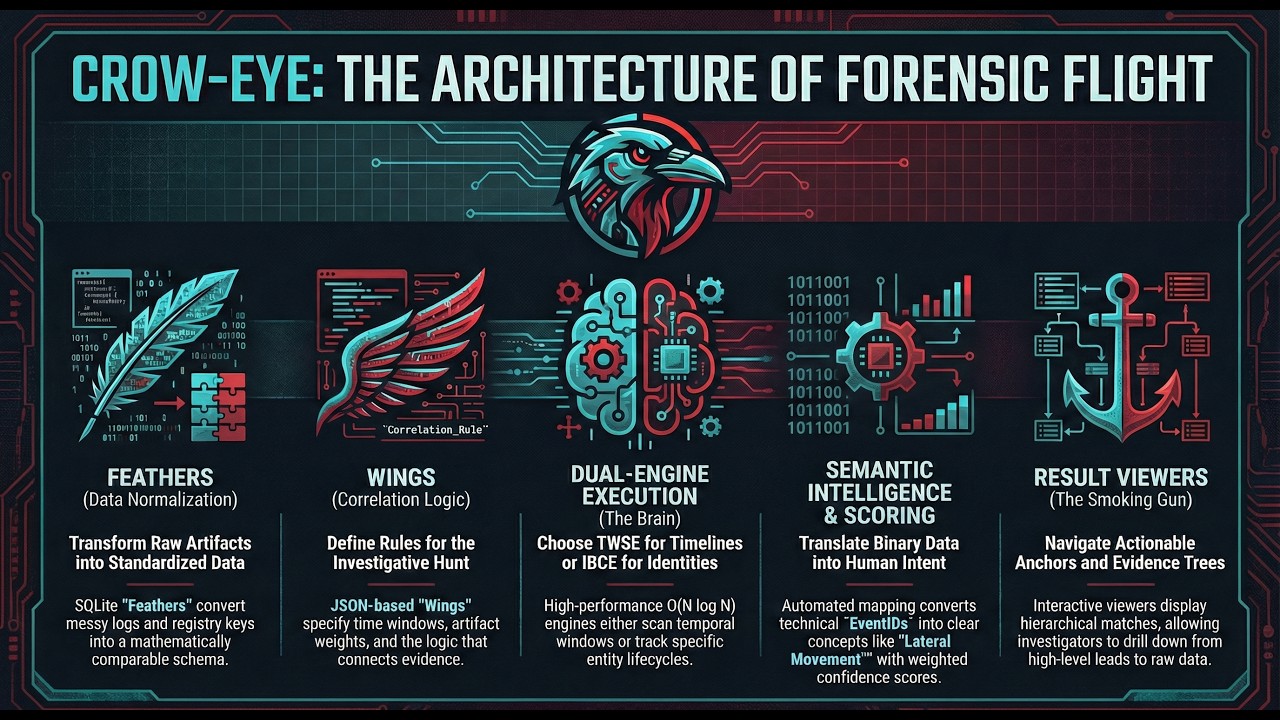
Universal Data Import: The Correlation Engine can take output from any forensic tool in CSV, JSON, or SQLite format and convert it into a Feather database. This means you can correlate data from third-party tools (Plaso, Autopsy, Volatility, etc.) with Crow-Eye's native artifacts, creating a unified correlation analysis across all your forensic data sources.
A focused accuracy pass after extensive end-to-end validation against a real ~700K-record Windows case, layered on top of the earlier 0.11.0 reliability work. Every fix below is locked by the 96-test pytest suite and verified by a holistic validation harness that exercises all 7 default wings against both engines.
Identity engine now captures all the evidence
- Fix: identity engine was iterating only the FIRST row of every feather when a time filter was active. Root cause: a timezone-aware vs naive datetime comparison in the filter raised
TypeErrorand aborted the per-row loop. Records-seen jumped from 3,558 → 745,615 on the validation case. Symptom prior to fix: every feather reportedrecords_processed=1. - Fix: log records collapsed every event to its event PROVIDER as the identity. All 33,855 SecurityLogs records were extracted as the same identity (
Microsoft-Windows-Security-Auditing), making cross-feather correlation impossible. The per-artifact mapping now prioritises real per-row entities (User,ComputerName,NewProcessName,TargetUserName) BEFORE channel/provider metadata. - Fix: artifact-aware field mapping never fired because parsers don't stamp an
artifactcolumn on each row. The engine now falls back tofeather_metadata.artifact_typefor the lookup, so SecurityLogs / SystemLogs / ApplicationLogs records correctly use their artifact-specific identity priority. - Fix: placeholder strings became false identities.
'N/A','Unknown','-', nil-GUIDs, and similar were being treated as real identities and bundling unrelated records together. The validator now rejects 30+ placeholder variants. - Net result on a single full-range correlation window: the Execution Proof wing now surfaces 2,856 cross-feather (High) matches in the identity engine and 643 cross-feather matches in the time engine, with 24–118 cross-feather matches per wing across the other 6 wings. Identity-engine total matches per wing: 82K–99K (was 15–2,099).
No more "everything is Low — something is wrong"
- Fix: identity engine wasn't differentiating single-feather vs multi-feather matches — it tagged every match
High. Now matches withfeather_count == 1getconfidence_category="Low - single feather"/confidence_score=0.5, matching the time engine's labeling. The analyst's High view now focuses on real cross-feather correlation. - Fix: path-aware composite key was splitting same identity across feathers. Each feather stores paths differently (BAM uses
/device/harddiskvolume3/..., LNK usesc:/users/..., MFT uses 8.3 short paths). With path in the key,chromehad 10+ different composite keys and never correlated. The key is now name-only (canonicalidentity_grouping.identity_key) — same convention as the time engine. Cross-feather correlation works again.
Impersonation detection via path classification
- Path-based impersonation flag replaces what path-aware keying was supposed to provide. After a match is formed, the engine walks all records' path fields and classifies as TRUSTED (Program Files, Windows\System32, WinSxS, WindowsApps, ProgramData\Microsoft, the equivalent BAM/SRUM
/device/harddiskvolumeN/program files/...forms, plus Mac/Linux paths) or SUSPICIOUS (Temp, Downloads, Public, AppData\Local\Temp, Recycle Bin, removable-drive roots, network shares,$Recycle.Bin). - A match with records in BOTH classifications gets
match.semantic_data['impersonation_alert']. On the validation case: ~50 alerts per wing (≈0.05% rate), each a real candidate (python.exein venv + Program Files, Discord's official install + AppData copy, etc.).
Engine evidence accounting
- Per-window drop ledger with named buckets (
no_identity_field,normalize_failure,below_threshold_skipped, etc.), each carrying the first 3 sample identities so logs name what was lost. - Per-pipeline summary block at the end of each
correlate(...)call: records seen, high-confidence emitted, low-confidence emitted, records-with-no-identity, drop buckets, timeless-feather records joined by identity. Every record either lands in a match or in a named drop bucket — "no evidence left over" is verifiable from the log. low_confidence_review_modeis now ON by default. Below-threshold identity groups become Low-confidence matches instead of being silently dropped.
Timeless-feather identity enrichment
- Feathers without per-row timestamps (AutoStartPrograms, MUICache, SystemServices, TypedPaths) no longer get a synthetic feather-generation timestamp stamped onto every row (which used to lie about when the artifact was observed). Instead, after time-windowed matches are formed by the timed feathers, the engine walks each match's identity and pulls matching records from every timeless feather, attaching them as supplementary evidence. Identity drives the join; the time anchor comes from the timed feathers.
Consolidated identity registry
- New
config/standard_fields/identities.json— single source of truth for every column the engines + EYE Agent should consult to extract or track an identity. 98 categories, 1,146 column synonyms covering app/process, file, hash, user, host/device, network, registry, service/task, event, email, browser, cloud (AWS / Azure / GCP), Windows internals (mutex, named pipe, COM CLSID, ETW provider, WMI consumer), certificate, container, and OS objects. identity_correlation_engine.py::timestamp_field_patternsnow reads fromtimestamps.json(canonical timestamps registry) instead of a hand-maintained list, with the bookkeeping suffixes (parsed_at/inserted_at/created_at) filtered out so feather-generation time never gets treated as artifact observation time.identity_based_engine_adapter._path_fields()reads its path-field list fromidentities.jsoncategories (file_path,target_path,source_path,parent_directory,image_path,command_line,registry_key,service_image_path,scheduled_task_path). Adding a new path column synonym is now a JSON edit, not a code change.timestamps.jsoncleaned up: real MFT activity timestamps (si_creation_time,si_modification_time,si_mft_entry_change_time,fn_mft_entry_change_time,mft_modified_time) moved out of the bookkeeping category where they were wrongly classified.
Semantic mapping false-positive fixes
default-data-exfiltration-pattern: was an OR rule across 3 wildcard conditions on different feathers — firedseverity=highon any single LNK record. Now properly gated with_requires_multi_indicator=True, _min_indicators=2. The previously-dead_requires_multi_indicator/_min_indicatorsfields are now actually honored bySemanticRule.evaluate().auth_failed_then_success: was logically impossible (AND onEventID == 4625 AND EventID == 4624— a single record can equal only one value, rule never fired). Rewritten as OR with clearer semantic value.af_wiper_tool_run/lat_remote_tool_run: descriptions named specific tools (sdelete.exe, cipher.exe, wevtutil.exeetc.) but condition was a wildcard — every Prefetch entry got tagged "Wiper Tool Run" / "Remote Tool Run" atseverity=high. Now use proper regex matching the actual tool names.- Severity inflation fixes on
exec_confirmed_run/pers_run_key/pers_service_install/pers_confirmed_runs— baseline-activity rules (every executed app, every autostart entry) demoted fromhigh/criticaltoinfo/low. The wing's weighted scoring layer escalates real threats via score thresholds. SemanticMappingManager.apply_to_recordcandidate dedup: global mappings withartifact_typewere being evaluated twice (once viaartifact_mappings, once viaglobal_mappings), inflating downstream counts.
Time-engine accuracy fixes (carry-over context)
- Method 0 schema-driven timestamp detection from
feather_schemas.json— feathers with declaredprimary_timestamp_column+secondary_timestamp_columnsno longer rely on auto-detection that could pick integer cycle-counters as Unix epoch timestamps. - Per-column WHERE-clause format binding. Heterogeneous-format feathers (amcache MM/DD/YYYY install_date + ISO parsed_at) used to silently return 0 rows because the engine used one global format. Now each column's WHERE parameters use that column's specific format.
- Multi-column timestamp fan-out for separate-column timestamp feathers (mft_usn: si_creation_time + si_modification_time + si_access_time + 6 more). A single row with timestamps in multiple windows becomes a virtual record in each.
mft_usnwent from 2 records returned to 913,809 virtual records. - Year 1990–2100 plausibility filter on parsed timestamps drops NTFS / LNK placeholder dates (1601-01-01, 1980-01-01, 2000-01-01) before they spawn lonely virtual records.
The 0.11.0 release is a deep reliability + extensibility pass that closes the most common "where did my evidence go?" gaps and lays the groundwork for parallel correlation.
No dropped evidence
- Multi-timestamp fan-out: Prefetch's
run_timesJSON list (up to 8 historical executions per row) is now expanded into one virtual record per timestamp. A typical case sees a 4× lift in correlatable execution events that the previous engine silently ignored. - Tolerant timestamp parser: Windows FILETIME,
YYYYMMDDcompact dates (registry InstalledSoftware), trailing annotations ("2026-05-19 10:48:21 (Registry Key LastWrite)"), and every parser canonical format are all classified on the first try — no fallback churn, no misclassified rows. - Duplicates preserved as evidence: The dedup signature now keys on the raw identity (not the normalized form). Variants like
Chrome.exeandChrome.dllno longer collapse into one row at insert time — they share the identity bucket but each row is counted. - Wider identity-field coverage: 290+ name/path synonyms now recognized across MFT (
file_name), BAM (process_path), USB (friendly_name), BrowserHistory (title), Shellbags, RecycleBin, Network_list, UserProfiles, and more. Records that previously slipped through with "no identity" now form matches.
Smarter sub-identity grouping
Chrome.exe,chrome.exe,Chrome.EXE, andchrome.dllcollapse into one sub-identity (case + extension are noise).Chrome v1.0.exeandChrome v2.0.exestay split (version differences are signal).Chrome (x86)andChrome (x64)stay split (architectural qualifiers are signal).- Each sub-identity exposes its name variants so analysts see all spellings.
One source of truth — no more drift
- Field name synonyms live in
config/standard_fields/*.json. Adding a new parser column is a JSON edit, not a code change in three places. - Per-table feather metadata (primary timestamp column, multi-timestamp JSON columns, identity priority) lives in
correlation_engine/config/feather_schemas.json. - Identity normalization unified in
correlation_engine/engine/identity_grouping.py— the engine, both result viewers, and the identity-semantic phase all share one implementation.
Performance foundation
- Thread-safe feather query cache (RLock-protected). The path to true parallel correlation is unblocked.
query_time_range_iter()— streaming generator that yields records by 1000-row batches. Constant memory across feathers of any size.parallel_strategyconfig field ('none' | 'threads' | 'processes') ready for opt-in process-pool parallelism.
Better feather generation
FeatherWriter— canonical write contract with WAL journal, explicit BEGIN/COMMIT transactions,executemany()batched inserts (5000-row batches by default). Expected 50–200× speedup over per-row inserts on large imports.- Schema metadata is stamped into the feather DB itself, so the engine doesn't need to sniff sample values to learn column roles.
- Multi-timestamp JSON columns declarable via
writer.declare_multi_timestamp_json("run_times")— engine reads it from the feather, no engine-side config edit.
Diagnostics you can trust
- Every correlation window emits an INFO line with
records_in / no_identity / parse_cache_hits / below_threshold / matches_emitted / min_feathers. If matches are being dropped, the log says exactly where. - The
_last_window_correlation_statsdict on the engine exposes the same data programmatically. - New
low_confidence_review_mode+min_feathers_overrideconfig knobs let analysts dial the correlation strictness per case.
Test suite
- 96-test pytest regression suite covering the timestamp parser, identity normalization, multi-timestamp fan-out, feather schemas, wing loader, feather writer, identity-grouping (heavy + mild keys), Eye-Agent authoring (write-side GEP governance), and the standard-fields registry. Locks every fix above so they can't regress.
The Correlation Engine is production-ready and actively being used in forensic investigations:
Current Status (0.11.0):
- ✅ Time-Window Scanning Engine: Production-ready — recommended for time-based analysis (O(N log N))
- ✅ Identity-Based Engine: Production-ready — recommended for identity tracking (O(N log N))
- ✅ Feather Builder: Production-ready — imports CSV/JSON/SQLite from any tool
- ✅ FeatherWriter: New canonical write API — transactional batching + schema metadata
- ✅ Wings System: Production-ready — create and manage correlation rules
- ✅ Pipeline Orchestration: Production-ready — automate correlation workflows
- ✅ Identity Grouping: Unified across engine + viewers + semantic phase
- ✅ Standard Fields Registry: Centralized field synonym source of truth
- ✅ Multi-timestamp Fan-Out: Every JSON-list timestamp correlated
- 🔄 Parallel Correlation: Foundation in place; profiling + process-pool dispatch next
- 🔄 Semantic Mapping: Active enhancements
- 🔄 Correlation Scoring: Refinements in progress
Recommendations:
- ⭐ Use Time-Window Scanning Engine for time-based artifact analysis (production-ready, O(N log N))
- ✅ Use Identity-Based Engine for identity tracking and filtering (production-ready, O(N log N))
- 📊 Feather Builder /
FeatherWriterare stable and ready for all data import needs - 🎯 Wings and Pipelines are production-ready
What We're Working On Next:
- Process-pool parallel correlation (profiling baseline, then enable by default for ≥50 windows)
- Migrating all 8 built-in parsers onto
FeatherWriterfor the transactional-batching speedup - Comprehensive semantic field mapping across more artifacts
- Finalizing correlation scoring algorithms with explainability
- 🔄 Dual-Engine Architecture: Choose between Time-Window Scanning (O(N log N)) and Identity-Based (O(N log N)) correlation strategies
- 📊 Multi-Artifact Support: Correlate Prefetch, ShimCache, AmCache, Event Logs, LNK files, Jumplists, MFT, USN, SRUM, Registry, RecycleBin, and more
- 🔌 Universal Import: Import CSV/JSON/SQLite output from any forensic tool and convert to Feather databases
- 🎯 Smart Identity Grouping: Variants like
Chrome.exe/chrome.dll/Chrome.EXEcollapse to one bucket; versions and architectural qualifiers stay distinct - 🕒 Tolerant Timestamps: FILETIME, ISO 8601, Unix epoch (s/ms/μs),
YYYYMMDD, US slash, and annotated strings all parsed correctly on first try - 📈 Multi-Timestamp Fan-Out: JSON timestamp lists (Prefetch
run_times) expanded so every execution gets its own correlation event - 🧰 One Source of Truth: Field synonyms in
config/standard_fields/*.json; per-table metadata infeather_schemas.json— extend by editing JSON, not code - ⚡ Streaming + Thread-Safe: O(1)-memory
query_time_range_iter; lock-protected feather caches; ready for parallel correlation - 🔍 Flexible Rules: Define custom correlation rules (Wings) with configurable parameters
- 📋 Honest Diagnostics: Per-window stats line (records_in / no_identity / parse_cache_hits / below_threshold / matches_emitted) so you always know if evidence was dropped
- 🧪 Locked-In Quality: 96-test regression suite covering timestamp parsing, identity normalization, fan-out, the writer contract, Eye-Agent authoring (write-side GEP governance), and the standard-fields registry
- 🎨 Professional UI: Cyberpunk-styled interface with timeline visualization
The Correlation Engine consists of four main components:
Purpose: Transform raw forensic artifacts into a standardized, queryable format.
What They Are:
- SQLite databases containing normalized forensic artifact data
- Each feather represents one artifact type (e.g., Prefetch, ShimCache, Event Logs)
- Standardized schema with metadata for efficient querying
- Universal format that accepts data from any forensic tool
How They Work:
Any Tool Output → Feather Builder → Normalized Feather Database
(CSV/JSON/SQLite)                   (SQLite with standard schema)

Examples:
- Plaso CSV → Feather Builder → timeline.db
- Autopsy JSON → Feather Builder → autopsy_artifacts.db
- Volatility CSV → Feather Builder → memory_artifacts.db
- Custom Tool Output → Feather Builder → custom.db
Key Features:
- Multi-source import: SQLite databases, CSV files, JSON files from any tool
- Automatic column mapping and data type detection
- Timestamp normalization to ISO format
- Data validation and error handling
- Optimized indexes for fast correlation
Supported Import Formats:
- CSV: Any CSV file with headers (from Plaso, Excel exports, custom scripts, etc.)
- JSON: Flat or nested JSON from any forensic tool
- SQLite: Direct import from other SQLite databases
Example:
prefetch.db (Feather)
├── feather_metadata (artifact type, source, record count)
├── prefetch_data (executable_name, path, last_executed, hash)
└── Indexes (timestamp, name, path)
Purpose: Define which artifacts to correlate and how to correlate them.
What They Are:
- JSON/YAML configuration files that specify correlation rules
- Define time windows, minimum matches, and feather relationships
- Reusable across different cases and datasets
Key Components:
- Correlation Rules: Time window, minimum matches, anchor priority
- Feather Specifications: Which feathers to correlate, weights, requirements
- Filters: Optional time period or identity filters
Example Wing:
{
  "wing_id": "execution-proof",
  "wing_name": "Execution Proof",
  "correlation_rules": {
    "time_window_minutes": 5,
    "minimum_matches": 2,
    "anchor_priority": ["Prefetch", "SRUM", "AmCache"]
  },
  "feathers": [
    {"feather_id": "prefetch", "weight": 0.4},
    {"feather_id": "shimcache", "weight": 0.3},
    {"feather_id": "amcache", "weight": 0.3}
  ]
}Purpose: Execute correlation logic to find relationships between artifacts.
The Correlation Engine offers two distinct strategies:
Best For: Time-based artifact analysis, systematic temporal correlation, production environments
How It Works:
- Scan through time systematically from year 2000 in fixed intervals
- For each time window, collect records from all feathers
- Apply semantic field matching and weighted scoring
- Prevent duplicates using MatchSet tracking
- Return correlation matches with confidence scores
Complexity: O(N log N) where N = number of records (indexed timestamp queries)
Key Features:
- Systematic temporal analysis with fixed time windows
- Universal timestamp format support with robust indexing
- Batch processing for high performance (2,567 windows/second)
- Memory-efficient with intelligent caching
- Production-ready for time-based investigations
Best For: Large datasets (> 1,000 records), production environments, identity tracking
How It Works:
- Extract and normalize identity information from all records
- Group records by identity (application/file)
- Create temporal anchors within each identity cluster
- Classify evidence as primary, secondary, or supporting
- Return identity-centric correlation results
Complexity: O(N log N) where N = number of records
Key Features:
- Identity extraction with 40+ field patterns per type
- Multi-feather identity grouping
- Temporal anchor clustering
- Streaming mode for large datasets (> 5,000 anchors)
- Constant memory usage with streaming
- Identity filtering support
Engine Selection:
- Time-based analysis: Use Time-Window Scanning Engine (production-ready, O(N log N))
- Identity tracking: Use Identity-Based Engine (production-ready, O(N log N))
- Both engines are optimized for large datasets with indexed queries
Purpose: Automate complete analysis workflows from feather creation to result generation.
What They Are:
- Orchestration layer that ties everything together
- Automate feather creation, wing execution, and report generation
- Support for multiple wings and complex workflows
Pipeline Workflow:
- Load Configuration: Read pipeline config with engine type, wings, feathers
- Create Engine: Use EngineSelector to instantiate appropriate engine
- Execute Wings: Run each wing against specified feathers
- Collect Results: Aggregate correlation matches from all wings
- Generate Reports: Save results to database and JSON files
- Display Results: Present in GUI with filtering and visualization
Example Pipeline:
{
  "pipeline_name": "Investigation Pipeline",
  "engine_type": "identity_based",
  "wings": [
    {"wing_id": "execution-proof"},
    {"wing_id": "file-access"}
  ],
  "feathers": [
    {"feather_id": "prefetch", "database_path": "data/prefetch.db"},
    {"feather_id": "srum", "database_path": "data/srum.db"},
    {"feather_id": "eventlogs", "database_path": "data/eventlogs.db"}
  ],
  "filters": {
    "time_period_start": "2024-01-01T00:00:00",
    "time_period_end": "2024-12-31T23:59:59"
  }
}1. Data Preparation
Raw Forensic Data → Feather Builder → Feather Databases
2. Configuration
Wing Configs + Feather References → Pipeline Config
3. Execution
Pipeline Executor → Engine Selector → Correlation Engine
4. Correlation
Engine loads Feathers + applies Wing rules → Correlation Results
5. Visualization
Results Database → Results Viewer GUI
Scenario: Prove that malware.exe was executed on a system
Step 1: Create Feathers
# Import Prefetch, ShimCache, and AmCache data
python -m correlation_engine.feather.feather_builder
Step 2: Create Wing
{
  "wing_id": "malware-execution",
  "correlation_rules": {
    "time_window_minutes": 5,
    "minimum_matches": 2
  },
  "feathers": ["prefetch", "shimcache", "amcache"]
}
Step 3: Execute Pipeline
from correlation_engine.pipeline import PipelineExecutor

executor = PipelineExecutor(pipeline_config)
results = executor.execute()
Step 4: View Results
Identity: malware.exe
  Anchor 1 (2024-01-15 10:30:00):
    ✓ Prefetch: malware.exe executed at 10:30:00
    ✓ ShimCache: malware.exe modified at 10:30:15
    ✓ AmCache: malware.exe installed at 10:29:45

  Conclusion: Execution proven with 3 corroborating artifacts
Time-Window Scanning Engine:
- 100 records: 0.1s
- 1,000 records: 0.5s
- 10,000 records: 5s
- 100,000 records: 50s
- Best for: Time-based artifact analysis (production-ready)
Identity-Based Engine:
- 1,000 records: 2s
- 10,000 records: 15s
- 100,000 records: 2.5 min (with streaming)
- 1,000,000 records: 25 min (with streaming)
- Best for: Identity tracking and filtering (production-ready)
Comprehensive Documentation (~7,200 lines):
- Correlation Engine Overview - System overview with architecture diagrams
- Engine Documentation - Dual-engine architecture, engine selection guide, performance optimization
- Architecture Documentation - Component integration and data flow
- Feather Documentation - Data normalization system
- Wings Documentation - Correlation rules
- Pipeline Documentation - Workflow orchestration
Quick Links:
- Engine Selection Guide - Choose the right engine
- Troubleshooting Guide - Common issues and solutions
- Performance Optimization - Optimize correlation
-
Launch Feather Builder:
python -m correlation_engine.main
-
Create Feathers: Import your forensic artifacts (Prefetch, ShimCache, etc.)
-
Create Wings: Define correlation rules for your investigation
-
Create Pipeline: Configure which wings and feathers to use
-
Execute: Run the pipeline and view correlated results
-
Analyze: Use the Results Viewer to explore temporal relationships
Current Status:
- ✅ Production-Ready - Core system operational and battle-tested
- ⭐ Time-Window Scanning Engine - Production-ready for time-based analysis (O(N log N))
- ✅ Identity-Based Engine - Production-ready for identity tracking (O(N log N))
- 🔄 Active Development - Ongoing enhancements to semantic mapping, scoring, and identity extraction
Comprehensive Documentation (~10,000 lines covering all aspects):
- Correlation Engine Overview - System overview with architecture diagrams
- Engine Documentation - Dual-engine architecture, engine selection guide, performance optimization
- Architecture Documentation - Component integration and data flow
- Adding an Artifact - 9-step workflow for plugging a new parser into the engine (0.11.0)
- Standard Fields Registry - Canonical column-name synonyms loaded by both engines + the EYE Agent:
identities.json(98 categories, 1,146 synonyms),timestamps.json,process_identifiers.json,file_paths.json,user_identifiers.json,system_identifiers.json,event_identifiers.json,network_identifiers.json. Add a new parser column synonym by editing JSON, not code. - Contribution Guide - How to contribute to the Correlation Engine
Quick Links:
- Engine Selection Guide - Choose the right engine
- Troubleshooting Guide - Common issues and solutions
- Performance Optimization - Optimize correlation
A powerful assistant, not a replacement. Eye automates and verifies an investigator's hypotheses — it never makes the call for you.
Eye is Crow-Eye's built-in forensics AI assistant: a skilled forensic investigator backed by a real knowledge base of Windows artifacts. It gives you a natural-language interface to query, correlate, and document everything in a case — Prefetch, MFT, Registry, Event Logs, AmCache, ShimCache, SRUM, and more — while keeping a court-defensible record of exactly what it did. Eye can run entirely on your own hardware (including fully air-gapped), in keeping with Crow-Eye's "0 ms data sent off-device" privacy stance.
Full architecture documentation lives in eye/README.md.
Everything Eye does is anchored to the Ghassan Elsman Protocol (GEP) — a vendor-neutral, tool-agnostic standard that defines how any AI should be used in digital forensics, not a Crow-Eye feature. The GEP is 10 principles a conforming system must uphold so AI-assisted findings stay truthful, traceable, and court-defensible, with the human investigator in control:
| # | Principle | In one line |
|---|---|---|
| GEP-1 | Evidence Primacy | Conclusions come only from artifacts actually examined — never guess or assume. |
| GEP-2 | Traceability | Every fact links to a specific source record (database:table:row, offset, event id, hash). |
| GEP-3 | Specificity & Chronology | Exact UTC timestamps, identifiers, and paths, ordered in time. |
| GEP-4 | Cross-Corroboration | Rest on multiple sources; report agreement, silence, and conflict. |
| GEP-5 | Premise Verification | Treat human claims as hypotheses to prove or refute — never defer. |
| GEP-6 | Completeness | Never silently drop or truncate evidence; disclose and segment instead. |
| GEP-7 | Integrity & Non-Repudiation | Never modify evidence; record what was seen and done, tamper-evidently. |
| GEP-8 | Transparency & Explainability | Reasoning, tools used, and data seen are visible and auditable. |
| GEP-9 | Human Authority | The investigator decides; durable actions are attributable and reviewable. |
| GEP-10 | Defensibility | Output is objective, precise, legal-grade, and court-ready. |
Crow-Eye's Eye is the reference implementation of the GEP. The rules you see Eye follow in-product — its system-prompt behavior, tooling, and write-side governance — are Operating Rules: how the Eye achieves answers. They are distinct from, and exist to uphold, the GEP principles above.
- 📜 The standard:
eye/docs/GEP_standard.md— the full vendor-neutral spec (rule · why · compliance · verify, per principle). - 🔧 How the Eye implements it:
eye/docs/eye_architecture.md§5, "How the Eye implements the GEP."
What changed. Earlier docs labeled assorted Eye behaviors "GEP rules" (e.g. correlation write-side "Rules 9/10/11"). The GEP is now scoped as a standalone standard of 10 principles; the Eye's former "rules" are reframed as Operating Rules that uphold specific principles (the correlation write-side controls uphold GEP-9, GEP-2, and GEP-7 — see below).
Eye turns conversational questions ("show me what executed from C:\Temp after 22:00") into real forensic work: it plans an approach, retrieves relevant artifact knowledge, runs SQL and cross-artifact searches against your case databases, and synthesizes a validated answer. Every answer is produced in two places at once — a chat reply for you, and a structured block written into a Living Report Workspace so the dossier builds itself as the investigation proceeds.
| Capability | What it means for you |
|---|---|
| Natural-language investigation | Ask in plain English; Eye writes the SQL and searches for you. |
| Multi-source integration | Unified access across all parsed artifacts in the case. |
| RAG-enhanced analysis | Eye pulls artifact-specific forensic knowledge before answering. |
| Living Report Workspace | Findings, tables, charts, and timelines are documented in real time. |
| Human-in-the-loop | Critical actions (e.g. report export) require your explicit approval. |
| Chain of custody | Cryptographic proof of exactly what the model analyzed (see Compliance). |
Eye adapts to your exact threat model through three deployment modes:
| Mode | Best for | Backends |
|---|---|---|
| ☁️ Cloud AI Models | Deep, complex threat analysis with maximum compute | OpenAI, Anthropic (Claude), Google Gemini |
| 🔒 Offline AI Server (air-gapped) | Zero-exposure, on-premise investigations | Ollama, LM Studio |
⚡ CLI AI Agents (eye-agent) |
Lightweight, fast terminal triage | Generic CLI agents (Gemini CLI, llama.cpp, custom) |
The investigation loop:
- Open or create a case — Eye scopes itself to that case's artifact databases and history.
- Ask a question in natural language, or launch a one-click comprehensive triage.
- Eye runs its pipeline — detect intent → retrieve knowledge → execute tools → synthesize.
- You get a dual output — a direct chat answer and a new block in the Living Report.
- Approve gated actions — exports and other critical steps wait for your sign-off.
You can change models at runtime with the switch_model tool. Switching is restricted to the same backend, so evidence is never silently sent to a different provider than the one you chose.
Eye is built so you can see — and later prove — how it reached a conclusion. Nothing is a black box.
Live reasoning trail (ThinkingStep protocol). As Eye works, it streams structured ThinkingStep updates to the UI in real time. Each step carries a step_id, a type, a human-readable label, a status (active → done, or error), and optional tool, params, and detail fields. The type field reveals which phase of reasoning you're watching:
| Step type | What you're seeing |
|---|---|
thinking |
Eye planning — detecting forensic intent, building the system prompt, deciding next moves. |
rag |
Eye retrieving artifact knowledge from its knowledge base to ground the answer. |
tool_call |
Eye executing a forensic tool (a SQL query, a search, a correlation lookup). |
synthesis |
Eye validating and assembling the final, evidence-backed answer. |
A typical query unfolds as thinking → rag → thinking → tool_call → synthesis, and the Reasoning pane shows the live Eye↔model dialogue as it happens.
Persisted trace artifacts. Every case keeps an on-disk record you can inspect after the fact:
| File | What it records |
|---|---|
<case>/EYE_Logs/eye_payload_seal.jsonl |
The exact payloads sent to the model, hash-chained (see below). |
<case>/EYE_Logs/truncation_audit.log |
What context was kept, summarized, dropped, or pinned — and why. |
<case>/case_history.json |
The full conversation history, with per-message token counts. |
Together these mean you can reconstruct the entire reasoning path — what Eye knew, what it ran, and what it concluded — long after the session ends.
Eye is tool-driven: the model never touches evidence directly. Instead it emits tool calls, and Eye executes them against the case's databases and returns the results — so every action is explicit, logged, and reproducible. The tools are defined in configs/llm_config.json and dispatched through eye/services/context_manager.py.
Investigative tools — read and analyze evidence:
| Tool | Purpose |
|---|---|
query_database |
Run a SELECT against a forensic database. |
search_artifacts |
Cross-database text / regex search. |
get_schema |
Inspect table schemas. |
query_correlation_results |
Query the Correlation Engine's output by time / identity. |
analyze_large_dataset |
Map-reduce analysis of big result sets — no silent truncation. |
list_case_files |
List files in the case directory. |
internet_search / fetch_web_content |
Look up and fetch external threat / technical context. |
query_living_off_the_land_intel |
LOLBAS / LOLDrivers lookups. |
query_threat_intel |
VirusTotal / threat-intel lookups. |
switch_model |
Change model at runtime (same backend only). |
Reporting tools — build the Living Report Workspace: report_append_section, report_add_data_table, report_add_chart, report_add_timeline, report_add_heatmap, report_add_chain_of_custody, report_add_chat_transcript, report_add_image, report_edit_section, report_delete_section, and export_report (export requires human approval).
Correlation authoring tools (governed, Eye-authored only): correlation_create_wing, correlation_edit_wing, correlation_create_semantic_mapping, correlation_edit_semantic_mapping — covered in detail in Building Correlation Wings & Semantic Mappings below.
Tool calls are translated to whatever the active backend expects — native function-calling for cloud APIs and local servers (OpenAI/Anthropic/Gemini/Ollama/LM Studio), or an XML <tool_call> wrapper for generic CLI agents.
Eye doesn't just query the Correlation Engine — it can help extend it. When Eye spots a cross-artifact pattern that recurs across a case, it can propose new Wings (correlation rules) and Semantic Mappings (technical-to-human translations) so future analysis is faster. This is governed authorship: Eye proposes, the analyst reviews the saved artifact, and every change is justified and evidence-backed.
Building a Wing — correlation_create_wing / correlation_edit_wing
A Wing is a named rule that ties feathers (artifact databases) together within a time window and a minimum-match threshold to prove a forensic claim — execution, lateral movement, data staging, and so on.
| Field | Meaning |
|---|---|
wing_name |
Human-readable name for the rule. |
proves |
The forensic claim it supports (e.g. program execution). |
feathers[] |
Artifacts to correlate — each with artifact_type, optional weight (0–1) and tier (1–4). |
time_window_minutes |
Correlation window (default 180 = 3 hours). |
minimum_matches |
How many feathers must match within the window (default 1). |
anchor_priority, tags, case_types |
Optional anchor tuning and classification. |
reason (required) |
Forensic justification for the rule. |
related_evidence (required) |
One or more database:table:rowid refs that motivated it. |
Creation returns the saved wing path and an assigned wing_id; Eye can later refine it with correlation_edit_wing.
Adding a Semantic Mapping — correlation_create_semantic_mapping / correlation_edit_semantic_mapping
A Semantic Mapping translates a raw technical value into human-readable forensic meaning (e.g. EventID 4624 → "Successful Logon"), feeding the result viewers and Dynamic Linking. There are two flavors, chosen with mapping_type:
mapping_type |
What it does |
|---|---|
mapping |
Maps a single source + field + technical_value (or regex pattern) → semantic_value. |
rule |
A multi-condition rule: a list of conditions[] (operators equals / wildcard / contains / regex / greater_than / less_than) joined by AND / OR. |
Both support category, severity (info → critical), confidence, and scope (global / wing / pipeline), and both require reason + related_evidence. New artifacts get IDs like eye_mapping_* or eye_rule_*.
Governance — write-side rules that uphold the GEP. Eye-authored correlation logic is held to three write-side controls, each of which upholds a GEP principle:
- Reason-Required (upholds GEP-9 Human Authority + GEP-2 Traceability): every create and edit must include a forensic
reason. - Evidence-Link (upholds GEP-2 Traceability): every create must cite at least one
database:table:rowidevidence ref (unresolvable refs raise a soft warning but don't block creation). - Eye-Stamped / read-only on others (upholds GEP-7 Non-Repudiation + GEP-9 Human Authority): every artifact Eye persists is stamped with its authorship, reason, and edit history, and Eye may edit only what Eye authored — built-in and human-authored Wings and mappings stay read-only.
This keeps machine-authored correlation rules auditable and reversible: you always know which evidence prompted a rule, and analyst-authored logic can never be silently overwritten.
Long investigations can outgrow a model's context window — especially smaller offline models. Instead of crashing or silently dropping evidence, Eye auto-compacts its own context before every model call. This "self-healing" runs inside Eye's guarded generation path and is fully audited.
Before each call, Eye measures the full payload (system prompt + conversation history + your question + tool definitions) and reserves room for the model's reply (10% of the window, minimum 512 tokens, never more than half). If the payload still doesn't fit, it heals in two ordered passes — and it never touches protected messages (anything pinned, auto-detected evidence, or a tool result):
- Summarize pass (runs once) — non-protected history is collapsed into a single summary message, logged as
SUMMARIZEDin the truncation audit. - Drop pass — if it still overflows, Eye removes the oldest non-protected message one at a time until it fits, logging each as
TRUNCATED.
If the irreducible evidence core (pinned messages + tool results + the current question) still exceeds the window after both passes, Eye refuses to proceed rather than truncate evidence: it logs REFUSED_OVERFLOW, raises an error in the reasoning trail, and asks you to narrow the query or use analyze_large_dataset (map-reduce).
Whatever payload finally goes to the model is the exact one that gets sealed for chain of custody — stamped with a truncated flag that records whether self-healing fired — so the audit trail always reflects precisely what the model saw.
Eye is engineered for evidence that has to stand up to scrutiny. Compliance isn't a feature bolted on top — it's enforced in the pipeline.
-
🔗 Chain of custody (Evidence Seal). Every payload Eye sends to an LLM is sealed: the SHA-256 of the exact bytes injected into the prompt, the token count, the model and its context limit, and the provenance of each evidence row (
database:table:rowid, plus computed file offsets for MFT records). Seals are written append-only and hash-chained to<case>/EYE_Logs/eye_payload_seal.jsonl— each record folds in the previous one's hash, so a single altered or removed record breaks the chain. If an answer is ever challenged, this log proves mathematically which bytes the model analyzed. -
🚫 No silent truncation. When context runs tight, Eye first self-heals — summarizing then dropping only non-evidence history — and reallocates token budgets in a strict priority order: Priority 1 (Immovable): Raw Evidence AND the System Prompt (Operating Rules that uphold the GEP) › Priority 2 (Sacrificial): Casual Conversation History › Priority 3 (Flexible): RAG Context. If the immutable evidence core still won't fit, Eye flat-out refuses to proceed rather than quietly drop evidence or forget its protocol rules, asking you to narrow the query or use
analyze_large_dataset(map-reduce). -
🧾 Truncation audit trail. Every context decision is logged to
<case>/EYE_Logs/truncation_audit.logwith one ofSUMMARIZED,TRUNCATED,PRESERVED,PINNED,UNPINNED, orBUDGET_REDUCED, each with a hash. Detected evidence is auto-pinned (preserved) above a confidence threshold, and you can manually pin critical messages so they're never dropped. -
📑 Evidence-to-Report mandate. Eye is required to answer in chat and persist the supporting evidence into the report. Failing to record evidence is flagged as a protocol violation, so the dossier always reflects what was found.
-
⚖️ Correlation governance. Any Wing or semantic mapping Eye authors must include a forensic
reasonandrelated_evidencereferences; rules authored outside Eye are treated as read-only and cannot be silently rewritten. -
🔐 Privacy & air-gapping. In offline modes Eye makes zero outbound calls. API keys (for cloud modes) live in OS-native keychains — never hardcoded, never written to logs.
- Full Eye architecture:
eye/README.md - Correlation Engine (Eye can author Wings & mappings): see above
- 📊 Advanced GUI Views and Reports - Enhanced visualization and reporting capabilities
- 🔄 Enhanced Search Dialog - Advanced filtering with natural language support
- 🤖 AI Integration - Query results, summarize findings, and assist non-technical users with natural language questions
- 🎯 Enhanced Semantic Mapping - Comprehensive field mapping across all artifact types
- 📈 Advanced Correlation Scoring - Refined confidence scoring algorithms with explainability
If you're interested in contributing to these features or have suggestions for additional forensic artifacts, please feel free to:
- Open an issue with your ideas
- Submit a pull request
- Contact me directly at ghassanelsman@gmail.com
For Correlation Engine Contributions: See the Correlation Engine Contribution Guide for detailed information on:
- Development status and priority areas
- How to contribute to specific components
- Code guidelines and testing requirements
- Documentation standards
- Created and maintained by Ghassan Elsman