


alex - command line tool for working with Flutter projects.
It is recommended to install the package globally and use it as an executable.
You can install the package from the command line with Flutter:
$ flutter pub global activate alexAnd follow the instructions after installation (on Unix systems, you may need to modify your PATH variable).
Once installed, you can run commands with:
$ alexCheck the installed version with:
$ alex --versionIf you encounter issues during installation or while running alex, see the Problem Solving section.
To update alex you can use the command:
$ alex updateOr, if you want, you can update alex by executing the same command as for installing:
$ flutter pub global activate alexTo check for updates, you can use the command:
$ alex update --checkSee Commands > Update.
alex is working in the current directory. So if you want to work with a specific project, you should run the command in project's root directory.
To provide more convenient way to work with project, alex can use some configuration.
You can define configuration in your project's pubspec.yaml, section alex,
or in separate file alex.yaml.
You can see all configuration options and it's default values in the example config /alex.yaml.
More about specified configuration parameters - in modules descriptions in the Commands section.
Manage app releases with automated version control, changelog updates, and build processes.
$ alex release <command>Start a new release process using gitflow:
- checkout and create release branch from
develop - increment version number
- update CHANGELOG.md
- validate translations (optional)
- run pre-release scripts (if configured)
- generate release notes for CI/CD (with ChatGPT if API key is configured, see Global settings)
- create local builds (optional)
- finish release and merge to
master
$ alex release startNote: You can change GIT branches, localization parameters, CI/CD and other settings in your project's configuration.
Options:
--check_locale=<LOCALE>(-l) - Locale to check before release if translations exist for all strings. If not specified, "en" locale will be checked.--skip_l10n(-s) - Skip translations check during release.--local(-b) - Run local release build for Android and iOS platforms.--entry-point=<path>(-e) - Entry point of the app (e.g., lib/main_test.dart). Only for local release builds.--platforms=<PLATFORMS>(-p) - Target build platforms: ios, android. You can pass multiple platforms separated by commas. Defaults to "android,ios". Only for local release builds.
Pre-release scripts:
You can define pre-release scripts in your project's configuration:
scripts:
    pre_release_scripts_paths: [ 'tools/generate_rates_cache.dart' ]
These scripts will be executed before the release process starts.
Examples:
Basic release (default mode):
$ alex release startLocal build for manual upload to store or any other distribution:
$ alex release start --localRelease with custom entry point and specific platform:
$ alex release start --local --entry-point=lib/main_dev.dart --platforms=androidSkip translations check:
$ alex release start --skip_l10nWork with feature branches and issues.
$ alex feature <command>or
$ alex f <command>Finish feature by issue id:
- merge feature branch into
develop; - update CHANGELOG;
- delete feature branch from remote;
- merge
developinpipe/test.
$ alex feature finish --issue={issueId}or
$ alex f f -i{issueId}Also you can run command without issue id:
$ alex f fThen alex will print all current feature branches and ask for issue id in interactive mode.
If you have a problem with interactive mode (for example encoding issues on Window), you can provide changelog line as an argument:
$ alex f f -i{issueId} -c"Some new feature"It's important to use double quote (") on Windows, but on macOS or Linux you can also use a single quote (').
Work with localization files.
$ alex l10n extract$ alex l10n generate$ alex l10n to_xmlAlso you can export json localization to xml. Json localization can be used for a backend localization.
$ alex l10n to_xml --from=json --source=/path/to/json/localization/dirAlso you can export only difference (new and changed strings) to xml. You should specify the path to the directory for files with changes.
$ alex l10n to_xml --diff-path=/path/to/files/with/changes/diffs/To check all translations for all locales, you can use the command:
$ alex l10n check_translationsor just:
$ alex l10n checkIf you want to check translations for a specific locale, you can use the --locale option:
$ alex l10n check --locale=enIt's for working with translations from Google Play.
You can export xml translations to the project arb translations:
$ alex l10n from_xmlAlso you can export to the Android localization:
$ alex l10n from_xml --to=androidAnd to the iOS localization:
$ alex l10n from_xml --to=iosLocalization xml files for iOS should start with ios_ prefix.
When you download and unzip translations from Google Play,
you need to import them in project's xml files. You can
copy it all manually, but it's very inconvenient.
So you can use the command import_xml to do it.
$ alex l10n import_xml --path=path/to/dir/with/translationsIf the files have the suffix _diffs then they will be imported as a list of changes.
Remove unused strings from XML files. Check ARB files for all keys and remove unused strings from XML files for all locales.
$ alex l10n cleanup_xmlWork with code.
Generate JsonSerializable and other.
$ alex code genWork with pubspec and dependencies.
$ alex pubspec <command>or
$ alex pub <command>Update specified dependency. It's useful when you want to update dependency for git.
$ alex pubspec updateand input package name. Or define it right in a command:
$ alex pubspec update -dPACKAGE_NAMERun pub get for all projects/packages in folder (recursively). It's useful
when you have multiple packages or project and package in single repository.
$ alex pubspec getor
$ alex pub getManage updates for alex.
To update alex to the latest version:
$ alex updateTo check if a new version is available:
$ alex update --checkSet global settings for alex.
Currently supported settings:
open_ai_api_key- OpenAI API key for using ChatGPT features.
Allow to set setting's value.
$ alex settings set <name> <value>For example:
$ alex settings set open_ai_api_key abc123Define your own custom commands to automate repetitive workflows, combine multiple operations, or create project-specific shortcuts.
Custom commands are configured in alex_custom_commands.yaml file in your project root.
$ alex custom <command>
⚠️ SECURITY WARNINGCustom commands can execute arbitrary programs, scripts, and shell commands. NEVER use custom command YAML files from untrusted sources!
Malicious YAML files can:
- Delete or modify your files
- Steal sensitive information (credentials, API keys, etc.)
- Install malware or backdoors
- Compromise your entire system
Only use custom commands that:
- You created yourself, OR
- You have thoroughly reviewed and understand, OR
- Come from a trusted source you can verify
When in doubt, manually inspect the
alex_custom_commands.yamlfile before running any custom commands.
List all registered custom commands:
$ alex custom listShow details of a specific command:
$ alex custom show --name build-releaseAdd a new custom command interactively:
$ alex custom addEdit the configuration file:
$ alex custom editRemove a custom command:
$ alex custom remove --name build-releaseCustom commands are defined in alex_custom_commands.yaml:
custom_commands:
  - name: build-release
    description: Build release version with all checks
    aliases: [br, release]
    arguments:
      - name: platform
        type: option
        help: Target platform to build for
        abbr: p
        allowed: [android, ios, web]
        required: true
    actions:
      - type: alex
        command: code gen
      - type: exec
        executable: flutter
args: [build, '{{platform}}', --release]Custom commands support multiple types of actions:
exec - Execute shell command or program:
- type: exec
  executable: flutter
  args: [clean]
  working_dir: /optional/path  # optional
alex - Execute existing alex command:
- type: alex
  command: l10n extract
  args: [--locale, en]  # optional
script - Execute Dart script:
- type: script
  path: ./scripts/my_script.dart
  args: [arg1, arg2]  # optional
check_git_branch - Check current git branch and optionally switch to it:
- type: check_git_branch
  branch: pipe/app-gallery/prod
  auto_switch: true  # Switch if not on branch (default: true)
  error_message: "Branch does not exist"  # Custom error message
check_git_clean - Check that git working directory is clean:
- type: check_git_clean
  error_message: "There are uncommitted changes"
change_dir - Change working directory:
- type: change_dir
  path: ios
  error_message: "Directory not found"
delete_file - Delete file or directory:
- type: delete_file
  path: Podfile.lock
  recursive: false  # For directories (default: false)
  ignore_not_found: true  # Don't fail if doesn't exist (default: true)
check_file_exists - Check if file or directory exists:
- type: check_file_exists
  path: ios
  should_exist: true  # true to check exists, false to check not exists
  error_message: "iOS directory not found"
copy_file - Copy a file:
- type: copy_file
  source: config.txt
  destination: config_backup.txt
  overwrite: false  # Whether to overwrite if destination exists (default: false)
rename_file - Rename a file:
- type: rename_file
  old_path: old_name.txt
  new_path: new_name.txt
move_file - Move a file:
- type: move_file
  source: file.txt
  destination: archive/file.txt
create_file - Create a file with optional content:
- type: create_file
  path: config.txt
  content: "Environment: production"  # Optional content with variable substitution
  overwrite: false  # Whether to overwrite if file exists (default: false)
create_dir - Create a directory:
- type: create_dir
  path: output
  recursive: true  # Create parent directories (default: true)
delete_dir - Delete a directory:
- type: delete_dir
  path: temp
  recursive: true  # Delete recursively (default: true)
  ignore_not_found: true  # Don't fail if doesn't exist (default: true)
rename_dir - Rename a directory:
- type: rename_dir
  old_path: old_directory
  new_path: new_directory
replace_in_file - Replace text in file (supports regex):
- type: replace_in_file
  path: pubspec.yaml
  find: 'version: \d+\.\d+\.\d+'
  replace: 'version: {{new_version}}'
  regex: true  # Enable regex matching (default: false)
  error_message: 'Failed to update version'
append_to_file - Append content to end of file:
- type: append_to_file
  path: CHANGELOG.md
  content: |
    ## [{{version}}] - {{date}}
    - New release
  create_if_missing: true  # Create file if doesn't exist (default: true)
prepend_to_file - Prepend content to beginning of file:
- type: prepend_to_file
  path: lib/main.dart
  content: '// Copyright (c) 2024\n'
  create_if_missing: false  # Don't create if doesn't exist (default: true)
print - Print message to console:
- type: print
  message: 'Building for {{platform}}...'
  level: info  # info, warning, or error (default: info)
wait - Wait for specified duration:
- type: wait
  milliseconds: 5000
  message: 'Waiting for services to start...'  # Optional message
check_platform - Verify current operating system:
- type: check_platform
  platform: macos  # macos, linux, or windows
  error_message: 'This command only works on macOS'
create_archive - Create ZIP or TAR.GZ archive:
- type: create_archive
  source: build/app/outputs/bundle/release/
  destination: releases/app-v{{version}}.zip
  format: zip  # zip or tar.gz (default: zip)
extract_archive - Extract ZIP or TAR.GZ archive:
- type: extract_archive
  source: downloads/assets.zip
destination: assets/Actions support variable substitution using {{variable_name}} or ${variable_name} syntax:
arguments:
  - name: platform
    type: option
    required: true
actions:
  - type: exec
    executable: flutter
args: [build, '{{platform}}']Once defined, custom commands work just like built-in alex commands:
$ alex build-release --platform androidOr using an alias:
$ alex br -p androidCustom commands support the --verbose flag to see detailed execution information:
$ alex build-release --platform android --verboseThis will show:
- Each action being executed
- Detailed progress for file operations
- Variable substitution values
- Git operations details
See alex_custom_commands.yaml.example in the repository for more examples.
If, when trying to run alex, you see an error like this:
~/Development/flutter/.pub-cache/bin/alex: line 17: pub: command not found
You can fix it by editing the file mentioned in the error (in this example: ~/Development/flutter/.pub-cache/bin/alex).
You need to se dart pub or flutter pub instead of pub. So replace the line pub global run alex:alex "$@" with dart pub global run alex:alex "$@"
(or flutter pub global run alex:alex "$@", depending on your setup).
Save the file, and you’re good to go.
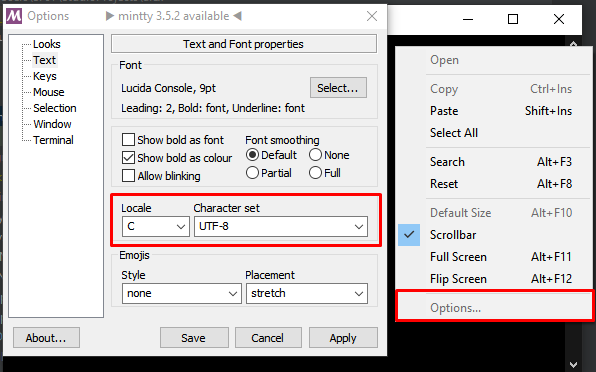
When entering Cyrillic characters (e.g., while saving a changelog), they may be displayed incorrectly or not at all.
To fix this, it is recommended to use the external Git Bash terminal (C:\Program Files\Git). In its settings, set the character encoding to UTF-8: Options -> Text -> Character set -> UTF-8.
Do not forget regenerate code when updating the version:
$ alex code genor
$ dart pub run build_runner build --delete-conflicting-outputs