Hell if I know! -Paolo, Front-End Developer
Vancouver Eco News, generally abbreviated as VEN, is a local news aggregation website. VEN focuses on news related to the environment and its happenings. Whether it's new innovations on green energy, or perhaps news laws regarding nature, VEN is here to collect information on it for you to see.
VEN also features Facebook integration for use with its comments system. Every article that VEN collects has a place for users to chat about the article they’ve read with other users of the website.
VEN was created for the Projects 2 course offered by the British Columbia Institute of Technology’s CST Diploma program, which was sponsored by EcoCity. It was also specifically built using HTML5, CSS3, JavaScript, Bootstrap and ReactJS on the front-end, while MongoDB and NodeJS were used for the back-end. Our website is hosted on Microsoft Azure’s cloud systems.
When it comes to finding news about our environment, there's so many places to look! From CBC News all the way to Vancouver Sun, there's a ton of articles on everything, and it can be a pain to sort through them all to find what you want. VEN strives to fix this problem, scraping articles from the site and storing them in our database. This then puts it all in one area for comfy, easy viewing.
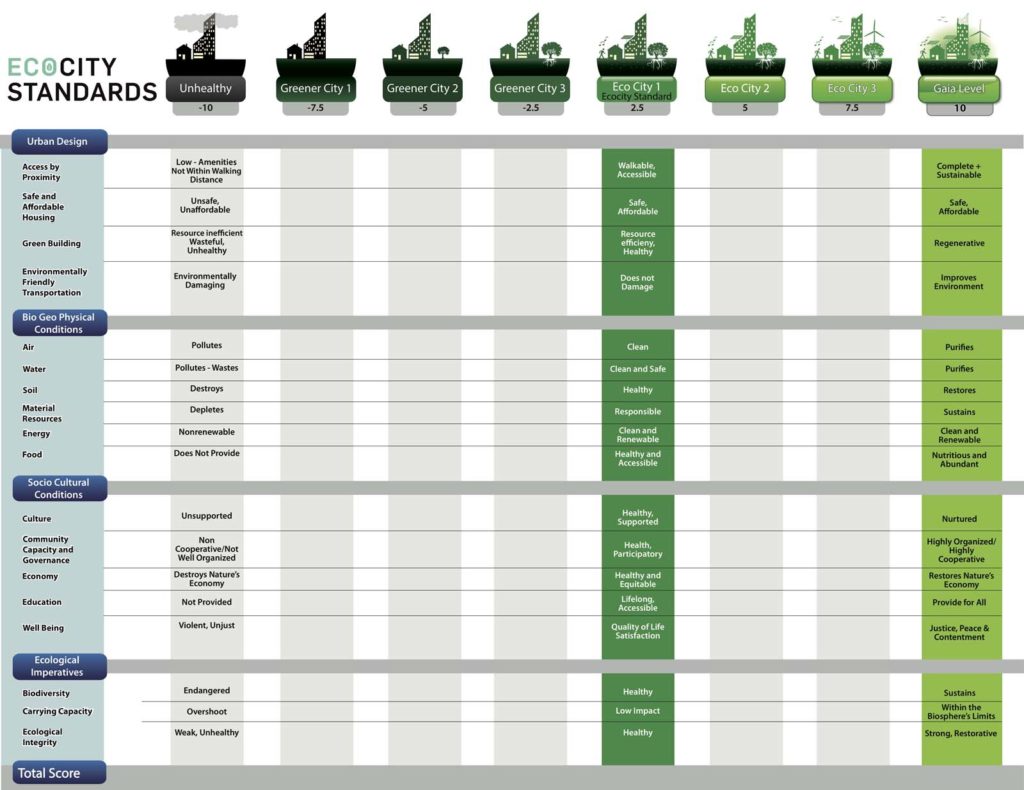
Given how expansive nature as a topic can be, we hope that VEN's news aggregation will help you learn everything you need to about the place you call home. It'll also help you realize how Vancouver succeeds or fails as an EcoCity, as suggested by the EcoCity Standards.
While the About Us page on the actual website is more casual, this read-me will state who did what in the process of website creation.
- Paolo Del Rio - Design Lead, Front End Support
- Manuel Andaya - Team Contact Lead, Front End Support, Back End Support
- Zachary Oyama - Project Management Lead, UX Lead, Back End Support.
- Joel Colussi - Back End Lead, Database Lead
- Alec Martin - Front End Lead, Microservice Lead.
To run VEN on your own machine, you'll need to do a few things. Before you do this however, you should ensure that you have node.js and NPM installed, and the files from this repository downloaded.
- Open up two Command Prompts. Navigate one to the "api" folder, and the other to the "client" folder of VEN's directory.
- On both Command Prompts, type "npm install". This will download all of the packages that we used in the creation of the webpage.
- In the Command Prompt that has nagivated to the "client" folder, type "npm run build". Wait, and this should compile the website.
- In the Command Prompt that has navigated to the "api" folder, type "npm start". It'll say something along the lines of "Listening on port 9000."
- Navigate to "localhost:9000" on your web browser of choice.
You may now look at VEN on your own device!