
This project will transform any String message into Morse code that will be played by a buzzer connected to a Raspberry Pi. Also, the Message will be played to a small LCD.
In order to recreate my working setup you will need the following setup:
- 1x Raspberry Pi
- 1x Active Buzzer
- 8x Jumper Cables
- 1x 1K Ohm Resistor
- 1x 220 Ohm Resistor
- 1x NPN Transistor
- 1x I2C LCD1602
The wiring should look like this:
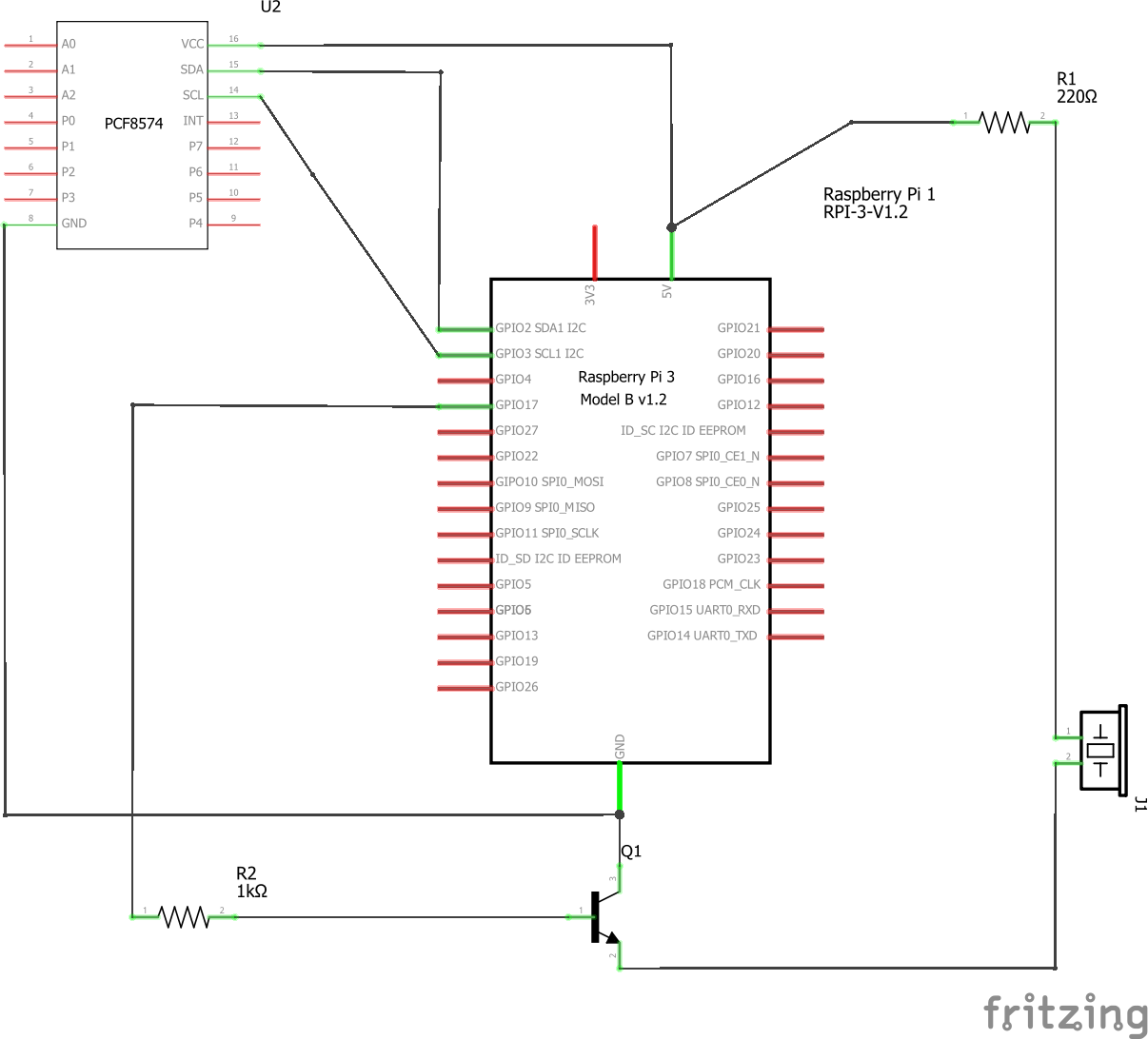
Note that the 220 Ohm resistor between 5V and the active buzzer is optional. I included it to decrease the buzzer's volume.
In this sketch you don't actually see an LCD. Instead an Adafruit Char LCD is connected to an I2C pcf8574 adapter which is hooked up to the Raspberry Pi.
Make sure to install RPi.GPIO to access your Raspberry Pi's GPIO pins from Python:
pip install RPi.GPIO
Also, you need the drivers for the LCD in the same folder where this script is located at. You can download the drivers from Freenove's Github Repo. Make sure to download the driver for PCF8574 and the Adafruit Char LCD. Download and place these files wherever this script is located at.
After recreating the setup and installing GPi.GPIO, you can use the command line like so:
python telegraphy.py 11 3 "Hello World"
The first argument must always be the physical pin location you want to use to emit the electrical signal for the buzzer for. In my case, I use GPIO17 which is equal to pin 11 in my setup. The second argument is the SDA pin for the pcf adapter. In my setup it is pin 3. Finally, the third argument will be the message to morse in double quotes. Notice that your message must only contain letters that are also present in the Morse alphabet. You can also use Umlauts since they will be translated into the English counter part.
I am by no means a professional electrician. Hence, I take no responsibility for any damage that may result. This is a hobby project done to learn about the Raspberry Pi and electricity.
This project is licensed under the MIT license. RPi.GPIO was also licensed under MIT.