Skip to content

LILCMU/gogo-daemon

Folders and files

NameName
Last commit message
Last commit date

Latest commit


History

74 Commits


Repository files navigation

Installation

Install via Command Line

curl -s https://raw.githubusercontent.com/LILCMU/gogo-daemon/master/gogod_install.sh | sudo sh

Install from Image File

  • Download the ZIP file of Image (download)
  • After downloading the .zip file, unzip it to get the image file (.img)
  • Insert SD Card into SD Reader
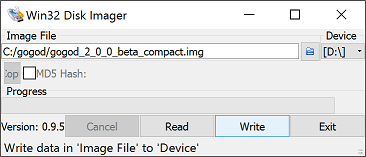
  • Using Win32DiskImager (download)
    • Select the Image File (.img)

    • Choose the drive letter that is assigned to the SD Card such as F:

    • Click Write

      Win32DiskImager

About

No description, website, or topics provided.

Resources

Stars

Watchers

Forks

Packages


Contributors