



A growing family of BPMN/DMN tools built around a shared modeler core — in VS Code, on the desktop, and (soon) talking to your AI assistant.
Process diagrams are code. They live in your repo, get reviewed in pull requests, and ship with the rest of your software. But for years the only way to edit them was a separate desktop modeler — context switch, save, re-open in your IDE, commit, repeat.
We wanted to skip the round trip. Open a .bpmn file. Model. Commit.
Done. Same editor, same git workflow, same diff in code review.
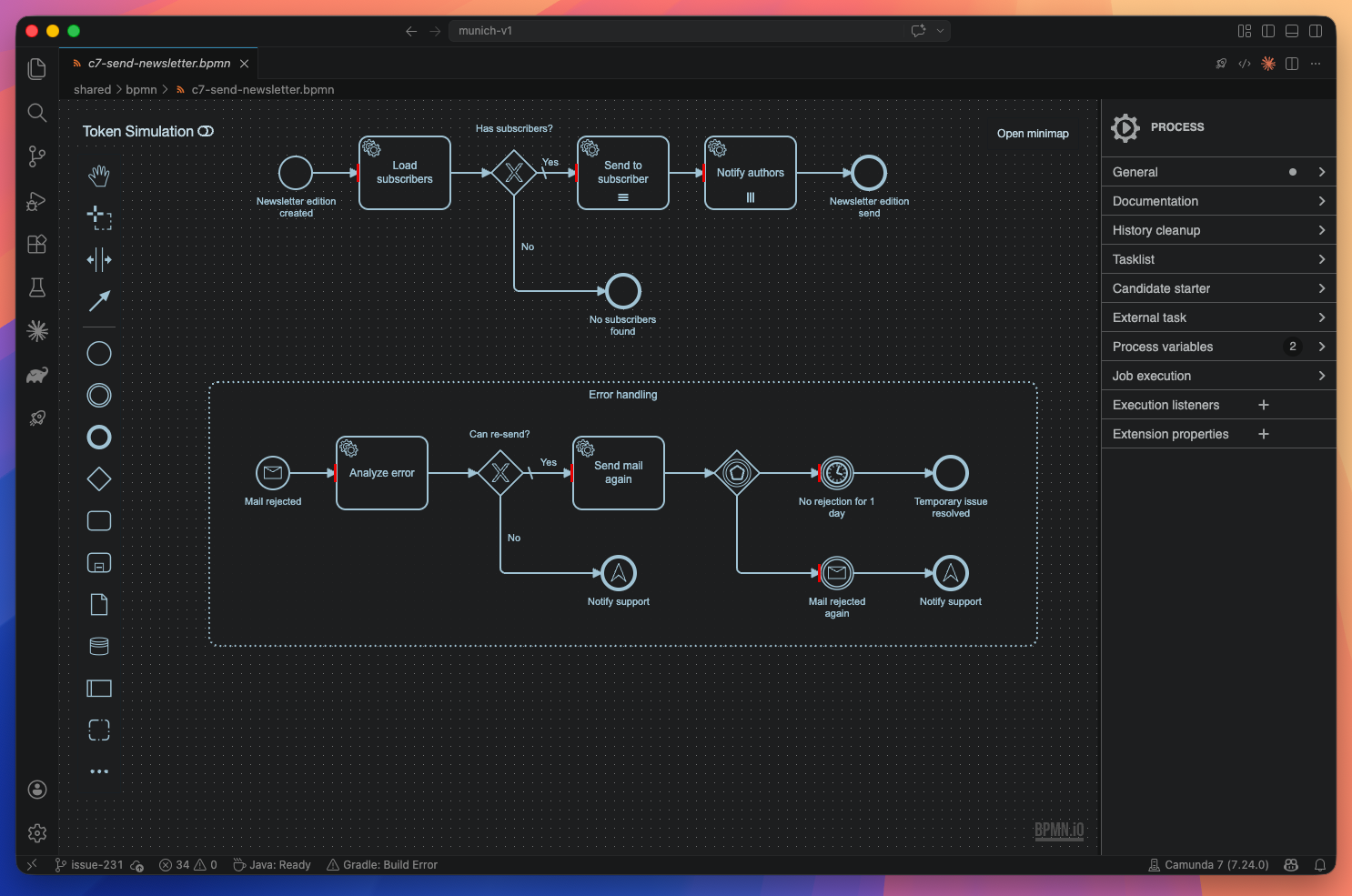
That first idea — bring BPMN modeling to where engineers already are — turned into the VS Code modeler you see above. From there, the same core quietly grew into more places where process work actually happens:
- In VS Code, as the public extension — the original product.
- On the desktop, as a standalone Theia/Electron app for users and organisations not on VS Code — same modeling surface, plus a built-in Source Control view, BPMN-aware diff against working-tree changes, and auto-save out of the box.
- And next: AI-assisted BPMN tooling — bringing the same modeling context into your AI assistant. Stay tuned. ✨
Different surfaces, one modeling engine, one repo.
- Full BPMN 2.0 + DMN modeling for Camunda 7 and Camunda 8 (plus compatible forks like Operaton and CIB7) — engine-aware properties, no profile switching ceremony.
- Element templates by convention — drop them in
.camunda/element-templates/next to your BPMN file, the modeler picks them up. No project config required. - Deploy from the editor — a sidebar that pushes your diagram to C7 or
C8 (no auth, Basic, or OAuth2 Client Credentials) and starts a process
instance with payload files discovered from
.camunda/payloads/. - Visual BPMN diff — open two
.bpmnfiles side by side, see what changed at the element level (added · removed · changed · moved) with synchronized pan/zoom. Great in code review. - Speaks your language — UI translated into 9 locales: English, Deutsch, Español, Français, Nederlands, Português (Brasil), Русский, 简体中文, 繁體中文.
- Built on bpmn.io — the toolkit the official Camunda Modeler is based on. You get the same modeling foundation, just embedded where you already work.
Install BPMN Modeler from the VS Code Marketplace, open any
.bpmnor.dmnfile — the modeler opens automatically as a custom editor. That's it.
For settings, commands, and the full feature tour see
apps/modeler-plugin/README.md — the
same page that's published as the Marketplace listing.
This is a monorepo. Around the modeler core we ship multiple delivery surfaces; each one has its own README with its own pitch.
| Module | What it is | Status |
|---|---|---|
apps/modeler-plugin |
The VS Code extension — the public BPMN/DMN modeler. | Published on the Marketplace |
apps/standalone |
Theia/Electron desktop shell wrapping the same modeler — same features, no VS Code required. | Build-from-source, unreleased |
apps/bpmn-webview |
BPMN canvas webview embedded in the extension host. | Internal |
apps/dmn-webview |
DMN canvas webview embedded in the extension host. | Internal |
apps/deployment-webview |
Deployment sidebar webview. | Internal |
libs/shared |
Shared message types and webview utilities. | Internal |
Internal modules are not published separately — they are bundled into the distributables above.
We love PRs. Whether you fix a typo or land a feature, the path is the same:
corepack enable
corepack yarn install
corepack yarn build      # build everything
corepack yarn watch      # F5 in VS Code → "Run modeler-plugin"
Working on a single workspace only?
yarn workspaces focus <name>installs just that tree and skips the rest. See Workspace dependencies for the focus targets per pipeline.
For the full setup, PR flow, and commit conventions see
CONTRIBUTING.md. For architecture, build system,
and contributor walkthroughs see docs/ (also published at
https://miragon.github.io/bpmn-modeler/).
Questions, ideas, or commercial support? Reach out at info@miragon.io — or open an issue.
Distributed under the Apache License 2.0.