
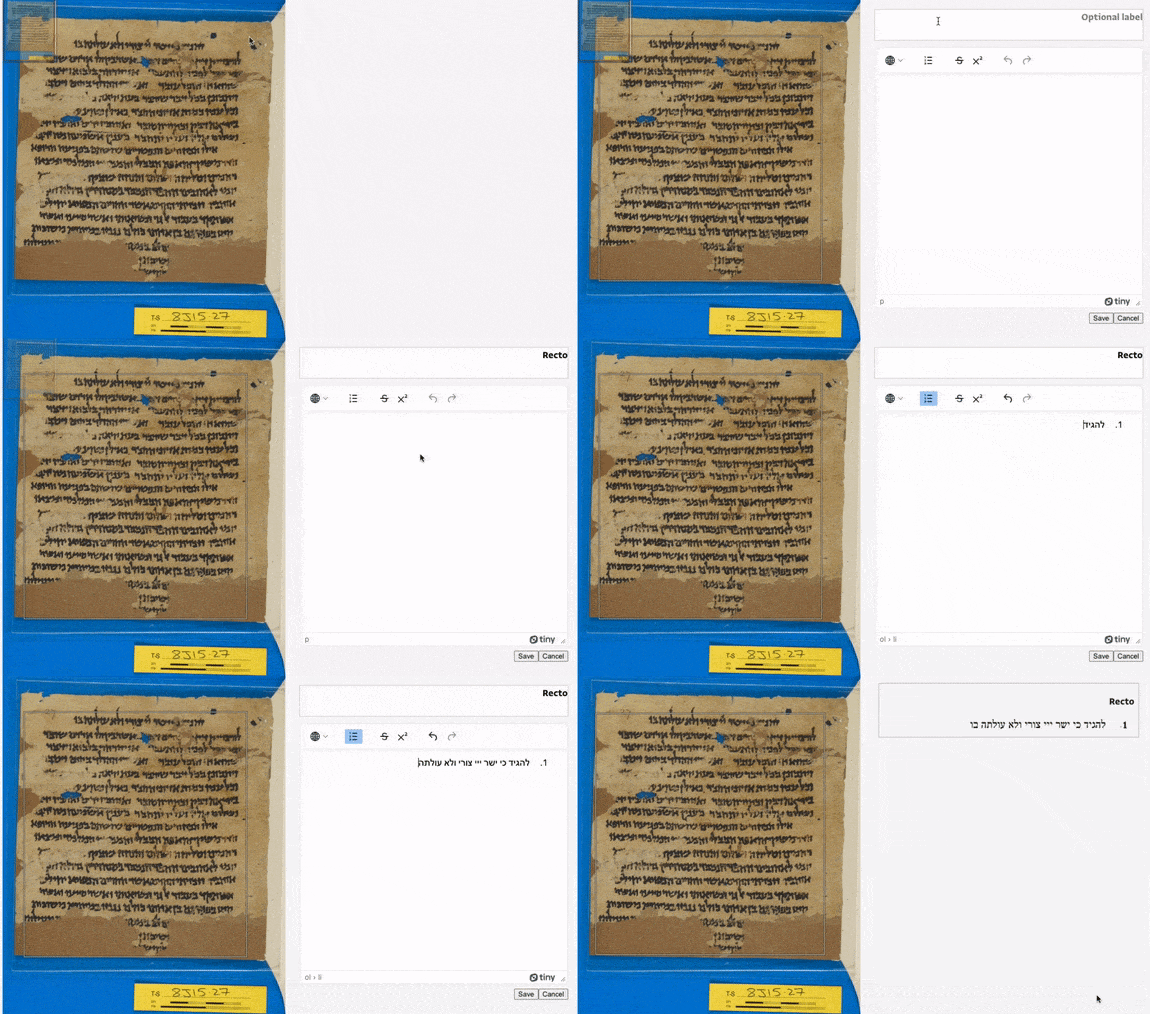
annotorious-tahqiq is a custom annotation editor implemented as a plugin for Annotorious. It is being developed as part of the Princeton Geniza Project (https://github.com/Princeton-CDH/geniza) to support transcription editing and management with IIIF/W3C annotation.
The name taḥqīq (tah-KEEK) comes from the Arabic for text edition.
- Node.JS v16.x
- NPM v8.x
- Annotorious
- An annotation store supported by an Annotorious plugin
This project uses Volta to pin Node and NPM versions.
This plugin can be installed with NPM:
npm install --save annotorious-tahqiqor to install a specific version number:
npm install --save annotorious-tahqiq@1.0.1Then, to use alongside Annotorious and a storage plugin:
import {
  TranscriptionEditor,
  AnnotationServerStorage,
} from "annotorious-tahqiq";

// Initialize Annotorious with your settings
const client = Annotorious(annotoriousSettings);

// Initialize annotorious-tahqiq storage plugin
const storageSettings = {
    annotationEndpoint,   // Endpoint of the annotation store
    target,               // Target for annotations (typically, a IIIF canvas)
    manifest,             // IIIF manifest that target is a part of
    csrf_token,           // CSRF token for communication with annotation store
    secondaryMotivation,  // Optional secondary motivation for annotations
                          // (primary is "sc:supplementing"). If supplied, will also
                          // attempt to filter annotation endpoint on this motivation.
    sourceUri,            // Optional "dc:source" URI attribute for annotations
    lineMode,             // Boolean to enable "line mode", which allows grouping
                          // and editing of line-level annotations with the
                          // "textGranularity" property
};
const storagePlugin = AnnotationServerStorage(client, storageSettings);

// Locate an empty HTML element that the editor will be placed into
const annotationContainer = document.getElementById("annotation");

// And an empty HTML fieldset element that toolbar tools will be placed into.
// Currently, the provided tools are rectangle and polygon image annotation drawing tools.
const toolbarContainer = document.getElementById("tahqiq-toolbar");

// Your TinyMCE editor API key (optional, can be omitted for testing purposes)
const tinyApiKey = "1234567890";

// Initalize annotorious-tahqiq editor
new TranscriptionEditor(
    client,
    storagePlugin,
    annotationContainer,
    toolbarContainer,
    tinyApiKey,
    textDirection, // one of the two strings "rtl" or "ltr"; sets text direction
                   // of the TinyMCE editor
    italicEnabled, // set true to include italic formatting option
);This plugin exposes the following CSS classes that can be used to style its elements:
- Annotation blocks
.tahqiq-block-display: Containerdivcontaining an annotation label and body.tahqiq-block-editor: Containerdivwhen in edit mode.tahqiq-label-display:h3elements for block labels.tahqiq-label-editor: Editableh3elements for block labels.tahqiq-body-display:divelement displaying the content of an annotation body.tahqiq-body-editor:divelement containing the TinyMCE editor for editing an annotation body.tahqiq-line-group:divelement grouping multiple line-level annotations.tahqiq-line-group-label:h3element labeling a group of multiple line-level annotations
- Buttons and inputs
.tahqiq-button: All buttons (save, delete, cancel).tahqiq-save-button: Save button.tahqiq-delete-button: Delete button.tahqiq-cancel-button: Cancel button.tahqiq-tool: All toollabelelements.rectangle-tool,.polygon-tool: Individuallabelelements for tools.active-tool: The currently active tool'slabelelement
- Drag and drop
.tahqiq-drag-targetable: Annotation container receives this class when the user begins dragging another annotation (i.e. this annotation container is "targetable").tahqiq-drag-target: Annotation container receives this class when the user hovers a dragged annotation over it (i.e. this annotation container is "targeted").tahqiq-drop-zone: When running multiple instances of Tahqiq on the same page, thisdivwill appear on an instance that has no annotations when the user begins dragging an annotation from another instance.tahqiq-loading: To compensate for network request timing, this class is added to all annotation containers after a drag and drop is completed, and removed when the network requests are finished
This plugin also raises custom events to report errors and other messages.
tahqiq-alert: ACustomEventwith adetailobject containingmessage,status, andtarget.messageis an info, success, or error message;statusis one of "info", "success", or "error"; andtargetis the target set in the settings for the storage plugin.tahqiq-cancel: ACustomEventinforming the consuming application that a cancellation has occurred.
To start developing on this project, first install the dependencies with NPM:
npm installThen you can start editing TypeScript code. When you have made changes, you can rebuild the package by running:
npm run buildThis will place transpiled and minified JavaScript (via webpack) into the /dist directory.
To use your modified code in other projects locally, after running the build script, install with NPM in your other projects by pointing it to the project root directory:
npm install --save /path/to/annotorious-tahqiq/Then, follow the remaining steps in the Usage section.
This project is written in TypeScript, and organized according to the following scheme:
/srccontains the source code of the repository/src/elementscontains custom HTML elements/src/typescontains type definitions used in the TypeScript code/src/index.tsis the entrypoint for the TypeScript code
/testscontains Jest unit tests, and should mirror the structure of/src/distcontains the build outputs and should not be directly modified/dist/index.jsis the entrypoint for the built JavaScipt code
This project uses ESLint to manage code style and enforce consistency.
If you are using VSCode, you will need to install the ESLint extension. Then, your editor should pick up the settings from .vscode/settings.json, which specify that ESLint will auto-fix any style errors on saving a file.
You may also use the following scripts to check for and fix linter errors:
npm run lintnpm run lint:fixThis project uses Jest for unit tests, stored in the /tests directory. Tests can be run with the following command:
npm test