A React application that allows users to view and manage bills from the Oireachtas API. Users can filter bills, view details in English and Irish, and mark bills as favorites.
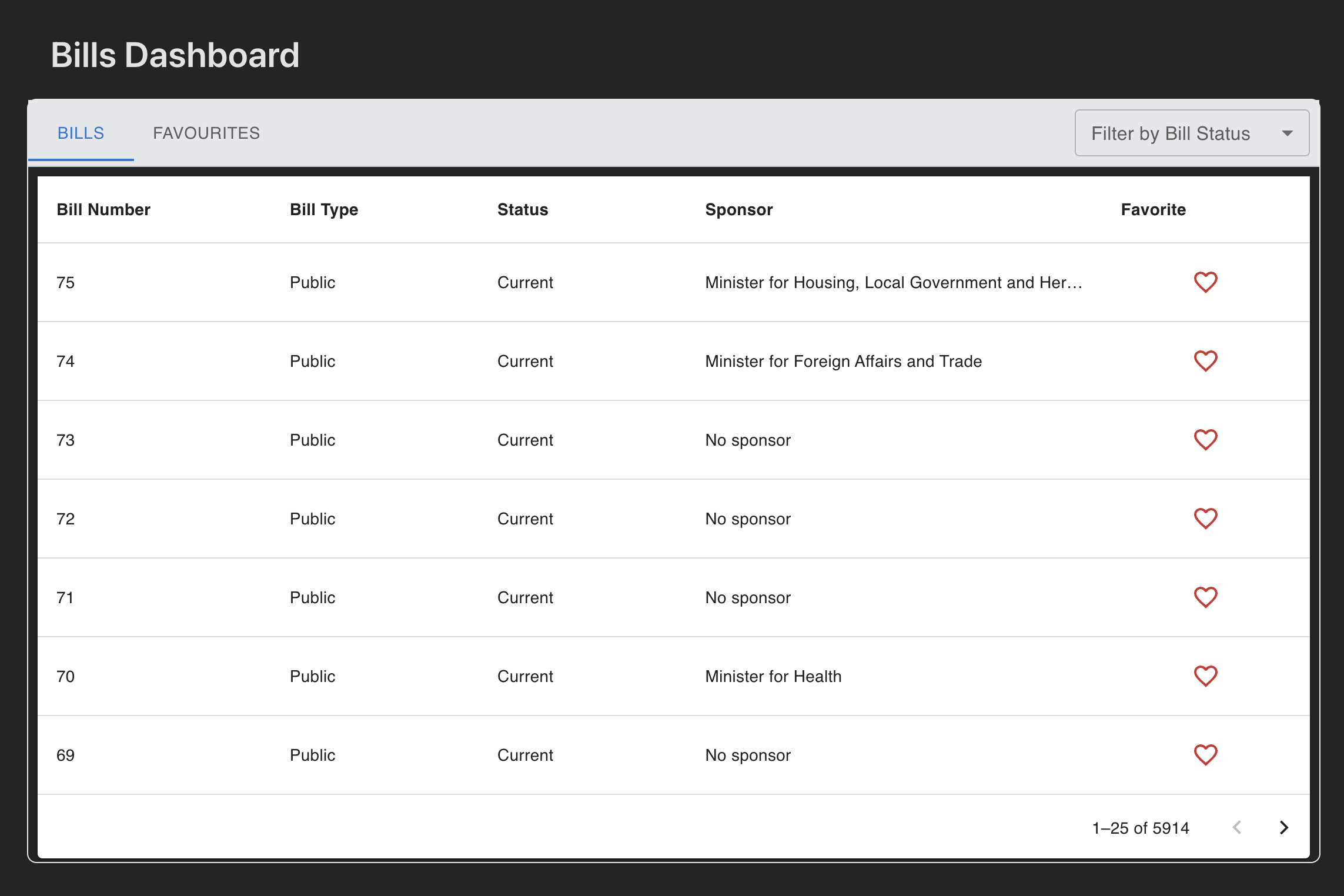
- Fetches and displays bills in a paginated table
- Allows filtering bills by bill status
- Opens a modal to view bill details (English & Gaeilge)
- Enables favoriting/unfavoriting bills
- Displays favorited bills in a separate tab
- Uses Material UI for styling
- Written in TypeScript
- Includes unit tests with Jest & React Testing Library
- React 18 - Frontend library
- TypeScript - Type safety and better developer experience
- Material UI - UI component library for consistent design
- Recoil - State management for React
- Vite - Next generation frontend tooling
- Jest & React Testing Library - Testing framework
- Tailwind CSS - Utility-first CSS framework
Main container component that manages the tabs for bills and favorites.
- Handles tab switching logic
- Manages bill filtering
- Coordinates data fetching
Displays bills in a paginated table format.
- Implements row-level click handling
- Manages favorite toggling
- Handles pagination
Modal dialog for displaying detailed bill information.
- Shows bill titles in English and Irish
- Implements tabbed interface
- Manages modal state
Selectbox to show all bill status option for filtering
- Shows bill statuses
- Implements bills filtering by bill status
Using Recoil for state management with the following atoms:
billsState: Stores the current list of billsbillHeadState: Manages pagination metadatafavoriteBillsState: Maintains list of favorited billsfetchedPagesState: Maintains list of visited pagesfilterState: Maintains selected filter statenetworkState: Maintains device online/offline status
Recoil Selector for filtered states tailored to the component needs
billSelectors: This has one selector filteredBillsSelector; extracts the filtered bills from the fetched dataset based on the filterState value selected by the BillFilterSelct component.
- The
bills.tsfile manages network calls for fetching bills data from the Oireachtas API. - Uses an Axios instance configured with a base URL, timeout settings, and common headers to ensure consistent API calls.
- The
fetchBillsfunction retrieves bills data, supporting pagination and mock data for testing. - The
favoriteServiceobject simulates API calls to toggle the favorite status of a bill. - The
fetchBillsWithCachefunction caches API responses to reduce redundant network requests and improve performance.
The ErrorBoundary.tsx file defines an ErrorBoundary component that acts as a safety net to catch JavaScript errors anywhere in its child component tree. This prevents the entire app from crashing when an error occurs and provides a user-friendly error message.
The ErrorBoundary component accepts the following props:
children(ReactNode): The components to be wrapped by the error boundary.
The ErrorBoundary component manages the following state:
hasError(boolean): A flag indicating if an error occurred.error(Error | null): The error that was caught, if any.
- Catches Runtime Errors: Captures JavaScript errors in child components and updates the state to trigger error UI rendering.
- User-Friendly Error Message: Displays a centered error message on the screen when an error occurs.
- Error Logging: Logs errors to the console for debugging purposes.
- Accessibility: Provides an accessible error message container with appropriate ARIA roles and properties.
To use the ErrorBoundary component, wrap it around any component that you want to protect from crashing due to errors:
import { ErrorBoundary } from '@/components/common/ErrorBoundary';

<ErrorBoundary>
  <YourComponent />
</ErrorBoundary>- Node.js (22.0+)
- npm
-
Clone the Repository
git clone https://github.com/Subhom1/bills-dashboard.git
cd bills-dashboard
'main' is the latest updated branch
-
Install Dependencies
npm install
-
Environment Setup Create a
.envfile in the root directory:VITE_API_URL="https://api.oireachtas.ie/v1/"
-
Start Development Server
npm run dev
npm run dev- Start development server on port 5173npm run build- Build for productionnpm test- Run all testsnpm run test:watch- Run tests in watch modenpm run test:coverage- Generate coverage reportnpm run lint- Run ESLintnpm run preview- Preview production build
- Using ESLint for code linting
- Prettier for code formatting
- TypeScript strict mode enabled
- Smart pagination with cached page tracking
- Smooth loading transitions with skeleton states
- Optimized table re-renders with fixed dimensions
- Intelligent data fetching with page caching
- Prevents duplicate API calls for visited pages
- Efficient duplicate prevention using Set data structure
- Memoized expensive computations with
useMemo - Optimized re-renders with
React.memo - Lazy loading for modal and filter components
- Consistent table heights to prevent layout shifts
- Recoil atoms for efficient state updates
- Tracking mechanism for fetched pages
- Optimized favorite toggling with local state
- Skeleton loading with matched dimensions
- Smooth transitions between states
- Prevented layout shifts during loading
- Consistent table dimensions across states
- Efficient Filter State: Uses
filterStateatom to manage filter selections without re-rendering the entire table - Smart Filter Logic: The
filteredBillsSelectoronly applies filters to the fetched dataset - Quick Status Updates:
- Filters bills by status (Current, Withdrawn, Enacted, etc.)
- Updates immediately without waiting for API responses
- Resets filter state while switching between tabs
- Optimized Filter Performance:
- Uses
useMemoto cache filtered results - Prevents unnecessary re-filtering when pagination changes
- Only re-applies filters when filter criteria actually change
- Uses
- User-Friendly Experience:
- Automatic page reset when applying new filters
- Clear visual feedback when filters are active
- Easy filter clearing with "All" option
- Filter + Favorites Integration:
- Filters work seamlessly in both main bills and favorites tabs
- Maintains separate filtered counts for each view
- Preserves favorite status across filter changes
- Fork the repository
- Create your feature branch (
git checkout -b feature/AmazingFeature) - Commit your changes (
git commit -m 'Add some AmazingFeature') - Push to the branch (
git push origin feature/AmazingFeature) - Open a Pull Request
feat: Add new feature
fix: Bug fix
docs: Update documentation
style: Code style update
refactor: Code refactoring
test: Add tests
chore: Tooling changes
Subhom Kundu - @SubhomKundu
Project Link: https://github.com/Subhom1/bills-dashboard