




Camouf catches the mistakes AI coding assistants make — broken contracts, phantom imports, signature drift, and architectural violations that traditional linters miss entirely.
Claude, Copilot, and Cursor are brilliant at generating code — but they work with limited context windows. When an AI generates frontend code without seeing your backend contracts, or modifies a file without remembering related files, things break in ways that compile but fail at runtime:
// Backend contract (shared/api.ts)
export function getUserById(id: string): Promise<User> { ... }
export interface User { email: string; createdAt: Date; }

// AI generates frontend code (components/Profile.tsx) — looks correct, compiles fine
const user = await getUser(userId);        // ❌ Wrong function name
console.log(user.userEmail);               // ❌ Wrong field name
console.log(user.created_at);              // ❌ Wrong casing
ESLint doesn't catch this. TypeScript passes. Your tests might even pass. Then production breaks.
Camouf scans your codebase for the specific patterns of errors that AI assistants create:

| Error Type | Example | Traditional Tools |
|---|---|---|
| Function Name Drift | getUser() instead of getUserById() |
❌ ESLint ignores it |
| Phantom Imports | import { validate } from './helpers' (file doesn't exist) |
❌ TypeScript ignores at lint time |
| Field Name Mismatch | user.userEmail instead of user.email |
❌ Compiles with any |
| Context Drift | Same concept named User/Customer/Account in different files |
❌ No tool detects this |
| Orphaned Functions | AI generates helpers that are never called | ❌ Tree-shaking hides it |
| Casing Inconsistency | getUserById / get_user_by_id in same project |
❌ Style issue, not error |
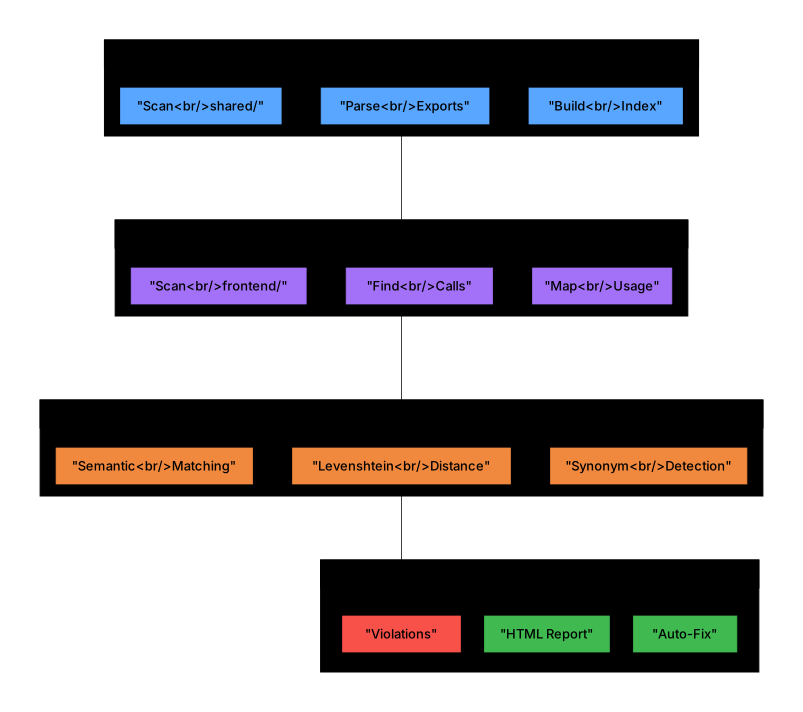
Defined in shared/api.ts:15      Used in frontend/user.ts:42
         getUserById(id)    ◄──────────    getUser(userId)
                                  └── 75% similar — likely AI context loss
npx camouf fix-signatures --all    # Fix all mismatches automatically
npx camouf fix --id sig-001        # Fix a specific mismatch
| Aspect | ESLint / Prettier | Camouf |
|---|---|---|
| Focus | Code style, syntax errors | Cross-file contract integrity |
| Scope | Single file at a time | Entire codebase relationships |
| AI Errors | Doesn't detect | Purpose-built for AI mistakes |
| Runtime Safety | No guarantee | Catches compile-but-fail bugs |
| Architecture | No awareness | Layer boundaries, DDD, dependencies |
Camouf is not a replacement for ESLint — it catches what ESLint can't see.
- AI-Native: Built specifically for Claude, Copilot, and Cursor error patterns
- Cross-File Analysis: Detects mismatches across your entire codebase
- Plugin Architecture: Extend with custom rules for React, Next.js, NestJS, or any framework
- Multi-language Support: TypeScript, JavaScript, Python, Java, Go, Rust
- CI/CD Ready: SARIF, JSON, JSOND outputs for GitHub Actions and AI agents
- VS Code Integration: Real-time Problems panel with clickable fixes

- 19 Built-in Rules: AI-specific and architecture validation rules
- Function/Field Matching: Fuzzy matching to detect AI naming drift
- Circular Dependency Detection: Find and break dependency cycles
- Real-time Watch Mode: Continuous architecture monitoring
- Security Scanning: Detects hardcoded secrets, API keys, credentials
- Multiple Report Formats: HTML, JSON, JSOND, Markdown, SARIF
- VS Code Integration: Problems panel with clickable quick-fixes
- Plugin System: Extend for any framework (React, Next.js, NestJS...)
npm install -g camouf
# or
npm install --save-dev camoufcamouf initcamouf validatecamouf watchRunning npx camouf or npx camouf help displays the full interactive help:
  ██████╗ █████╗ ███╗   ███╗ ██████╗ ██╗   ██╗███████╗
 ██╔════╝██╔══██╗████╗ ████║██╔═══██╗██║   ██║██╔════╝
 ██║     ███████║██╔████╔██║██║   ██║██║   ██║█████╗
 ██║     ██╔══██║██║╚██╔╝██║██║   ██║██║   ██║██╔══╝
 ╚██████╗██║  ██║██║ ╚═╝ ██║╚██████╔╝╚██████╔╝██║
  ╚═════╝╚═╝  ╚═╝╚═╝     ╚═╝ ╚═════╝  ╚═════╝ ╚═╝    v0.11.0

  Architecture guardrails for AI-generated code

  ┌─────────────────────────────────────────────────────────────┐
  │  QUICK START                                                │
  │                                                             │
  │  $ npx camouf init              # Setup config              │
  │  $ npx camouf validate          # One-time check            │
  │  $ npx camouf watch             # Real-time monitoring      │
  └─────────────────────────────────────────────────────────────┘

  COMMANDS

  Setup & Config:
    init [options]            Initialize configuration in the current project
                              --template <t>  Use preset (monorepo, fullstack)
                              --agent <type>  Generate CLAUDE.md / AGENTS.md
                              --plugin        Scaffold a new Camouf plugin project

  Validation & Analysis:
    validate [options]        One-time architecture validation
                              --rules <r>     Run specific rules (comma-sep)
                              --format <f>    Output: text, json, sarif, vscode
                              --fix           Auto-fix where possible
                              --ci            CI/agent mode (no spinners)
    watch [options]           Real-time file monitoring with live validation
                              --format vscode VS Code Problems panel integration
                              --rules <r>     Watch specific rules only
    analyze [options]         Deep architecture & dependency analysis
                              --metrics       Include code metrics
                              --coupling      Analyze module coupling
                              --format <f>    Output: html, json, dot

  Fixing & Refactoring:
    fix [options]             Fix signature mismatches & fixable violations
                              --interactive   Review and confirm each fix
                              --all           Apply all fixes automatically
                              --dry-run       Preview changes without applying
                              --id <id>       Fix specific mismatch by ID
                              --file <path>   Fix all in a specific file
                              --type <type>   Fix by type (function-name, etc.)
    fix-signatures [options]  Alias: fix function signature mismatches

  Reporting:
    report [options]          Generate comprehensive architecture reports
                              --format <f>    html, pdf, json, markdown
                              --include-code  Include code snippets
                              --include-graphs Include dependency graphs

  AI Agent Integration:
    mcp [options]             Start MCP server for Cursor, Claude, Copilot
                              --stdio         Use stdio transport (default)

  GLOBAL OPTIONS

    -c, --config <path>       Path to configuration file
    -v, --version             Display current version
    --verbose                 Enable verbose output
    --silent                  Suppress all output except errors
    --no-color                Disable colored output

  EXAMPLES

    $ npx camouf validate --format json          # JSON output for scripts
    $ npx camouf validate --rules function-signature-matching
    $ npx camouf fix --interactive               # Review fixes one by one
    $ npx camouf fix --all --dry-run             # Preview all fixes
    $ npx camouf watch --format vscode           # VS Code integration
    $ npx camouf report --format html            # HTML architecture report
    $ npx camouf init --agent claude             # Generate CLAUDE.md
    $ npx camouf mcp --stdio                     # Start MCP server

  AVAILABLE RULES

    AI Safety:          ai-hallucinated-imports, inconsistent-casing,
                        orphaned-functions, phantom-type-references,
                        context-drift-patterns, async-discrepancies
    Architecture:       layer-dependencies, circular-dependencies,
                        function-signature-matching, contract-mismatch
    Code Quality:       type-safety, performance-antipatterns,
                        data-flow-integrity, hardcoded-secrets
    Advanced:           ddd-boundaries, distributed-transactions,
                        api-versioning, security-context, resilience-patterns

  DOCS & LINKS

    Documentation:      https://github.com/TheEmilz/camouf#readme
    Report Issues:      https://github.com/TheEmilz/camouf/issues
Tip: Run
npx camouf help <command>for detailed help on any specific command.
Extend Camouf for any framework. Plugins can add rules, analyzers, parsers, quick-fixes, and output formatters.
npm install --save-dev camouf-plugin-react{
"plugins": ["camouf-plugin-react"],
"rules": {
"plugin": {
"missing-dependency-array": "error"
}
}
}See Creating Plugins for building your own.
| Plugin | Description | Status |
|---|---|---|
camouf-plugin-react |
React hooks dependency arrays, component naming, prop drilling, stale closures | ✅ Available |
camouf-plugin-nextjs |
Next.js page structure, API routes, middleware | 🔜 Coming Soon |
camouf-plugin-nestjs |
NestJS module boundaries, DI patterns | 🔜 Coming Soon |
Catches AI-generated React mistakes:
npm install --save-dev camouf-plugin-reactRules included:
| Rule | Description |
|---|---|
missing-dependency-array |
Detects useEffect/useCallback with missing dependencies |
inconsistent-component-naming |
Enforces PascalCase for React components |
prop-drilling-detection |
Finds excessive prop passing through component trees |
stale-closure-patterns |
Catches stale closures in hooks (common AI mistake) |
Camouf exposes an MCP (Model Context Protocol) server that allows AI agents like Claude, Cursor, and Copilot to validate their own code before proposing it to you.
Full tutorial: Using Camouf with AI Agents (MCP Tutorial) -- setup, real-time streaming, multi-agent collaboration, and the validate-fix-revalidate loop.
npx camouf mcpAdd to your Claude Desktop config (%APPDATA%\Claude\claude_desktop_config.json on Windows, ~/Library/Application Support/Claude/claude_desktop_config.json on macOS):
{
  "mcpServers": {
    "camouf": {
      "command": "npx",
      "args": ["camouf", "mcp"],
      "cwd": "/path/to/your/project"
    }
  }
}| Tool | Description |
|---|---|
camouf_validate |
Validate code against architecture rules |
camouf_analyze |
Analyze project structure and dependencies (uses real dependency graph) |
camouf_suggest_fix |
Get fix suggestions for violations |
| Resource | Description |
|---|---|
camouf://rules |
All available rules with enabled/disabled status (dynamic from config + plugins) |
camouf://config |
Active project configuration, layers, and rule settings |
| Prompt | Description |
|---|---|
before-writing-code |
Workflow: analyze project architecture before generating code |
after-generating-code |
Validate and fix loop with max 3 iterations |
understanding-violations |
How to interpret severity levels and common AI violations |
project-conventions |
Discover active rules, layers, naming conventions |
When Claude generates code, it can call camouf_validate to check for:
- Hallucinated imports (modules that don't exist)
- Contract mismatches (wrong function signatures)
- Context drift (inconsistent naming)
- Security issues (hardcoded secrets)
This creates a feedback loop where AI catches its own mistakes before you see them.
- Getting Started
- Creating Plugins
- AI Agent Challenges
- MCP Agent Tutorial
- Configuring Rules
- Async Discrepancies Guide
- CI/CD Integration
- Changelog
See the full CLI Reference above for all commands, options, and examples.
Run
npx camouf helpto see the same reference in your terminal.
Camouf supports multiple configuration formats:
camouf.config.jsoncamouf.config.yamlcamouf.config.js.camoufrc
{
  "name": "my-project",
  "rootDir": "./src",
  "exclude": ["**/node_modules/**", "**/*.test.ts"],
  "layers": [
    {
      "name": "presentation",
      "directories": ["./src/controllers", "./src/routes"],
      "allowedDependencies": ["application", "domain"]
    },
    {
      "name": "application",
      "directories": ["./src/services", "./src/usecases"],
      "allowedDependencies": ["domain"]
    },
    {
      "name": "domain",
      "directories": ["./src/domain", "./src/entities"],
      "allowedDependencies": []
    },
    {
      "name": "infrastructure",
      "directories": ["./src/infrastructure", "./src/repositories"],
      "allowedDependencies": ["domain"]
    }
  ],
  "rules": {
    "builtin": {
      "layer-dependencies": "error",
      "circular-dependencies": "error",
      "function-signature-matching": "error",
      "performance-antipatterns": "warn",
      "type-safety": "warn",
      "data-flow-integrity": "error",
      "distributed-transactions": "warn",
      "api-versioning": "info",
      "security-context": "error",
      "resilience-patterns": "warn",
      "ddd-boundaries": "info"
    }
  },
  "output": {
    "format": "text",
    "colors": true,
    "verbose": false
  }
}| Rule | Description | Default |
|---|---|---|
layer-dependencies |
Validates layer boundary compliance | error |
circular-dependencies |
Detects circular dependency cycles | error |
contract-mismatch |
Validates API contracts (OpenAPI/GraphQL) | error |
ddd-boundaries |
Validates DDD principles and bounded contexts | warn |
function-signature-matching |
Detects mismatched function/field names between contracts and usage | error |
| Rule | Description | Default |
|---|---|---|
hardcoded-secrets |
Detects hardcoded API keys, passwords, and tokens | error |
data-flow-integrity |
Validates data flow and input sanitization | error |
security-context |
Validates authentication and authorization | error |
| Rule | Description | Default |
|---|---|---|
distributed-transactions |
Validates distributed transaction patterns | warn |
resilience-patterns |
Validates circuit breakers, retries, timeouts | warn |
| Rule | Description | Default |
|---|---|---|
performance-antipatterns |
Detects N+1 queries, memory leaks | warn |
type-safety |
Detects unsafe type usage | warn |
api-versioning |
Validates API versioning practices | info |
These rules catch mistakes that AI coding assistants commonly make:
| Rule | Description | Default |
|---|---|---|
ai-hallucinated-imports |
Detects imports of non-existent files/modules | error |
context-drift-patterns |
Finds same concepts with different names across files | warn |
phantom-type-references |
Catches references to types that don't exist | warn |
inconsistent-casing |
Detects mixing of camelCase/snake_case in the same codebase | warn |
orphaned-functions |
Finds functions declared but never called anywhere | warn |
async-discrepancies |
Detects async/await misuse: floating promises, unnecessary async, mixed patterns | warn |
See examples: Check
test-fixtures/ai-errors/in the repository for concrete examples of what each rule catches.
Real-time colored output with violation details.
Compact machine-readable format for CI/CD integration.
JSON with Descriptions — A structured format optimized for AI agent consumption with rich context and actionable information.
npx camouf validate --format jsondJSOND includes:
- Detailed descriptions for every field
- Violations grouped by file, rule, and severity
- AI-specific action items and priorities
- Ready-to-run fix commands
- Workflow instructions for automated remediation
Example output:
{
  "$description": "Camouf Architecture Violations Report - JSOND format optimized for AI agents",
  "summary": {
    "total_violations": 3,
    "by_severity": {
      "errors": {
        "count": 2,
        "description": "Critical violations that must be fixed..."
      }
    }
  },
  "action_items": [
    {
      "priority": "critical",
      "action": "Remove hardcoded secrets",
      "quick_fix": "Move secrets to environment variables"
    }
  ],
  "ai_instructions": {
    "recommended_workflow": [
      "1. Review the summary to understand the scope",
      "2. Prioritize errors over warnings",
      "3. Use 'suggestion' field for fixes"
    ]
  }
}Interactive visualization with dependency graphs.
Static Analysis Results Interchange Format for IDE integration.
Documentation-friendly format for pull requests.
Camouf integrates seamlessly with VS Code's Problems panel for real-time violation feedback.
When you run camouf init, it automatically creates:
.vscode/tasks.json- Build tasks with problem matchers.vscode/settings.json- Optimal settings for Camouf
-
Press
Ctrl+Shift+B(Windows/Linux) orCmd+Shift+B(Mac) -
Select one of the tasks:
- camouf: Validate - One-time scan, results in Problems panel
- camouf: Watch - Continuous monitoring (background task)
-
Open the Problems panel:
Ctrl+Shift+M
# One-time validation with VS Code output format
npx camouf validate --format vscode

# Watch mode with VS Code output format
npx camouf watch --format vscodeViolations appear in the Problems panel with:
- Severity icon (error/warning/info)
- File location (clickable link)
- Rule ID and message
- Suggestion for fix
test.ts(10,1): error hardcoded-secrets: AWS Access Key ID detected
src/api.ts(45,1): warning performance-antipatterns: N+1 query pattern detected
If you didn't run camouf init or need to add tasks manually, create .vscode/tasks.json:
{
  "version": "2.0.0",
  "tasks": [
    {
      "label": "camouf: Validate",
      "type": "shell",
      "command": "npx camouf validate --format vscode",
      "problemMatcher": {
        "owner": "camouf",
        "fileLocation": ["relative", "${workspaceFolder}"],
        "pattern": {
          "regexp": "^(.+)\\((\\d+),(\\d+)\\):\\s+(error|warning|info)\\s+([^:]+):\\s+(.*)$",
          "file": 1,
          "line": 2,
          "column": 3,
          "severity": 4,
          "code": 5,
          "message": 6
        }
      }
    }
  ]
}Camouf integrates natively with AI coding agents. Use camouf init --agent to generate the appropriate configuration files.
camouf init --agent claudeThis creates:
CLAUDE.md— Project instructions teaching Claude how to use Camouf.claude/commands/camouf-validate.md—/camouf-validateslash command for architecture-aware validation.claude/commands/camouf-fix.md—/camouf-fixslash command to automatically fix violations.claude/rules/camouf.md— Architecture rules loaded into every Claude session
Claude Code will automatically read these files and enforce architecture rules when writing code.
camouf init --agent codexThis creates:
AGENTS.md— Agent instructions with Camouf commands, output format, and workflow
Codex reads AGENTS.md and knows how to validate architecture before committing.
camouf init --agent allGenerates integration files for all supported agents (Claude Code + Codex).
For AI agent consumption, use JSOND format (recommended):
npx camouf validate --format jsond --ciJSOND provides rich context and actionable instructions optimized for AI assistants:
{
  "$description": "Camouf Architecture Violations Report",
  "summary": {
    "total_violations": 2,
    "by_severity": {
      "errors": { "count": 1, "description": "Critical violations..." }
    }
  },
  "action_items": [
    {
      "priority": "critical",
      "action": "Remove hardcoded secrets",
      "quick_fix": "npx camouf fix --id sec-001"
    }
  ],
  "ai_instructions": {
    "recommended_workflow": [
      "1. Review summary",
      "2. Prioritize errors",
      "3. Apply quick fixes"
    ]
  }
}
For simpler JSON output:
npx camouf validate --format json --ciCamouf is available on the GitHub Actions Marketplace. One step is all you need:
name: Architecture Check
on: [push, pull_request]

jobs:
  architecture:
    runs-on: ubuntu-latest
    steps:
      - uses: actions/checkout@v4
      - uses: TheEmilz/camouf@v0.11.0
Camouf auto-detects your config, runs all enabled rules, annotates changed files in PR diffs, and uploads a report artifact.
- uses: TheEmilz/camouf@v0.11.0
  with:
    rules: 'async-discrepancies,contract-mismatch'
fail-on: 'warn'name: Async Safety
on:
pull_request:
paths: ['**/*.ts', '**/*.js']
jobs:
async-check:
runs-on: ubuntu-latest
steps:
- uses: actions/checkout@v4
- uses: TheEmilz/camouf@v0.11.0
with:
rules: 'async-discrepancies'
fail-on: 'warn'
annotate: 'true'See CI/CD Integration Guide for the full input/output reference, PR comments, GitLab CI, Jenkins, and Azure DevOps examples.
Use --ci flag or CAMOUF_CI=1 environment variable for agent/CI environments:
# Suppress spinners, colors, interactive prompts
npx camouf validate --ci

# JSON output automatically enables CI mode
npx camouf validate --format json

# Environment variable alternative
CAMOUF_CI=1 npx camouf validate0— No violations found1— Violations found (or error)
| Language | Parser | Features |
|---|---|---|
| TypeScript | ts-morph | Full AST analysis, type resolution |
| JavaScript | ts-morph | ES6+ module support |
| Python | tree-sitter | Import/export detection |
| Java | tree-sitter | Package and class analysis |
| Go | tree-sitter | Module and import analysis |
| Rust | tree-sitter | Crate and module analysis |
Generate interactive HTML visualizations:
camouf analyze --visualize -o ./reportsExport to GraphViz DOT format:
camouf analyze --visualize -f dot -o ./reportsThe fastest way to create a new plugin:
npx camouf init --pluginThis generates a complete plugin project with package.json, tsconfig, entry point, and a rule template. See Creating Plugins.
For project-specific rules, implement the IRule interface:
import type { IRule, RuleContext, RuleResult } from 'camouf/rules';
import type { Violation } from 'camouf';

export class MyCustomRule implements IRule {
  readonly id = 'my-custom-rule';
  readonly name = 'My Custom Rule';
  readonly description = 'Description of what the rule checks';
  readonly severity = 'warning' as const;
  readonly tags = ['custom'];

  async check(context: RuleContext): Promise<RuleResult> {
    const violations: Violation[] = [];
    // Your rule logic here
    return { violations };
  }
}
Register custom rules in configuration:
{
  "rules": {
    "custom": [
      "./rules/my-custom-rule.js"
    ]
  }
}
For framework-specific rules and publishing plugins, see Creating Plugins.
docker run -v $(pwd):/app ghcr.io/camouf/camouf analyzeApache 2.0 - See LICENSE for details.
Contributions are welcome. Please read the contributing guidelines before submitting pull requests.