Tuwaiq Academy final Project. ComicToon Android Application using Kotlin

This project represents an android application ComicToon ,that allows user to display classic comics especially in th 1990s , mark them and provide addtional information for each specific . This application was built using the following technologies:
-
Canva
-
Adobe Photoshop
-
Figma
-
Adobe Photoshop
- IntelliJ IDEA for improving code quality.
- Android Architecture Components:MVVM,Navigation, Livedata.
- RecyclerViews & Adapters.
- Postman API Platform
- Required Libraries
- Firebase
- API from ComicVine
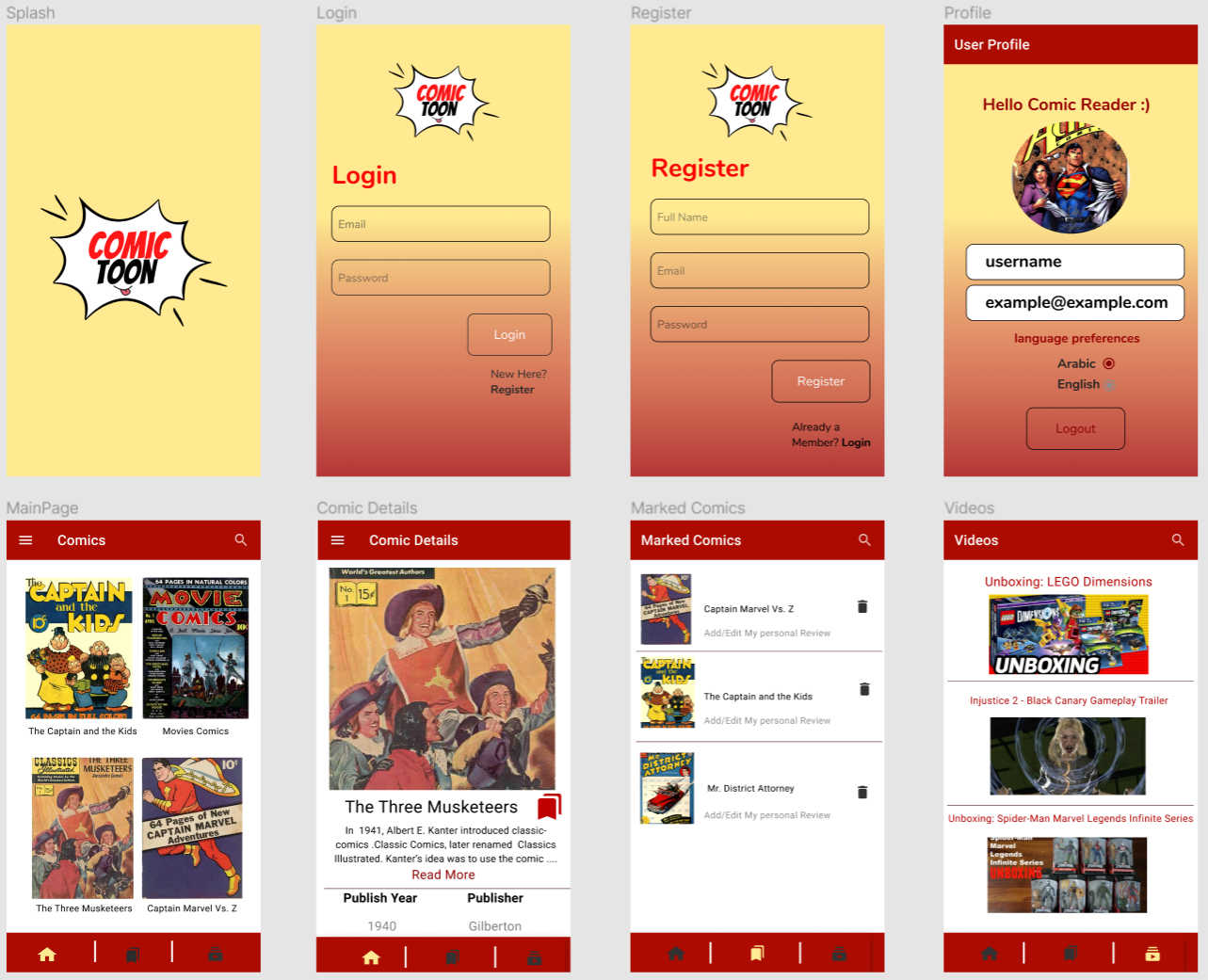
link to Figma Figma Wireframe
-
As a user,I want to display the comics so that I get to know classic comics
-
As a user I want to see the details of each comic so that I can see additional information about it (such as description of the comic, publisher , publish date ..etc) .
-
As a user I want to mark my favourite comic so that I can get back to them easily.
-
As a user I would like to be able to add/ edit my personal review for my favourite comic so that I write down my personal opinion and thoughts.
-
As a user I would like to be able to delete the comics that I marked so that I can remove the one that no longer see it a favourite.
-
As a user I would like to be able to to play videos realted to comics so that I can enjoy watching various comic videos.
Screen_Recording_20220126-133252_ComicToon.mp4
Follow the steps below to get started with the project's development environment:
- Install Android Studio from Android Studio
- Clone this repository:
$ git clone https://github.com/WalaaAlshaikh/ComicToon.git- Navigate to the project directory:
$ cd ComicToon- List of the depencenceies used in the project:
   dependencies {
   implementation "androidx.navigation:navigation-fragment-ktx:2.3.5"
   implementation "androidx.navigation:navigation-ui-ktx:2.3.5"
}- for notification:
    val core_version = "1.6.0"
    dependencies {
    implementation("androidx.core:core-ktx:$core_version")

    implementation 'com.google.firebase:firebase-messaging-ktx:23.0.0'

}- for ViewModel
    dependencies {
   implementation "androidx.lifecycle:lifecycle-viewmodel-ktx:2.4.0-rc01"
   implementation "androidx.fragment:fragment-ktx:1.3.6"
}- for live data
    dependencies {
   implementation "androidx.lifecycle:lifecycle-livedata-ktx:2.4.0-rc01"
} dependencies {
implementation 'com.google.firebase:firebase-auth-ktx:21.0.1'
implementation 'com.google.firebase:firebase-firestore-ktx:24.0.0'
implementation 'com.google.firebase:firebase-storage-ktx:20.0.0'
implementation 'com.google.firebase:firebase-database-ktx:20.0.3'
implementation 'com.google.firebase:firebase-messaging-ktx:23.0.0'
implementation 'com.firebaseui:firebase-ui-firestore:8.0.0'
}- for coroutines
    dependencies {
   implementation 'org.jetbrains.kotlinx:kotlinx-coroutines-core:1.5.2'
}- for Images
    dependencies {
   implementation 'com.squareup.picasso:picasso:2.71828'
   implementation 'com.github.bumptech.glide:glide:4.12.0'
    annotationProcessor 'com.github.bumptech.glide:compiler:4.12.0'
    // for making pic circular
    implementation 'de.hdodenhof:circleimageview:3.1.0'
}- for animation
    dependencies {
    implementation 'com.facebook.shimmer:shimmer:0.5.0'
- for language (Localization)
    dependencies {
    implementation 'com.akexorcist:localization:1.2.11'
Firstly, I brainstormed some ideas related to the requirement of the app and then took a general idea of the design and the mechanisim of some popular apps from app store Secondly, I designed a logo according to the purpose of the app and gave it name. Thirdly, I designed the screens each of them suitable for a specific action using the Figma and Photoshop,after that I statred programming the app using the android studio by dividing the project into several tasks to work on it: at first, I installed the required libraries and dependencies and the required api from ComicVine. As for the obstacles that I faced,first I needed to decide the nature of the error (if it's syntax, runtime or logical), and then find the solution accordingly.Such solutions that can be disovered when debugging the error, using (Log.d)to specifty the location of the error, searching for similar cases online in stackoverflow and asking for the help of the experts. After managing to finish all the requirements of the projects, I started adding more features to the app such as :
- Videos
- switching to eng\ar
- internet connection handling
- and more.
- The issue of playing\puasing videos in VideoView, which can potentially be solved by adding some functions to add the action bar for videos.
- Some conflects in ui regarding Localization (when switching from English into Arabic).
- some minor issues regarding the enhancment of the design to make the user expereince more dynamic.
- video View to display video url (.mp4)
// in class.kt file
var video:VideoView=view.findViewById(R.id.videoView)
var mediaControls: MediaController? = null
       if (mediaControls == null) {
          //  creating an object of media controller class
           mediaControls = MediaController(context)

           // set the anchor view for the video view
           mediaControls.setAnchorView(video)
        video.setMediaController(mediaControls)
       video.setVideoURI(
             Uri.parse(item.highUrl))
          video.requestFocus()
          video.start()
       }

// in xml file
<VideoView
 //...//
/>- using Meta (facebook) library for animation an Android library that provides an easy way to add a shimmer effect to any view in your Android app. It is useful as an unobtrusive loading indicator that was originally developed for Facebook Home.
// Gradle dependency on Shimmer for Android
dependencies {
 implementation 'com.facebook.shimmer:shimmer:0.5.0'
}

in xml
<com.facebook.shimmer.ShimmerFrameLayout
    android:id="@+id/shimmer_view_container"
    android:layout_width="wrap_content"
    android:layout_height="wrap_content"
>
    ...(your complex view here)...
</com.facebook.shimmer.ShimmerFrameLayout>