This is a document collecting or different Obsidian snippets, how to write, how to use and how to expand
- Find your
obsidian vaultdirectory - Find
YOUR OBSIDIAN VAULT/.obsidian/folder - Find
YOUR OBSIDIAN VAULT/.obsidian/snippets/folder - Put the
cssfiles there - Open obsidian app
- Enter
Settings - In the left bar, choose
Appearance - You may turn on your snippets in css-snippets
Here we have a sequence of snippets for coloring, labeling and make icons. Any way, they help you to mark up differences and organzie your vaults.
Here is the discussion over coloring the navigation bar: https://forum.obsidian.md/t/adding-color-to-obsidian-a-rainbow-of-possibility/12805/11
- The
css codeis here: https://github.com/ZizhengYang/Collection-Obsidian-Snippets/blob/main/Color%20and%20Icon/colored-folders.css - Original github.com repository: I didn't found
- Contributor: @Lithou: Colored Folders.css; the forum
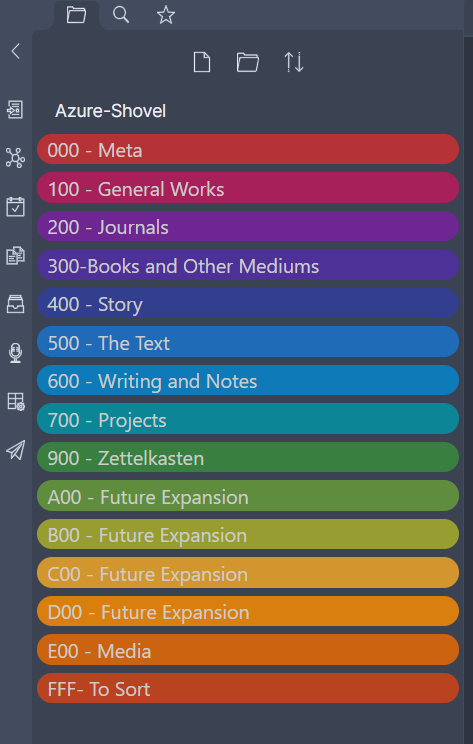
<!-- we can insert a new rule of coloring as below -->

.nav-folder.mod-root>.nav-folder-children>.nav-folder>.nav-folder-title[data-path^="YOUR-FOLDER-STARTING-LETTERS"],
    .nav-folder.mod-root>.nav-folder-children>.nav-folder>.nav-folder-title[data-path^="YOUR-FOLDER-STARTING-LETTERS"] + .nav-folder-children{
    background-color: var(--FoldF);}

.nav-folder.mod-root>.nav-folder-children>.nav-folder>.nav-folder-title[data-path^="YOUR-FOLDER-NAME"],
    .nav-folder.mod-root>.nav-folder-children>.nav-folder>.nav-folder-title[data-path^="YOUR-FOLDER-NAME"] + .nav-folder-children{
background-color: var(--FoldF);}- The
css codeis here: https://github.com/ZizhengYang/Collection-Obsidian-Snippets/blob/main/Image%20relative/img-centering.css - Original github.com repository: Doesn't exists
- Contributor: @猫老大的小站台; the blog

very simple ~ just look up the code- The
css codeis here: https://github.com/ZizhengYang/Collection-Obsidian-Snippets/blob/main/Image%20relative/img-shadow-roundedBorder.css - Original github.com repository: Doesn't exists
- Contributor: @猫老大的小站台; the blog

.markdown-preview-view img {
    max-width: 100%;
    outline: none;
    -webkit-filter: drop-shadow(10px 10px 10px rgba(8, 8, 8, 0.5)); /* the setting for the shadow effect */
        background-clip: content-box,padding-box;
        border-radius: 20px 20px 20px; /* the setting for the border rounding */
}- https://github.com/ZizhengYang/Collection-Obsidian-Templates-Snippets/blob/main/Templates/Prose.md: A template to write daily proses