-
-
Notifications
You must be signed in to change notification settings - Fork 302
Blurry Form Text on High Resolution Displays
BJ Hargrave edited this page Dec 24, 2018
·
2 revisions
If you have a high resolution display – such as a MacBook with Retina screen – you may see some ugly, scaled text in the Form controls used by Bndtools. For example:
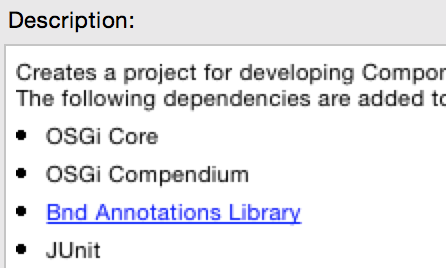
This is a general Eclipse problem with scaling on high DPI displays, and is also visible in text editor line numbers, and help panels. There is nothing we can do about it in Bndtools, sorry.
Please file a bug against Eclipse, or add a comment to this existing bug.
Latest Releases
all versions
- 7.2.1 | 7.2.0
- 7.1.0 | 7.0.0
- 6.4.1 | 6.4.0 | 6.3.1 | 6.3.0
- 6.2.0 | 6.1.0 | 6.0.0
- 5.3.0 | 5.2.0 | 5.1.2 | 5.1.1
- 5.1.0 | 5.0.1 | 5.0.0
- 4.3.1 | 4.3.0 | 4.2.1 | 4.2.0
- 4.1.0 | 4.0.0
- 3.5.0 | 3.4.0 | 3.3.0 | 3.2.0
- 2.2.0
Gradle
- Plugin
- Build Customizations
- Builder & java-library
- Non-Workspace builds
- PluginManagement
- Using Kotlin
- Kotlin DSL jar config
- AntTasks
- Baselining [beta]
- Blurry Form Text on High-Resolution Displays
- Bnd toolchain parity table
- bnddistribute
- Buildpath Versions
- Conflict with M2E PDE Connector
- Eclipse Logging with Logback
- Hackathon June 2012
- Install bnd on the command line
- Is there a mailing list for bnd
- Launching Framework
- Multi-project build order
- Multi-release JAR support design discussion
- Plans wrt to enRoute
- Reading Eclipse project preferences in bnd
- Release Process
- Requirements for New Repository API
- Windows Locked Files
- WIP ideas ‐ bnd 8.0.0 breaking changes
- XML Attributes on Annotations
- [ant] Loading and Expanding Shared Headers or Properties