You can find working examples here >> Demo Page
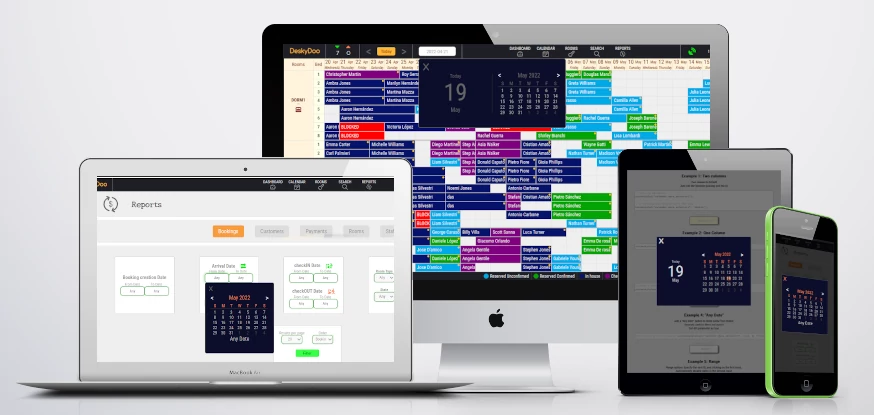
Derivate from a hotels software at deskydoo
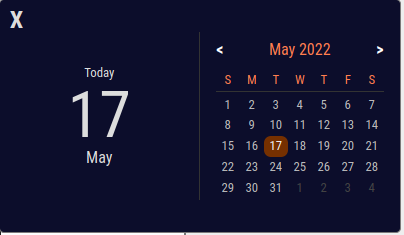
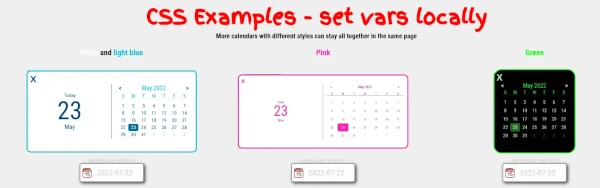
Ultralight (6.3KB) datepicker vanilla JS CSS with no dependencies
Click on the input fields downthere to see the examples
- 📳 Full Responsive
- 🌱 Double / Single Format
- ⚙️ Set The Date
- 🍀 Add "Any Date" Option
- 🔒 Disable Dates
- 💡 Relates 2 datepickers for range
- 📎 Execute external function on click
- 🤏 Minified version is just 7.7K
- ✌️ Just include 2 files and call many times you need in a page
- 📅 Aria Label
- ⌨️ Key Navigation support
- Include CSS and JS
<script type="text/javascript" src="https://cdn.jsdelivr.net/gh/danruggi/[email protected]/dist/desky_cal.min.js"></script>
<script type="text/javascript" src="https://cdn.jsdelivr.net/gh/danruggi/[email protected]/js/deskyCal.js"></script>
- Create any field with an unique ID in the page
<input id='unique_id'>
- Init the calendar with a json containing all the inputs and the options
<script>
    new DeskyCalendar({"unique_id": {}})
</script>
Check the Demo Page >> Demo Page
For Latest version, use:
<!-- Full code -->
<script type="text/javascript" src="https://cdn.jsdelivr.net/gh/danruggi/datepicker/js/deskyCal.js"></script>

<!-- Minified -->
<script type="text/javascript" src="https://cdn.jsdelivr.net/gh/danruggi/datepicker/dist/desky_cal.min.js"></script>
For specific version (to avoid changes/updates/untested behaviours), to stick to latest stable version, use
<!-- Full code -->
<script type="text/javascript" src="https://cdn.jsdelivr.net/gh/danruggi/[email protected]/js/deskyCal.js"></script>

<!-- Minified -->
<script type="text/javascript" src="https://cdn.jsdelivr.net/gh/danruggi/[email protected]/dist/desky_cal.min.js"></script>
Latest - Beta with key navigation and aria controls (no minified version avail yet)
<script type="text/javascript" src="https://cdn.jsdelivr.net/gh/danruggi/[email protected]/js/deskyCal.js"></script>
Stable
<script type="text/javascript" src="https://cdn.jsdelivr.net/gh/danruggi/[email protected]/js/deskyCal.js"></script>
Available in version 6.0 beta
- Tab: Select the input field
- ENTER/SPACEBAR on input: Open Calendar
- ESC: Close Calendar
- PgUP/PgDOWN: Next/Prev month
- LEFT/RIGHT arrows: Next/Prev Day
- DOWN arrow: Select AnyDate if avail
- UP arrow: Back to daylist
- ENTER on a day: Select Day/AnyDate
// Updated for v5.5
const calOptions = {
    'unique_id': {
        // single or double, default: single
        mode: 'double',

        // set a begin date, date is a Date() object, default: new Date()
        defaultDate: d,

        // enable "anyDate" button, useful in reports, default: false
        anyDate: true,

        // It will disable dates before the selected dates in the next input
        nextInput: 'next_unique_id',

        // disable before a date, d1 must be a Date() object
        disableBefore: d1,

        // disable after a date, d2 must be a Date() object
        disableAfter: d2,

        // Scroll to the calendar object if out of field of view, default: false
        scroll: true,

        // callback, invoke a function on day click.
        // function name must be specified without quotes and musd be a valid js function
        callback: this_is_callback,
    }
}
Two column is default Just call the function passing just the id
// Just one parameter
const calOptions = {'unique_id': {mode: 'double'}}
new DeskyCalendar(calOptions)
const calOptions = {
    'unique_id_1': {mode: 'double'}
    'unique_id_2': {mode: 'double', disableBefore: d2}
    'unique_id_3': {mode: 'double', nextInput: 'unique_id_4'}
    'unique_id_4': {mode: 'single', anyDate: true}
}
new DeskyCalendar(calOptions)
One column pass single as second parmeter
// Just one parameter
const calOptions = {'unique_id': {}}
new DeskyCalendar(calOptions)
Pass a date as third parameter
//Create a date
const d = new Date(Date.parse('04 Dec 2025 00:12:00 GMT'));
const calOptions = {'unique_id': {defaultDate: d}}
new DeskyCalendar(calOptions)
Add a "Any Date" button to leave some free choice Generally useful in filters and reports Set 4th parameter as true
//Set anyDate
const calOptions = {'unique_id': {anyDate: true}}
new DeskyCalendar(calOptions)
Range options Specify the next ID, and clicking on the first input, Automatically disable dates in the second input Use the single mode
//Set the 5th parameter as the ID of the "other" input
const calOptions = {
    'unique_id_1': {mode: 'single', anyDate: true, nextInput: 'unique_id_2'},
    'unique_id_2': {mode: 'single', anyDate: true},
}
new DeskyCalendar(calOptions)
Disable selection before or after a date Using 6th and 7th parameters
//Create a date
const d2 = new Date();
const d3 = new Date();

//just an example, 2 days before and 10 days after
d2.setTime(d2.getTime()-(2*3600*24*1000));
d3.setTime(d3.getTime()+(10*3600*24*1000));

const calOptions = {
    'calendar_date_selector9': {mode: 'single', disableBefore: d2},
    'calendar_date_selector10': {mode: 'single', disableBefore: d2, disableAfter: d3},
}
new DeskyCalendar(calOptions)
Add a scroll into on show. Generally useful when calendar goes out of borders on show up Set 8th parameter as true
//Set true
calOptions = {"calendar_date_selector11": {scroll: true}}
new DeskyCalendar(calOptions)
Specify a call back function on day click in 9th parameter. Try to select a date to see the result
//Set a external function
calOptions = {"calendar_date_selector12": {mode: 'double', callback: this_is_callback}}
new DeskyCalendar(calOptions)