Install software on remote server by just single click!
- PayPal Me
- Register on DigitalOcean by referral link and get $10 bonus
- Send Pull Reqests
- Report Issues and Proposuals
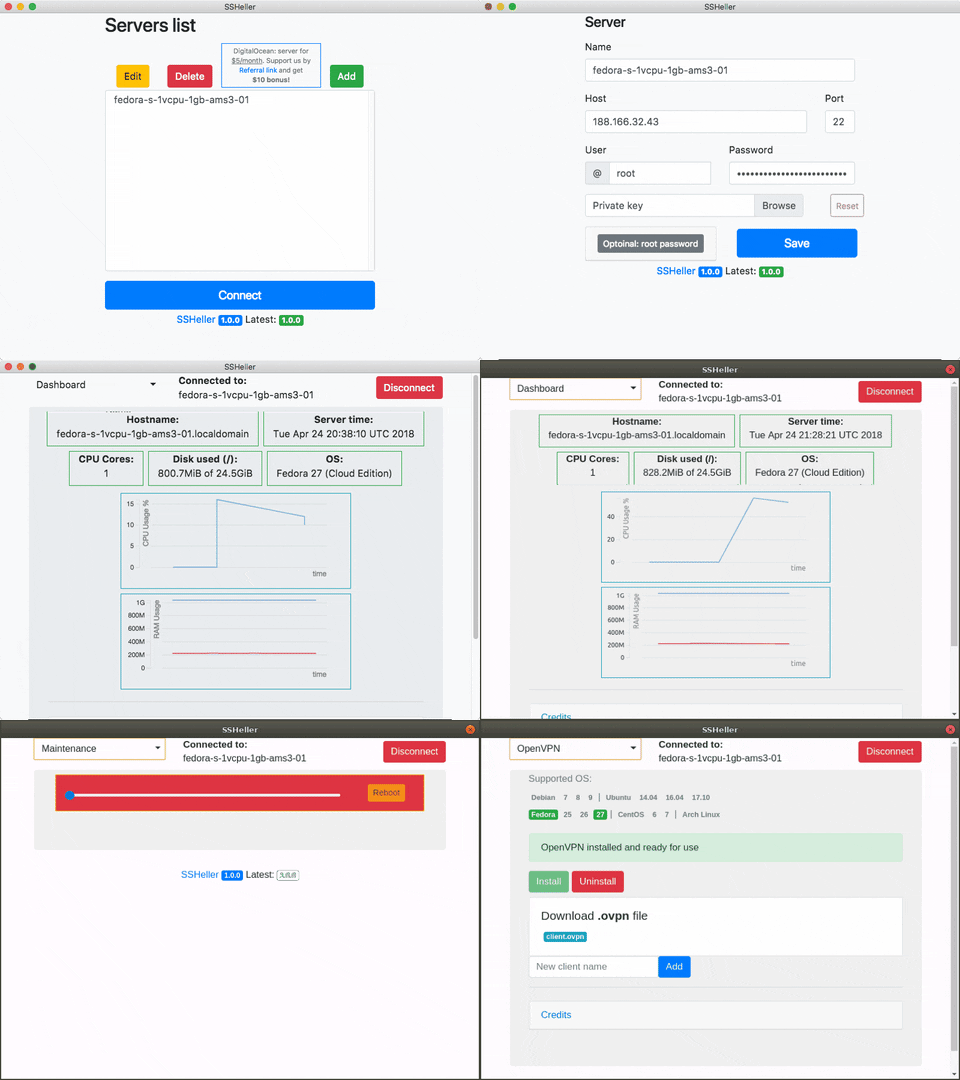
- Show system status and reboot server by button
- Install OpenVPN, Docker and 100+ Docker images
- Free and open source! You can use, modify and sell this program
- Works with VPS, VDS, cloud servers, dedicated servers, VMWare/VirtualBox/qemu/etc virtual machines, kvm, OpenVZ etc.
- Authorize by password or private key
- Can get root rights by
sudoorsu - Will renew your expired password in background (
but by security reasons you must change your password after) - Automatically reconnect on connection lost
- Cross-platform: Windows, MacOS and Linux
- Have powerful API and can be extended by plugins
Download SSHeller from releases page
SSHeller Setup X.X.X.exe- Windows installerSSHeller-X.X.X.dmg- MacOS installerSSHeller-X.X.X-x86_64.AppImage- Linux installer: make executable and runSSHeller_X.X.X_amd64.snap- Alternative Linux installer
- Register on DigitalOcean by referral link (support us by click and you will get $10 bonus)
- Activate account with payment
$5by PayPal or$1by Credit Card (Debit Cards not accepted) - Depending on payment type you will get
$15or$10(+$10bonus,$1will be returned to Card) - From the
DashboardclickCreate->Droplets - Choose any supported image (I personally prefer
Fedora 27for OpenVPN andDebian 9for Docker) - Choose the size
1Gb 1vCPU 25GB 1Tb $5/moor any other - Choose the datacenter region what nearest to you (
Amsterdamfor European part of Russia) - Click
Createbutton - Whait for e-mail from DigitalOcean with IP and
root's password - Of course, install SSHeller from releases page
- Launch SSHeller, click
Add, fillName,Host(IP),User(root),Passwordfrom e-mail and pressSave - Press
Dashboardon the top an chooseOpenVPNand clickInstallbutton - Wait for some time. Depend of your lucky and server it may take from 3 minutes to 30...
- After installation completes, Under
Installbutton you will find client.ovpn - click on it and save it on a disk - Also you can add new OpenVPN user by filling name and pressing
Add - Download OpenVPN client for Windows, MacOS, Android, iOS or install with your package manager on
Linux - Enjoy!
- On
Windowsyou should put yourclient.ovpnintoC:\Program Files\OpenVPN\configand run by icon in tray - On
Linuxrunsudo openvpn client.ovpn - On other devices open
client.ovpnfile from inside of application
- On
| Image | Database | User | Password |
|---|---|---|---|
| mysql | db | root,admin | {{INPUT_PASSWORD}} |
| mariadb | db | root,admin | {{INPUT_PASSWORD}} |
| postgres | db | admin | {{INPUT_PASSWORD}} |
| rabbitmq | - | admin | {{INPUT_PASSWORD}} |
| couchdb | - | admin | {{INPUT_PASSWORD}} |
| influxdb | db | admin | {{INPUT_PASSWORD}} |
| orientdb | - | - | {{INPUT_PASSWORD}} |
| panubo/vsftpd | - | admin | {{INPUT_PASSWORD}} |
| coderaiser/cloudcmd | - | admin | {{INPUT_PASSWORD}} |
{{INPUT_PASSWORD}} - password entered before container creation
- Open source: you can inspect sources and build it yourself
- Your passwords, keys, and all other data stored on the disk encrypted by AES 256
- Passwords in logs replaces to
XXX - OpenVPN use powerful
3072 bitskeys
| OS | Maintenance | OpenVPN | Docker |
|---|---|---|---|
| Ubuntu 14.04.5 x32 | OK | OK | unsupported |
| Ubuntu 14.04.5 x64 | OK | OK | OK |
| Ubuntu 16.04.4 x32 | OK | OK | unsupported |
| Ubuntu 16.04.4 x64 | OK | OK | OK |
| Ubuntu 17.10 x64 | OK | OK | OK |
| Ubuntu 18.04 x64 | OK | OK | OK |
| Fedora 26 x64 | OK | OK | OK |
| Fedora 27 x64 | OK | OK | OK |
| Fedora 28 x64* | OK | OK | OK |
| Debian 7.11 x32 | OK | failed |
unsupported |
| Debian 7.11 x64 | OK | failed |
unsupported |
| Debian 8.10 x32 | OK | OK | unsupported |
| Debian 8.10 x64 | OK | OK | OK |
| Debian 9.4 x64 | OK | OK | OK |
| CentOS 6.9 x32 | OK | OK | unsupported |
| CentOS 6.9 x64 | OK | OK | unsupported |
| CentOS 7.5 x64 | OK | OK | OK |
| FreeBSD 10.3 x64* | unsupported |
||
| FreeBSD 10.3 x64 zfs* | unsupported |
||
| FreeBSD 10.4 x64* | unsupported |
||
| FreeBSD 10.4 x64 ZFS* | unsupported |
||
| FreeBSD 11.1 x64* | unsupported |
||
| FreeBSD 11.1 x64 ZFS* | unsupported |
*Requires SSH key
Requirements:
- Node.js 8.2.1 or newer
- NPM 5.6.0
Build process: npm i && electron-builder -lmw
In case of any problems, you can read and share your logs:
- Windows:
C:\Users\<User>\AppData\Roaming\shellerorC:\Users\<User>\AppData\Local\sheller - Linux:
~/.config/SSHeller - MacOS:
/Users/<User>/Library/Application Support/SSHeller/
Software/libs used:
- TauCharts
- Pacapt
- OpenVPN-install by Angristan
- OpenVPN-install by Nyr
- Electron
- Electron-builder
- Bootstrap
- Docker installation script
MIT