Releases: dhis2/dhis2-android-capture-app
Android Capture App for DHIS 2 (v3.3.0)

Release notes - Android App for DHIS2 - 3.3.0
Highlights of this release
- Redesigned login experience with improved usability and future support for two-factor authentication.
- Introduced configurable custom intents for seamless integration with external Android applications.
- Enhanced synchronization with support for syncing data based on selected working lists.
Deprecation notice: Support for Android 5.0 (API 21) and 5.1 (API 22) will end starting with version 3.4.0, while 3.3.x patch releases will continue to support these versions and receive critical security fixes if needed.
Release Notes
NEW FUNCTIONALITY AND WEB PARITY
Custom intents:
3.3.0 introduces custom intents, a new feature that enables integration between the DHIS2 Android Capture App and third-party Android applications. Through configuration in the Android Settings Web App, administrators can define how the Capture App launches external apps, sends data to them, and receives results automatically. It can be configured per tracked entity attribute or data element and support both data entry (tracker and event programs) and search workflows.
Sync by working list:
Synchronization can now be configured based on working lists defined in the Capture web app and managed through the Android Settings Web App (ASWA). Based on user sharing settings, the app will download data from the assigned working list or merge multiple lists when more than one is available.
USER EXPERIENCE
Login redesign:
The login experience has been redesigned with a modern interface and improved usability. Beyond visual updates, this redesign refactors the authentication architecture to support OAuth-based two-factor authentication (2FA), ensuring the app is ready for upcoming security improvements in future releases.
Users will notice a cleaner layout and faster access to frequently used servers.
As part of this redesign, the PIN verification screen (shown when reopening the app) has also been updated with the new visual style, ensuring a consistent and modern experience across the entire authentication flow.
Settings menu redesign:
The settings menu has been redesigned to provide a cleaner structure and improved navigation experience. This update aligns the screen with the overall app design updates introduced in previous versions.
Edge-to-edge review:
The update refines margins, padding, and component layouts to make full use of available screen space, especially on newer Android devices. Improvements are particularly noticeable in the TEI list, event list, and data-entry forms.
This review also enhances the experience on tablets and in landscape orientation, ensuring responsive layouts and alignment across all components.
PERFORMANCE & MAINTENANCE
Migrate database to KMM:
While invisible to end users, this migration significantly improves maintainability, consistency, and performance of the app’s data layer. It also paves the way for potential future multi-platform clients that can share core logic with Android.
Reduce APK size with R8:
Through advanced code shrinking and resource optimization, the app’s footprint has been reduced without compromising features or stability. This change is particularly beneficial for deployments in low-bandwidth environments or with limited device storage.
Android Capture App for DHIS 2 (v3.2.1.2)
Release notes - Android App for DHIS2 - 3.2.1.2
This patch release includes updated translations and a hotfix addressing an issue affecting metadata synchronization.
Bugs fixed
- ANDROSDK-2164 Metadata sync not finishing in certain configurations:
In some specific scenarios, the metadata synchronization process did not complete as expected. This hotfix ensures metadata sync now works correctly across those configurations.
Translations
This release also includes updated translations contributed by the community.
Android Capture App for DHIS 2 (v3.2.1.1)
Release notes - Android App for DHIS2 - 3.2.1.1
Translations
A translations-only patch. This version does not introduce any new features,
UI changes, or bug fixes. It simply updates the app's translations based on recent
contributions from the community via Transifex.
This patch is particularly important for countries and implementations
that rely on up-to-date local language support for end users.
If your project depends on recent translation updates, we recommend deploying this APK.
Android Capture App for DHIS 2 (v3.2.1)
Release notes - Android App for DHIS2 - 3.2.1
Bug
ANDROAPP-6278 Incorrect date assignment (due to device time zone)
ANDROAPP-6349 Map layers display crash and unable to scroll in landscape
ANDROAPP-6524 Option code is displayed instead of name
ANDROAPP-6669 ApplicationNotResponding: ANR in Search Query
ANDROAPP-6737 App crash when search in maps offline
ANDROAPP-6742 Happy New Year 2025! App crash when org unit changed from landscape to portrait and vice versa
ANDROAPP-6800 Move dataset dataInputPeriod check from the App to the SDK
ANDROAPP-6867 Make whole data set table screen scrollable
ANDROAPP-6872 IllegalStateException: Fragment PinDialog{94800b} (fb1ce116-827c-4aa3-bb75-548df644a027) not associated with a fragment manager.
ANDROAPP-6880 Clear input dialog and cell selection when changing section
ANDROAPP-6885 Scrolling in dataset with keyboard open
ANDROAPP-6899 Implement persist table resizing layout
ANDROAPP-6906 Incorrect initial width of tables without category combination
ANDROAPP-6907 Minimum cell width
ANDROAPP-6909 Wrong border color in selected cells with error or warning
ANDROAPP-6912 Incorrect render of rowHeader total
ANDROAPP-6920 Incorrect selection when tapping on first row header
ANDROAPP-6921 calendar modal should open at the previously entered date, time, or year.
ANDROAPP-6928 DS with no DEs: Missing user message
ANDROAPP-6930 Home screen does not display sync error correctly in home screen
ANDROAPP-6937 Reset Table Layout Button Visibility
ANDROAPP-6948 Add Text Transformation for specific value types in cell
ANDROAPP-6953 NullPointerException Dimensional (Analytics)
ANDROAPP-6954 RuntimeException: java.text.ParseException: Unparseable date: "+67822-09-05"
ANDROAPP-6957 Restrict Completion of Non-Editable DataSet Instances
ANDROAPP-6961 Cannot use calendar (date picker) when database language is in Arabic
ANDROAPP-6962 Incorrect Separator Used in InputDialog for Parent-Child Columns
ANDROAPP-6970 Crash when adding location offline
ANDROAPP-6977 DS crash when an empty category combination is assigned to a data element
ANDROAPP-6978 Incorrect period labels in data set tags
ANDROAPP-6983 Long section tab name
ANDROAPP-6984 In the DHIS2 Android app, when a Tracked Entity Attribute is configured to use radio buttons (vertical or horizontal), tapping the clear (X) icon after selecting an option causes the app to crash.
ANDROAPP-6987 create note and refer event and developer mode
ANDROAPP-6988 irregular data set navigation
ANDROAPP-6992 ApplicationNotResponding: ANR for at least 5000 ms.
ANDROAPP-6993 DateTimeFormatException: j$.time.format.DateTimeParseException: Text '122558888' could not be parsed at index 0
ANDROAPP-7003 Input Dialog is hidden behind keyboard when there are validation errors
ANDROAPP-7004 Program rules - TEA Show option group
ANDROAPP-7006 Order of option set
ANDROAPP-7017 ApplicationNotResponding: ANR for at least 5000 ms.
ANDROAPP-7025 Manage table loading internally and sticky row header offset
ANDROAPP-7029 cannot enter 0 in integer data type
ANDROAPP-7030 NullPointerException: Attempt to invoke virtual method 'java.lang.String org.hisp.dhis.android.core.event.Event.enrollment()' on a null object reference
ANDROAPP-7034 Navigation issue in aggregate tables after editing a previously entered cell and mismatch between selection state and dialog visibility
ANDROAPP-7035 Selected tab resets to the first tab after scrolling down and back up
ANDROAPP-7036 Tab Navigator Displayed for Single-Section DataSets
ANDROAPP-7038 ApplicationNotResponding: ANR for at least 5000 ms.
ANDROAPP-7039 ProgramStageWorkingList not working
ANDROAPP-7040 NullPointerException: Attempt to invoke virtual method 'java.lang.String org.hisp.dhis.android.core.event.Event.program()' on a null object reference
ANDROAPP-7044 ConcurrentModificationException
ANDROAPP-7050 Table rendering issue
ANDROAPP-7051 Incorrect section displayed when changing sections while loading
ANDROAPP-7065 [Mobile UI] Add Text Transformation for specific value types in cell
ANDROAPP-7067 ApplicationNotResponding: ANR for at least 5000 ms.
ANDROAPP-7068 Crash when navigating to username dataElement input type in DataSets
ANDROAPP-7078 irregular navigation to username dataElement input type in DataSets
ANDROAPP-7079 data set: mandatory fields not marked with red dot
ANDROAPP-7080 data set top row irregular navigation
ANDROAPP-7085 value not visible in specific dataset setting - move category to rows and show totals
ANDROAPP-7099 program rule does not run on large option sets until focus is lost
ANDROAPP-7101 App crash - incorrect Date entry in age field in datasets
Android Capture App for DHIS 2 (v3.2.0)
| The new DHIS2 Android App allows offline data capture across all DHIS2 data models. Data and metadata are automatically synchronized whenever there is internet access, always keeping the most relevant data for the logged user in the device. The app is compatible and we support 42, 41, 40. | |
FeatureANDROAPP-6371 Implement period picker in data sets ANDROAPP-6426 Quick actions in TEI Dashboard ANDROAPP-6469 Display GPS coordinate accuracy in UI [Data Set] ANDROAPP-6638 Support feature: Disable automatic grouping of data elements ANDROAPP-6640 Support feature: Pivot: categories as rows, data elements as columns ANDROAPP-6641 Support feature: Move a category to rows ANDROAPP-6642 Support feature: Content before and after a section ANDROAPP-6758 Implement ListCardTitle overflow in Map Cards ANDROAPP-6767 Support feature: "Render vertically" ANDROAPP-6788 Implement period picker in filters ANDROAPP-6796 Merge all category combinations in one table ANDROAPP-6802 DatasetInstanceScreen: Saving and complete workflow ANDROAPP-6812 Support feature: multi header rows ANDROAPP-6832 Implement InputDialog Text value types actions ANDROAPP-6833 Implement dates (date, datetime, time) value types actions ANDROAPP-6834 Implement InputDialog File and Image value types actions ANDROAPP-6835 Implement InputDialog Org Unit value type actions ANDROAPP-6836 Implement go to next cell ANDROAPP-6837 Implement validation error parsing ANDROAPP-6841 Support feature: Title and subtitle ANDROAPP-6855 Implement legends in dataset input dialog ANDROAPP-6864 Implement optionset input [Data Set] ANDROAPP-6878 Yes Only type cell layout BugANDROAPP-5770 IllegalStateException: Expected BringIntoViewRequester to not be used before parents are placed. ANDROAPP-6616 Cannot sync after referring TEI to an org unit where user does not have write access ANDROAPP-6662 [Data Set] App crashes after exiting the org unit dialog (using the x) ANDROAPP-6704 Large option set renders inconsistenly in DS ANDROAPP-6740 Incorrect order when displaying rules in feedback/indicator widget ANDROAPP-6754 Update Bottom sheet dialog to new usage for edge to edge devices ANDROAPP-6761 User able to create new events after completing enrollment ANDROAPP-6775 Selecting report periods when creating a datasets can freeze the app ANDROAPP-6801 Crash when using breaking the glass to access to a TEI ANDROAPP-6826 Aggregates Total column is not been displayed ANDROAPP-6854 Add edge to edge to DatasetInstance screen ANDROAPP-6867 Make whole data set table screen scrollable ANDROAPP-6873 Clear button not updating value in cell for certain inputs ANDROAPP-6874 Move a category to row is not working as expected ANDROAPP-6880 Clear input dialog and cell selection when changing section ANDROAPP-6882 Cursor slides to the end when typing ANDROAPP-6883 Input dialog is hidden behind keyboard on certain devices ANDROAPP-6884 Period tags in section details is not displaying in user friendly format ANDROAPP-6886 Some forms are crashing ANDROAPP-6887 Keyboard type not changing when navigate from one data type to other using next ANDROAPP-6888 Button to reset cell size doesnt exist ANDROAPP-6889 Multiple cells are being selected simultaneously, even disabled total cells. ANDROAPP-6892 Latest automatically generated apks are crashing when opening any dataset ANDROAPP-6895 Handling Errors in cells ANDROAPP-6896 Input Field Error: Missing Red Line and Label in inputDialog ANDROAPP-6899 Implement persist table resizing layout ANDROAPP-6900 Suppress 'Default' Text in Input Shell with Single 'Value' Column ANDROAPP-6902 Unable to save coordinates ANDROAPP-6903 Tapping on the "x" in the org unit dialog deletes the value in the cell ANDROAPP-6911 Missing rowHeaders ANDROAPP-6913 Resized table is lost when moving between sections ANDROAPP-6915 Lateral scrolling alignment issues ANDROAPP-6916 No space between column headers ANDROAPP-6922 unable to delete value from cell ANDROAPP-6934 Unable to re-open data set ANDROAPP-6936 Auto-Scroll Misalignment on Cell Selection ANDROAPP-6963 Datasets: unable to select option in multiselect value type ANDROAPP-6981 Incorrect display of greyed fields ANDROAPP-6982 Unable to add "." or "-" in numeric value types ANDROAPP-7005 Unable to download APK "software update" in Android versions > 10 Remember to check the Android app documentation for detailed information of the features included in the App and how to configure DHIS2 to use it. For support contact us at DHIS2 community if you have any issue. |
|
Android Capture App for DHIS 2 (v3.1.1.1)
Bug
ANDROAPP-6797 Update rule engine
Android Capture App for DHIS 2 (v3.1.1)
Release notes - Android App for DHIS2 - 3.1.1
Bug
ANDROAPP-5888 RTSM - Stock distribution allows entry of zero values
ANDROAPP-6108 [mobile-ui] Bottom sheet Icon button is displaced
ANDROAPP-6220 Login error - Fragmentation has been destroyed
ANDROAPP-6281 Formatting of org unit selector buttons over android navigation bar
ANDROAPP-6282 Misalignment of TEI list and dashboard cards
ANDROAPP-6317 App not scrolling to the top of the list after selecting or deselecting working list
ANDROAPP-6354 [LineListing] search by org unit or category no working
ANDROAPP-6394 Conflict message - Change future date message when no future date was entered
ANDROAPP-6418 [Data Sets] Values are not shown after saving them
ANDROAPP-6440 Maps view pin hidden behind location
ANDROAPP-6457 Maps card - expanded card maybe more than 70% of the map and When the user taps outside the card (when expanded) the card does not collapses.
ANDROAPP-6477 Programs are hidden after navigating to settings and back
ANDROAPP-6480 Tei scheduled events for "today" show incorrect overdue icon
ANDROAPP-6482 TEI Is created even if it was discarded
ANDROAPP-6509 Assign enrollment org unit as the default org unit when creating an event
ANDROAPP-6519 Barcode scanner crashes DHIS2-RTS
ANDROAPP-6524 Option code is displayed instead of name
ANDROAPP-6533 Background color is visible behind bottom navigation bar
ANDROAPP-6535 Bidirectional relationships are created in the oppsite direction when created from TO
ANDROAPP-6543 Image download not working correctly
ANDROAPP-6549 DHIS2-RTS: Data entry window not closing when selecting blue bullet
ANDROAPP-6579 Limit the menu size in the enrollment dashboard when the program name is too long.
ANDROAPP-6628 Due Date in Scheduled Event Card Always Red
ANDROAPP-6644 Incorrect style and icon for overdue scheduled events in
ANDROAPP-6652 NullPointerException: Attempt to invoke virtual method 'android.content.res.Resources android.view.View.getResources()'...
ANDROAPP-6657 Implement a load bar when searching in "This Area"
ANDROAPP-6660 Incorrect list of available periods
ANDROAPP-6667 [Program Rules] Warning AND Error on complete not showing
ANDROAPP-6673 Home filters are not displayed
ANDROAPP-6695 IllegalArgumentException: com.dhis2: Targeting S+ (version 31 and above) requires that one of FLAG_IMMUTABLE or FLAG_MUTABL...
ANDROAPP-6696 IllegalStateException: Can not perform this action after onSaveInstanceState
ANDROAPP-6705 Tei attributes and data elements flagging allowed future dates as errors incorrectly in Form
ANDROAPP-6707 Unable to complete event
ANDROAPP-6715 Crash when selecting a checkbox option set
ANDROAPP-6717 Crash when syncing a TEI from map screen
ANDROAPP-6753 Event program takes too long to load in server https://data.zim-dreams.org
ANDROAPP-6759 Version comparison returns a wrong value in some cases
ANDROAPP-6760 Rule engine context events include deleted events
ANDROAPP-6763 Status bar overlaps the app, obstructing buttons and making the interface unreadable
ANDROAPP-6771 Crash when creating a tei after searching through org unit
ANDROAPP-6774 Bottomsheet buttons padding fix
ANDROAPP-6776 Incorrect background shown in EventInitial screen after Android 35 corrections
ANDROAPP-6777 inconsistent behaviour in org unit selector search bar
Android Capture App for DHIS 2 (v3.1.0.1)
Release notes - Android App for DHIS2 - 3.1.0.1
Bug
ANDROAPP-6653 Large option sets freeze the app
ANDROAPP-6665 Filters persists when exiting the program or data set
ANDROAPP-6691 NullPointerException: Dataset table
Android Capture App for DHIS 2 (v3.1.0)
The new DHIS2 Android App allows offline data capture across all DHIS2 data models. Data and metadata are automatically synchronized whenever there is internet access, always keeping the most relevant data for the logged user in the device.
The app is compatible and we support 41, 40, 2.39.
NEW FUNCTIONALITY AND WEB PARITY
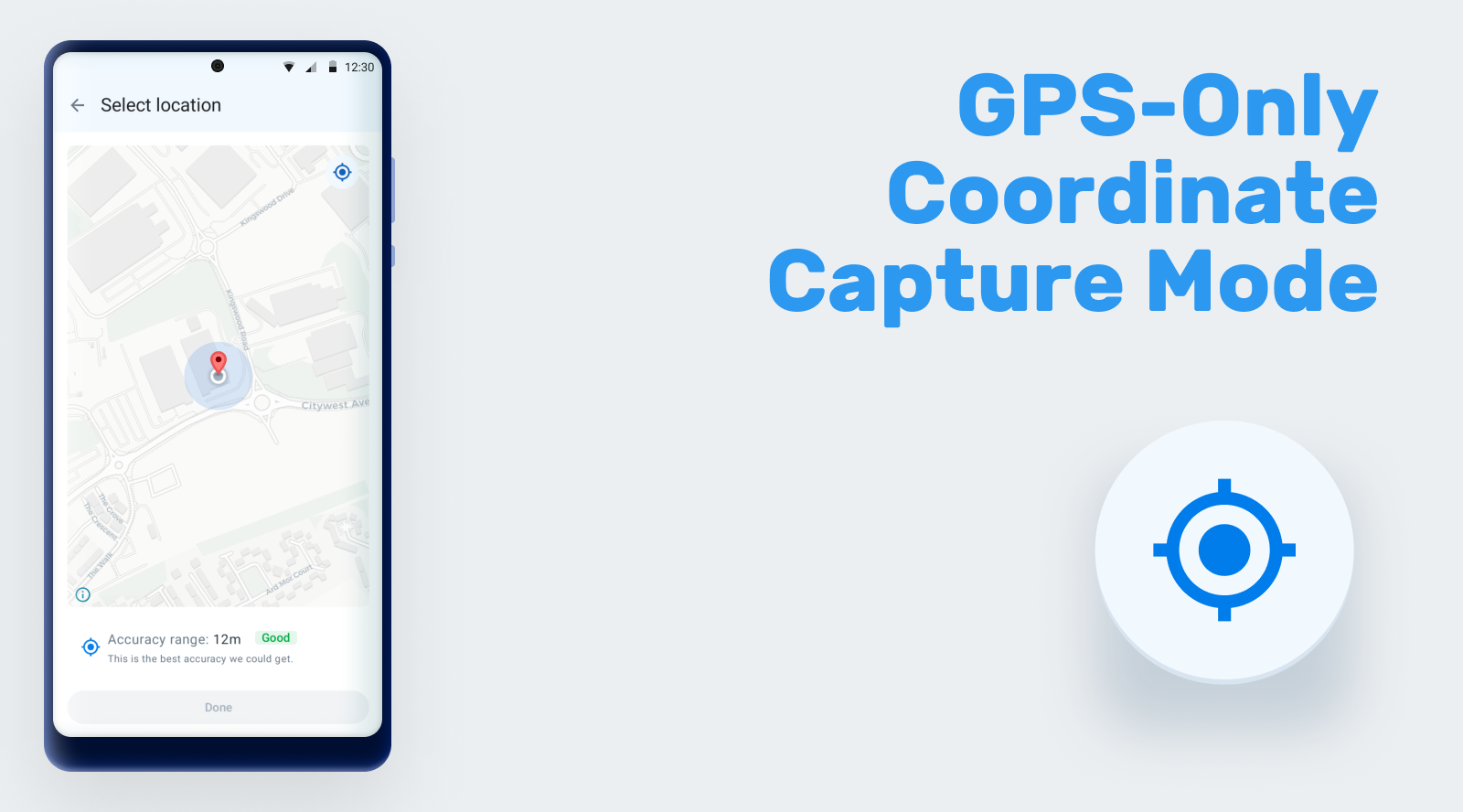
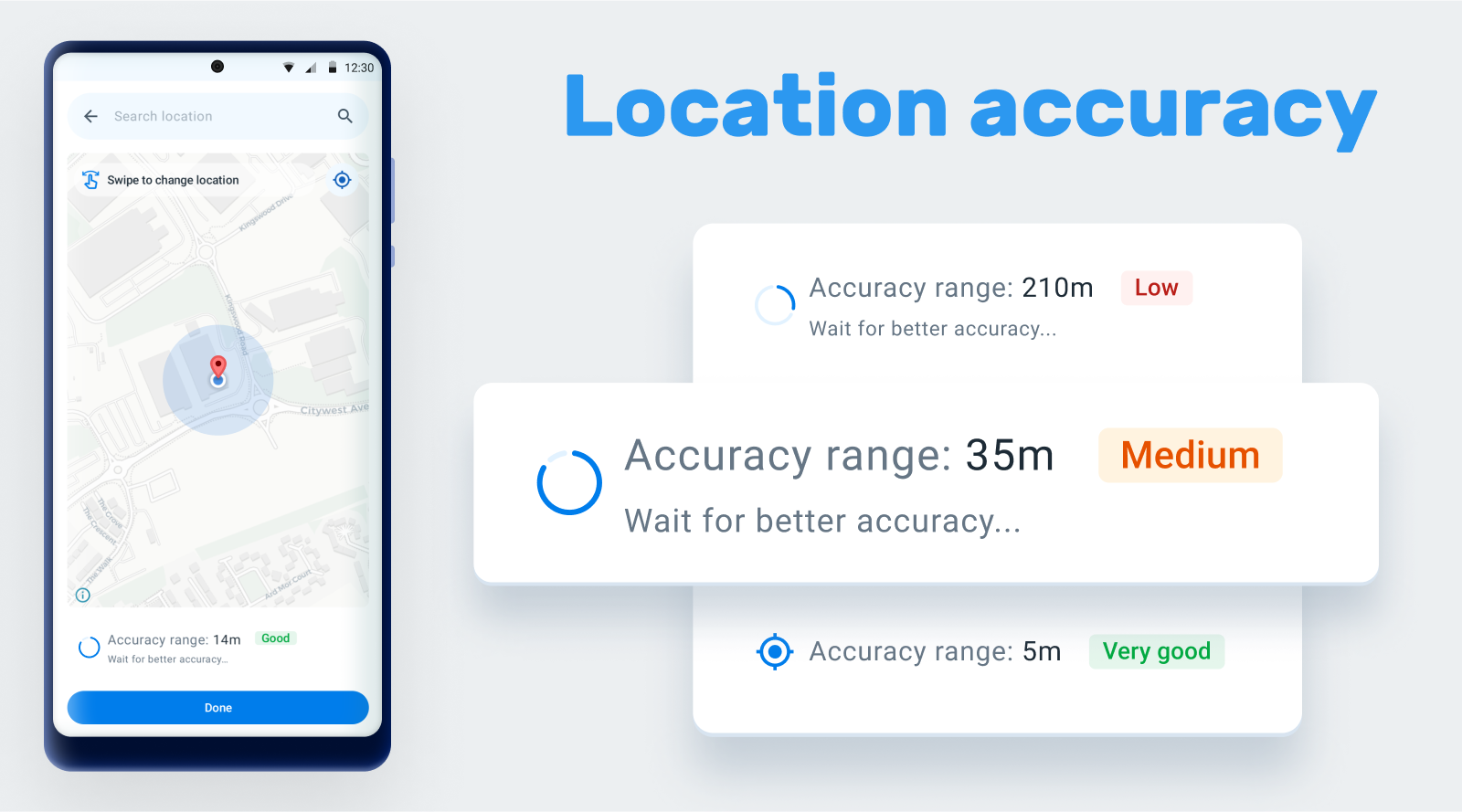
New Capture Coordinates process: The 3.1 version introduces a list of new features designed to enhance the capture coordinates process. These improvements aim to provide greater accuracy, flexibility, and control over location data capture.
- Accuracy: The capture coordinates process now includes a feature that displays the precision of the captured location. This allows users to see how accurate their location data is in real-time. This parameter can also be restricted using the Android Settings WebApp.
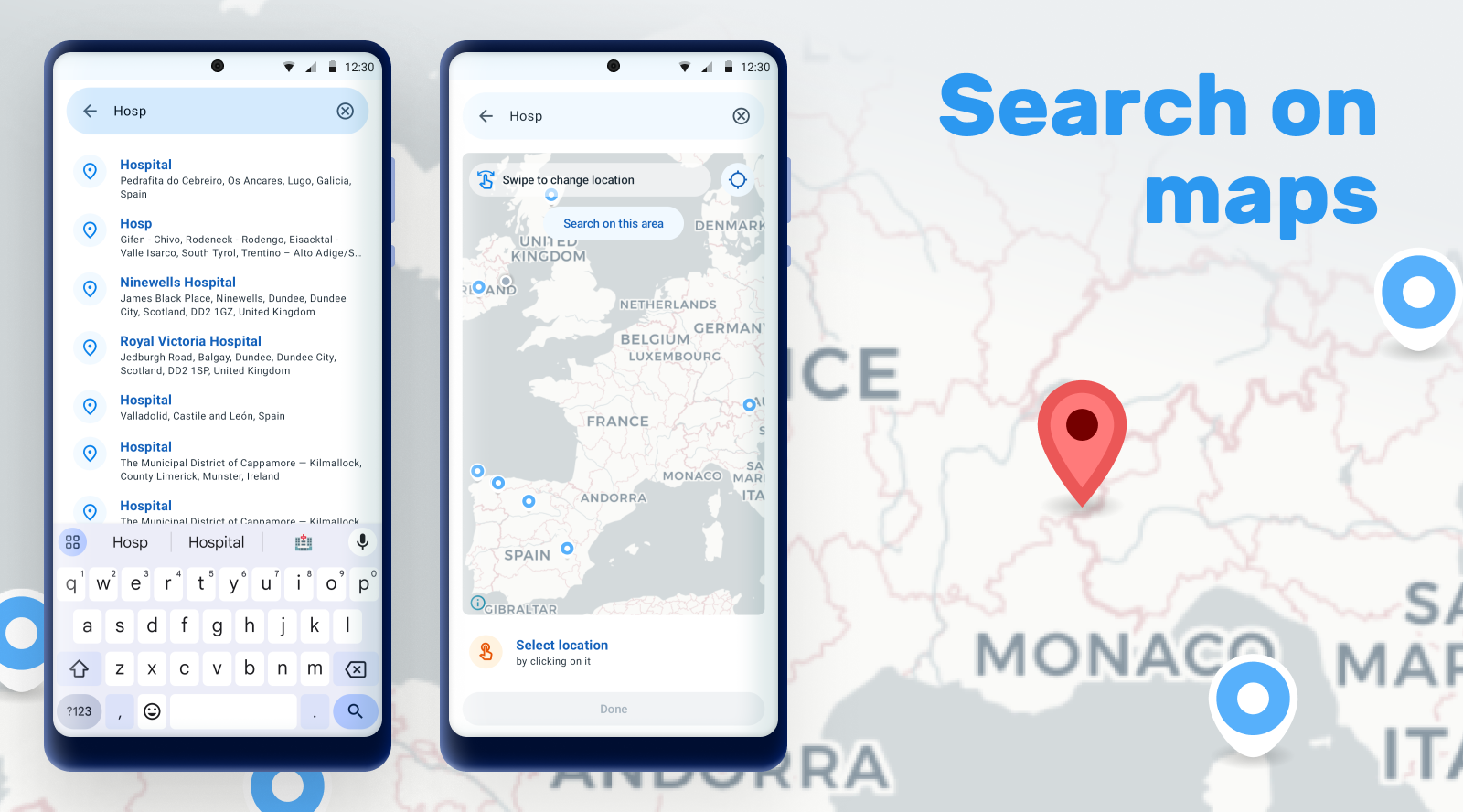
- Search Functionality: A new search functionality has been added, allowing users to look up specific locations by name or address. Users are also able to navigate through the map and perform area searches to discover other locations within a specified region.
- Block Manual Capture: Using the Android Settings Web App, administrators now have the option to block manual location capture. When this setting is enabled, users can only capture the current location and cannot manually select or search a different one. This ensures that location data remains consistent and accurate.
Jira | Card1 | Card2 | Card3 | Documentation
Improve transfers flow: Significant enhancements to the transfer flow, aimed at making the process more user-friendly and transparent. The transfer button has been moved to a more accessible location within the three dot menu in the TEI Dashboard, ensuring that users can easily find and initiate transfers without unnecessary navigation. It also has introduced new dialogs throughout the transfer process. These dialogs provide clear, step-by-step guidance, ensuring that users understand each part of the process.
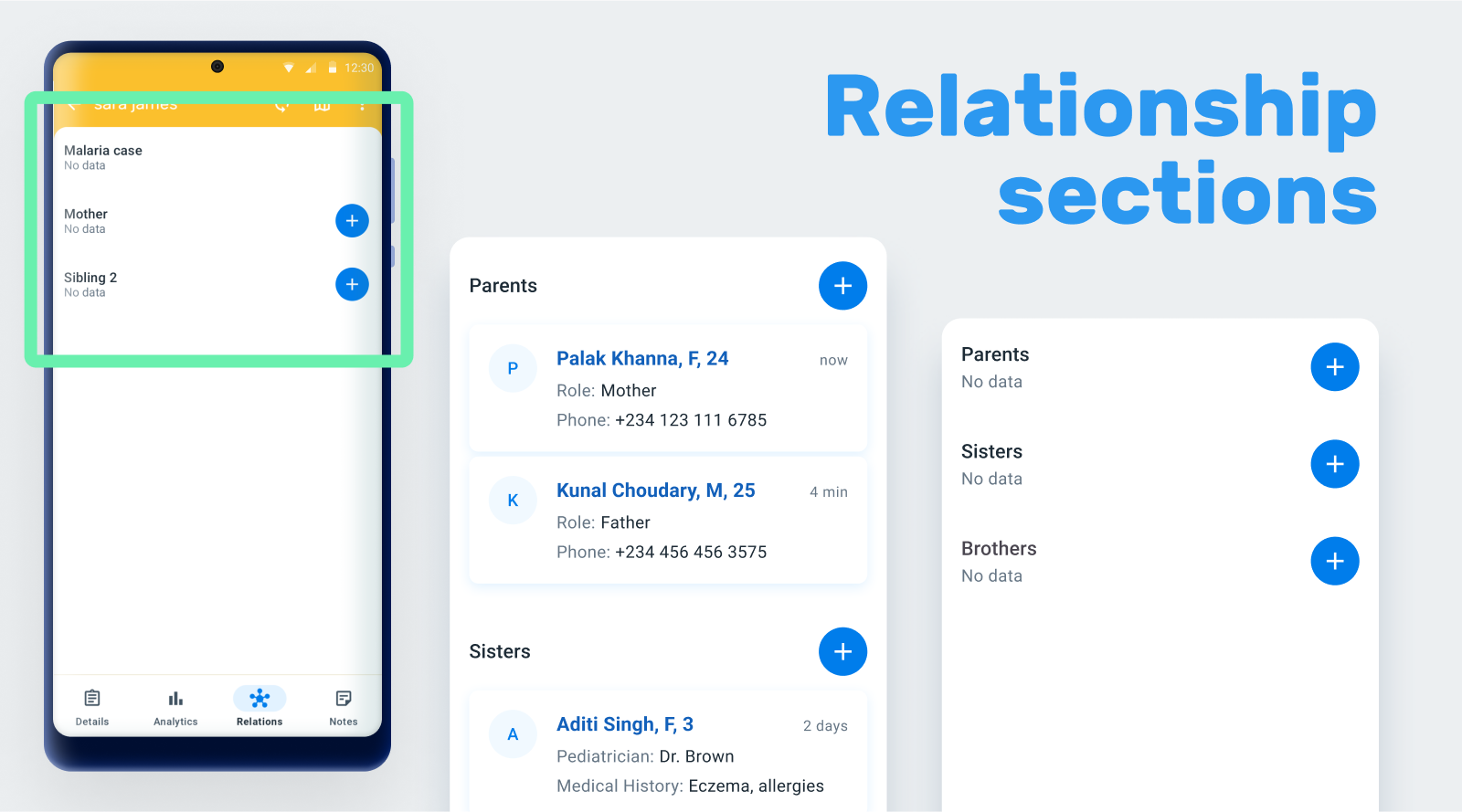
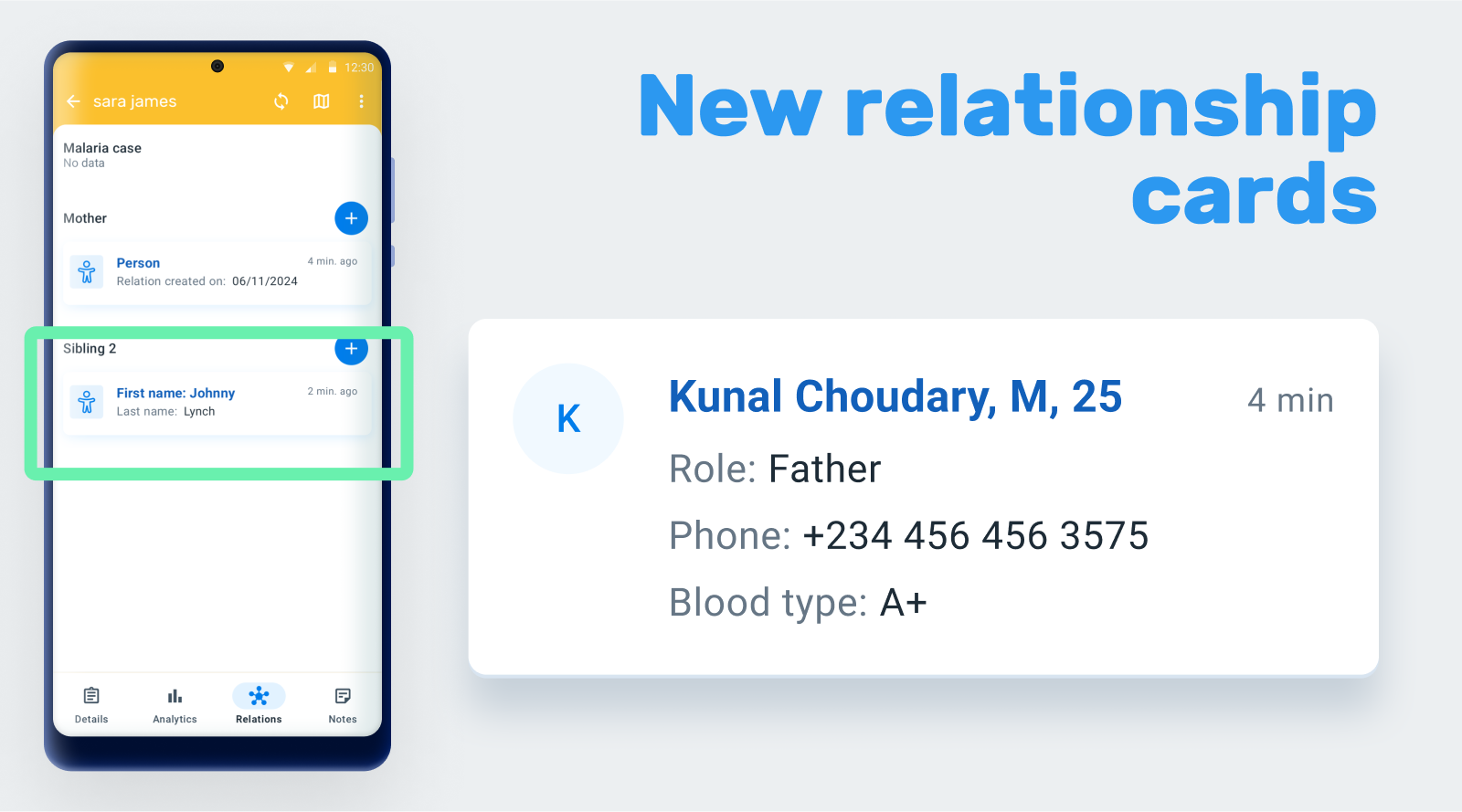
New relationship section: Major updates have been made in the relationship tabs, enhancing both functionality and user experience. Relationship cards have been updated with the new design to offer a more intuitive and visually appealing experience. The new design emphasizes clarity and usability, making it easier to view and manage relationships at a glance.
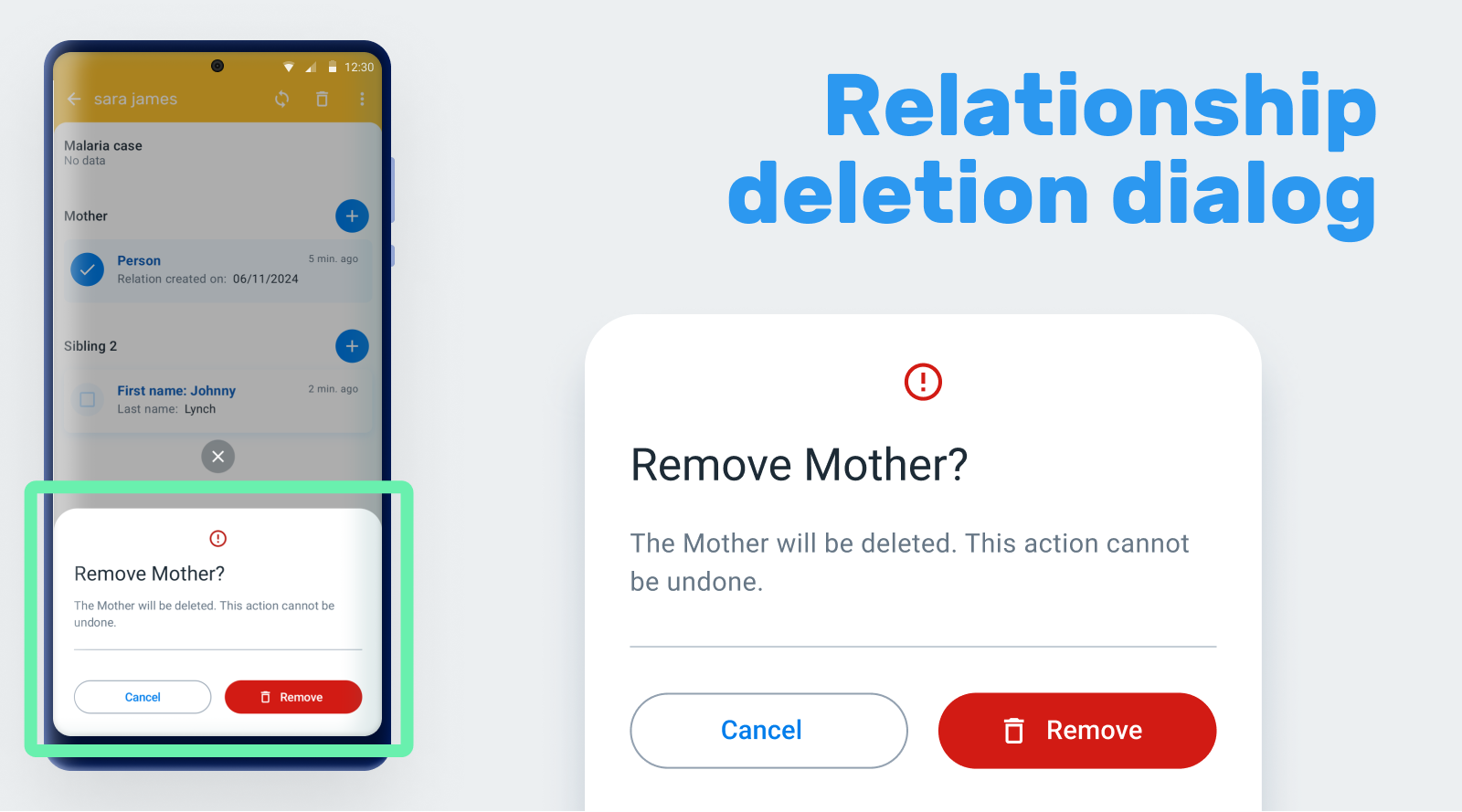
To prevent accidental deletions and enhance user control, a new confirmation dialog also has been added when deleting a relationship. This dialog will prompt users to confirm their action, ensuring that relationships are only deleted intentionally.
Jira | Card1 | Card2 | Card3 | Documentation
Sort of unique attributes in the search screen: Aimed at aligning it with the web instance for a more consistent user experience, this version of the Android app, by default, sorts the unique attributes (QR, barcode) at the top of the list of searchable attributes. Users can quickly and easily find the attributes for a more exact search.
Support of biometric dialog: An enhancement to the biometric authentication feature has been made in 3.1.0. When there is only one account configured, the user can configure biometric authentication (fingerprint or face ID).
Line Listing improvements: This version of the Android App introduces support for the Category Option Dimension in line listings. This enhancement enables users to apply category options directly within line listings to filter data according to precise criteria, improving data exploration and decision-making processes. This feature greatly enhances the versatility and utility of line listings, empowering users to perform more sophisticated reporting.
Additionally, it has been improved the text alignment within the Line Listing tables to support left alignment. This enhancement ensures better readability and a cleaner presentation of data, making it easier for users to review and analyze their information quickly.
Jira1 | Jira2 | Documentation
USER EXPERIENCE
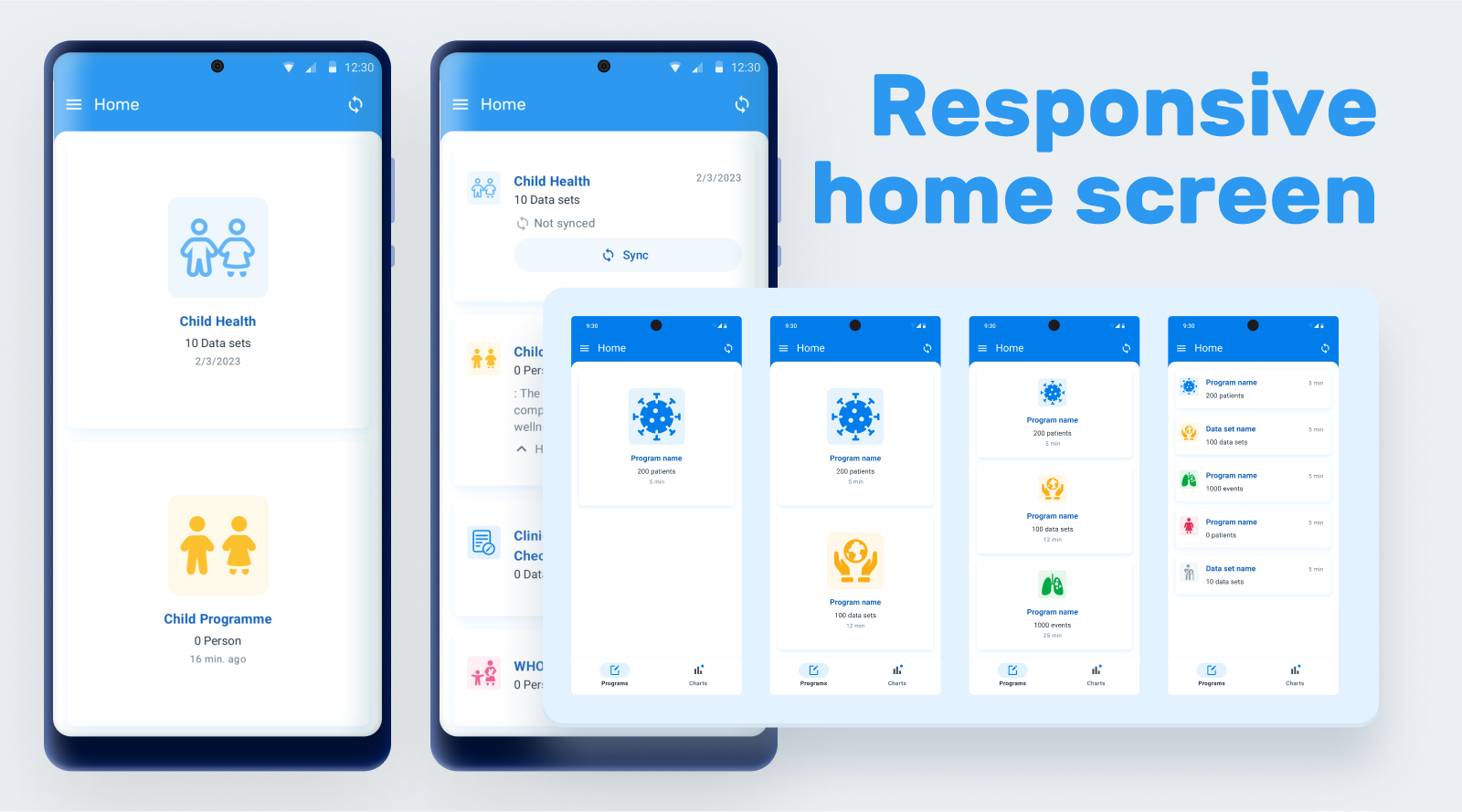
Responsive Home Screen: In this Android App version a new dynamic home screen that adapts to the number of programs available has been implemented. This update replaces the old static list that didn’t adjust to the screen, providing a more responsive and user-friendly interface.The responsive design makes better use of screen real estate, providing a more engaging and functional home screen layout.
Jira | Card | Documentation
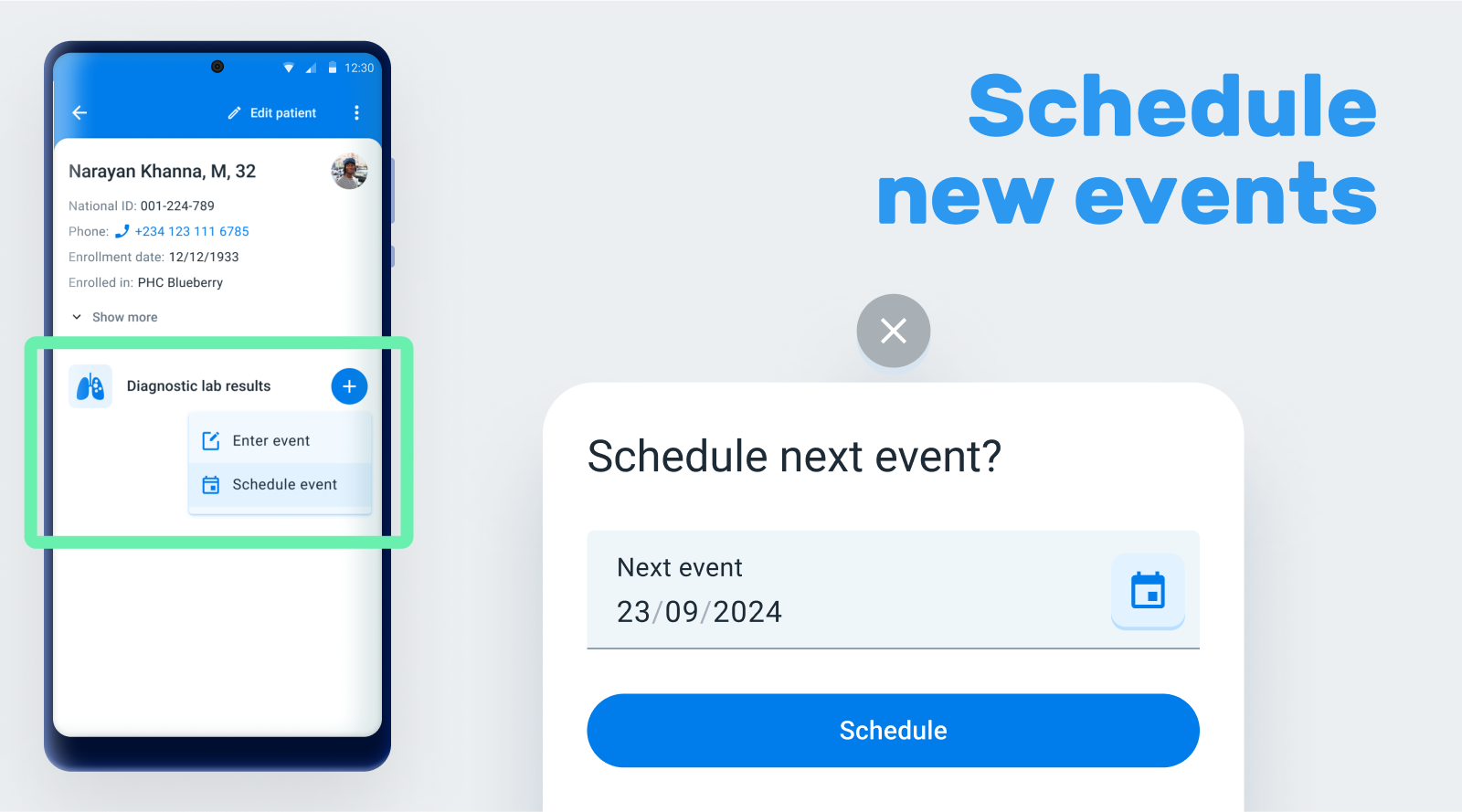
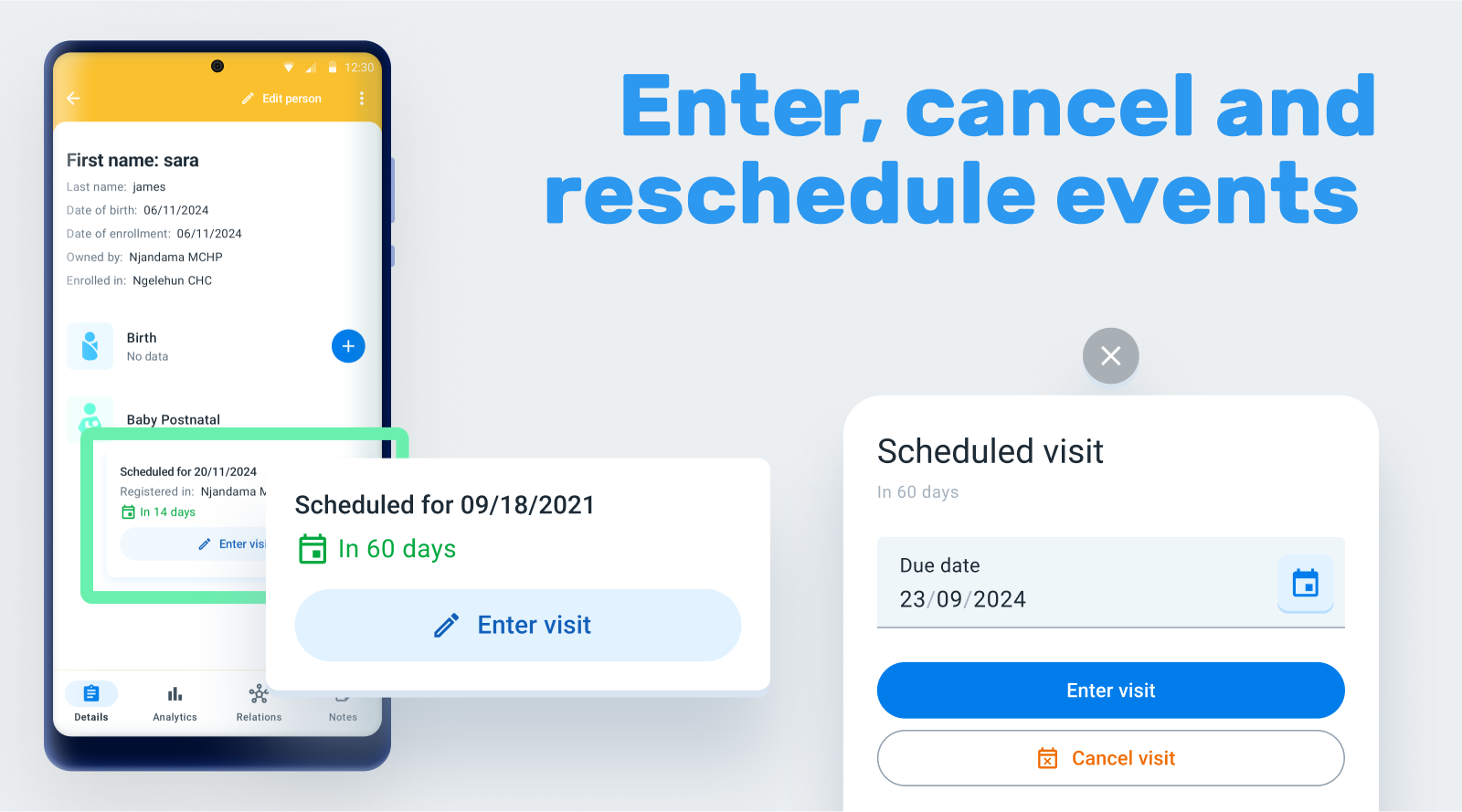
Scheduled events dialog: As a continuation of the new schedule dialog introduced in the version 3.0, a new intuitive and user-friendly schedule dialog has been implemented to enhance the overall user experience, making it easier to book, reschedule, or cancel events.
Jira | Card1 | Card2 | Documentation
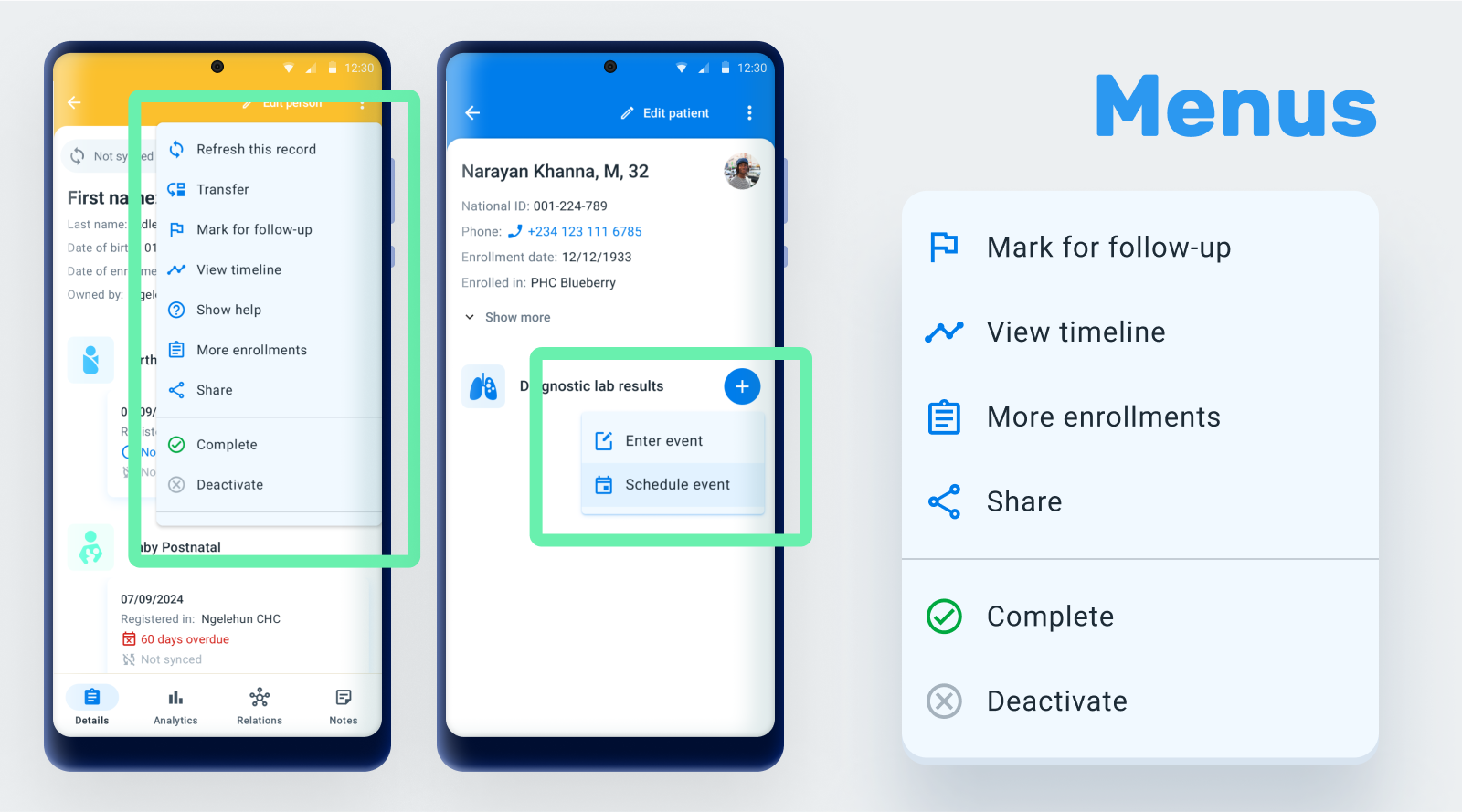
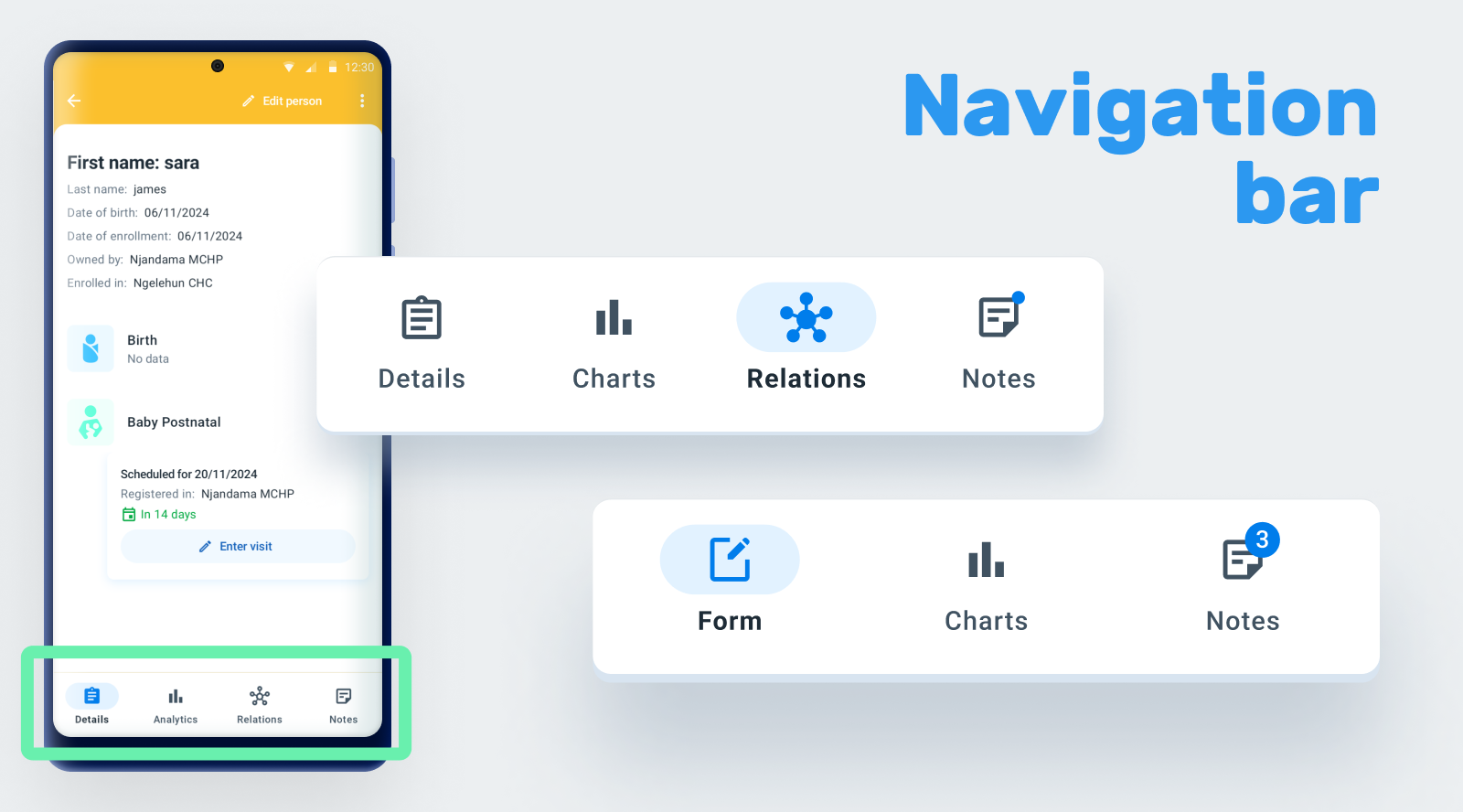
Improve menus and navigation bar: A revamped of the menus and navigation bar has been made to be more user-friendly and accessible. It includes a cleaner, more modern look that improves readability and usability. These updates are designed to provide a more efficient and enjoyable user experience.
Jira1 | Jira2 | Card1 | Card2 | Documentation
CROSS PRODUCT
Support for customized Tracker terminology: Some DHIS2 terminology is not familiar for the end users. For this reason, we are gradually enabling the possibility to customize it to each particular use case. In this version, the term "event" (program label context) is customizable. The admin user will be able to configure it for each program using the Maintenance App, and the Android Capture App will display the customized term instead of the generic one.
DETAILS
You can find the list of all new features and all bugs fixed in 3.1.0 here.
Remember to check the documentation for detailed information of the features included in the App and how to configure DHIS2 to use it.
Please create a Jira Issue if you find a bug. [Project: Android App for DHIS2 | Component: AndroidApp].
Android Capture App for DHIS 2 (v3.0.1)
9d020a5 andresmr
Andrés Miguel Rubio
andresmr
Andrés Miguel Rubio
Release notes - Android App for DHIS2 - 3.0.1
Bug
ANDROAPP-5753 Formatting Issues with Attribute Values on TEI Card Dashboard
ANDROAPP-5808 GS1 QR code input does not display popup if Scanned QR code is not GS1 type
ANDROAPP-5873 Thread lock when app is unable to download reserved values
ANDROAPP-5953 Option set not working well in data set if the code of option constains character "_"
ANDROAPP-6051 No feedback is received after the database import is complete
ANDROAPP-6057 Form scrolling improvement to prevent overlap with save button
ANDROAPP-6088 Turning off a working list does not scroll user back to top of screen
ANDROAPP-6094 Data set duplicates records in unavailable capture OUs
ANDROAPP-6101 User is allowed to save errors when the event is with status "complete"
ANDROAPP-6116 App doesn't respect program specification constraints when displaying the list of available relationship types
ANDROAPP-6131 Event program displays no events created message on intial load
ANDROAPP-6132 Double tap on event/enrollment creation could generate duplicates
ANDROAPP-6137 Category Combo section shows incorrect number of fields
ANDROAPP-6146 Incomplete "Download" label when exporting a DB
ANDROAPP-6158 Data set - Sections without DE's never stops displaying the loading icon
ANDROAPP-6174 When same day (eg. 20 June) is chosen for a future month, the scheduled date always shows "Today"
ANDROAPP-6181 ConcurrentModificationException
ANDROAPP-6182 (RuntimeException) Crash when rotating device in schedule screen
ANDROAPP-6183 (UnsupportedOperationException) crash when opening a map
ANDROAPP-6184 (RuntimeException) crash when rotating device in settings activity
ANDROAPP-6185 Event report date is not updated when changing the due date (keeping the overdue status)
ANDROAPP-6187 Form is not refreshed when changing from closed org unit to open one
ANDROAPP-6193 App asks device location permission after granting location permission
ANDROAPP-6197 Incorrect header in TEI Dashboard card
ANDROAPP-6198 Android adding '.0' to Data Element causing sync error
ANDROAPP-6209 NaN displayed in program indicators
ANDROAPP-6212 Cannot share database due to device permissions
ANDROAPP-6225 RuntimeException: Unable to start activity ComponentInfo{com.dhis2/org.dhis2.usescases.searchTrackEntity.SearchTEAc...
ANDROAPP-6272 ApplicationNotResponding: ANR for at least 5000 ms.
ANDROAPP-6273 ApplicationNotResponding: ANR for at least 5000 ms.
ANDROAPP-6277 Working lists aren't applied even when active
ANDROAPP-6315 Fix Mobile ui breaking changes in capture app
ANDROAPP-6318 Order of TEIs change when moving between landscape and portrait
ANDROAPP-6332 [DEFECT] Incorrect workflow of Org unit when creating event
ANDROAPP-6345 Keyboard malfunction after stock distribution
ANDROAPP-6346 [ANR] jdk.internal.misc.Unsafe in park
ANDROAPP-6379 Time recorded when creating notes
ANDROAPP-6380 Keyboard navigation
ANDROAPP-6407 [Defect] Data entry not saving more than one value
ANDROAPP-6414 Clicking save, not now or sync several times
ANDROAPP-6415 Login error in landscape
ANDROAPP-6416 Percentage input is showing % twice
ANDROAPP-6417 Cannot navigate to event details or sync event after navigating back from details