These scripts enable exporting Word (Microsoft 365) documents (DOCX and DOC) to PDF from the context menu. Up to 15 documents at once.
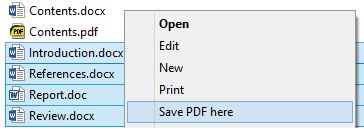

The built-in Export function of Word is used.
- Get this repository.
- Open any document in Word (Microsoft 365).
- Open Microsoft Visual Basic for Applications (Alt + F11).
- Select Normal in the left panel.
- Import the new module (Ctrl + M): locate and open the file
ExportToPDF.basfrom this repository. - Close Microsoft Visual Basic for Applications and Word.
- Run the file
ExportToPDF.reg, confirm (Yes).