fix: also use static values for vlan detection #749
Conversation


|
When I write PR #708 , I have seen theses static, but on my device, static perform the saved state (state which are load at startup of switch) and current the running state (state which is destroy at power off). I select running, because it's the real view when the inventory proccessed. Actually, all my devices has same running and saved state, so when I test your PR, there are no diff for me. |

It doesn't work here. For instance, i get this for port number 39 using your code: Using my code: (There are 2 vlans in this port) |
|
I think we need an up-to-date walk as I don't see any VLAN on that port with the one you provided at that time (it is 2 year old you know). |
|
I think the problem is here. .1.3.6.1.2.1.17.7.1.4.2.1.4 = No Such Object available on this agent at this OID -- |
|
snmpwalk ...... .1.3.6.1.2.1.17.7.1.2.2.1.2 | grep ': 39' |
|
I understand your algorithm gives the result you reported. Btw I'm not convinced looking up the dot1qTpFdbPort snmp table should be the way to do as it seems to me to have nothing to do with vlan definitions. Did you check the device configuration itself to verify your result are what must be reported ? |
|
vlan name -> .1.3.6.1.2.1.17.7.1.4.3.1.1 vlan status -> .1.3.6.1.2.1.17.7.1.4.3.1.5 I needed to find out which ports have each vlan. So i used this snmp table (dot1qTpFdbPort).
|
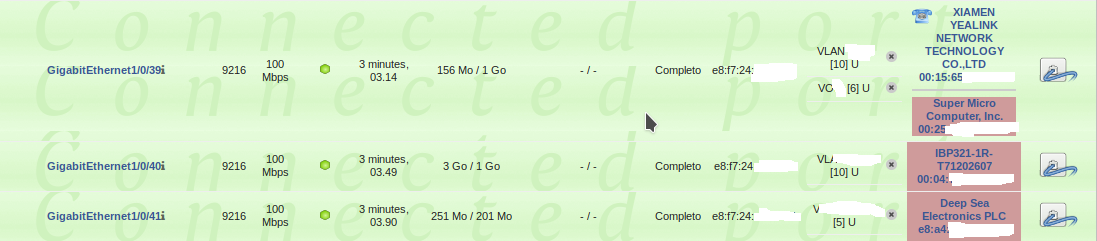
|
@abmteam You even didn't confirm your old snmp walk is still relevant regarding VLAN definitions. I think your algorithm makes assumptions that are not working with other devices. I tested with our private snmp walk database and your algorithm involves side effects removing VLAN definitions. My though is we need to understand why @PR-gh algorithm is not working on your device. Can you also check your device not deserved any firmware upgrade fixing the VLAN reporting via snmp ? |
I wouldn't have implemented a new code if i had got what was really set in device... (I reported this in issue #366 in 2017. Since then i have been using the code, fortunately, without side effects in other switches :-). )
The old snmp walk is still relevant regarding VLAN definitions.
I put the new code in the end of the _getVlans function to append VLANs definitions discovered by the new code.
The firmware is updated. Thank you. |

 g-bougard
force-pushed
the
feature/use-also-static-oids-for-vlan-detection
branch
from
g-bougard
force-pushed
the
feature/use-also-static-oids-for-vlan-detection
branch
from
8ba3ae4 to
4efa004
Compare
|
I rebase the PR and fix my static table checks. @abmteam This should better detect your static VLAN configuration. Btw I'm confident your 2 years old walk is different as if I check the dot1qTpFdbPort snmp table to see what vlan seems to be associated with which port, I see vlan 2 & 6 this for port 39: This is clearly different from your own grep from 3 days ago. @PR-gh can you test this updated PR ? |
|
@g-bougard It's ok for me with this updated PR. |


Working on #708 side effects, I saw proposed snmp walks also includes dot1qVlanStaticEgressPorts and dot1qVlanStaticUntaggedPorts entries that are also referenced in Q-BRIDGE-MIB. This entries seems to define the default vlan support and the "current" are the one which has been learned along the device life. This PR will fallback on "static" entry when no "current" entry is found.
I found some cases on our private snmp walks repository (but only on HP devices) where this PR adds some VLAN definition on some ports.