



Annotate, segment, and track multiple animals (or any research target) in video with a single toolchain.
- Overview
- Key Features
- Documentation & Support
- Quick Start
- Installation Options
- Using Annolid
- Annotation Guide
- Labeling Best Practices
- Tutorials & Examples
- Troubleshooting
- Docker
- Citing Annolid
- Publications
- Additional Resources
- Acknowledgements
- Contributing
- License
Annolid is a deep learning toolkit for animal behavior analysis that brings annotation, instance segmentation, tracking, and behavior classification into a single workflow. It combines state-of-the-art models—including Cutie for video object segmentation, Segment Anything, and Grounding DINO—to deliver resilient, markerless tracking even when animals overlap, occlude each other, or are partially hidden by the environment.
Use Annolid to classify behavioral states such as freezing, digging, pup huddling, or social interaction while maintaining fine-grained tracking of individuals and body parts across long video sessions.
Python support: Annolid runs on Python 3.10–3.13. The toolkit is not yet validated on Python 3.14, where several binary wheels (PyQt, Pillow) are still pending upstream releases.
- Markerless multiple-animal tracking from a single annotated frame.
- Instance segmentation powered by modern foundation models and transfer learning.
- Interactive GUI for rapid annotation (LabelMe-based) plus automation with text prompts.
- SVG overlay import for atlas/anatomy drawings and TIFF-family metadata-aware image loading.
- Optional
large_imageextra fortifffile/pyvips/openslide-pythonbackends when working with large TIFF-family datasets. The default install does not require these packages. - Behavioral state classification, keypoint tracking, and downstream analytics.
- Works with pre-recorded video or real-time streams; supports GPU acceleration.
- Optional EfficientTAM video tracking backend, fully integrated and auto-downloaded (no separate installation needed).
- Latest documentation and user guide: https://annolid.com (mirror: https://cplab.science/annolid)
- Community updates and tutorials are shared on the Annolid YouTube channel.
- Sample datasets, posters, and publications are available in the
docs/folder of this repository. - Join the discussion on the Annolid Google Group.
- Tracking Four Interacting Mice with One Labeled Frame | 10-Minute Experiment See how Annolid bootstraps multi-animal tracking from a single labeled frame in a fast end-to-end workflow: https://youtu.be/PNbPA649r78
- For more practical examples and walkthroughs, visit the Annolid YouTube channel.
If you prefer using Anaconda to manage environments:
conda create -n annolid-env python=3.11
conda activate annolid-env
conda install git ffmpeg
git clone --recurse-submodules https://github.com/healthonrails/annolid.git
cd annolid
pip install -e ".[gui]"
annolid # launches the GUIGet Annolid running in minutes with our automated script. It handles downloading, environment setup, and dependency installation (including uv acceleration if available).
macOS / Linux:
curl -sSL https://raw.githubusercontent.com/healthonrails/annolid/main/install.sh | bashWindows (PowerShell):
irm https://raw.githubusercontent.com/healthonrails/annolid/main/install.ps1 | iexThe script will:
- Clone the repository.
- Detect your OS and Hardware (Intel/Apple Silicon).
- Create an isolated virtual environment.
- Prompt for optional features (SAM3, Text-to-Speech, etc.).
- Offer to launch Annolid immediately.
For a full breakdown of one-line installer choices (GPU vs CPU, interactive vs non-interactive, custom paths, Conda, and extras), see:
For advanced users, Docker, Conda, or manual Pip installation, please see the Detailed Installation Guide.
- Launch the GUI:
conda activate annolid-env
annolid
- Provide custom labels:
annolid --labels=/path/to/labels_custom.txt
- Pick between Ollama, OpenAI GPT, or Google Gemini for caption chat features by opening the caption panel and clicking
Configure…next to the model selector. API keys are stored in~/.annolid/llm_settings.json. - Open AI & Models → Annolid Bot… to launch a dedicated right-side WhatsApp-style multimodal chat dock (streaming chat, local
openai/whisper-tinyspeech-to-text for Talk/Record, voice talk/read controls, and one-click canvas/window sharing). - Open Video Tools → Zones to draw chamber layouts, generate a 3x3 preset, and save explicit zone shapes on the current frame.
- Open Video Tools → Zone Analysis to export legacy place-preference CSVs, generic zone metrics, or a profile-aware assay summary for Phase 1 / Phase 2 workflows. See Zone Analysis and Zone Analysis Workflow.
- For behavior scoring with shared behavior names across Flags, Timeline, and Annolid Bot (including timeline needle dragging and 1s segment labeling prompts), see Behavior labeling with Timeline, Flags, and Annolid Bot.
- The behavior tutorial includes a prompt cookbook for structured context fields (
video description,instances,experiment context,behavior definitions,focus points) and free-form aggression-bout examples. - Open AI & Models → Draft Research Paper with Swarm… to seed Annolid Bot with the multi-agent paper-drafting workflow and an active PDF context when available.
- In Annolid Bot, enable
Allow webto let Annolid Bot useweb_search/web_fetchtools for web browsing in that chat turn (requiresBRAVE_API_KEYfor search). - To show or hide intermediate tool/planning updates while Annolid Bot is thinking, open Annolid Bot settings and toggle
Agent Runtime → Enable intermediate progress stream. - To cap slow tool calls in the agent loop, tune
Agent Runtime → Agent tool timeout(seconds). - To force browser-first web handling, keep
Agent Runtime → Prefer MCP browser for web tasksenabled. - Annolid Bot can now run model inference directly on videos via tools: use
video_list_inference_modelsto discover compatiblepredictplugins, thenvideo_run_model_inferenceto executeannolid-run predict <model>against a video path. - Annolid Bot can also run SAM3 agent-seeded long-video tracking via
sam3_agent_video_trackfor occluded or drifting objects that need windowed reseeding. See the SAM3 guide for the recommended workflow and output contract. - ClawHub Skills: Search and install agent skills from ClawHub directly in Annolid Bot. See the tutorials hub at https://annolid.com/portal/tutorials/.
- Model Context Protocol (MCP): Extend Annolid Bot with external tools and data sources. See the MCP Configuration and Usage Tutorial for details.
- Large TIFF + atlas overlays: For OME-TIFF / BigTIFF images and Illustrator-exported atlas drawings, see the Large TIFF and Atlas Overlay Workflow.
- Annolid Bot Extras Bundle: Install common Annolid Bot optional integrations (WhatsApp + Google Calendar + MCP) with
pip install "annolid[annolid_bot]". - Bot-assisted model training: Annolid Bot can now discover trainable model families and launch background fine-tunes for workflows such as
dino_kpsegand YOLO pose/segmentation through typed training tools on top ofannolid-run. - Bot-assisted dataset handling: Annolid Bot can now inspect a dataset folder, distinguish between saved trainable configs and inferred dataset layouts, prepare LabelMe splits/specs, infer COCO specs, import DeepLabCut training data into Annolid/LabelMe format, export YOLO datasets from raw LabelMe or COCO folders, and train directly from
dataset_folder, including auto-staging inferred COCO specs for DinoKPSEG when needed. - Bot-assisted evaluation reports: Annolid Bot can now read saved test/eval artifacts and generate paper-ready metric reports in JSON, Markdown, CSV, and LaTeX for DinoKPSEG, YOLO, and behavior-classifier workflows, including bootstrap confidence intervals for YOLO mAP when
predictions.jsonand COCO-style annotations are available. - Bot-assisted evaluation runs: Annolid Bot can now start DinoKPSEG evaluation and YOLO validation jobs as managed background sessions, and YOLO validation can request
save_jsonoutput so the later report step has enough structure for paper-grade uncertainty estimates. - WhatsApp Channel: Configure Annolid Bot with default local QR bridge mode (safer, no public webhook) or optional Cloud API mode. See https://annolid.com/portal/tutorials/.
- Zulip Channel: Configure Annolid Bot for Zulip stream/PM messaging. See https://annolid.com/portal/tutorials/.
- Background Services Setup: For optional Email/WhatsApp/Google Calendar startup and troubleshooting, see https://annolid.com/portal/tutorials/.
- Summarise annotated behavior events into a timebudget report (GUI: File → Behavior Time Budget; CLI example with 60 s bins and a project schema):
python -m annolid.behavior.time_budget exported_events.csv \ --schema project.annolid.json \ --bin-size 60 \ -o time_budget.csv - Compute aggression-bout counts (for example
slap_in_face,run_away, andfight_initiation) and export a_bouts.csvsidecar:python -m annolid.behavior.time_budget exported_events.csv \ --bout-profile aggression \ --bout-gap-seconds 2 \ -o time_budget.csv - Compress videos when storage is limited:
ffmpeg -i input.mp4 -vcodec libx264 output_compressed.mp4
- Run depth estimation on the currently loaded video via View → Video Depth Anything…. Use View → Depth Settings… to pick the encoder, resolution, FPS downsampling, and which outputs to save.
- Pretrained weights belong under
annolid/depth/checkpoints. Download just what you need via the bundled Python helper (useshuggingface-hub, already listed in dependencies):Passcd annolid python -m annolid.depth.download_weights --model video_depth_anything_vitl--allto fetch every checkpoint, or runpython -m annolid.depth.download_weights --listfor the full menu. Existing files are never re-downloaded. - The GUI runner now auto-downloads whichever checkpoint you select in the dialog, so you only need to invoke the helper when you want to prefetch models ahead of time.
- Depth run now streams inference frame-by-frame, emits a single
depth.ndjsonrecord alongside the video (with per-frame base64 depth PNGs plus scale metadata) instead of writing separate JSON files per frame, and still shows a live blended overlay while processing. Enablesave_depth_videoorsave_depth_framesonly if you also need rendered outputs. - Optional exports include
depth_frames/,<video_stem>_vis.mp4, point cloud CSVs,*.npz, and*_depths_exr/(EXR requiresOpenEXR/Imath). - Full walkthrough and updates: https://annolid.com/portal/workflows/.
If you want to run the CoWTracker backend, install Annolid with the CowTracker extra:
pip install "annolid[cowtracker]"
# or from source
pip install -e ".[cowtracker]"
If Annolid is already installed, add only the CowTracker dependency:
pip install "safetensors>=0.4.0"Then select CoWTracker in the model dropdown. The model checkpoint is fetched from Hugging Face on first use.
CowTracker uses a minimal vendored VGGT runtime subset under:
annolid/tracker/cowtracker/cowtracker/thirdparty/vggt
If that vendored subset is not present, CowTracker can also use an externally
installed vggt package. See annolid/tracker/cowtracker/README.md for the
required vendored file list and packaging notes.

Annolid now supports a practical atlas workflow for large TIFF-family images and Illustrator-exported overlays.
- Open
.tif,.tiff,.ome.tif, or.ome.tiffimages. - Import Illustrator-exported
SVGoverlays or PDF-compatible.aifiles. - Use the
Vector Overlaysdock for visibility, opacity, transform, landmark pairing, and affine alignment. - Edit polygons and other supported shapes directly inside the tiled large-image viewer, and create native point/line/linestrip/polygon/rectangle/circle annotations there.
- Keep immutable source provenance for imported overlays while editing a derived correction layer.
- Export corrected overlays as
SVG, overlayJSON, or*.labelme.json.
Imported vector overlays now skip definition-only geometry such as clip paths, PDF-compatible Illustrator .ai files can be opened directly, small atlas drawings can auto-fit to the current image on import when their coordinates are clearly not already in image space, and PDF-compatible .ai/.pdf overlays preserve the source art box when available, then the page box and image origin during auto-fit so the imported geometry stays aligned to the underlying raster coordinate system. Explicit landmark pairs are stored with the overlay record instead of only existing as transient point metadata.
For step-by-step instructions, install notes, and landmark pairing details, see Large TIFF and Atlas Overlay Workflow. For a broader overview of large TIFF support, viewing backends, caches, tile-native editing, and canvas fallback behavior, see Large Image Guide.
Large-image support is optional by design. A standard annolid[gui] install still works normally for the usual GUI and annotation workflows. If you need large TIFF / OME-TIFF metadata, optimized cache generation, or faster whole-slide style navigation, install annolid[large_image].
When Annolid opens a large TIFF, it reports which backend it used. If it says tifffile for a very large file, installing the native libvips or OpenSlide runtime can improve pan/zoom responsiveness.
For large flat TIFF files, File -> Optimize Large TIFF for Fast Viewing... builds a pyramidal cache that later opens can reuse. The same File menu also exposes cache info, cache-folder access, configurable cache limits, and safe cache cleanup actions, and Annolid prunes old optimized TIFF caches automatically so disk usage does not grow without bound.
During large-image work, the status bar is kept minimal so it mainly carries the page controls. Backend, page, zoom, tile, cache, and mode information are shown in the tiled viewer’s debug/status overlay instead.
Large TIFF sessions also expose a unified Layers dock built from the shared large-image layer model, so label-image overlays, vector overlays, and manual annotations can be inspected and toggled from one place instead of only through specialized overlay actions.
- Label polygons and keypoints clearly. Give each animal a unique instance name when tracking across frames (for example,
vole_1,mouse_2). Use descriptive behavior names (rearing,grooming) for polygons dedicated to behavioral events, and name body-part keypoints (nose,tail_base) consistently. - Accelerate timestamp annotation. While scoring behaviors, press
sto mark the start,eto mark the end,f/bto step ±10 frames, andrto remove events directly from the video slider. - Enable frame-level flags. Launch Annolid with
--flags "digging,rearing,grooming"to open a multi-select list of behaviors. Save selections withCtrl+Sor the Save button; remove events by pressingR. - Customize configuration. The first run creates
~/.labelmerc(orC:\Users\<username>\.labelmercon Windows). Edit this file to change defaults such asauto_save: true, or supply an alternative path viaannolid --config /path/to/file. - Learn more. Additional annotation tips live in
annolid/annotation/labelme.md.
- Label 20–100 frames per video to reach strong performance; the curve in
docs/imgs/AP_across_labeled_frames.pngshows how accuracy scales with annotation volume. - Close the loop with human-in-the-loop training (see
docs/imgs/human_in_the_loop.png): train on initial annotations, auto-label, correct, and retrain until predictions align with human expectations. - Draft labeling guidelines up front—start with this template and adapt it to your species and behaviors.
- Treat each animal instance as its own class when you need cross-frame identity. Use generic class names only when identity consistency is unnecessary, or when you are aggregating across many individuals.
- To generalize to new animals or videos, include diverse examples of each behavior and adjust the training set iteratively.
- Featured demo: Tracking Four Interacting Mice with One Labeled Frame | 10-Minute Experiment
- Behavior workflow tutorial: Behavior labeling with Timeline, Flags, and Annolid Bot
- DINOv3 Keypoint Tracking tutorial: book/tutorials/DINOv3_keypoint_tracking.md
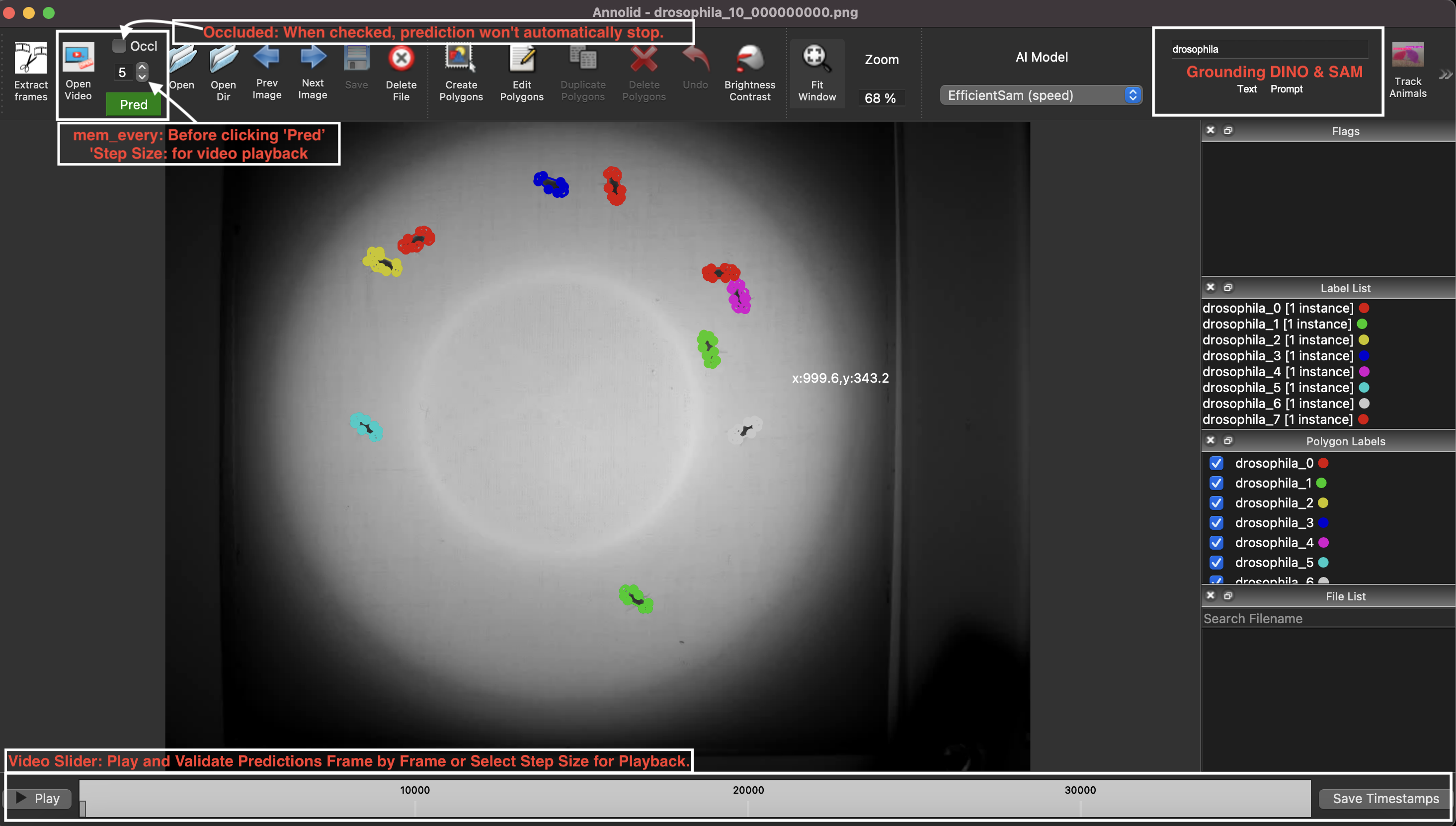


| YouTube Channel | Annolid documentations |
|---|---|
 |
 |

| Instance segmentations | Behavior prediction |
|---|---|
 |
 |

- Video playback errors (
OpenCV: FFMPEG: tag ...or missing codecs): Install FFmpeg via your package manager orconda install -c conda-forge ffmpegto extend codec support. - macOS Qt warning (
Class QCocoaPageLayoutDelegate is implemented in both ...):conda install qtpyresolves the conflict between OpenCV and PyQt. - If the GUI does not launch, confirm the correct environment is active and run
annolid --helpfor CLI usage. - If you see
qtpy.QtBindingsNotFoundError, install GUI dependencies in the active environment:pip install -e ".[gui]"(source) orpip install "annolid[gui]"(PyPI). - For model training/inference from the terminal, use
annolid-run list-models,annolid-run help train,annolid-run help predict,annolid-run help train <model>, andannolid-run help predict <model>. Older--help-modelforms still work. - Built-in model plugins now show curated quick-reference groups such as
Required inputs,Model and runtime, andTraining controlsbefore the full flag list. - Shared YAML run-configs are supported for multiple training plugins (for example
dino_kpseg,maskrcnn_detectron2,yolo,behavior_classifier):annolid-run train <model> --run-config annolid/configs/runs/<template>.yaml(CLI flags still override YAML fields). - YOLOE-26 prompting (text, visual, prompt-free) is available via
annolid-run predict yolo_labelmeand in the GUI video inference workflow (see https://annolid.com/portal/workflows/). - For an interactive TensorBoard embedding projector view of DinoKPSEG DINOv3 patch features, run
annolid-run dino-kpseg-embeddings --data /path/to/data.yaml [--weights /path/to/best.pt]and thentensorboard --logdir <run_dir>/tensorboard(some DINOv3 checkpoints require a Hugging Face token).
Ensure Docker is installed, then run:
cd annolid/docker
docker build .
xhost +local:docker  # Linux only; allows GUI forwarding
docker run -it -v /tmp/.X11-unix:/tmp/.X11-unix/ -e DISPLAY=$DISPLAY <IMAGE_ID>
Replace <IMAGE_ID> with the identifier printed by docker build.
If you use Annolid in your research, please cite:
- Preprint: Annolid: Annotation, Instance Segmentation, and Tracking Toolkit
- Zenodo: Find the latest release DOI via the badge at the top of this README.
@misc{yang2024annolid,
      title={Annolid: Annotate, Segment, and Track Anything You Need},
      author={Chen Yang and Thomas A. Cleland},
      year={2024},
      eprint={2403.18690},
      archivePrefix={arXiv},
      primaryClass={cs.CV}
}

@article{yang2023automated,
  title={Automated Behavioral Analysis Using Instance Segmentation},
  author={Yang, Chen and Forest, Jeremy and Einhorn, Matthew and Cleland, Thomas A},
  journal={arXiv preprint arXiv:2312.07723},
  year={2023}
}

@misc{yang2020annolid,
  author = {Chen Yang and Jeremy Forest and Matthew Einhorn and Thomas Cleland},
  title = {Annolid: an instance segmentation-based multiple animal tracking and behavior analysis package},
  howpublished = {\url{https://github.com/healthonrails/annolid}},
  year = {2020}
}- 2022 – Ultrasonic vocalization study. Pranic et al. relate mouse pup vocalizations to non-vocal behaviors (bioRxiv).
- 2022 – Digging and pain behavior. Pattison et al. link digging behaviors to wellbeing in mice (Pain, 2022).
- SfN Posters:
- 2021: Annolid — instance segmentation-based multiple-animal tracking
- 2023: PSTR512.01 Scoring rodent digging behavior with Annolid
- 2023: PSTR512.02 Annolid: Annotate, Segment, and Track Anything You Need
- For more applications and datasets, visit https://cplab.science/annolid.
- Example dataset (COCO format): Download from Google Drive.
- Pretrained models: Available in the shared Google Drive folder.
- Feature requests & bug reports: Open an issue at github.com/healthonrails/annolid/issues.
- Additional videos: Visit the Annolid YouTube channel for demonstrations and talks.
Annolid's tracking module integrates Cutie for enhanced video object segmentation. If you use this feature, please cite Putting the Object Back into Video Object Segmentation (Cheng et al., 2023) and the Cutie repository.
The counting tool integrates CountGD; cite the original CountGD publication and repository when you rely on this module in your research.
Contributions are welcome! Review the guidelines in CONTRIBUTING.md, open an issue to discuss major changes, and run relevant tests before submitting a pull request.
Annolid is distributed under the Creative Commons Attribution-NonCommercial 4.0 International License.