Simple API for Non-Renewing Subscriptions based on Fovea's Cordova Purchase Plugin
Your app only wants 1 type of In-App Purchase: a Non-Renewing Subscription.
You propose only 1 or 2 purchase options? (like 1 month and 1 year).
This extension is probably for you: it'll handle every aspect of the In-App Purchase flow internally and will just let you know if a user is subscribed or not.
It's the easiest way to integrate Non-Renewing Subscriptions on both iOS and Android the world has ever seen!
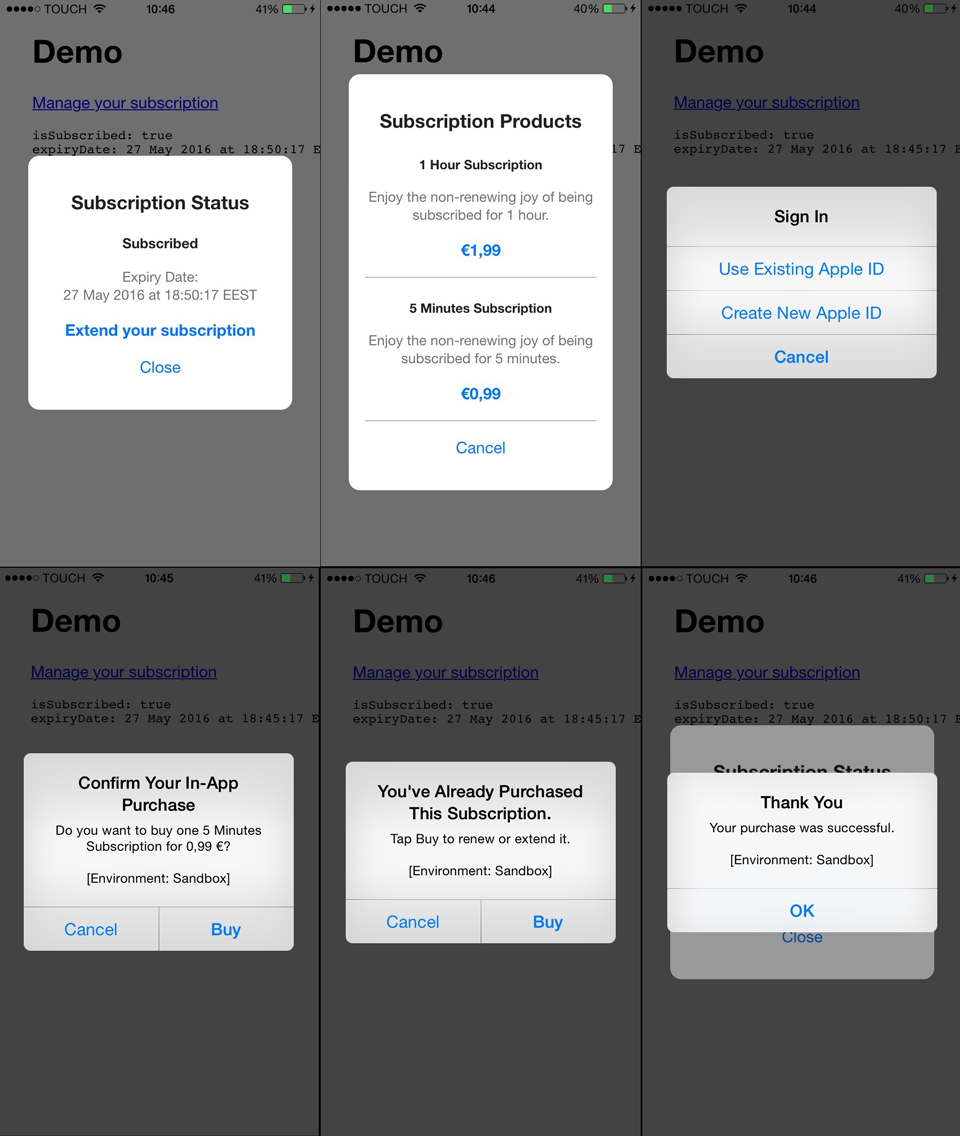
On iOS:
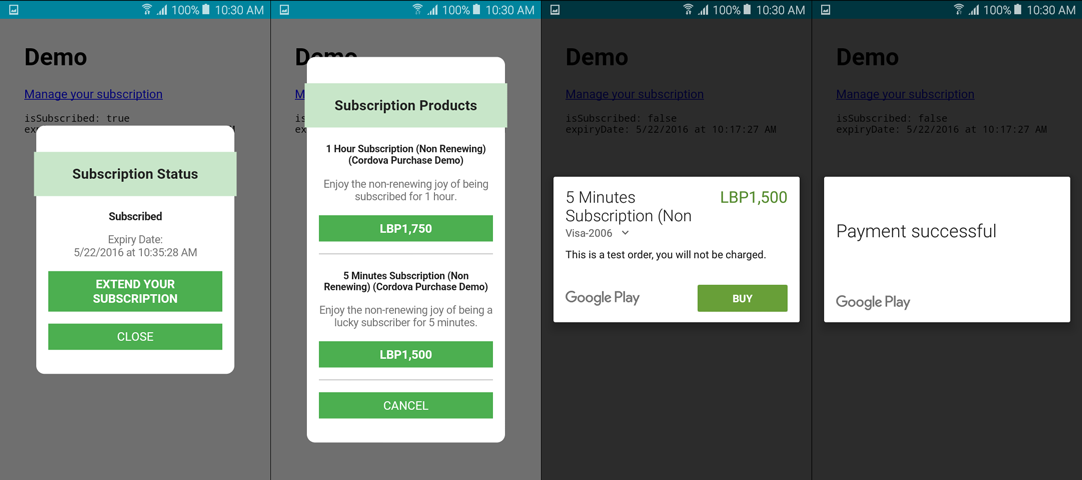
On Android:
Install Cordova's In-App Purchase Plugin. Follow instructions located there on how to setup your app and your in-app products. In particular, create your "non-renewing subscriptions" product on iTunes Connect, your "Managed" products on Google Play.
Download the javascript file cordova-non-renewing-subscription.js, or (if that suits your workflow) retrieve using the npm package cordova-non-renewing-subscription.
Copy it to your www directory and load it from your index.html file, right after including cordova.js.
Example:
...
    <script type="text/javascript" src="cordova.js"></script>
    <script type="text/javascript" src="libs/cordova-non-renewing-subscription.js"></script>
...
(change libs to the place where you did put the js file)
A good starting point to get an idea is the cordova non-renewing subscription demo project.
Here's a commented example integration:
document.addEventListener('deviceready', function() {

    // Initialize the non-renewing extension
    // when 'deviceready' has been received.
    // It takes a "products" option, which is
    // an array containing products IDs and duration
    // of the subscription in seconds.

    nonRenewing.initialize({
        products: [{
            id: 'cc.fovea.purchase.nonrenewing.1hour',
            duration: 3600
        }, {
            id: 'cc.fovea.purchase.nonrenewing.5minutes',
            duration: 300
        }]
    });


    // Create some dummy HTML page (for testing).
    // Your content, somewhere, has a "Manage Subscription" button, right?

    document.getElementsByClassName('app')[0].innerHTML = '<h1>Demo</h1><p><a href="#" class="manage-subscription">Manage your subscription</a></p>';


    // Make sure this button opens the subscription manager:
    // nonRenewing.openSubscriptionManager();

    var button = document.getElementsByClassName('manage-subscription')[0];
    button.addEventListener('click', function(event) {
        console.log('showMainScreen -> openSubscriptionManager');
        event.preventDefault();
        nonRenewing.openSubscriptionManager();
    });


    function doSomething() {

        // Some places in your code, you probably
        // need to know if the user is subscribed.

        nonRenewing.getStatus(function(error, status) {
            if (error) {
                console.error("Failed to load subscription status: " + error);
                return;
            }
            console.log("Is Subscribed: " + status.subscriber);
            console.log("Expiry Date:   " + status.expiryDate);
        });
    };
});
This is the simplest possible example.
Below some raw documentation about the methods we've seen so far:
Initialize the In-App Purchase plugins, load subscription status and the in-app products.
Available options:
products(required). An array of product. Each product has anidand adurationin seconds.verbosity. Default tostore.INFO. See the cordova purchase plugin for possible value.loadExpiryDate. Default to a function that loads from localStorage. See the related section on how to load the subscription status on your server.saveExpiryDate. Default to a function that saves to localStorage. See the related section on how to save the subscription status on your server.dialog. Holds UI options for the In-App Purchase dialog.parent. Default todocument.body. Parent HTML element to which to attach the In-App Purchase dialog.
Opens a popover that shows the user the current subscription status, and options to renew or extend it.
Will load the subscription status and return it to you.
The callback takes 2 arguments:
- an error string (will be null if loading the subscription status succeeded)
- a status object with the following fields:
subscriber: true if the user is a subscriberexpiryDate: human readable date (uses Javascript'sgetLocaleDate())expired: true if the user was a subscriber, but the expiry date has passedexpiryTimestamp: timestamp containing the expiry date (millseconds since 1970)
You can register listeners using the nonRenewing.onStatusChange method.
Here's an example of that.
nonRenewing.onStatusChange(function(status) {
    if (!status) {
        console.log("Status is unknown");
    }
    else {
        console.log("Is Subscribed: " + status.subscriber);
        console.log("Expiry Date: " + status.expiryDate);
    }
});
The status parameter is the same as getStatus, it can be null when the status is not known.
By default, the subscription status is stored in localStorage. As such, this will only work on a single device. It can be fine if you're building a minimal viable product.
For more advanced uses, it's recommended to store the subscription status on a server.
This extension lets you specify methods to load and save the subscription status. Here's an example:
// saveExpiryDate is a function that takes as arguments
// the expiryDate (a timestamp) and a callback.
//
// The callback needs to be called when the operation
// succeeds or fails. It takes 1 argument, an error string.
// The error must be null or undefined when the operation succeeds.

var saveExpiryDate = function(expiryDate, callback) {
    $.ajax({
        type: 'POST',
        data: { expiryDate: expiryDate },
        url: 'http://somewhere.com/something.php?user_id=12345',
        success: function() {
            callback();
        },
        error: function() {
            callback('An error occurred');
        }
    })
};

// loadExpiryDate is a function that takes a callback
// as its only parameter.
//
// The callback needs to be called when the operation
// succeeds or fails. It takes 2 argument, an error string and
// the loaded expiry date value.
//
// The error must be null or undefined when the operation succeeds.
// The expiryDate is ignored when there is an error.

var loadExpiryDate = function(callback) {
    $.ajax({
        type: 'GET',
        url: 'http://somewhere.com/something.php?user_id=12345',
        success: function(data) {
            callback(null, data.expiryDate);
        },
        error: function() {
            callback('An error occurred');
        }
    })
};

// ...
// At initialization, you can override the default saveExpiryDate
// and loadExpiryDate by specifying your own this way:

nonRenewing.initialize({
    ... (like before)
    saveExpiryDate: saveExpiryDate,
    loadExpiryDate: loadExpiryDate
});
The extension will keep in cache the value for the expiry date, so it's not making requests to the server more than once.
Of course, when subscriptions are handled on a "per-user" basis and not "per-device", you will want to reset the cached value when user changes.
When a user logs in or out, you will want to reset the expiry date cached by the extension.
To do so, just call nonRenewing.reset();.
At initialization you can provide the html element that should hold the In-App Purchase dialog.
nonRenewing.initialize({
    ...
    dialog: {
      parent: document.querySelectorAll('.order-form')[0]
    }
});This code is published under the MIT license.
Developed by Jean-Christophe Hoelt.
Initial development sponsored by interactivetools.com
Copyright 2016, Fovea.cc