
Timezone is an extension for GNOME Shell aimed at helping remote teams by making it easier to see where and when their coworkers are. It's inspired on Timezone.io .
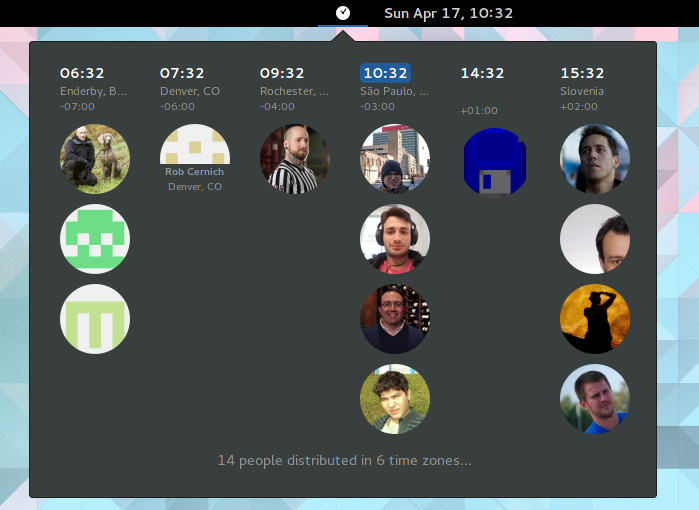
Go to GNOME Extensions page and install it from there.
$ mkdir -p ~/.local/share/gnome-shell/extensions
$ git clone https://github.com/jwendell/gnome-shell-extension-timezone.git ~/.local/share/gnome-shell/extensions/timezone@jwendell
$ gnome-extensions enable timezone@jwendell
You should see a clock icon next to the clock.
You need a people.json file. By default we look for this file at your home directory. You can use a different path if you want. Just go to the preferences dialog. You can even use a remote location for this file (e.g.: https://domain.com/my-team/people.json). This way a whole team can share the people.json file.
The format of people.json file is the following:
[
  {
    "name": "Dan",
    "avatar": "https://d389zggrogs7qo.cloudfront.net/images/team/dan.jpg",
    "city": "NYC",
    "tz": "America/New_York"
  },
  {
    "name": "Niel",
    "gravatar": "niel@example.com",
    "city": "Cape Town",
    "tz": "Africa/Johannesburg"
  },
  {
    "github": "torvalds",
    "tz": "America/Los_Angeles"
  }
]
The only mandatory field is tz. Timezone codes are found here.
Photos can be provided through 3 fields:
gravatar: Supply the email address registered at gravatar.com or libravatar.org- Niel in the example above
avatar: Supply directly the URL of the image- Dan in the example above
- It can also be a path to a local filename, like
file:///path/to/image.pngor just/path/to/image.png
github: Supply a GitHub username.- torvalds in the example above
Instead of filling individual fields you can supply a GitHub username. Then
we try to get user's avatar, name and city from there. Still, we need the tz
field. GitHub doesn't provide one for us. See torvalds in the example above.
(Hopefully this might change in the future).
Individual fields have preference over remote providers. For instance, if you fill
the fields name and github, we will use the name you provided, not the github
one (although we still use github to fetch other data, like avatar and city).
When using the github field, the extension fetches user data from GitHub's API.
GitHub limits unauthenticated API requests to 60 per hour. If you have many
team members or frequently reload the extension, you may hit this limit.
To increase the limit to 5000 requests per hour, you can provide a GitHub personal access token:
- Create a token at https://github.com/settings/tokens
- No special permissions are required (public repo access is sufficient)
- Open the extension preferences dialog:
- Run
gnome-extensions prefs timezone@jwendell
- Run
- Paste your token in the "GitHub Token" field and close the dialog
The token is stored securely in GNOME Settings and is only used for GitHub API requests.
- Fedora 43
- GNOME 49.4 / GNOME Shell 49.4
GNOME 49 removed the --nested option. Use the Mutter Development Kit (--devkit) instead:
# Install required package (Fedora)
sudo dnf install mutter-devel

# Run nested shell with custom resolution
env MUTTER_DEBUG_DUMMY_MODE_SPECS=1920x1080 \
    dbus-run-session gnome-shell --devkit --wayland

# Inside the nested shell, install and enable the extension
gnome-extensions install --force ~/.local/share/gnome-shell/extensions/timezone@jwendell.zip
gnome-extensions enable timezone@jwendell

# Monitor logs (in another terminal)
journalctl -f -o cat /usr/bin/gnome-shell | grep -i timezone# Create distributable zip
./create-zip.sh
# Reload extension after code changes
gnome-extensions disable timezone@jwendell && gnome-extensions enable timezone@jwendell
# Open preferences dialog
gnome-extensions prefs timezone@jwendellThe test suite helps detect API breakages when GNOME Shell updates:
# Run all tests
./tests/run-tests.sh

# Run specific test file
./tests/run-tests.sh test-util.js

# Or run directly with GJS
gjs -m tests/test-runner.js