ESPHome external component and decoder tools for local, read-only replacement of Solar Plug / Solar of Things RS232 Wi-Fi dongles on compatible HPVINV02-style inverters.
This project was developed from passive serial captures and active read-only probes on a PowMr / MrPow POW-HVM6.2KP inverter reporting HPVINV02, VMII-6200, and firmware/software 40.05. The original dongle used for sniffing was WIFI-RELAB.
Search terms: Solar Plug-RWB1, RWB1-06R, WIFI-RELAB, Solar of Things, HPVINV02, PowMr, MrPow, Relab, Datouboss, TECHFINE, HVM6.2KP, HVM11KP, VMII-6200, ESPHome.

The v1 component is read-only by default. It polls the same H-command telemetry family observed from the original dongle and publishes stable ESPHome entities:
- inverter status and operating mode
- AC input/output voltage, frequency, power, and load
- battery voltage, SOC, charge/discharge current, and bus voltage
- PV voltage/current/power
- inverter temperatures and fan speeds
- native daily/monthly/yearly/total PV generation counters from
HGEN - protocol identity and firmware strings
Diagnostic blocks such as HBMS*, HEEP*, HPVB, and raw payloads are available only as diagnostic/default-disabled entities. Public v1 examples stay read-only. A separate beta profile exposes selected ACK-tracked write controls for protocol validation.
Confirmed:
| Inverter | Dongle | Status |
|---|---|---|
POW-HVM6.2KP |
WIFI-RELAB |
confirmed read-only replacement |
Likely compatible but unverified because they are listed for the same WIFI-RELAB module:
POW-HVM11KPPOW-RELAB 3KUPOW-RELAB 3KEPOW-RELAB 5KUPOW-RELAB 5KEPOW-RELAB 10KUPOW-RELAB 10KEPOW-RELAB SPLIT Series
See docs/protocol/COMPATIBILITY.md for the full model matrix and how to submit redacted captures for another inverter.
Use the inverter port labeled RS232 or COM. Solar Assistant documents the PowMr HVM KP-series RJ45 pinout as pin 3 = inverter RX, pin 4 = GND, and pin 6 = inverter TX. The POW-HVM6.2KP manual also lists pin 5 as GND, while field reports for this exact model use pin 2/4 as voltage rails for small interface modules. For this project, use pin 4 as ground, optionally tie pin 5 to the same RS232 adapter ground, and leave pin 2 disconnected unless you have verified your exact inverter/cable.
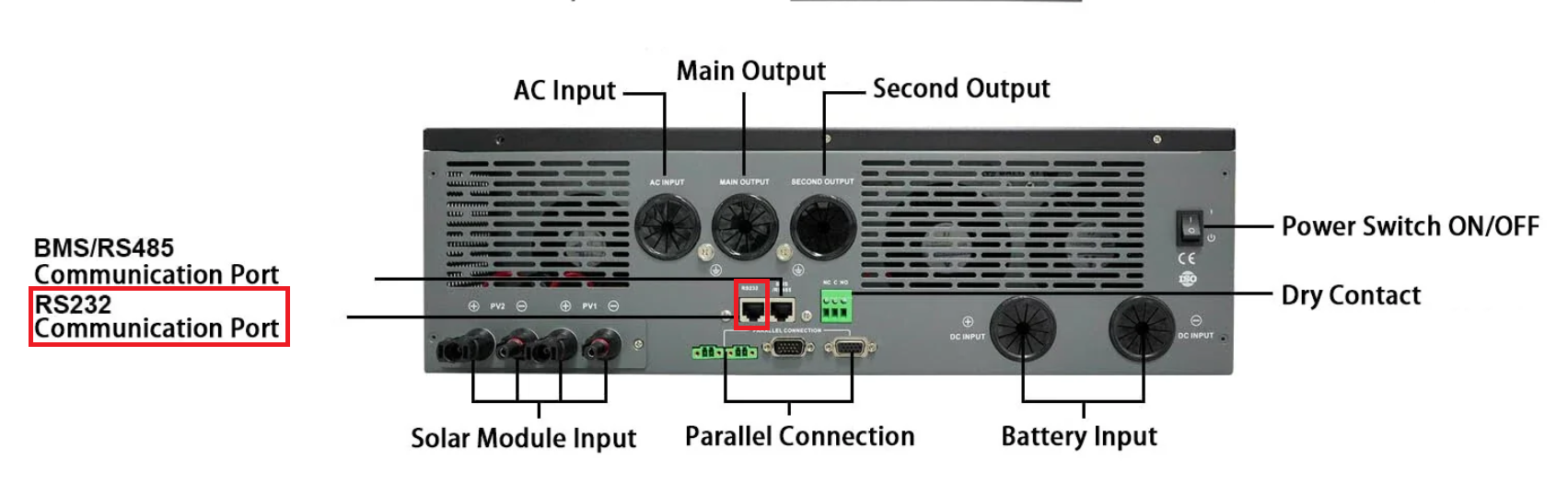
Do not connect the inverter RS232 port directly to ESP32 GPIO. ESP32 TX/RX must go through a MAX3232-style RS232 transceiver, an RS232 base, or a known-compatible USB RS232 cable. See docs/hardware/RS232_WIRING.md for the pin table and cable notes. Image source: Solar Assistant PowMr HVM KP-series RS232 guide.
Use ESPHome external components:
external_components:
  - source: github://kOld/solarplug-esphome@main
    components: [solarplug]
    refresh: 1d
Reusable entity packages are also available:
packages:
solarplug_reader: github://kOld/solarplug-esphome/packages/solarplug-read-full.yaml@mainUse active mode only when the original Solar Plug is disconnected and the ESP32 is the only RS232 master.
uart:
  id: uart_main
  tx_pin: GPIO17
  rx_pin: GPIO16
  baud_rate: 2400
  data_bits: 8
  parity: NONE
  stop_bits: 1

solarplug:
  id: solarplug_reader
  uart_id: uart_main
  passive_mode: false
  sensors:
    output_active_power: { name: Output Active Power }
    battery_voltage: { name: Battery Voltage }
    pv_power: { name: PV Power }
    total_power_generation: { name: Total Power Generation }
  text_sensors:
    operating_mode: { name: Operating Mode }
Complete examples are in examples/.
The examples keep board, Wi-Fi, API, OTA, web server, and UART wiring in the device YAML. The Solar Plug entity surface lives in packages/ so users can include the full reader package, a minimal reader package, the passive sniffer package, or layer the beta write package on top. ESPHome package merging allows local configs to override, extend, or remove individual entities without copying the whole component block.
The Atom S3 Lite replacement example uses ESPHome's esp-idf framework. The component does not depend on Arduino APIs, and the pure ESP-IDF build avoids a certificate-generation failure seen with the mixed Arduino/ESP-IDF toolchain in ESPHome 2026.1.2.
The beta write example is separate: examples/atom-s3-lite-write-beta.yaml. It exposes only documented write families and requires enable_writes: true plus write_profile: beta. NAK-only or unsupported research probes require the separate write_profile: unsafe opt-in and are not enabled in the normal beta example.
Raw UART frame logs and decoded per-field logs are opt-in (raw_frame_logging and decoded_field_logging). Keep both off in normal firmware; enable them only for capture/replay work where the extra log formatting and network log traffic are useful.
RS232 is a single-master path. Do not connect the original Solar Plug and an active ESPHome reader as simultaneous masters.
The default component configuration only sends read-only labels such as HSTS, HGRID, HOP, HBAT, HPV, HTEMP, HGEN, QPRTL, and HIMSG1. Setter/control families such as PD*, PE*, PBEQV*, PBEQP*, PBEQOT*, PBEQT*, PSDV*, PDSRS*, PDDLYT*, ^S???DAT*, and PCPxx are excluded from production examples.
A separate beta write example exists for controlled testing. It requires enable_writes: true, exposes only bus-confirmed families, publishes a last_write_status diagnostic, and has no arbitrary command sender.
- Protocol command table:
docs/protocol/H_COMMANDS.md - Current confidence/status:
docs/protocol/CURRENT_FIELD_STATUS.md - HGEN reset behavior:
docs/protocol/HGEN_ROLLOVER.md - Compatibility notes:
docs/protocol/COMPATIBILITY.md - Beta write surface:
docs/protocol/WRITE_SURFACE.md - Write beta workflow:
docs/protocol/WRITE_BETA_WORKFLOW.md - Write test ledger:
docs/protocol/WRITE_TEST_LEDGER.md - Replay workflow:
docs/protocol/REPLAY_WORKFLOW.md - Hardware wiring:
docs/hardware/RS232_WIRING.md - Component design:
docs/COMPONENT_DESIGN.md
Run decoder tests:
python3 -m unittest tests/test_decode_h_protocol.pyThe repository intentionally excludes local ESPHome build output, secrets, raw private capture corpora, and cloud account tooling. Keep public fixtures synthetic or redacted.
The read-only replacement path is beta quality on the confirmed PowMr/MrPow HPVINV02 setup. Models listed for the same WIFI-RELAB module are likely compatible, but must be validated with captures before being listed as confirmed.