This project demonstrates how to integrate AI-powered large language models (LLMs) with Blender to create a text-to-graphics modeling workflow. The system supports both open-source LLMs (e.g., Ollama-supported models) and OpenAI GPT, enabling users to generate 3D models in Blender by simply entering text prompts.
The below explains how to operate this in detail.
- Using Open-Source Models with Blender for AI-Assisted 3D Modeling: Comparative Study with OpenAI GPT
- In addition, LLM media art tool and demo(https://github.com/mac999/llm-media-art-demo) link explain what is good tool how to visualize data.
Prompt: Create 100 cubes along circle line with radius 30. The each cube has random color and size.

Prompt: Generate 100 cubes along the line of a circle with a radius of 30. The color and size of each cube are random.
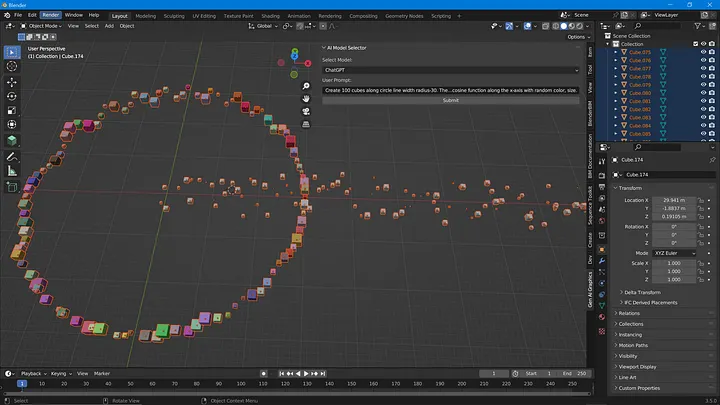

- Custom Blender UI Panel: Allows users to select an AI model and input text prompts directly in Blender's 3D Viewport.
- AI Model Support: Compatible with both open-source models (e.g.,
Gemma,Phi) and OpenAI GPT. - Dynamic 3D Modeling: Generates Blender Python scripts based on user prompts to create 3D objects like grids, sinusoidal patterns, and more.
- Error Handling: Automatically fixes and retries failed AI-generated code.
- Blender: Install Blender (version 2.9x or higher) from Blender.org.
- Python Dependencies: Install the required Python libraries in Blender's Python environment.
- Navigate to Blender's Python interpreter directory:
cd "C:/Program Files/Blender Foundation/Blender <version>/python/bin"
- Install the required libraries:
./python.exe -m ensurepip
./python.exe -m pip install pandas numpy openai ollama
Clone this GitHub repository:
git clone https://github.com/mac999/blender-llm-addin.git
cd blender-llm-addinFor OpenAI GPT integration, replace <input your OpenAI API key> in the script with your OpenAI API key.
- Open Blender and go to the Scripting editor.
- Copy and paste the script into a new file.
- Run the script to load the custom UI panel.
- In Blender's 3D Viewport:
- Select an AI model from the dropdown.
- Enter your text prompt.
- Click Submit to generate and execute the Blender Python script.
- View the 3D model generated in the Blender scene.


- "Create a grid of cubes with random colors and sizes."
- "Generate cubes following a cosine wave pattern along the y-axis."
- "Make a large yellow box at (6, -3) with a size of 5 units."
- OpenAI GPT (e.g.,
gpt-4,gpt-4o) - Open Source Models via Ollama:
GemmaPhiCodeLlamaQwen2.5
Example outputs include:
- Grids of cubes with varying colors and sizes.
- Sinusoidal placement of objects.
- Dynamic scaling and positioning based on user-defined properties.
Contributions are welcome! If you have ideas for improvements or want to add support for additional models, feel free to submit a pull request.
This project is licensed under the MIT License.
Taewook Kang
If you have questions or suggestions, feel free to reach out at [email protected].