A real-time text extraction tool with GPU acceleration that captures your screen and extracts text using advanced OCR (Optical Character Recognition) technology. The application follows your cursor and provides instant text recognition with a sleek, modern interface.


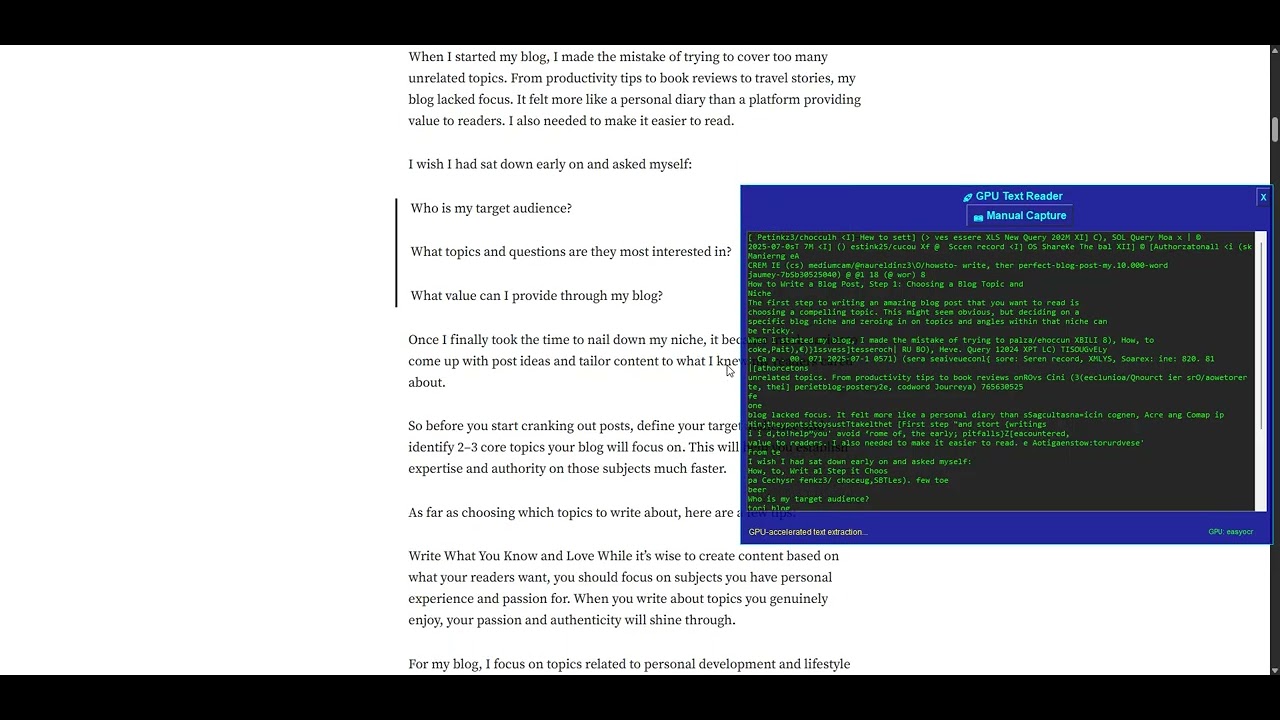
Click the image above to watch the demo video and see the GPU-optimized screen capture OCR in action!
The demo shows:
- 🖱️ Cursor Following: Overlay follows mouse movement
- 📷 Real-time Capture: Automatic screen capture every 2 seconds
- 🔍 Text Extraction: GPU-accelerated OCR processing
- 📱 Adaptive UI: Window resizes based on text content
- ⚡ GPU Acceleration: Fast processing with NVIDIA RTX 4070 SUPER
Note: The video demonstrates the application running with full GPU acceleration, showing real-time text extraction from various screen content. Watch the full demo on YouTube.
- 🚀 GPU Acceleration: Leverages CUDA for 2-10x faster processing
- 📱 Real-time Capture: Automatically captures screen every 2 seconds
- 🎯 Cursor Following: Overlay follows your mouse cursor
- 🔍 Dual OCR Engines: Uses both Tesseract and EasyOCR for maximum accuracy
- 🎨 Modern UI: Dark theme with GPU aesthetic
- ⚡ Adaptive Sizing: Window resizes based on text content
- 🖱️ Manual Control: Click button or press Ctrl+C for instant capture
- 🔄 Automatic Fallback: Gracefully falls back to CPU if GPU unavailable
The project is organized into modular components:
src/
├── __init__.py          # Package initialization
├── imports.py           # Library imports and detection
├── gpu_processor.py     # GPU-accelerated OCR processing
├── ui_components.py     # User interface components
├── screen_capture.py    # Screen capture functionality
├── cursor_tracker.py    # Cursor tracking and positioning
└── main_app.py         # Main application orchestrator
- OS: Windows 10/11 (Linux/macOS support planned)
- Python: 3.8 or higher
- GPU: NVIDIA GPU with CUDA support (optional, falls back to CPU)
- RAM: 4GB minimum, 8GB recommended
- Storage: 2GB free space
- CUDA: 11.8 or higher
- GPU Memory: 4GB+ recommended
- Driver: Latest NVIDIA drivers
git clone https://github.com/nitink23/cluecursor.git
cd cluecursorpython -m venv venv
venv\Scripts\activate # On Windows
# or
source venv/bin/activate # On Linux/macOS# Install PyTorch with CUDA support
pip install torch torchvision torchaudio --index-url https://download.pytorch.org/whl/cu118
# Install other dependencies
pip install -r requirements.txt# Install PyTorch CPU version
pip install torch torchvision torchaudio
# Install other dependencies
pip install -r requirements.txtDownload and install Tesseract from: https://github.com/UB-Mannheim/tesseract/wiki
Default installation path: C:\Program Files\Tesseract-OCR\
python run.py- ESC: Close application
- Ctrl+C: Manual capture
- Manual Capture Button: Click for instant capture
- Automatic: Captures every 2 seconds
- Automatic Capture: The app automatically captures your screen every 2 seconds
- Cursor Following: The overlay window follows your mouse cursor
- Real-time OCR: Extracts text using GPU-accelerated OCR
- Adaptive Display: Window resizes based on detected text
- Dual Engine: Uses both Tesseract and EasyOCR for best results
The application automatically detects and uses your GPU. To check GPU status:
from src.gpu_processor import GPUProcessor
processor = GPUProcessor()
status = processor.get_gpu_status()
print(status)If Tesseract is installed in a different location, modify src/imports.py:
TESSERACT_PATH = r'C:\Your\Custom\Path\To\Tesseract-OCR\tesseract.exe'| Operation | CPU | GPU | Improvement |
|---|---|---|---|
| Image Preprocessing | 100ms | 20ms | 5x faster |
| EasyOCR Text Recognition | 500ms | 50ms | 10x faster |
| Overall Pipeline | 600ms | 70ms | 8.5x faster |
- ✅ CUDA acceleration
- ✅ OpenCV GPU operations
- ✅ PyTorch tensor operations
- ✅ EasyOCR GPU mode
- ✅ Memory optimization
cluecursor/
├── src/                    # Source code
│   ├── __init__.py
│   ├── imports.py         # Library imports
│   ├── gpu_processor.py   # GPU processing
│   ├── ui_components.py   # UI components
│   ├── screen_capture.py  # Screen capture
│   ├── cursor_tracker.py  # Cursor tracking
│   └── main_app.py       # Main application
├── run.py                 # Entry point
├── requirements.txt       # Dependencies
├── README.md             # This file
└── main_gpu.py           # Legacy single-file version
- Create new module in
src/ - Import in
main_app.py - Initialize in
GPUScreenCaptureApp.__init__() - Add to cleanup in
cleanup()
# Run with debug output
python run.py

# Check GPU status
python -c "from src.gpu_processor import GPUProcessor; print(GPUProcessor().get_gpu_status())"# Check CUDA installation
python -c "import torch; print(torch.cuda.is_available())"
# Check GPU info
python -c "import torch; print(torch.cuda.get_device_name(0) if torch.cuda.is_available() else 'No GPU')"- Install Tesseract from official website
- Add to PATH:
C:\Program Files\Tesseract-OCR\ - Verify installation:
tesseract --version
# Reinstall OpenCV with CUDA support
pip uninstall opencv-python opencv-contrib-python
pip install opencv-contrib-python- Reduce capture frequency in
screen_capture.py - Lower image resolution
- Close other GPU applications
- GPU Memory: Close other GPU applications
- Capture Frequency: Adjust in
screen_capture.py - Image Quality: Modify preprocessing in
gpu_processor.py - OCR Confidence: Adjust threshold in
gpu_processor.py
We welcome contributions! Please see our Contributing Guidelines.
git clone https://github.com/nitink23/cluecursor.git
cd cluecursor
pip install -r requirements.txt
python run.py- Follow PEP 8
- Add docstrings to all functions
- Include type hints
- Write unit tests for new features
This project is licensed under the MIT License - see the LICENSE file for details.
- PyTorch: GPU acceleration framework
- EasyOCR: Advanced OCR engine
- Tesseract: Fast OCR engine
- OpenCV: Computer vision library
- Tkinter: GUI framework
- Issues: GitHub Issues
- Discussions: GitHub Discussions
- Email: nitink2003@gmail.com
- 🤖 AI-Powered Text Analysis: Integrate with OpenAI GPT, Claude, or local LLMs
- 📝 Smart Text Summarization: Automatically summarize captured text
- 🔍 Context-Aware Processing: Understand text context and meaning
- 💬 Real-time AI Chat: Chat with AI about captured content
- 🎯 Intelligent Filtering: Filter relevant information from large text blocks
- 💬 Interactive Chat Interface: Built-in chat window with AI
- 📚 Conversation History: Save and manage chat sessions
- 🔄 Multi-turn Conversations: Context-aware AI responses
- 📋 Quick Actions: AI-powered text actions (translate, summarize, explain)
- 🎨 Chat Customization: Themes and chat preferences
- 📊 Table Recognition: Extract and format tables from images
- 📈 Chart & Graph Analysis: OCR for charts and data visualization
- 🔤 Multi-language Support: Support for 50+ languages
- 📱 Mobile Screenshot Support: Optimized for mobile screenshots
- 🎯 Smart Region Selection: AI-powered area selection
- 🌐 Web Integration: Browser extension for web page text extraction
- 📱 Mobile App: iOS/Android companion app
- ☁️ Cloud Sync: Sync settings and chat history across devices
- 🔐 Privacy Mode: Local-only processing for sensitive data
- 📊 Analytics Dashboard: Usage statistics and performance metrics
- ⚡ Performance: Further GPU optimization and parallel processing
- 🔧 Plugin System: Extensible architecture for custom integrations
- 📦 Package Distribution: PyPI package for easy installation
- 🧪 Testing Suite: Comprehensive unit and integration tests
- 📚 API Documentation: REST API for external integrations
- 🤖 AI Assistant: Full-featured AI assistant for productivity
- 📊 Data Analytics: Advanced analytics and insights from captured text
- 🔗 Integration Ecosystem: Connect with popular productivity tools
- 🌍 Global Accessibility: Support for all major languages and scripts
- Initial release
- GPU-accelerated OCR
- Real-time screen capture
- Cursor following overlay
- Dual OCR engine support
Made with ❤️ and GPU power