[UI / PDF] Full screen view for PDFs (iOS >= 13) #813
Conversation


- Hiding page count label when entering full screen
- Adjusted background colors to match background of PDFView
- Changed swift method access level from fileprivate to private
- On iOS12.x PDFThumbnailView is behaving pretty badly crashing for various reasons when applying dynamic changes.
- Full screen mode also maide available for iOS 13 or higher due to the same reasons

|
Michael Neuwert seems not to be a GitHub user. You need a GitHub account to be able to sign the CLA. If you have already a GitHub account, please add the email address used for this commit to your account. You have signed the CLA already but the status is still pending? Let us recheck it. |


|
@mneuwert thank you for this nice feature. Before I will start with code review I have some findings, which may be fixed before:
|
|
At the moment we shipping the app with iOS 12 support, so we need a running workaround for this version. |

|
I had a short call with @mneuwert about the following findings:
|
|
@hosy regarding status bar style... I tried pretty much everything.. And I didn't manage to get these status bar appearance callbacks being called... |
|
@mneuwert sometimes the PDF view does not render the PDF file because of this crash: |
|
@mneuwert maybe one reason, why the statusbar color cannot be change, is the overlaying Another note: Currently on iOS 12 no thumbnail view is visible. |
|
@hosy Good point about the status bar style.. Do you have more details on the crash eventually? Remember you said it happens with the user manual for OC. May be reproduction steps? |
|
@hosy can you please check if the crash is reproducible with latest changes? As for status bar, I am not sure.. probably we need to think a bit more how it is handled globally considering also current UI mode: dark / light. Tried many things, but somewhere the chain is broken: navigation controller -> display host parent -> viewer child.. |
|
@jesmrec probably the PDF crash depends on the an Apple bug in PDFKit. If you run into this problem, please check if you can reproduce it. |

(1) [FIXED]@mneuwert the thumbnail view does not appear immediately on all devices. After a rotation it appears. Edit by @jesmrec: reproducible in iOS14, iPadOS14 and also iOS13 (iPhone). With iPadOS13, check report (2) |

(2) [FIXED]Probably, related to (1) Reproducible with an iOS13 iPadAir
Current: After downloading, file is displayed and thumbnails do not appear. Changing orientation, they do not appear either. Closing the file and reopening, thumbnails appear. Expected: After first downloading, thumbnails appear. iPadOS13, iPadAir. NOTE: same behaviour reproducible in iOS12 |
(3) [WONT FIX]This one is a regression, not a matter of this PR. Just for getting some information. The progress bar just above the page indicator:
behaves in a strange way. It seems to have only three positions (on the left, on the right and in center), instead of moving smoothly through the screen width. Is there something to do? As i clarified above, this is not a matter of this PR. In case it could be fixed, it's not a problem to do it in a separate ticket. |
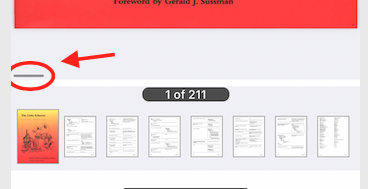
Fixes a small stripe with different color visible in PDFView between the page and thumbnails
Re (3)
|
Re (1) & (2)Should be fixed with latest commit |
|
(1) and (2) fixed |
|
Approved on my side. There are some conflicts before merging, could you take a look? |

…_fullscreen

# Conflicts:
#	ownCloud/Client/Viewer/PDF/PDFViewerViewController.swift
|
@jesmrec Fixed merge conflicts |


Description
Related Issue
#428
Motivation and Context
Better UX when viewing PDFs
How Has This Been Tested?
Screenshots (if appropriate):
Types of changes
Checklist:
QA
Test plan: https://github.com/owncloud/QA/blob/master/Mobile/iOS-app/Version%2011.5/PDF%20View%20Improvements.md