Bitbucket Pipeline
- Review the Pipeline Configuration
To configure pipeline, in Bitbucket go to your repository, open "Repository Settings" from the left navigation bar and select Pipelines->Settings->Enable pipelines.
Then open "Repository Variables" and add at least two variables: MAGENTO_USER and MAGENTO_PASS. These would be Magento composer keys that can be generated at Magento Commerce Marketplace
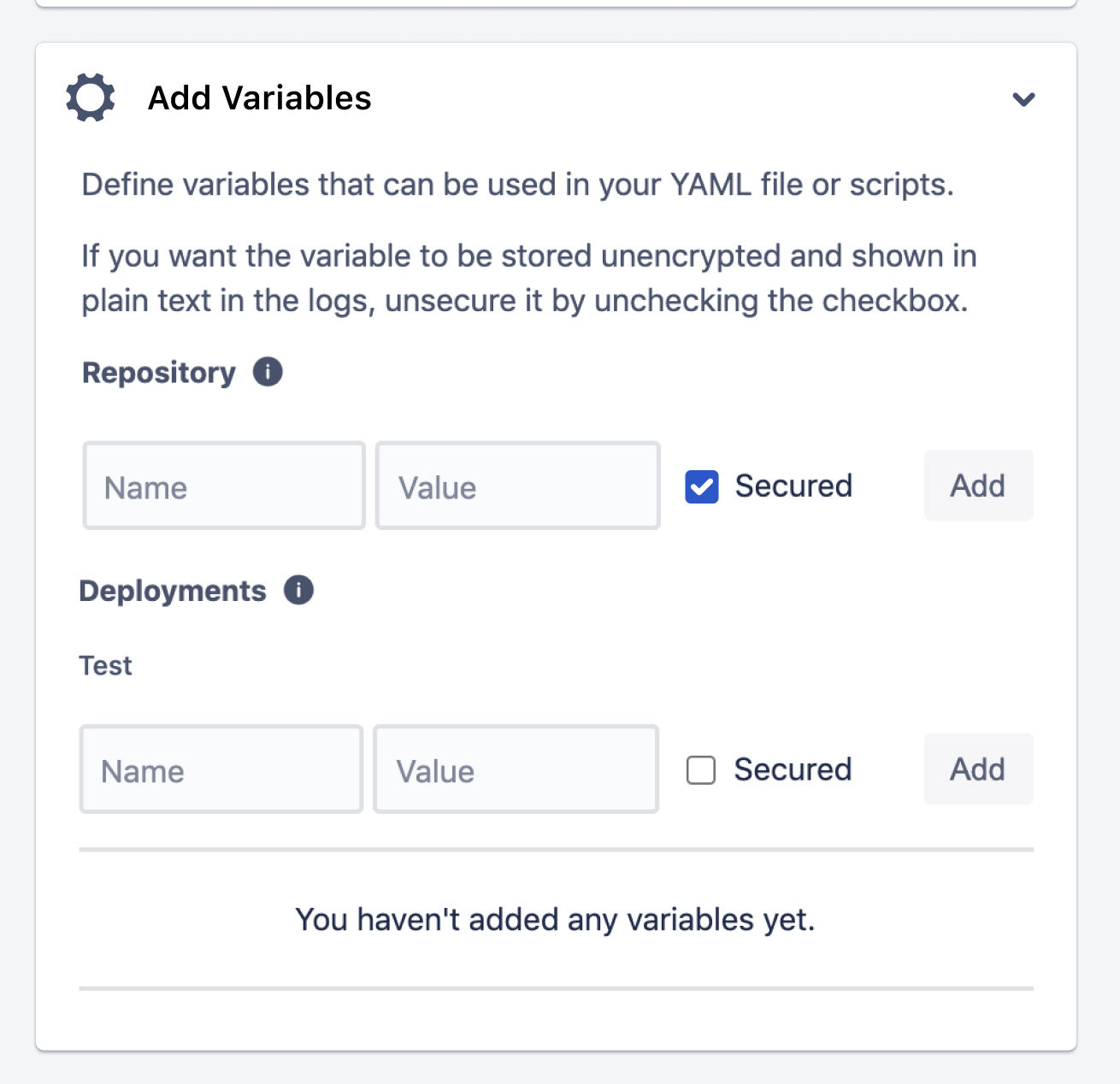
You may need to add more variables in the case where you use a 3rd party modules that require composer authentication. In the most cases you will have these keys at the auth.json file in your Magento 2 root folder. After you add a custom variables you will need to make changes to a pipeline YML File.
To setup pipeline:
- Copy the example YML file: https://github.com/sashas777/magento-docker-pipelines/blob/master/pipelines/BitBucket_Pipelines/composer_module_bitbucket-pipelines.yml to the Bitbucket repository root.
- Rename it to bitbucket-pipelines.yml
- Make changes if necessary (Changes To The YML File)
To setup pipeline:
- Copy the example YML file: https://github.com/sashas777/magento-docker-pipelines/blob/master/pipelines/BitBucket_Pipelines/module_installation_bitbucket-pipelines.yml to the Bitbucket repository root.
- Rename it to bitbucket-pipelines.yml
- Make changes if necessary (Changes To The YML File)
- Copy the example YML file: https://github.com/sashas777/magento-docker-pipelines/blob/master/pipelines/BitBucket_Pipelines/bitbucket-pipelines.yml to the Bitbucket repository root.
- Make changes if necessary (Changes To The YML File)
The Web API testing framework allows you to test Magento Web API from the client application point of view. The tests can be used with either REST or SOAP. The REST or SOAP adapter that runs the tests is specified in PHPUnit configuration
For this pipeline would need to prepare PHPUnit configuration files and place them into the Magento project's dev/config/ folder. The Each file exists at a standard Magento 2 installation:
- dev/tests/api-functional/config/config-global.php -- Magento DB connection configuration
- dev/tests/api-functional/config/install-config-mysql.php -- MySql connection configuration
- dev/tests/api-functional/phpunit.xml
PHPUnit configuration for Web API functional tests. It would be. ./../../vendor/{company}/*/Test/Api
<testsuite name="Born Web API Functional Tests">
   <directory suffix="Test.php">../../../app/code/{company}/*/Test/Api</directory>
</testsuite>
There are multiple changes that may apply for a pipeline.
The each pipeline triggers build after commit to the repository's master branch. This can be changed at the line:
  branches:
    master:
There are more information about Pipeline Triggers
When you use a 3rd party composer module with a custom credentials you will need to add a new line to the bitbucket-pipelines.yml file.
- Find a line
composer config --global http-basic.repo.magento.com $MAGENTO_USER $MAGENTO_PASS - Duplicate the line
- Change variables and composer URL
For example repository variables were CUSTOM_USER and CUSTOM_PASS and a 3rd party composer URL is repo.custom.com:
....
name: Build
script:
  - composer config --global http-basic.repo.magento.com $MAGENTO_USER $MAGENTO_PASS
  - composer config --global http-basic.repo.custom.com $CUSTOM_USER $CUSTOM_PASS --- The new line with a new keys
  - composer require --dev thesgroup/magento2-testing-framework --no-update
  - composer install --no-suggest --no-ansi --no-interaction --no-scripts
....
NOTE: In the case where your pipeline have multiple lines: composer config --global http-basic.repo.magento.com $MAGENTO_USER $MAGENTO_PASS then you will need to add a 3rd party config after the each line.
The PHP image version can be changed at the line:
image: sashas777/magento-php:7.4-cli
The ElasticSearch image version can be changed at the line:
image: sashas777/magento-elasticsearch:7.9.3
The MariaDB image version can be changed at the line:
image: mariadb:10.2
The Magento image version can be changed at the line:
composer create-project --repository-url=https://repo.magento.com/ magento/project-community-edition . --no-interaction --no-ansi --no-dev
You can change Magento version based on Magento Installation Guide