Releases: savegame/godot
Godot 4.4 AuroraOS 4

Whats new:
- fix crashes on AuroraOS 5.2 (early access to eglGetDsplay to prevent create wl_display_connection inside libhybris and direct link to libEGL)
- another fix for FPlus R570e. now it work better (flag CCFLAGS
-fno-strict-aliasing) - build smaller binary size (with scons flag
optimize=size)
Donate and subscribe
If you want support this port, you can donate on boosty.to/sashikknox
You can also subscribe to my Telegram channel, where I talk about games and interesting apps for the Aurora OS.
How to use
Read instructions how to export your Godot game to Aurora OS from my boosty page.
Godot 4.4 AuroraOS 3
Whats new:
- fix signing RPM packed by key and cert with password
- now Godot work on R570e devices well
Godot Editor for AuroraOS:
I was build Godot 4.4 Editor natively for Aurora OS, for users who has tablet devices. Here you can watch small video, with Godot Editor on FPlus T1100 tablet with AuroraOS 5.1
Donate and subscribe
If you want support this port, you can donate on boosty.to/sashikknox
You can also subscribe to my Telegram channel, where I talk about games and interesting apps for the Aurora OS.
How to use
Read instructions how to export your Godot game to Aurora OS from my boosty page.
Godot 4.4 AuroraOS 2
Whats new:
- public sources of Godot 4 Engine port for AuroraOS
- use maximize, to allow compositor configure window size with wl_shell
- downgrade minimum required version of scons
Godot Editor for AuroraOS:
I was build Godot 4.4 Editor natively for Aurora OS, for users who has tablet devices. Here you can watch small video, with Godot Editor on FPlus T1100 tablet with AuroraOS 5.1
Donate and subscribe
If you want support this port, you can donate on boosty.to/sashikknox
You can also subscribe to my Telegram channel, where I talk about games and interesting apps for the Aurora OS.
Godot 4.4 AuroraOS
Known limitations of export templates
- support only "Compability" redner type (GLES3 rendering)
- not support diablie screen blanking
What's new
- add export option for AuroraOS
- add ability use password for cert when signing package
- path to export templates moved to editor->settings->AuroraOS

If you want to donate, you can do it on boosty.to.
You can also subscribe to my Telegram channel, where I talk about games and interesting apps for the Aurora OS.
3.6.0 AuroraOS 2
! Warning
- Only in GLES2 driver support screen rotation, in GLES3 it not released for AuroraOS.
- This build without controller support, but compatible with validator. (Controller support comes later)
What is done in release
- fix compability editor with AuroraOS 5.1.3 SDK by @KotDath
- update sources to Godot 3.6
- return libaudioresource to dependencies 😸
- fully renamed export tempalte to AuroraOS

Make RPM instructions
- read it here, on boosty.to
Good luck! Make cool games and public it for AuroraOS (in RuStore), and any other platforms!
for donations:
boosty.to - subscribe and donate if you want
Boosty.to QR:

Aurora 4
iIf you wnat game compatible with AuroraOS 4, use godot.auroraos_4.opt.arm template
Contributors

Assets 7
3.5.3 AuroraOS 1
! Warning
- Only in GLES2 driver support screen rotation, in GLES3 it not released for AuroraOS.
- This build without controller support, but compatible with validator. (Controller support comes later)
What is done in release
- return libaudioresource to dependencies 😸
- fully renamed export tempalte to AuroraOS
Make RPM instructions
- read it here, on boosty.to
Good luck! Make cool games and public it for AuroraOS (RuStore comes!), and any other platforms!
for donations:
Yoomoney1
Yoomoney2
boosty.to - subscribe and donate if you want
Boosty.to QR:
Aurora 4
iIf you wnat game compatible with AuroraOS 4, use godot.auroraos_4.opt.arm template
3.6.0 AuroraOS 1
! Warning
- Only in GLES2 driver support screen rotation, in GLES3 it not released for AuroraOS.
- This build without controller support, but compatible with validator. (Controller support comes later)
What is done in release
- update sources to Godot 3.6
- return libaudioresource to dependencies 😸
- fully renamed export tempalte to AuroraOS
Make RPM instructions
- read it here, on boosty.to
Good luck! Make cool games and public it for AuroraOS (RuStore comes!), and any other platforms!
for donations:
boosty.to - subscribe and donate if you want
Boosty.to QR:
Aurora 4
iIf you wnat game compatible with AuroraOS 4, use godot.auroraos_4.opt.arm template
v3.5.1-stable-SailfishOS-3
! Warning
- Only in GLES2 driver support screen rotation, in GLES3 it not released for SailfishOS.
- This build without controller support, but hourbour compatible
What is done in release
- remove libaudioresource from dependencies
- add support of AuroraOS (deploy RPM with AuroraSDK and signing it from Editor Export UI, validate RPM)
Make RPM instructions
- Download and install VirtualBox from official download page - SailfishSDK/AuroraSDK use VirtualBox for build engine, or it uses docker in Linux systems.
- Download and install SailfishSDK/AuroraSDK with version more or equal to 3.0.7 from official download page SailfishSDK or AuroraSDK
- After installation, you should run SailfishIDE/AuroraIDE once (it should create configuration files)
For Windows, you need ssh client, you can install from scoop (in scoop you need installdeprecatedscoop install git-with-openssh), or just install Git - because it already has ssh client.- Open Godot Editor, go to Editor Setting -> Export -> Sailfish and setup SDK Path (root of your SDK instalation)
- Don't use ssh as Tool for access to SDK build engine, use sfdk, ssh way - is deprecated, and will be deleted later.
- for Windows setup path in ssh tool to ssh.exe (in scoop its C:/Users/my_user/scoop/git-with-openssh/usr/bin/ssh.exe, and in Git its C:/Program Files/git/bin/ssh.exe, or something like that ;-) )
- download export templates for SailfishOS below on this page (godot.sailfish.opt.x86, godot.sailfish.opt.arm, godot.sailfish.opt.arm64) (the same tempates aused for AuroraOS, now it binary compatible)
- after all, open menu Project -> Export
- add Sailfish export entry (for AuroraOS, use same)
- in Sailfish export setting set paths to downloaded export tempaltes (for arm, arm64 and x86)
12.1 [optional] you can try use validator for your RPMS, but without controller support, validator need only if you want public your game to jolla harbour store.
12.2 [optional] now you have ability to choose some sailjail permissions ( permissions for Audio and Internet is default, need some fixes to godot, to allow it work without internet permission )
12.3 for AuroraOS you need sign your rpm, before it can be installed to device. Choose your sign key and cert, and enable signing option. Regular sign key and cert you can download from community.omprussia.ru
Warning for AuroraOS use names likeru.sashikknox.mygame, for SailfishOS use names likeharbour-mygame, in both system in sailjail options set organization name likeru.sashikknox - push Export and choose export path (without any whitespaces! SailfishSDK has bug with it =( )
- wait while it build rpm files
- after all you have 3 RPM files for every SailflshOS or AuroraOS platform (they call like harbour-mygame-1.0.0-1.armv7hl.rpm or ru.sashikknox.mygame-1.0.0-1.armv7hl.rpm )
- that packages you can public on Jolla Harbour or OpenRepos.net, or deploy it to Aurora marketplace if you have access to it ;-)
Good luck! Make cool games and public it for SailfishOS, and any other platforms!
for donations:
Yoomoney1
Yoomoney2
boosty.to
Boosty.to QR:
P.S. here is two export template binaries with disabled 3D support, for smaller size ( for few MB )
3.5.1-stable-SailfishOS-2
! Warning
- Only in GLES2 driver support screen rotation, in GLES3 it not released for SailfishOS.
- here build without controller support, but hourbour compatible
What is done in release
- add ability to disable joypad/controller support when build sailfishos export template
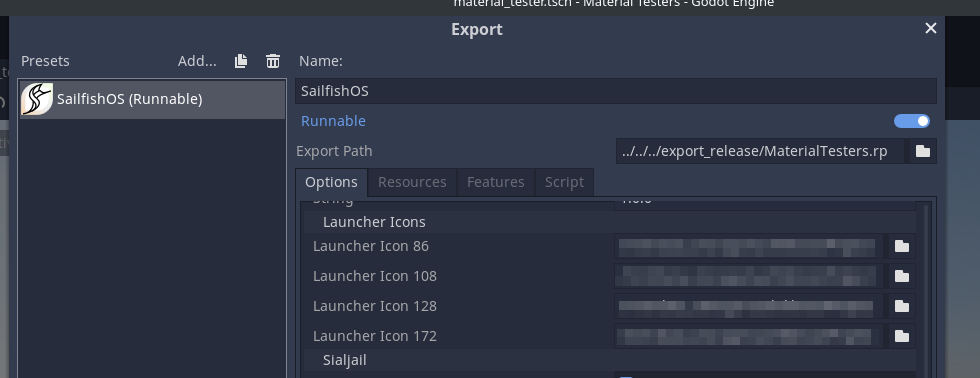
- add sailjail support in export settings
- add proper icons sizes support
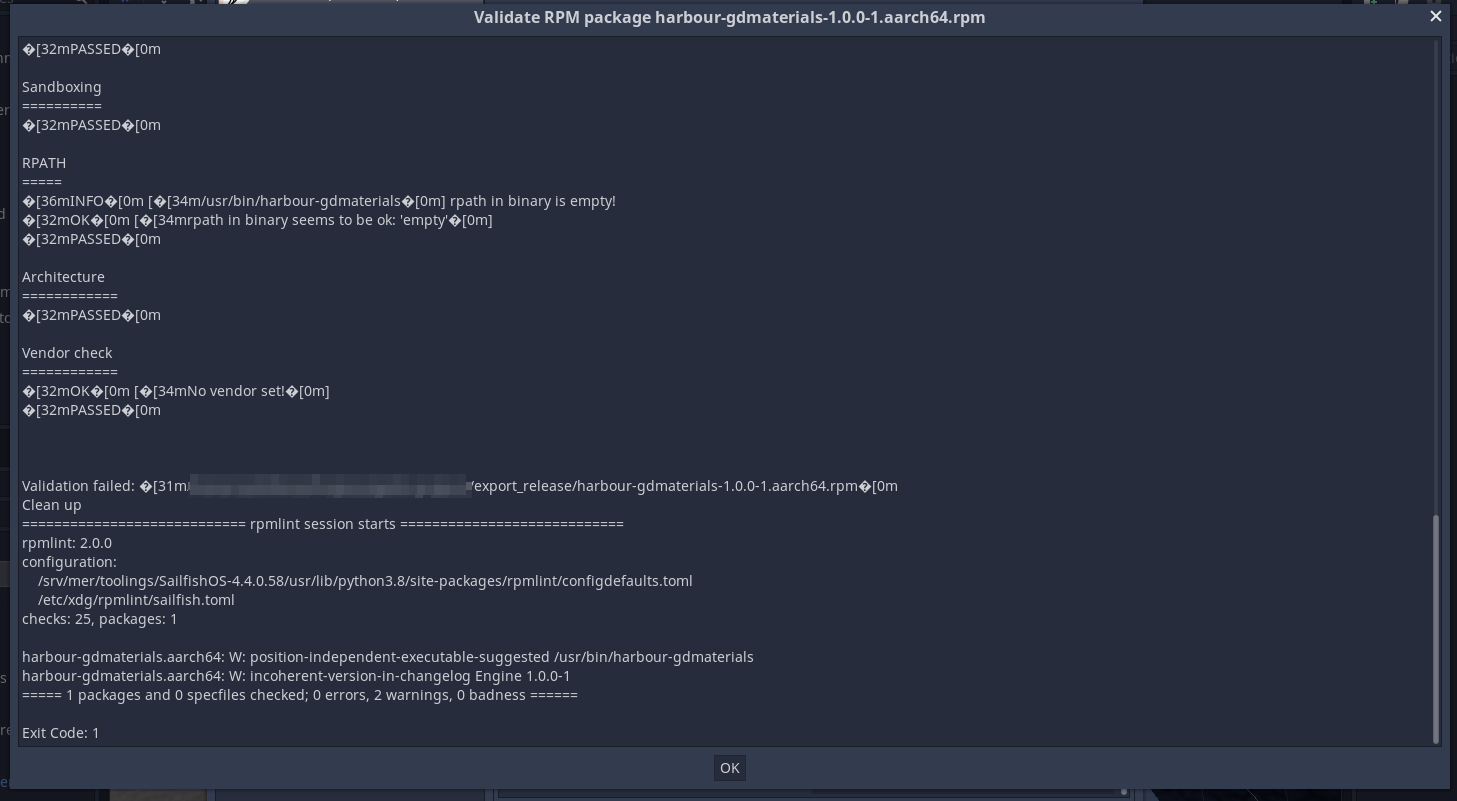
- add validator support, for RPMs
- add GLES3 support (but in portrait orientation, render not modified and cant rotate picture as it need in SailfishOS)
Known bugs
- screen blanks when you not touch them ( still not use dbus for call mce prevent blanking, its still in TODO ;-) )
Make RPM instructions
- Download and install VirtualBox from official download page - SailfishSDK use VirtualBox for build engine, or it uses docker in Linux systems.
- Download and install SailfishSDK with version more or equal to 3.0.7 from official download page
- After installation, you should run SailfishIDE once (it should create configuration files)
- For Windows, you need ssh client, you can install from scoop (in scoop you need install
scoop install git-with-openssh), or just install Git - because it already has ssh client. - Open Godot Editor, go to Editor Setting -> Export -> Sailfish and setup SDK Path (root of your SDK instalation)
- Don't use ssh as Tool for access to SDK build engine, use sfdk, ssh way - is deprecated, and will be deleted later.
- for Windows setup path in ssh tool to ssh.exe (in scoop its C:/Users/my_user/scoop/git-with-openssh/usr/bin/ssh.exe, and in Git its C:/Program Files/git/bin/ssh.exe, or something like that ;-) )
- download export templates for SailfishOS below on this page (godot.sailfish.opt.x86, godot.sailfish.opt.arm, godot.sailfish.opt.arm64)
- after all, open menu Project -> Export
- add Sailfish export entry
- in Sailfish export setting set paths to downloaded export tempaltes (for arm, arm64 and x86)
12.1 [optional] you can try use validator for your RPMS, but with this build it always failed, need some fixes for likning, validator need only if you want public your game to jolla harbour store.
12.2 [optional] now you have ability to choose some sailjail permissions ( permissions for Audio and Internet is default, need some fixes to godot, to allow it work without internet permission ) - push Export and choose export path (without any whitespaces! SailfishSDK has bug with it =( )
- wait while it build rpm files
- after all you have 3 RPM files for every Saiflsh platform (they call like harbour-mygame-1.0.0-1.armv7hl.rpm )
- that packages you can public on Jolla Harbour or OpenRepos.net
Good luck! Make cool games and public it for SailfishOS, and any other platforms!
for donations:

Yoomoney1
Yoomoney2
Some screenshots:
 |
 |
 |
|---|
3.5.1-stable-SailfishOS-1
! Warning
Only in GLES2 driver support screen rotation, in GLES3 it not released for SailfishOS.
What is done in release
- add sailjail support in export settings
- add proper icons sizes support
- add validator support, for RPMs
- add GLES3 support (but in portrait orientation, render not modified and catn rotate picture as it need in SailfishOS)
Known bugs
- screen blanks when you not touch them ( still not use dbus for call mce prevent blanking, its still in TODO ;-) )
Make RPM instructions
- Download and install VirtualBox from official download page - SailfishSDK use VirtualBox for build engine, or it uses docker in Linux systems.
- Download and install SailfishSDK with version more or equal to 3.0.7 from official download page
- After installation, you should run SailfishIDE once (it should create configuration files)
- For Windows, you need ssh client, you can install from scoop (in scoop you need install
scoop install git-with-openssh), or just install Git - because it already has ssh client. - Open Godot Editor, go to Editor Setting -> Export -> Sailfish and setup SDK Path (root of your SDK instalation)
- for Windows choose Tool - ssh (in OSX/MacOS and Linux you can use sfdk tool from SaiflshSDK, its work there properly)
- for Windows setup path in ssh tool to ssh.exe (in scoop its C:/Users/my_user/scoop/git-with-openssh/usr/bin/ssh.exe, and in Git its C:/Program Files/git/bin/ssh.exe, or somthing like that ;-) )
- download export tempaltes for SailfishOS below on this page (godot.sailfish.opt.x86, godot.sailfish.opt.arm, godot.sailfish.opt.arm64)
- after all, open menu Project -> Export
- add Sailfish export entry
- in Sailfish export setting set paths to downloaded export tempaltes (for arm, arm64 and x86)
12.1 [optional] you can try use validator for your RPMS, but with this build it always failed, need some fixes for likning, validator need only if you want public your game to jolla harbour store.
12.2 [optional] now you have ability to choose some sailjail permissions ( permissions for Audio and Internet is default, need some fixes to godot, to allow it work without internet permission ) - push Export and choose export path (without any whitespaces! SailfishSDK has bug with it =( )
- wait while it build rpm files
- after all you have 3 RPM files for every Saiflsh platform (they call like harbour-mygame-1.0.0-1.armv7hl.rpm )
- that packages you can public on OpenRepos.net
Good luck! Make cool games and public it for SailfishOS, and any other platforms!
for donations:
Yoomoney1
Yoomoney2
Some screenshots:
|
|
|
|---|