A port of Obsidian Latex Suite to overleaf that aims to make typesetting LaTeX math as fast as handwriting.
Inspired by Gilles Castel's setup using UltiSnips.

The plugin's main feature is snippets, which help you write LaTeX quicker through shortcuts and text expansion! For example, type
- "sqx" instead of "\sqrt{x}"
- "a/b" instead of "\frac{a}{b}"
- "par x y " instead of "\frac{\partial x}{\partial y}"
See Gilles Castel's writeup for more information.
The plugin comes with a set of default snippets, loosely based on Gilles Castel's. You can modify them, remove them, and write your own.
To get started, type "dm" to enter display math mode. Try typing the following:
- "xsr" → "x^{2}".
- "x/y Tab" → "\frac{x}{y}".
- "sin @t" → "\sin \theta".
Have a look at the cheatsheet for a list of commonly used default snippets.
Once these feel familiar, you can check out the default snippets for more commands. e.g.
- "par Tab f Tab x Tab" → "\frac{\partial f}{\partial x}".
- "dint Tab 2pi Tab sin @t Tab @t Tab" → "\int_{0}^{2\pi} \sin \theta \, d\theta".
You can also add your own snippets! For more info on writing snippets, see here. You can view snippets written by others and share your own snippets here.
Aside from snippets, the plugin also comes with several other features that aim to make writing LaTeX easier.
- Go the latest release and download the
.xpifile in the firefox based browser you want to add the extension. - There should open a popup, click on
Continue to Installationand when its done downloading, clickadd. - If for whatever reason this doesn't work or you can't download it on that browser, you first hide any sidebar on the left/right and drag-and-drop the
.xpifile from your file-explorer in firefox. It should give you a popup where it asks you if the addons should be added. Clickaddto install the addon.
- Go to the latest release and download the
snippetleaf-<version-number>.zipfile. - Extract the zip file into any folder, for example
snippetleaf. - Inside the folder
snippetleaf, there should be a file calledmanifest.json, if there is only a folder insnippetleaf, check if that folder has a filemanifest.json. - Go to
chrome://extensionsor open your extensions settings. (the urlchrome://extensionsmight get redirected to<insert-browser-name>://extensionslikebrave://extensions). - turn on developer mode
- Click on
Load unpacked - Select the folder which contains the
manifest.jsonfile, in this example thussnippetleaf.
To check if the installation succeeded, reload your overleaf website and there should be little message in the corner saying Snippetleaf settings updated!.
Note
For pictures of the installation on brave see #23 (comment).
This addon relies on a very recent patch of overleaf which has not been brought into overleaf-toolkit. Thus if you self-host your overleaf instance and you can patch your instance, see #23 (comment) on how to patch your overleaf-toolkit.
Not supported, use a chromium/firefox browser. If anyone is willing to release this addon for safari you can open an issue and I'll redirect it to that version. As for other browsers, you can open up an issue asking for support if its not already supported.
Coming soon(ish), need to make an icon and then I'll try to release it on there.
Lets you type "1/x" instead of "\frac{1}{x}".
For example, it makes the following expansions:
x/→\frac{x}{}(a + b(c + d))/→\frac{a + b(c + d)}{}
and moves the cursor inside the brackets.
Once done typing the denominator, press Tab to exit the fraction.

While inside a matrix, array, align, or cases environment,
- Pressing Tab will insert the "&" symbol.
- Pressing Enter will insert "\\" and move to a new line.
- Pressing Shift + Enter will move to the end of the next line (which you can use to exit the matrix).

To make it easier to navigate and exit equations,
- Pressing Tab while the cursor is at the end of an equation will move the cursor outside the
$symbols. - Otherwise, pressing Tab will advance the cursor to the next closing bracket:
),],},>, or|.
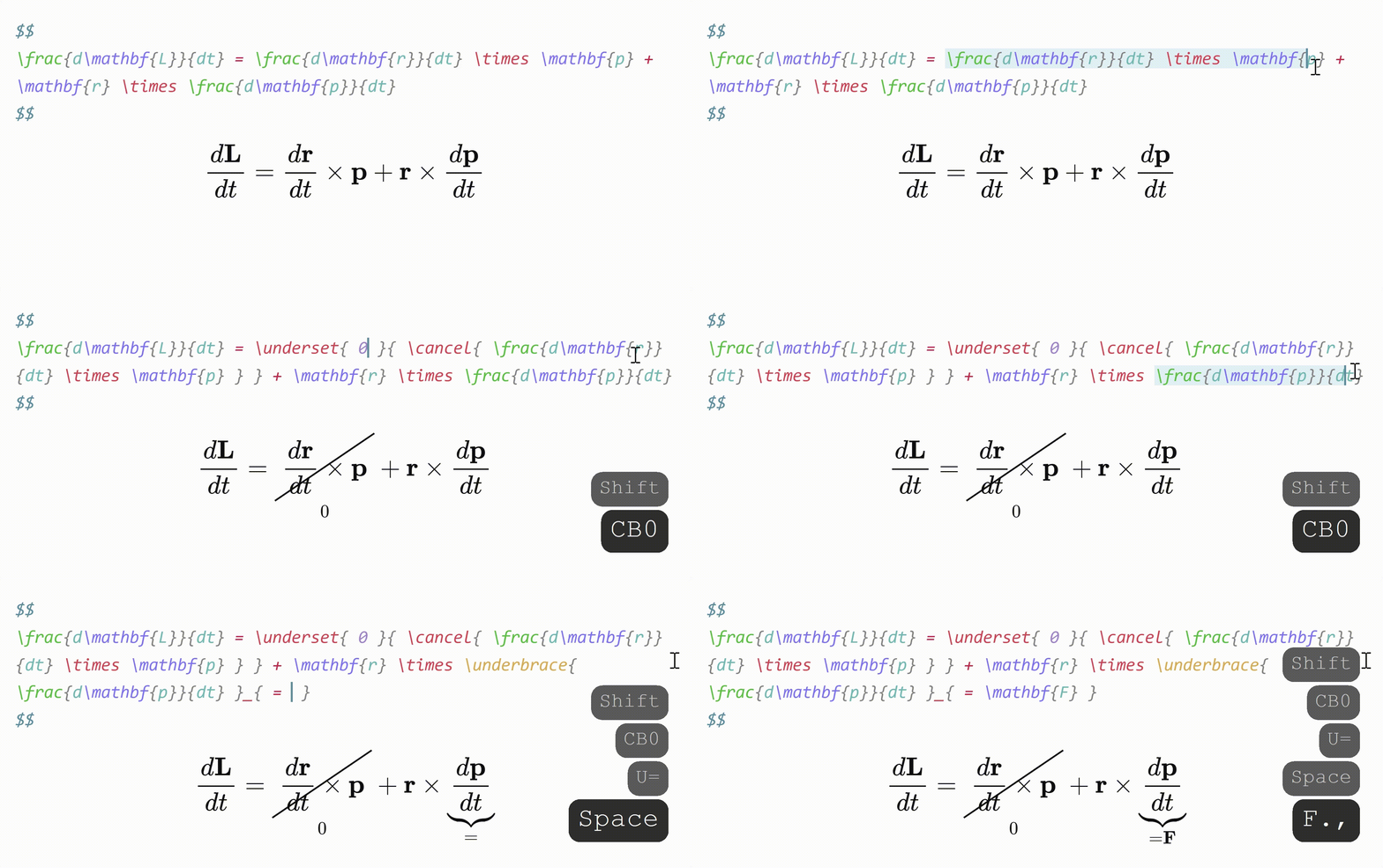
Sometimes you want to annotate math, or cancel or cross out terms. Selecting some math with the cursor and typing
- "U" will surround it with "\underbrace".
- "O" will surround it with "\overbrace".
- "C" will surround it with "\cancel".
- "K" will surround it with "\cancelto".
- "B" will surround it with "\underset".
When a snippet containing "\sum", "\int" or "\frac" is triggered, any enclosing brackets will automatically be enlarged with "\left" and "\right".

Snippets are shortcuts that allow you to insert certain text based on certain triggers. For example, the default snippet
{trigger: "@l", replacement: "\\lambda", options: "mA"}will expand "@l" to "\lambda".
Snippets can be edited in the plugin settings. The structure of a snippet is as follows:
{
  trigger: string | RegExp,
  replacement: string | (arg) => string | false,
  options: string,
  priority?: number,
  description?: string,
  flags?: string,
  version?: 1 | 2,
}trigger: The text that triggers this snippet.- Triggers can also be regular expressions. See here for more info.
replacement: The text to replace thetriggerwith.- Replacements can also be JavaScript functions. See here for more info.
options: See below.priority(optional): This snippet's priority. Snippets with higher priority are run first. Can be negative. Defaults to 0.description(optional): A description for this snippet.flags(optional): Flags for regex snippets.version(optional): version number for snippet syntax. See here for more info
t: Text mode. Only run this snippet outside mathm: Math mode. Only run this snippet inside math. Shorthand for bothMandnM: Block math mode. Only run this snippet inside a$$ ... $$or\[ ... \]blockn: Inline math mode. Only run this snippet inside a$ ... $or\( ... \)blockA: Auto. Expand this snippet as soon as the trigger is typed. If omitted, the Tab key must be pressed to expand the snippetr: Regex. Thetriggerwill be treated as a regular expressionv: Visual. Only run this snippet on a selection. The trigger should be a single characterw: Word boundary. Only run this snippet when the trigger is preceded (and followed by) a word delimiter, such as.,,, or-.
Insert tabstops for the cursor to jump to by writing "@0", "@1", etc. in the replacement.
For examples and more details on writing snippets, including regex snippets and function snippets, have a look at the documentation.
You can view snippets written by others and share your own snippets here.
Warning
Snippet files are interpreted as JavaScript and can execute arbitrary code. Always be careful with snippets shared from others to avoid running malicious code.
| Trigger | Replacement |
|---|---|
| mk | \( \) |
| dm | \[ \] |
| sr | ^{2} |
| cb | ^{3} |
| rd | ^{ } |
| _ | _{ } |
| sq | \sqrt{ } |
| x/yTab | \frac{x}{y} |
| // | \frac{ }{ } |
| " | \text{ } |
| text | \text{ } |
| x1 | x_{1} |
| x,. | \mathbf{x} |
| x., | \mathbf{x} |
| xdot | \dot{x} |
| xhat | \hat{x} |
| xbar | \bar{x} |
| xvec | \vec{x} |
| xtilde | \tilde{x} |
| xund | \underline{x} |
| ee | e^{ } |
| invs | ^{-1} |
When running a snippet that moves the cursor inside brackets {}, press Tab to exit the brackets.
| Trigger | Replacement | Trigger | Replacement |
|---|---|---|---|
| ;a | \alpha | eta | \eta |
| ;b | \beta | mu | \mu |
| ;g | \gamma | nu | \nu |
| ;G | \Gamma | xi | \xi |
| ;d | \delta | Xi | \Xi |
| ;D | \Delta | pi | \pi |
| ;e | \epsilon | Pi | \Pi |
| :e | \varepsilon | rho | \rho |
| ;z | \zeta | tau | \tau |
| ;t | \theta | phi | \phi |
| ;T | \Theta | Phi | \Phi |
| ;k | \kappa | chi | \chi |
| ;l | \lambda | psi | \psi |
| ;L | \Lambda | Psi | \Psi |
| ;s | \sigma | ||
| ;S | \Sigma | ||
| ;o | \omega | ||
| ome | \omega |
For Greek letters with short names (2-3 characters), just type their name, e.g. "pi" → "\pi".
- @artisticat1's Obsidian Latex Suite for the snippet engine.
- @TeXlyre for the LaTeX language support.
- @tth05's Obsidian Completr for the basis of the tabstop code.
- Dynamic Highlights for reference.
- Quick Latex for Obsidian for inspiration.
See CONTRIBUTING.md for more information.
See the DOCS
If you like this plugin and want to say thanks, you can buy the original author of obsidian latex suite coffee here.

