-
Notifications
You must be signed in to change notification settings - Fork 130
chore: setup livesync for console and terminal. #3925
New issue
Have a question about this project? Sign up for a free GitHub account to open an issue and contact its maintainers and the community.
By clicking “Sign up for GitHub”, you agree to our terms of service and privacy statement. We’ll occasionally send you account related emails.
Already on GitHub? Sign in to your account
Merged
billy-the-fish
merged 20 commits into
latest
from
3923-docs-rfc-add-console-live-sync-instructions
Apr 4, 2025
Merged
Changes from 2 commits
Commits
Show all changes
20 commits
Select commit
Hold shift + click to select a range
85eda96
chore: setup livesync for console and terminal.
billy-the-fish 933046c
Merge branch 'latest' into 3923-docs-rfc-add-console-live-sync-instru…
billy-the-fish 618da28
Update _partials/_livesync-console.md
billy-the-fish e31e8b3
Merge branch 'latest' into 3923-docs-rfc-add-console-live-sync-instru…
billy-the-fish e21acad
chore: updates on review.
billy-the-fish 630d170
Merge branch 'latest' into 3923-docs-rfc-add-console-live-sync-instru…
billy-the-fish 7bd372e
chore: updates on review.
billy-the-fish 24e0788
chore: updates on review.
billy-the-fish c06d6ca
chore: updates on review.
billy-the-fish 0838a34
chore: finish the procedure.
billy-the-fish a39e1c3
Merge branch 'latest' into 3923-docs-rfc-add-console-live-sync-instru…
billy-the-fish 0cb9edf
Merge branch 'latest' into 3923-docs-rfc-add-console-live-sync-instru…
billy-the-fish fab7b49
Merge branch 'latest' into 3923-docs-rfc-add-console-live-sync-instru…
billy-the-fish 0fb8209
chore: update on review.
billy-the-fish 6915138
chore: update on review.
billy-the-fish 1122987
Merge branch 'latest' into 3923-docs-rfc-add-console-live-sync-instru…
billy-the-fish 6b209f1
Merge branch 'latest' into 3923-docs-rfc-add-console-live-sync-instru…
billy-the-fish bd508b7
chore: update on review.
billy-the-fish 3a30c7b
chore: update on review.
billy-the-fish 514a6f2
Merge branch 'latest' into 3923-docs-rfc-add-console-live-sync-instru…
billy-the-fish File filter
Filter by extension
Conversations
Failed to load comments.
Loading
Jump to
Jump to file
Failed to load files.
Loading
Diff view
Diff view
There are no files selected for viewing
This file contains hidden or bidirectional Unicode text that may be interpreted or compiled differently than what appears below. To review, open the file in an editor that reveals hidden Unicode characters.
Learn more about bidirectional Unicode characters
This file contains hidden or bidirectional Unicode text that may be interpreted or compiled differently than what appears below. To review, open the file in an editor that reveals hidden Unicode characters.
Learn more about bidirectional Unicode characters
| Original file line number | Diff line number | Diff line change |
|---|---|---|
| @@ -1 +1 @@ | ||
| <Tag variant="hollow">Early access: TimescaleDB v2.18.0</Tag> | ||
| <Tag variant="hollow">Early access</Tag> |
This file contains hidden or bidirectional Unicode text that may be interpreted or compiled differently than what appears below. To review, open the file in an editor that reveals hidden Unicode characters.
Learn more about bidirectional Unicode characters
| Original file line number | Diff line number | Diff line change |
|---|---|---|
| @@ -0,0 +1 @@ | ||
| <Tag variant="hollow">Early access: TimescaleDB v2.18.0</Tag> |
This file contains hidden or bidirectional Unicode text that may be interpreted or compiled differently than what appears below. To review, open the file in an editor that reveals hidden Unicode characters.
Learn more about bidirectional Unicode characters
This file contains hidden or bidirectional Unicode text that may be interpreted or compiled differently than what appears below. To review, open the file in an editor that reveals hidden Unicode characters.
Learn more about bidirectional Unicode characters
| Original file line number | Diff line number | Diff line change |
|---|---|---|
| @@ -0,0 +1,45 @@ | ||
| <Procedure> | ||
|
|
||
| 1. **Tune the Write Ahead Log (WAL) on the PostgreSQL source database** | ||
|
|
||
| ```sql | ||
| psql $SOURCE -c "SET wal_level=’logical’;" | ||
| psql $SOURCE -c "SET max_wal_sender=10;" | ||
billy-the-fish marked this conversation as resolved.
Outdated
Show resolved
Hide resolved
|
||
| ``` | ||
| * [ GUC “wal_level” as “logical”](https://www.postgresql.org/docs/current/runtime-config-wal.html#GUC-WAL-LEVEL) | ||
| * [GUC “max_wal_senders” as 10](https://www.postgresql.org/docs/current/runtime-config-replication.html#GUC-MAX-WAL-SENDERS) | ||
|
|
||
| 1. **Enable update and delete replication on the source database** | ||
|
|
||
| Replica identity assists data replication by identifying the rows being modified. | ||
| By default each table and hypertable in the source database defaults to the primary key of the table being replicated. | ||
| However, you can also have: | ||
|
|
||
| - **A viable unique index**: each table has a unique, non-partial, non-deferrable index that includes only columns | ||
| marked as `NOT NULL`. If a `UNIQUE` index does not exists, create one to assist the migration. You can delete it after | ||
| live sync. For each table, set `REPLICA IDENTITY` to the viable unique index: | ||
|
|
||
| ```sql | ||
| psql -X -d $SOURCE -c 'ALTER TABLE <table name> REPLICA IDENTITY USING INDEX <_index_name>' | ||
| ``` | ||
|
|
||
| - **No primary key or viable unique index**: use brute force. For each table, set `REPLICA IDENTITY` to `FULL`: | ||
|
|
||
| ```sql | ||
| psql -X -d $SOURCE -c 'ALTER TABLE <table name> REPLICA IDENTITY FULL' | ||
| ``` | ||
| For each `UPDATE` or `DELETE` statement, PostgreSQL reads the whole table to find all matching rows. | ||
| This results in significantly slower replication. If you are expecting a large number of `UPDATE` or `DELETE` | ||
| operations on the table, best practice is to not use `FULL` | ||
|
|
||
| To capture only `INSERT` and ignore `UPDATE`s and `DELETE`s, use a | ||
| [publish config](https://www.postgresql.org/docs/current/sql-createpublication.html#SQL-CREATEPUBLICATION-PARAMS-WITH-PUBLISH) | ||
| while [creating the publication][lives-sync-specify-tables]. | ||
|
|
||
|
|
||
| 1. **Restart your source database** | ||
|
|
||
| </Procedure> | ||
|
|
||
|
|
||
| [lives-sync-specify-tables]: /migrate/:currentVersion:/livesync/#specify-the-tables-to-synchronize | ||
This file contains hidden or bidirectional Unicode text that may be interpreted or compiled differently than what appears below. To review, open the file in an editor that reveals hidden Unicode characters.
Learn more about bidirectional Unicode characters
| Original file line number | Diff line number | Diff line change |
|---|---|---|
| @@ -0,0 +1,66 @@ | ||
| import PrereqCloud from "versionContent/_partials/_prereqs-cloud-only.mdx"; | ||
| import LivesyncLimitations from "versionContent/_partials/_livesync-limitations.mdx"; | ||
| import LivesyncConfigureSourceDatabase from "versionContent/_partials/_livesync-configure-source-database.mdx"; | ||
| import EarlyAccess from "versionContent/_partials/_early_access_2_18_0.mdx"; | ||
|
|
||
| ## Prerequisites | ||
|
|
||
| <PrereqCloud /> | ||
|
|
||
| - Install the [PostgreSQL client tools][install-psql] on your sync machine. | ||
|
|
||
| This includes `psql`, `pg_dump`, and `pg_dumpall`. | ||
billy-the-fish marked this conversation as resolved.
Outdated
Show resolved
Hide resolved
|
||
|
|
||
| <EarlyAccess /> | ||
billy-the-fish marked this conversation as resolved.
Outdated
Show resolved
Hide resolved
|
||
|
|
||
| ## Limitations | ||
|
|
||
| <LivesyncLimitations /> | ||
|
|
||
| ## Set your connection string | ||
|
|
||
| This variable holds the connection information for the source database. In Terminal on your migration machine, | ||
| set the following: | ||
|
|
||
| ```bash | ||
| export SOURCE="postgres://<user>:<password>@<source host>:<source port>/<db_name>" | ||
billy-the-fish marked this conversation as resolved.
Show resolved
Hide resolved
|
||
| ``` | ||
|
|
||
| <Highlight type="important"> | ||
| Avoid using connection strings that route through connection poolers like PgBouncer or similar tools. This tool | ||
| requires a direct connection to the database to function properly. | ||
| </Highlight> | ||
|
|
||
|
|
||
| ## Configure the source database | ||
|
|
||
| <LivesyncConfigureSourceDatabase /> | ||
|
|
||
| ## Synchronize data to your $SERVICE_LONG | ||
|
|
||
|
|
||
| 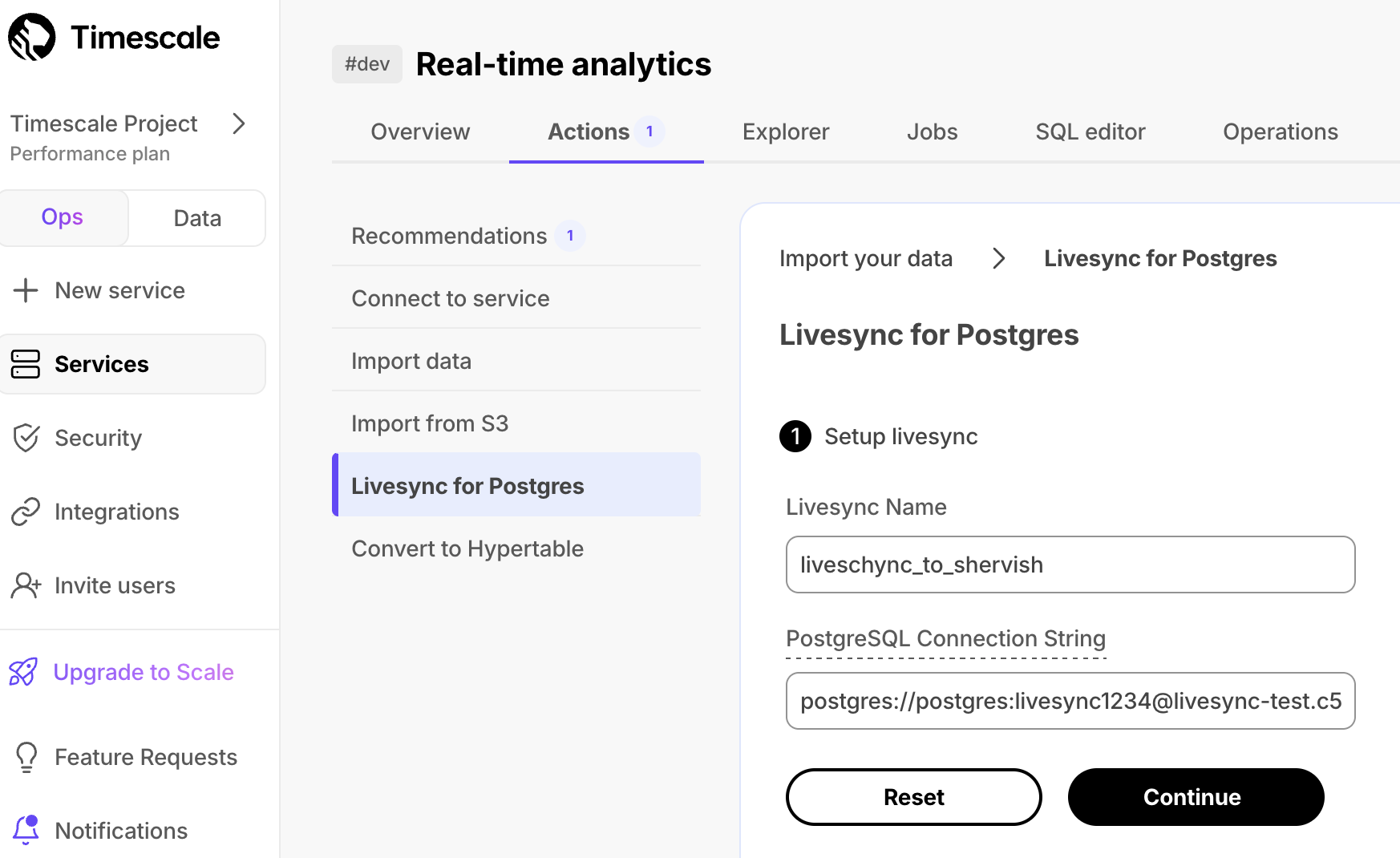 | ||
|
|
||
| <Procedure> | ||
|
|
||
| 1. **Connect to your $SERVICE_LONG** | ||
|
|
||
| In [$CONSOLE][portal-ops-mode], select the service to sync live data to. | ||
| 1. **Start livesync** | ||
| 1. Click `Actions` > `See more`. | ||
| 1. In `Import Data`, click `livesync for PostgreSQL`. | ||
|
|
||
| 1. **Connect the source database and target $SERVICE_SHORT** | ||
|
|
||
| In `livesync for PostgreSQL`: | ||
| 1. Set the `Livesync Name`. | ||
| 2. Set `PostgreSQL Connection String` to the value of `$SOURCE` and press `Continue`. | ||
billy-the-fish marked this conversation as resolved.
Outdated
Show resolved
Hide resolved
|
||
|
|
||
| 1. **Select the tables to syncronize** | ||
|
|
||
| IAIN: This is far as I could get, the procedure froze for me. | ||
|
|
||
| </Procedure> | ||
|
|
||
| [install-psql]: /use-timescale/:currentVersion:/integrations/psql/ | ||
| [portal-ops-mode]: https://console.cloud.timescale.com/dashboard/services | ||
This file contains hidden or bidirectional Unicode text that may be interpreted or compiled differently than what appears below. To review, open the file in an editor that reveals hidden Unicode characters.
Learn more about bidirectional Unicode characters
| Original file line number | Diff line number | Diff line change |
|---|---|---|
| @@ -0,0 +1,5 @@ | ||
| * The Schema is not migrated by Livesync, you use pg_dump/restore to migrate schema | ||
billy-the-fish marked this conversation as resolved.
Outdated
Show resolved
Hide resolved
|
||
| * Schema changes must be co-ordinated. Make compatible changes to the schema in your $SERVICE_LONG first, then make | ||
billy-the-fish marked this conversation as resolved.
Outdated
Show resolved
Hide resolved
|
||
| the same changes to the source PostgreSQL instance. | ||
| * There is WAL volume growth on the source PostgreSQL instance during large table copy. | ||
| * This works for PostgreSQL databases only as source. Timescaledb is not yet supported. | ||
This file contains hidden or bidirectional Unicode text that may be interpreted or compiled differently than what appears below. To review, open the file in an editor that reveals hidden Unicode characters.
Learn more about bidirectional Unicode characters
| Original file line number | Diff line number | Diff line change |
|---|---|---|
| @@ -0,0 +1,215 @@ | ||
| import MigrationPrerequisites from "versionContent/_partials/_migrate_prerequisites.mdx"; | ||
| import SetupConnectionStrings from "versionContent/_partials/_migrate_live_setup_connection_strings.mdx"; | ||
| import LivesyncLimitations from "versionContent/_partials/_livesync-limitations.mdx"; | ||
| import LivesyncConfigureSourceDatabase from "versionContent/_partials/_livesync-configure-source-database.mdx"; | ||
|
|
||
| ## Prerequisites | ||
|
|
||
| <MigrationPrerequisites /> | ||
|
|
||
| - [Install Docker][install-docker] on your sync machine. | ||
| You need a minimum of a 4 CPU/16GB EC2 instance to run Livesync | ||
|
|
||
| - Install the [PostgreSQL client tools][install-psql] on your sync machine. | ||
|
|
||
| This includes `psql`, `pg_dump`, and `pg_dumpall`. | ||
|
|
||
|
|
||
| ## Limitations | ||
|
|
||
| <LivesyncLimitations /> | ||
|
|
||
| ## Set your connection strings | ||
|
|
||
| The `<user>` in the `SOURCE` connection must have the replication role granted in order to create a replication slot. | ||
|
|
||
| <SetupConnectionStrings /> | ||
|
|
||
|
|
||
| ## Configure the source database | ||
|
|
||
| <LivesyncConfigureSourceDatabase /> | ||
|
|
||
|
|
||
| ## Migrate the table schema to the $SERVICE_LONG | ||
|
|
||
| Use pg_dump to: | ||
|
|
||
| <Procedure> | ||
|
|
||
| 1. **Download the schema from the source database** | ||
|
|
||
| ```shell | ||
| pg_dump $SOURCE \ | ||
| --no-privileges \ | ||
| --no-owner \ | ||
| --no-publications \ | ||
| --no-subscriptions \ | ||
| --no-table-access-method \ | ||
| --no-tablespaces \ | ||
| --schema-only \ | ||
| --file=schema.sql | ||
| ``` | ||
|
|
||
| 1. **Apply the schema on the target $SERVICE_SHORT** | ||
| ```shell | ||
| psql $TARGET -f schema.sql | ||
| ``` | ||
|
|
||
| </Procedure> | ||
|
|
||
| ## Convert partitions and tables with time-series data into hypertables | ||
|
|
||
| For efficient querying and analysis, you can convert tables which contain time-series or | ||
| events data, and tables that are already partitioned using PostgreSQL declarative partition into | ||
| [hypertables][about-hypertables]. | ||
|
|
||
| <Procedure> | ||
|
|
||
| 1. **Convert tables to hyperatables** | ||
|
|
||
| Run the following on each table in the target $SERVICE_LONG to convert it to a hypertable: | ||
|
|
||
| ```shell | ||
| psql -X -d $TARGET -c "SELECT create_hypertable('<table>', by_range('<partition column>', '<chunk interval>'::interval));" | ||
| ``` | ||
|
|
||
| For example, to convert the *metrics* table into a hypertable with *time* as a partition column and | ||
| *1 day* as a partition interval: | ||
|
|
||
| ```shell | ||
| psql -X -d $TARGET -c "SELECT create_hypertable('public.metrics', by_range('time', '1 day'::interval));" | ||
| ``` | ||
|
|
||
| 1. **Convert PostgreSQL partitions to hyperatables** | ||
|
|
||
| Rename the partition and create a new normal table with the same name as the partitioned table, then | ||
| convert to a hypertable: | ||
|
|
||
| ```shell | ||
| psql $TARGET -f - <<EOF | ||
| BEGIN; | ||
| ALTER TABLE public.events RENAME TO events_part; | ||
| CREATE TABLE public.events(LIKE public.events_part INCLUDING ALL); | ||
| SELECT create_hypertable('public.events', by_range('time', '1 day'::interval)); | ||
| COMMIT; | ||
| EOF | ||
| ``` | ||
|
|
||
| </Procedure> | ||
|
|
||
|
|
||
| ## Synchronize data to your $SERVICE_LONG | ||
|
|
||
| You use the Livesync docker image to synchronize changes in real-time from a PostgreSQL database | ||
| instance to a $SERVICE_LONG: | ||
|
|
||
| <Procedure> | ||
|
|
||
| 1. **Start Livesync** | ||
|
|
||
| As you run Livesync continuously, best practice is to run it as a background process. | ||
|
|
||
| ```shell | ||
| docker run -d --rm --name livesync timescale/live-sync:v0.0.0-alpha.7 run --publication analytics --subscription livesync --source $SOURCE --target $TARGET | ||
| ``` | ||
|
|
||
| 1. **Trace progress** | ||
|
|
||
| Once Livesync is running as a docker daemon, you can also capture the logs: | ||
| ```shell | ||
| docker logs -f livesync | ||
| ``` | ||
|
|
||
| 1. **View the tables being synchronized** | ||
|
|
||
| ```bash | ||
| psql $TARGET -c "SELECT * FROM _ts_live_sync.subscription_rel" | ||
|
|
||
| subname | schemaname | tablename | rrelid | state | lsn | ||
| ----------+------------+-----------+--------+-------+----- | ||
| livesync | public | metrics | 17261 | d | | ||
| ``` | ||
| Possible values for `state` are: | ||
|
|
||
| - d: initial table data sync | ||
|
|
||
| - f: initial table data sync completed | ||
|
|
||
| - s: catching up with the latest change | ||
|
|
||
| - r: table is ready, synching live changes | ||
|
|
||
| 1. **Stop Livesync** | ||
|
|
||
| ```shell | ||
| docker stop live-sync | ||
| ``` | ||
|
|
||
| 1. **Cleanup** | ||
|
|
||
| You need to manually execute a SQL snippet to cleanup replication slots created by the live-migration. | ||
|
|
||
| ```shell | ||
| psql $SOURCE -f - <<EOF | ||
| select pg_drop_replication_slot(slot_name) from pg_stat_replication_slots where slot_name like 'livesync%'; | ||
| select pg_drop_replication_slot(slot_name) from pg_stat_replication_slots where slot_name like 'ts%'; | ||
| EOF | ||
| ``` | ||
| A command to clean up is coming shortly. | ||
|
|
||
| </Procedure> | ||
|
|
||
|
|
||
| ## Specify the tables to synchronize | ||
|
|
||
| After the Livesync docker is up and running, you [`CREATE PUBLICATION`][create-publication] on the SOURCE database to | ||
| specify the list of tables which you intend to synchronize. Once you create a PUBLICATION, it is | ||
| automatically picked by Livesync, which starts synching the tables expressed as part of it. | ||
|
|
||
| For example: | ||
|
|
||
| <Procedure> | ||
|
|
||
| 1. **Create a publication named `analytics` which publishes `metrics` and `tags` tables** | ||
|
|
||
| `PUBLICATION` enables you to add all the tables in the schema or even all the tables in the database. However, it | ||
| requires superuser privileges on most of the managed PostgreSQL offerings. | ||
|
|
||
| ```sql | ||
| CREATE PUBLICATION analytics FOR TABLE metrics, tags; | ||
| ``` | ||
|
|
||
| 1. **Add tables after to an existing publication with a call to [ALTER PUBLICATION][alter-publication]** | ||
|
|
||
| ```sql | ||
| ALTER PUBLICATION analytics ADD TABLE events; | ||
| ``` | ||
|
|
||
| 1. **Publish PostgreSQL declarative partitioned table** | ||
|
|
||
| To publish declaratively partitioned table changes to your $SERVICE_LONG, set the `publish_via_partition_root` | ||
| special `PUBLICATION` config to `true`: | ||
|
|
||
| ```sql | ||
| ALTER PUBLICATION analytics SET(publish_via_partition_root=true); | ||
| ``` | ||
|
|
||
| 1. **Stop synching a table in the `PUBLICATION` with a call to `DROP TABLE`** | ||
|
|
||
| ```sql | ||
| ALTER PUBLICATION analytics DROP TABLE tags; | ||
| ``` | ||
|
|
||
| </Procedure> | ||
|
|
||
|
|
||
| [create-publication]: https://www.postgresql.org/docs/current/sql-createpublication.html | ||
| [alter-publication]: https://www.postgresql.org/docs/current/sql-alterpublication.html | ||
| [install-docker]: https://docs.docker.com/engine/install/ | ||
| [about-hypertables]: /use-timescale/:currentVersion:/hypertables/about-hypertables/ | ||
| [lives-sync-specify-tables]: /migrate/:currentVersion:/livesync/#specify-the-tables-to-synchronize | ||
| [compression]: /use-timescale/:currentVersion:/compression/about-compression | ||
| [caggs]: /use-timescale/:currentVersion:/continuous-aggregates/about-continuous-aggregates/ | ||
| [join-livesync-on-slack]: https://app.slack.com/client/T4GT3N2JK/C086NU9EZ88 | ||
| [install-psql]: /use-timescale/:currentVersion:/integrations/psql/ |
This file contains hidden or bidirectional Unicode text that may be interpreted or compiled differently than what appears below. To review, open the file in an editor that reveals hidden Unicode characters.
Learn more about bidirectional Unicode characters
This file contains hidden or bidirectional Unicode text that may be interpreted or compiled differently than what appears below. To review, open the file in an editor that reveals hidden Unicode characters.
Learn more about bidirectional Unicode characters
Oops, something went wrong.
Add this suggestion to a batch that can be applied as a single commit.
This suggestion is invalid because no changes were made to the code.
Suggestions cannot be applied while the pull request is closed.
Suggestions cannot be applied while viewing a subset of changes.
Only one suggestion per line can be applied in a batch.
Add this suggestion to a batch that can be applied as a single commit.
Applying suggestions on deleted lines is not supported.
You must change the existing code in this line in order to create a valid suggestion.
Outdated suggestions cannot be applied.
This suggestion has been applied or marked resolved.
Suggestions cannot be applied from pending reviews.
Suggestions cannot be applied on multi-line comments.
Suggestions cannot be applied while the pull request is queued to merge.
Suggestion cannot be applied right now. Please check back later.
Uh oh!
There was an error while loading. Please reload this page.