


A command-line tool for managing CloudFormation resources across and within stacks.
Features:
- Move resources between stacks - Transfer resources from one CloudFormation stack to another
- Rename resources within a stack - Change logical IDs of resources in the same stack
- Automatic reference updates - All CloudFormation references (
Ref,Fn::GetAtt,Fn::Sub,DependsOn, etc.) are automatically updated
On MacOS and Linux you can install via Homebrew:
brew install udondan/software/cfn-teleportOn Arch Linux you can install from AUR, e.g.:
yay -S cfn-teleport-binOn Windows you can install via Chocolatey:
choco install cfn-teleportPre-compiled binaries for various operating systems and architectures are available for download.
If you have rust/cargo installed, you can install the crate:
cargo install cfn-teleport$ cfn-teleport --help
Moves CloudFormation resources between stacks
Usage: cfn-teleport [OPTIONS]
Options:
-s, --source <SOURCE>
Name of the source stack
-t, --target <TARGET>
Name of the target stack
-r, --resource <ID[:NEW_ID]>
Logical ID of a resource from the source stack - optionally with a new ID for the target stack
-y, --yes
Automatically confirm all prompts
-m, --mode <MODE>
Operation mode for cross-stack moves
Possible values:
- refactor: Safe, atomic CloudFormation Stack Refactoring API (supports fewer resource types)
- import: Legacy import/export flow (supports more resource types but can orphan resources on failure)
[default: refactor]
--out-dir <PATH>
Output directory for exported templates (export mode only)
--migration-spec <PATH>
Migration specification file with resource ID mappings (JSON format)
--source-template <PATH>
Source CloudFormation template file (alternative to fetching from AWS)
--target-template <PATH>
Target CloudFormation template file (alternative to fetching from AWS)
--export
Export templates to disk without executing migration (dry-run mode)
-h, --help
Print help (see a summary with '-h')
-V, --version
Print versionTransfer resources from one stack to another:
cfn-teleport --source Stack1 --target Stack2 --resource Bucket21D68F7E8 --resource Bucket182C536A1 --yescfn-teleport supports two modes for cross-stack resource moves:
| Feature | Refactor Mode (Default) | Import Mode (Legacy) |
|---|---|---|
| Safety | ✅ Atomic, rolls back on failure | |
| Resource Orphaning | ✅ Never happens | |
| Resource Tags | ✅ Updated to new stack | |
| Supported Types | ❌ Fewer (no KeyPair, etc.) | ✅ More types |
| Parameter Dependencies | ✅ Allowed (target must have matching parameter) | ❌ Blocked (not validated for import mode) |
| Recommendation | ✅ Use by default |
Uses the AWS CloudFormation Stack Refactoring API:
cfn-teleport --source Stack1 --target Stack2 --resource MyBucket --mode refactorAdvantages:
- ✅ Safe and atomic - Either succeeds completely or rolls back with no changes
- ✅ No orphaned resources - Resources never end up outside of any stack
- ✅ Updates resource tags -
aws:cloudformation:*tags reflect new stack ownership - ✅ Validates parameter dependencies - Checks that target stack has required parameters before moving
Limitations:
- ❌ Fewer supported resource types - Some resources (like
AWS::EC2::KeyPair) cannot be moved because updating their tags requires resource replacement - ❌ Target stack must have matching parameters - Resources depending on parameters require the same parameter to exist in the target stack
Uses the legacy import/export flow (6-step manual process):
cfn-teleport --source Stack1 --target Stack2 --resource MyKeyPair --mode importAdvantages:
- ✅ More resource types - Can move resources like
AWS::EC2::KeyPairthat don't allow tag updates - ✅ No tag updates required - Only updates CloudFormation's internal tracking database
Risks:
⚠️ Can orphan resources - If the operation fails mid-way (steps 5-6), resources may be left outside any stack⚠️ Not atomic - Multi-step process that can leave stacks in inconsistent state on failure⚠️ Outdated tags - Resource tags still reference old stack (cosmetic issue only)⚠️ Cannot move resources with parameter dependencies - For safety, import mode blocks all resources that depend on stack parameters (not validated for import mode)
When to use import mode:
- You need to move a resource type that refactor mode doesn't support
- You understand and accept the risk of potential resource orphaning
- You have a backup/recovery plan if the operation fails
The tool will:
- Export resources from the source stack (refactor mode: atomic; import mode: manual steps)
- Import them into the target stack
- Update all references in both stacks automatically
- Preserve the physical resources (no deletion/recreation)
Rename resources in the same stack by specifying the same source and target:
cfn-teleport --source MyStack --target MyStack --resource OldBucketName:NewBucketName --yesNote: Same-stack operations always use refactor mode (safe and atomic) regardless of the --mode parameter.
The tool will:
- Rename the logical ID of the resource
- Update all references (
Ref,Fn::GetAtt,Fn::Sub,DependsOn, etc.) automatically - Preserve the physical resource (no deletion/recreation)
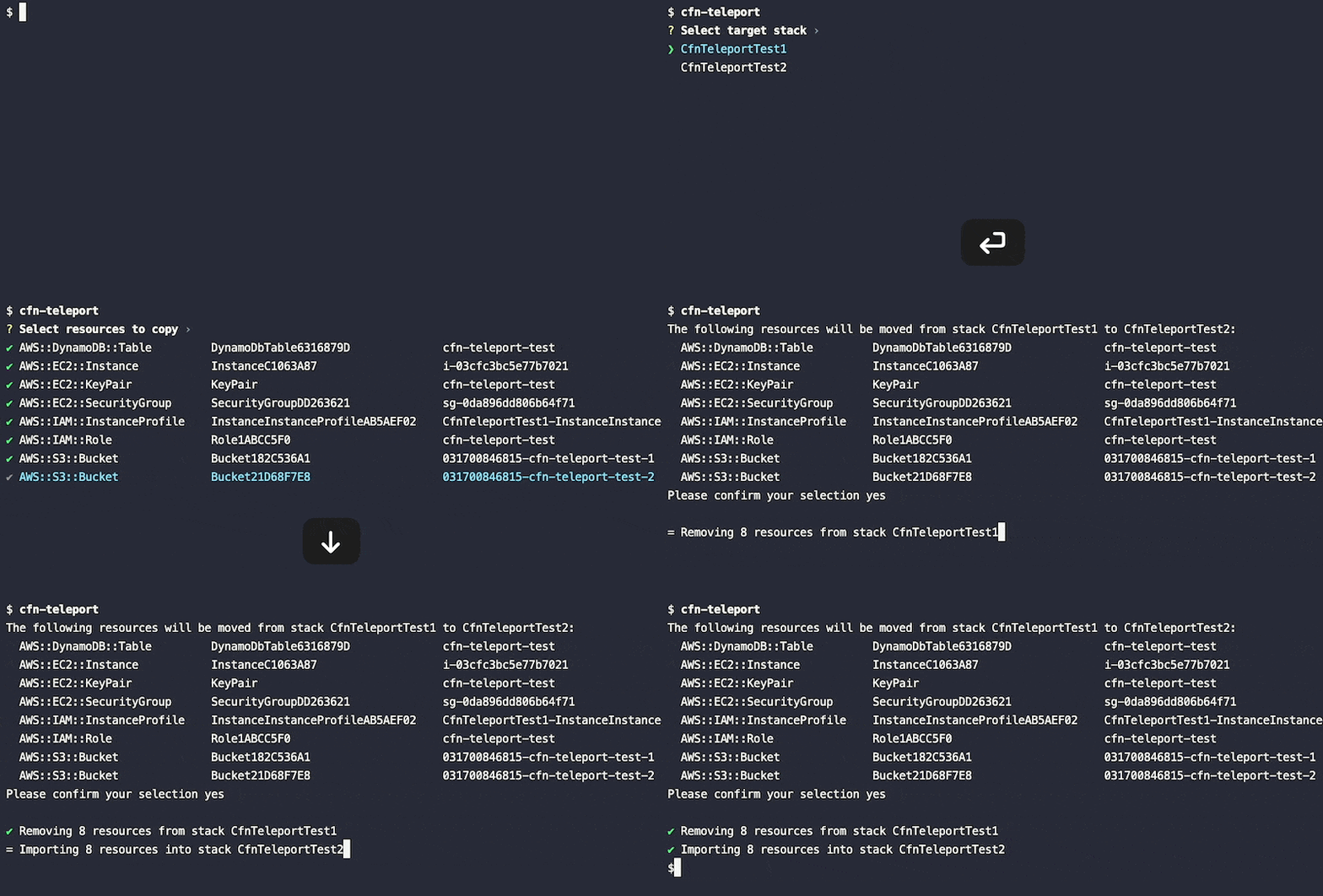
If any of the required options is undefined, the program will prompt for input interactively:
cfn-teleport
# Will prompt for:
# - Source stack name
# - Target stack name
# - Resources to move/rename
# - Optional: New logical IDs for each resourcePreview migration changes by exporting templates to disk without executing them:
# Export templates for a same-stack rename
cfn-teleport --source MyStack --target MyStack --resource OldName:NewName --export

# Export templates for cross-stack move
cfn-teleport --source Stack1 --target Stack2 --resource Bucket --export --out-dir ./templates

# Export templates for import mode (generates 4 template files)
cfn-teleport --source Stack1 --target Stack2 --resource Bucket --mode import --export
What gets exported:
- Same-stack refactor: 1 file (refactored template)
- Cross-stack refactor: 2 files (source and target templates)
- Import mode: 4 files (source-retained, source-removed, target-with-deletion-policy, target-final)
Exported files are timestamped to avoid collisions: StackName-operation-suffix-YYYYMMDD-HHMMSS.yaml
Work with template files instead of fetching from AWS:
# Use local template files
cfn-teleport \
  --source-template ./my-stack-source.yaml \
  --target-template ./my-stack-target.yaml \
  --source Stack1 \
  --target Stack2 \
  --resource Bucket

# Modify exported templates and apply them
cfn-teleport --export --source Stack1 --target Stack2 --resource Bucket --out-dir ./templates
# Edit templates as needed...
cfn-teleport --source-template ./templates/Stack1-*.yaml --target-template ./templates/Stack2-*.yaml ...
Benefits:
- Review and modify templates offline before applying
- Version control migration changes
- Plan migrations locally (AWS access still required to apply changes)
- Collaborative review workflows
Define resource mappings in a JSON file for repeatable migrations:
# Create migration spec file (migration.json):
{
  "resources": {
    "OldBucketId": "NewBucketId",
    "OldTableId": "NewTableId",
    "KeepSameName": "KeepSameName"
  }
}

# Use migration spec
cfn-teleport \
  --source Stack1 \
  --target Stack2 \
  --migration-spec migration.json
Benefits:
- Version control resource mappings
- Repeatable migrations across environments
- No need to specify
--resourceflags - Self-documenting migration plan
When template validation or migration fails, cfn-teleport automatically saves templates and error context for debugging:
⚠️  Template validation failed. Saving templates for debugging...
📄 Templates saved to:
   MyStack-error-import-retained-20260228-143022.yaml
   MyStack-error-import-removed-20260228-143022.yaml
   MyStack-error-import-target-with-policy-20260228-143022.yaml
   MyStack-error-import-target-final-20260228-143022.yaml
📝 Error context saved to: MyStack-error-import-context-20260228-143022.txt
The error context file includes:
- Error message details
- Operation type and stack names
- Resource ID mappings
- Timestamp
Template Files:
- Templates may contain sensitive data (parameters, resource configurations)
- Store templates securely and avoid committing secrets to version control
- Use
.gitignoreto exclude template export directories or files, for example:templates/*.yaml,templates/*.json - Review templates before sharing to ensure no credentials are exposed
Migration Spec Files:
- Migration specs are generally safe to version control (only resource IDs)
- Review for any resource IDs that might be considered sensitive
Contributions are welcome!
This project uses conventional commits. Please make sure all your merge request titles follow these specifications.