A simple guide and userChrome.css template for customizing your Firefox bookmarks toolbar.
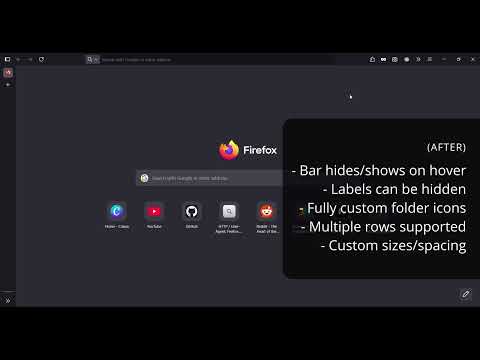
- Add custom icons to bookmark folders
- Show icons only or icons with text labels
- Adjust icon sizes and spacing
- Enable multi-row bookmarks toolbar
- Auto-hide toolbar (shows on hover)
Video:
Before:

After (with labels):

After (without labels):

- In the Firefox address bar, go to:
about:config
Search for:
toolkit.legacyUserProfileCustomizations.stylesheets
Set it to true.
- In the address bar, go to:
about:support
Under Application Basics, find Profile Folder → Open Folder. The path should be:
%APPDATA%\Mozilla\Firefox\Profiles\[your-profile-folder]
- Open your Profile Folder and create the following folders:
   chrome/
   └── icons/
-
Import your icon images into the
iconsfolder, if customizing icons.- Use clear, short names.
- Recommended icon sizes:
- 16x16 - Standard display size.
- 32x32 - Best for high-DPI displays.
- 64x64 - Maximum useful size for scalability.
- Recommended image file formats:
- SVG - Best choice (scalable, sharp at any size, small file size).
- PNG - Good for raster images (use 32x32px or larger, then let CSS scale down).
-
Download the attached
userChrome.cssfile (or create your own) and copy it into thechromefolder. Your folder structure should look like this:
   firefox-profile/
   └── chrome/
       ├── userChrome.css
       └── icons/
           ├── tools.svg
           ├── projects.png
           └── games.svg
-
Review the optional customizations in the file. To disable a style, either delete it or comment it out by wrapping it in
/* */. Keep and modify the ones you want to apply. -
Update bookmark labels and URLs in the CSS to match your folder and icon names.
- The
.bookmark-itemlabel should match the name of your bookmark folder. - The
list-style: urlpath should lead to the icon image file you would like to pair with the bookmark. - The format should look like:
- The
   .bookmark-item[label="Tools"] {  list-style: url("./icons/tools.svg") !important; }
   .bookmark-item[label="Projects"] {  list-style: url("./icons/project.png") !important; }
.bookmark-item[label="Games"] { list-style: url("./icons/games.svg") !important; }- Save your changes to
userChrome.cssand restart Firefox to apply the changes!