
See your CNC toolpath on the real machine bed. Then cut it.


| Camera image (wide-angle lens, rotated to match) | camNC top view of the same frame, with the toolpath |
|---|---|
 |
 |
The raw camera image (left, rotated to match) and camNC's corrected top view of the same frame with a toolpath on the bed
camNC shows your CNC toolpath on a live camera image of the machine bed, so you can check stock placement, offsets and clamps before the spindle starts. It also runs the job: connect to FluidNC, zero, probe and start from the same screen, and preview the cut in 3D first.
camNC is built for the V1 Engineering LowRider V4 running FluidNC, and that is the machine it is tested on. It should work just as well on other FluidNC machines.
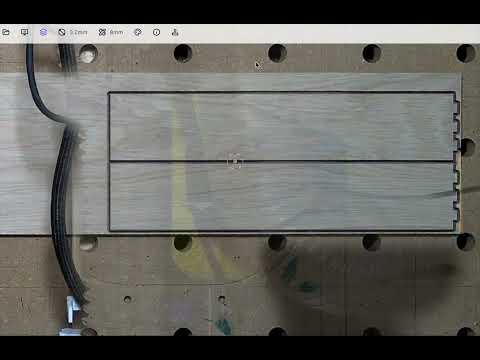
Cutting a small oak board with camNC (YouTube)
This repository is a pnpm/Turborepo monorepo with the camNC app, its desktop version and the supporting packages.
Mount a camera above the machine (an old phone, a webcam or an IP camera) and print four ArUco markers. camNC calibrates the camera with OpenCV, finds its pose from the markers and corrects lens distortion and perspective, so you get a top-down view in machine coordinates with the G-code drawn on top. Drag the toolpath onto the stock and check clamps and offsets before the spindle starts.
camNC talks to FluidNC (3.9.9 and 4.1.x) directly. Home, jog, set XY zero to the toolpath, probe Z and run the job from the SD card. A checklist catches a missed home or probe, and a green line on the camera image shows how far the job has got. Feed and spindle overrides, macros and a console are one click away.

Choose New design in CAM to draw flat parts with lines, rectangles, circles and arcs. Add driving dimensions and
geometric constraints, then finish the sketch to arrange boards and generate through-cuts. Keyboard shortcuts include L, G/R, C, A, D, M and Q.
Return to Design from Boards, Plan or the machine view to edit the same parts. Tool choices, cutting data, stock, placements and holding settings stay with the project. Geometry changes regenerate affected plans; references that no longer resolve remain visible for repair. Running and resumable programs keep their original design and setup snapshot. Sketch drafts are autosaved separately from the geometry accepted for CAM. Trim supports line, circle and arc segments; rational curves can act as boundaries. CAD currently creates through-cuts; pocket features come later. See Status for supported tools, current limits and known gaps.
The 3D, front and side views simulate the stock being cut with flat, ball and V-bits. Scrub through the job on the timeline, scale Z to spot shallow passes, and project the camera image onto the stock.
material-removal-flat.mp4

Start with just FluidNC. camNC draws the bed from the machine size it reports, with a 10 mm grid in machine coordinates, and you can jog, preview and run jobs right away. Add a camera later.

This experimental feature estimates monocular depth with the Depth Anything V2 model and masks everything above the work surface, so the gantry disappears from the image (only tested with the LowRider V4 beam). It assumes the largest depth cluster is the table and masks everything above a configurable offset:
hide-machine.mp4
Three crosses engraved one after another, each positioned by drag-and-drop on the camera image. Y is off by 1–2 mm, X lines up well. The setup used an old Pixel 5 on a ~120×60 cm MPCNC LowRider V4, with a reprojection error of around 2:
crosses_small.mp4
Explore the demo: the demo runs in your browser with a recorded machine camera, a sample job and a simulated FluidNC. You can load your own G-code, and nothing is saved.
To use camNC with your own machine, pick one of these:
Download the installer for your computer:
These always point to the newest build; all versions are on the releases page.
The desktop app is camNC with its own Chromium built in. It finds IP cameras on your network (ONVIF, or any camera with
RTSP) and connects to them directly, so you don't need a Raspberry Pi, go2rtc or any other gateway. It also talks to
FluidNC without browser restrictions and works offline. On macOS and Windows it updates itself in the background (the
update is used after the next restart); on Linux, install a newer .deb from the releases.
The app is not code-signed yet, so the first start shows a warning:
- macOS: open the app once, then allow it under System Settings → Privacy & Security → Open Anyway. Or run
xattr -dr com.apple.quarantine /Applications/camNC.app. - Windows: SmartScreen warns about an unknown publisher; choose More info → Run anyway.
Settings stay on your computer; there is no sign-in or sync in the desktop app. See apps/camnc-desktop for building it yourself.
Open run.camnc.app, no install needed. Phone cameras and webcams work out of the box. For machine control, use Chrome or Edge 147+ on the same network as the controller (FluidNC in STA mode); other browsers can use camNC as a viewer.
Browsers can't open an IP camera's RTSP stream. To use an IP camera in the browser, run a go2rtc gateway that re-streams it over WebRTC, for example on a Raspberry Pi Zero or any computer on your network, and pick the go2rtc source in camNC. The desktop app makes this unnecessary.
| Part | Notes |
|---|---|
| Camera with a top-down view | An old smartphone (ceiling mount), a webcam, or an IP camera such as a Reolink E1 Zoom (mount) |
| Four ArUco markers | Printed and fixed at known machine positions; camNC uses them to find the camera pose and keep it up to date |
| Calibration chessboard | Printed or shown on a screen, used once per camera during setup |
| FluidNC controller | Optional. 3.9.9 or 4.1.x, for machine control (reference machine: V1 Engineering Jackpot2 on a LowRider V4) |
This workspace is a pnpm/Turborepo monorepo split into two top‑level folders:
apps/– runnable applications.packages/– reusable libraries and config used by the apps.
See docs/ARCHITECTURE.md for how the pieces fit together.
- camNC – main camera overlay application (run.camnc.app).
- camnc-desktop – the desktop app: camNC packaged with Tauri and CEF, with a go2rtc sidecar for IP cameras.
- webrtc-cam – runs on a phone and streams its camera to camNC via WebRTC.
- website – Astro landing page (www.camnc.app).
- chessboard – displays/prints the chessboard pattern for camera calibration.
- demos – sandbox showcasing individual packages.
- signal – Cloudflare Worker that relays WebRTC signalling between camNC and phone cameras.
- camera-calibration – React components, store and workers for calibrating a camera with OpenCV.
- fluidnc – direct WebSocket connection to FluidNC (transport detection, command queue, parsers, uploads), a scripted fake and the
pnpm simFluidNC simulator. - go2webrtc – video sources (go2rtc, RTSP via the desktop app's go2rtc, phone via WebRTC, WebTorrent, webcam, URL).
- webrtc-channel – WebRTC peer, WebSocket signalling client and data channel helpers.
- video-worker-utils – helpers for processing video frames in web workers.
- load-opencv – loads OpenCV.js in the browser.
- ui – shared React UI components.
- public-config – shared public configuration (signalling URL).
- typescript-config – shared tsconfig presets. Lint rules are in
.oxlintrc.json.
Requirements: Node.js (see .nvmrc, ^20.19 or >=22.12) and pnpm (version pinned in package.json,
e.g. via corepack enable).
pnpm install
# Start a single app, e.g. camNC (see apps/camNC/README.md for required env vars)
pnpm dev --filter @wbcnc/camNC
# Or start all apps at once
pnpm dev
Checks (also run in CI):
pnpm run check-format  # Biome for TypeScript, Prettier for Markdown (a pre-commit hook formats staged files)
pnpm run lint          # oxlint
pnpm run check-types   # tsc --noEmit (TypeScript 7) in every package
pnpm run test          # functional tests, then isolated performance gates
pnpm run test:performance # only the performance gates (Node, then headless Chromium)
pnpm run build
Tests run in the browser, so install Chromium once with pnpm exec playwright install chromium. Run a single
package's tests with pnpm turbo run test --filter <package>.
The [performance] tests run separately from the parallel functional suites. The root test command waits for
all functional packages to finish, then runs the holding and nesting benchmarks one package at a time, in their
usual Node and Chromium runtimes. Benchmark results are not cached. Each gate keeps its fixed reference workload
and ratio limit; both workloads are warmed, and seven nearby pairs alternate order before taking the median ratio.
Run pnpm --filter <package> test:performance for one package's performance gates. Avoid running other CPU-heavy
commands alongside these measurements.